Transform complex support workflows

AI Support Agents in 2026: How They Work and the Best Tools
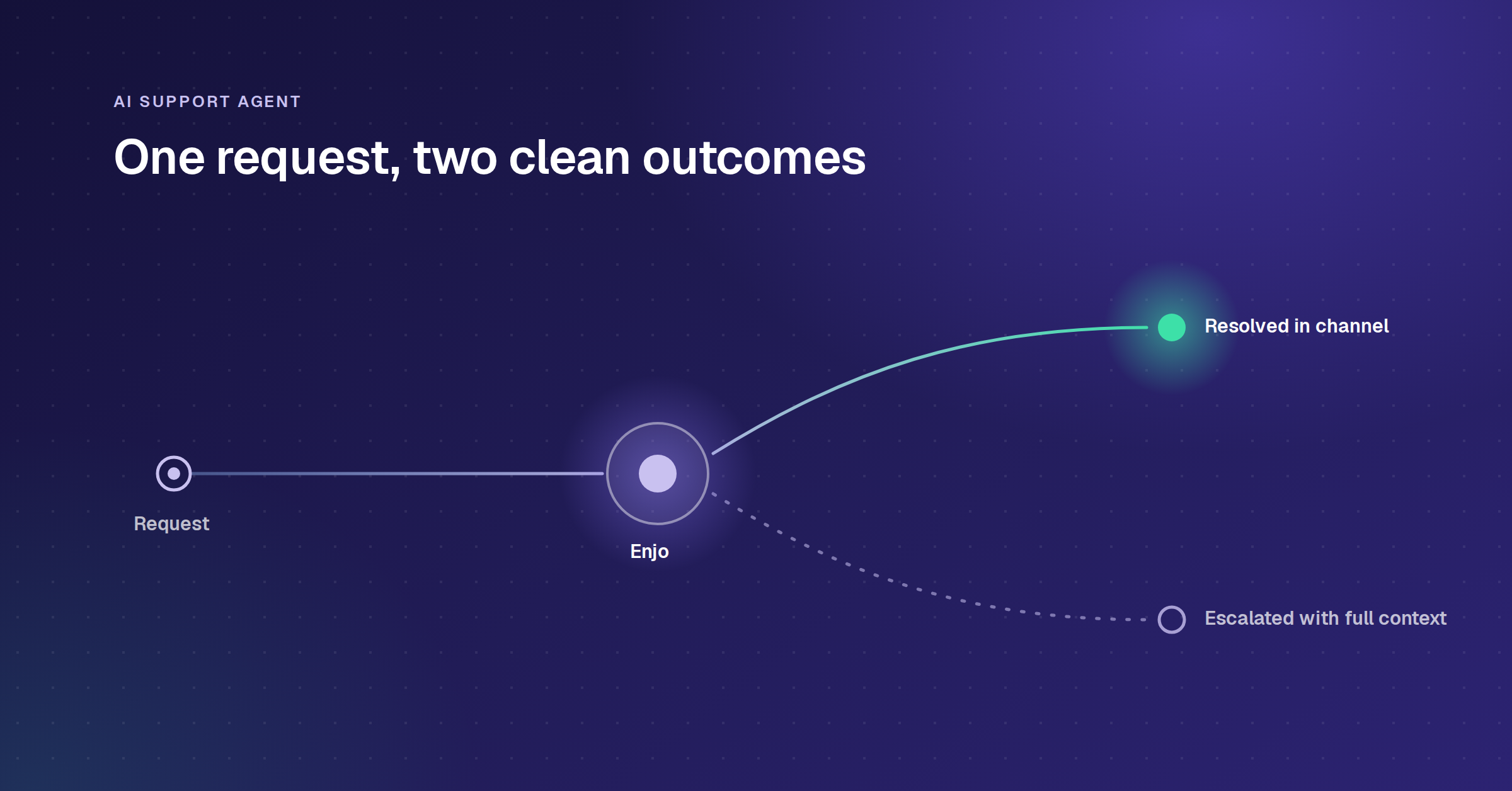
An AI support agent is an AI system that uses a large language model and your company's knowledge to resolve support requests on its own: it understands the request, answers it, takes actions in connected systems, and hands off to a human with the full context when it cannot finish. Many are priced by usage, per AI reply, outcome or resolution, rather than per seat.
According to Gartner, agentic AI will autonomously resolve 80% of common customer service issues without human intervention by 2029, driving a 30% reduction in operational costs in the process. This guide covers how AI support agents work, the best AI support agents in 2026 and what they cost, and how to roll one out.
Key Takeaways
- An AI support agent resolves requests on its own: it understands the request, answers from your knowledge, takes actions in connected systems, and hands off to a human with the full context when it cannot finish.
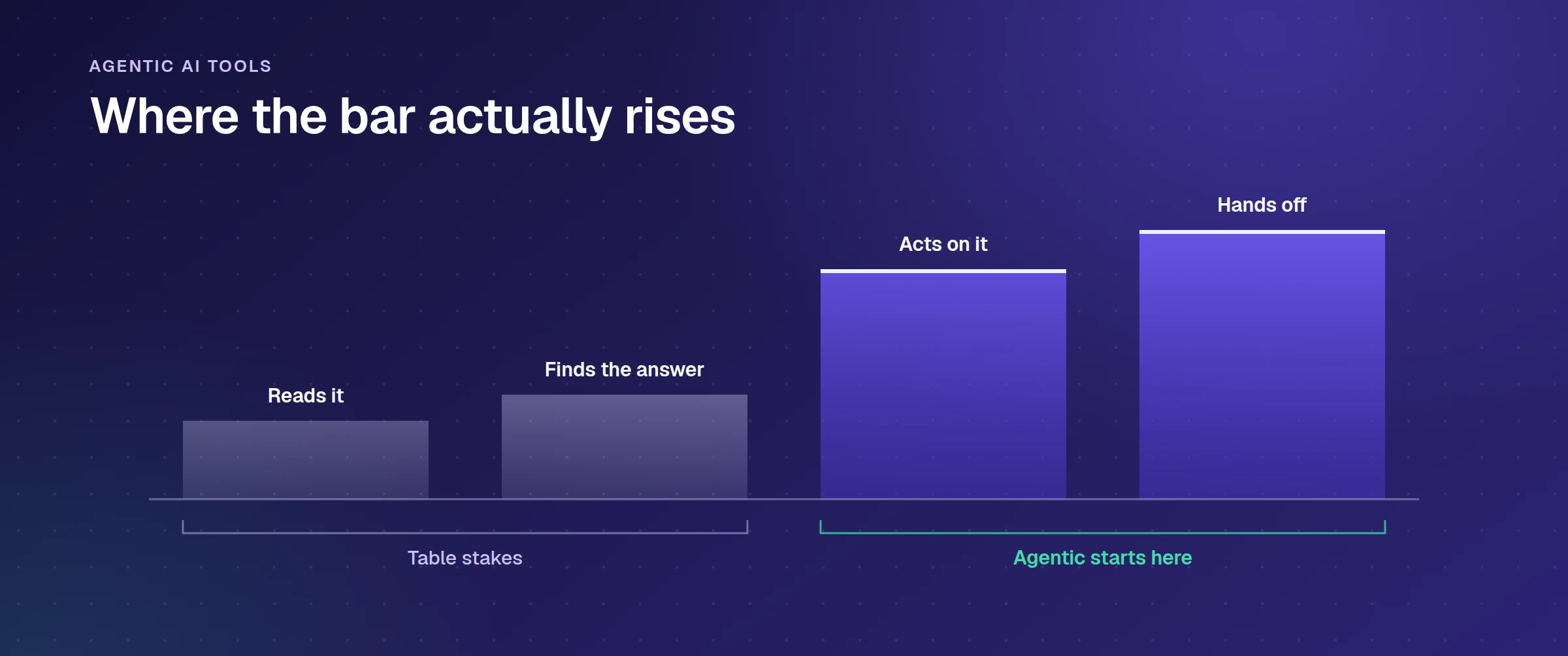
- It differs from a chatbot because it reasons and acts across systems instead of following a script.
- The AI support agents most teams shortlist in 2026 are Enjo, Fin, Zendesk AI agents, Agentforce, Decagon, Sierra, Ada, Forethought and Moveworks.
- Many bill by usage, per AI reply, outcome, resolution or conversation, so the bill follows volume rather than seats. Enjo starts free with 200 AI replies a month and unlimited human agent seats.
What Is an AI Support Agent?
An AI Support Agent is an intelligent system that combines large language models, enterprise knowledge, and workflow automation to handle support requests autonomously. Unlike basic chatbots that navigate conversation trees or respond with static answers, true AI Support Agents can:
- Understand natural language queries with context and nuance
- Access and synthesize information from various AI knowledge bases
- Evaluate multiple potential solutions
- Plan and execute multi-step workflows
- Take action in enterprise systems (e.g., reset passwords, create accounts)
- Learn from interactions to continuously improve
The key distinction between AI Support Agents and previous generations of AI agents is their ability to handle ambiguity and take autonomous action. While traditional chatbots could only respond based on pre-programmed rules, modern AI Support Agents leverage large language models (LLMs) to understand intent, context, and to generate appropriate solutions. Conversational AI sits between the two, and our guide to how chatbots, conversational AI and AI agents differ lays out where each one stops.
Fundamentally, AI Support Agents represent the shift from reactive, script-based support tools to proactive, reasoning-based autonomous systems.
AI Agent vs Chatbot vs Rule-Based Automation
The three are often sold under the same name. The difference is what each one can decide and which systems it can touch.
| Chatbot | Rule-based automation | AI support agent | |
|---|---|---|---|
| How it decides | A script or keyword match | Fixed if-this-then-that rules | Reasons about the request and plans the steps |
| Systems it touches | Usually its own channel | The platform it runs in | Connected systems through actions, such as Okta, Jira or Salesforce |
| What it handles | FAQs and links to articles | Routing, tagging and SLA timers | Multi-step requests resolved end to end |
| When it cannot finish | Repeats or drops the customer | Waits for a person | Hands off with the full conversation, account context and suggested next steps |
How the three approaches differ in practice.
Autonomous Agents and Agent Assist
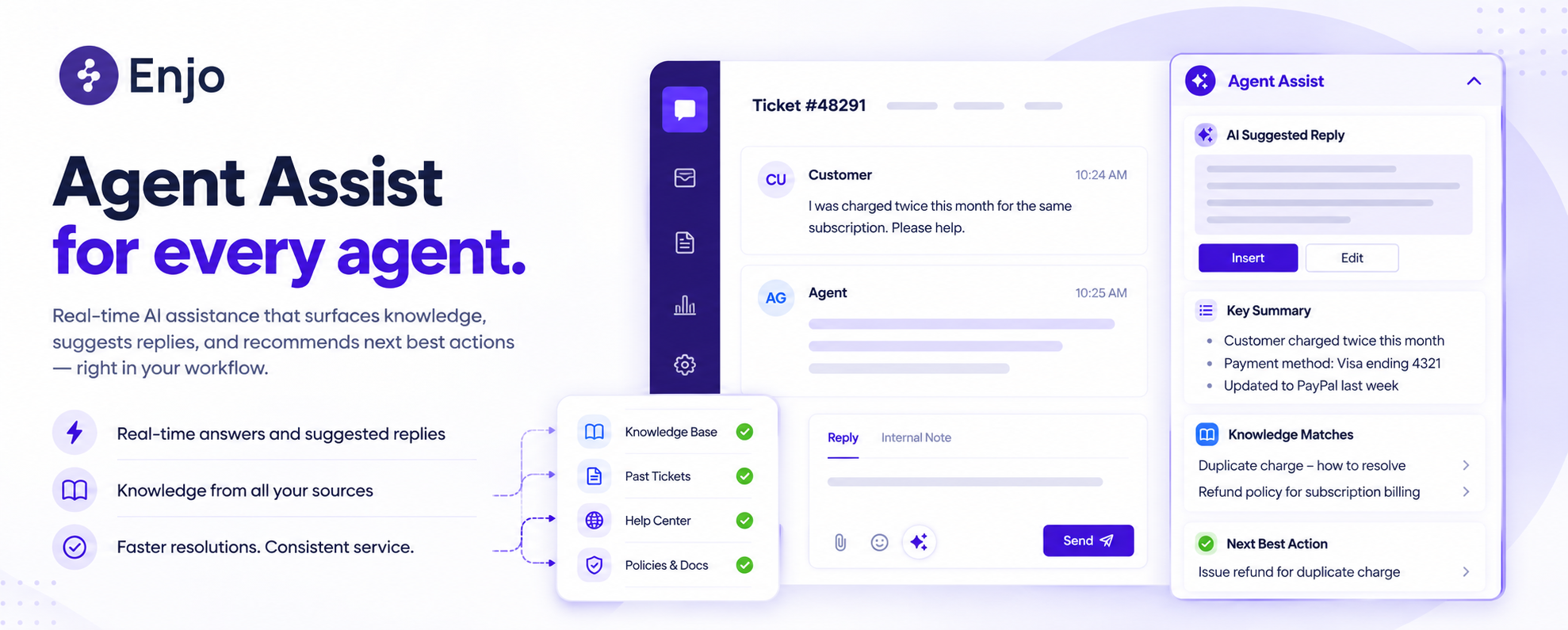
AI in support works in two modes. An autonomous agent resolves the request itself, from understanding it to taking the action. Agent Assist works for the human after escalation: inside the helpdesk, it surfaces the conversation summary, related cases and a suggested reply, so the agent picks up where the AI stopped. Enjo runs both on one knowledge index, so what the AI says is what the human sees.
Best AI Support Agents in 2026
The AI support agents most teams shortlist in 2026 are Enjo, Fin, Zendesk AI agents, Agentforce, Decagon, Sierra, Ada, Forethought and Moveworks. They differ most on how they bill: per AI reply, per outcome, per resolution or per conversation, or by quote. Here is what each one is built for and how it charges.
- Enjo. An AI Support Agent that resolves requests end to end in Slack, Microsoft Teams, website chat and the Help Center portal, takes actions in connected systems through AI Actions, and escalates with the full conversation, account context and suggested next steps. Priced per AI reply: the Free plan includes 200 AI replies a month with unlimited human agent seats and no credit card; Starter is $95 a month for 1,000 replies and Standard $295 a month for 3,000.
- Fin. The AI agent from Fin, the company formerly called Intercom, which Salesforce acquired in September 2026. Fin bills $0.99 per outcome, with a 50-outcome monthly minimum, and Fin Voice $1.99 per outcome. Our guide to Fin alternatives compares the agents teams weigh against it.
- Zendesk AI agents. Included in every Zendesk Suite and Support plan: Suite Team includes 5 automated resolutions per agent a month and Suite Professional 10, then each resolution bills $1.50 committed or $2.00 pay as you go. Our guide to Zendesk AI agents covers what they resolve, and teams weighing the platform itself can see our list of Zendesk alternatives.
- Agentforce. Salesforce's agent platform, built on Salesforce data and the Service Cloud license. Salesforce lists $2 per conversation, or Flex Credits at $500 per 100,000 credits billed per action. Our guide to the Agentforce platform covers what Service Cloud teams need.
- Decagon. A platform for building and scaling customer experience AI agents, sold through its sales team with no published price. See our Decagon alternatives and our Decagon vs Sierra comparison.
- Sierra. A platform for building customer experience AI agents, sold on outcome-based pricing with no published rate. Our list of Sierra AI alternatives compares the agents around it on price and setup.
- Ada. AI customer service agents for consumer support, priced by quote after a demo.
- Forethought. AI agents for customer support on an existing helpdesk, now part of Zendesk after its acquisition, and sold through Zendesk's sales team.
- Moveworks. An AI assistant for employee IT and HR requests, acquired by ServiceNow and priced by quote. Our guide to Moveworks alternatives covers what IT teams weigh it against, and our list of ServiceNow alternatives covers the platform itself.
| Tool | Built for | How AI is billed | Published price |
|---|---|---|---|
| Enjo | Resolving requests in Slack, Microsoft Teams, website chat and the Help Center portal, with actions in connected systems | Per AI reply, unlimited human agent seats | Free for 200 replies a month; $95 for 1,000; $295 for 3,000 |
| Fin | Customer conversations on Fin's own helpdesk or another helpdesk | Per outcome | $0.99 per outcome; Fin Voice $1.99 |
| Zendesk AI agents | Teams running support in Zendesk | Per automated resolution beyond an allowance | 5 or 10 per agent a month included, then $1.50 to $2.00 |
| Agentforce | Teams on Salesforce and Service Cloud | Per conversation or per action | $2 per conversation; Flex Credits $500 per 100,000 |
| Decagon | Building and scaling customer experience agents | Sales quote | Not published |
| Sierra | Building customer experience agents | Outcome-based | Not published |
| Ada | Consumer customer service | Sales quote | Not published |
| Forethought | AI agents on an existing helpdesk, now part of Zendesk | Sales quote | Not published |
| Moveworks | Employee IT and HR requests, now part of ServiceNow | Sales quote | Not published |
Prices from each vendor's own pricing page. Enjo prices from enjo.ai/pricing.
For a deeper comparison on pricing, knowledge reach and escalation, see our ranking of enterprise AI support agents.
Key Benefits of AI Support Agents
The measurable gains show up in resolution rate, response time and hours returned to the team, and the three deployments named below report those figures directly. As support volumes continue to scale exponentially across digital channels, these benefits become increasingly pronounced, creating competitive advantages for early adopters.
Implementing AI Support Agents delivers measurable improvements across several critical dimensions:
Operational Efficiency
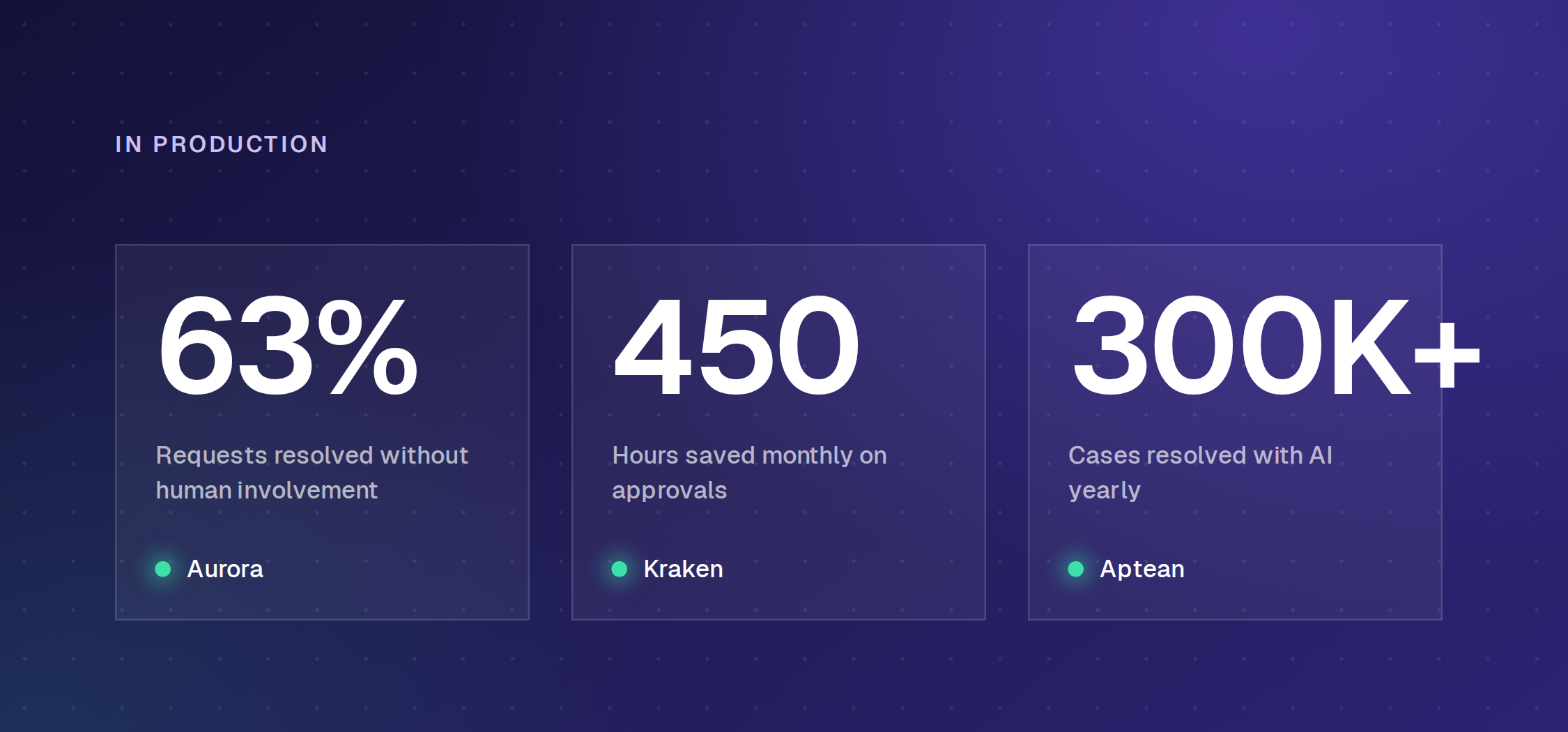
- Aurora reached 63% autonomous resolution and 45% faster resolution
- Delivery Hero saw 30% deflection and 80% faster response times
- Kraken automated approval workflows, saving 450 hours a month
- 24/7 availability without staffing changes
Enhanced Experience
- Instant responses without queues or wait times
- Consistent quality regardless of volume fluctuations
- Self-service resolution for users who prefer it
- Multilingual support without additional resources
Strategic Advantages
- Detailed analytics on common issues and knowledge gaps
- Identification of process inefficiencies and improvement opportunities
- Redeployment of human expertise to complex, high-value activities
- Scalable support operations that grow without proportional costs
Curious about AI-Native vs. AI-Assisted Knowledge Bases?
See the difference →Enjo's Multilingual module (under Help Center) and AI Translation module (under Agent Assist) give support teams native-language help content and one-click agent-side translation. For how this connects to account data rather than conversations, see our guide to AI in customer relationship management.
- Multilingual (Help Center): localized help centers with translation, so requesters read articles and AI answers in their own language
- AI Translation (Agent Assist): one-click translation of agent drafts into any target language before sending
Delivery Hero runs Enjo across 30+ Jira service desks in 70+ countries with multilingual support, seeing 30% average deflection, a 25% increase in employee satisfaction, and 80% faster response for both answering and ticket creation.
These benefits of AI Support Agents translate to substantial ROI, with the potential to accelerate payback by reducing support costs and improving operational efficiency.
Want the full customer service automation playbook?
Read the Automation guide →How AI Support Agents Work (Technically)
Understanding the technical architecture of AI Support Agents is essential for effective implementation. Modern systems typically incorporate several key components:
Foundation Models
Advanced AI Customer Service Agents utilize large language models (LLMs) as their core reasoning engine. These models understand natural language, interpret user intent, and generate contextually appropriate responses. Enterprise-grade solutions use either fine-tuned versions of models like GPT-4 or Claude, or proprietary models specifically trained for support scenarios. The wider guide to AI in customer service covers where these models fit alongside routing, self-service and quality assurance.
Knowledge Integration
To provide accurate, organization-specific responses, AI Support Agents must access enterprise knowledge.
- Document indexing and embedding of help center articles, FAQs, and documentation
- The quality of that index is set by the source content, which is where AI help center software that drafts and repairs its own articles changes the maintenance burden.
- Processing of historical ticket data to learn from previous resolutions
- Integration with product knowledge bases and technical resources
- Continuous synchronization as knowledge bases evolve
Reasoning & Planning
What separates true AI Support Agents from simple chatbots is their reasoning capability. When presented with a request, the system:
- Evaluates the nature of the request
- Determines whether it has sufficient information
- Plans a resolution approach
- Identifies necessary steps and tools
- Executes the plan or escalates when appropriate
System Integrations
To deliver end-to-end resolution, AI Customer Service Agents connect with enterprise systems through:
- API integrations with ticketing platforms (Zendesk, ServiceNow, Jira)
- Workflow automation tools
- User management systems
- Communication platforms (Slack, Teams)
- Custom business applications
Feedback Loop & Learning
AI Support Agents improve over time through structured feedback mechanisms:
- Resolution ratings from end-users
- Manual reviews by support specialists
- Analysis of escalation patterns
- Periodic retraining with new data
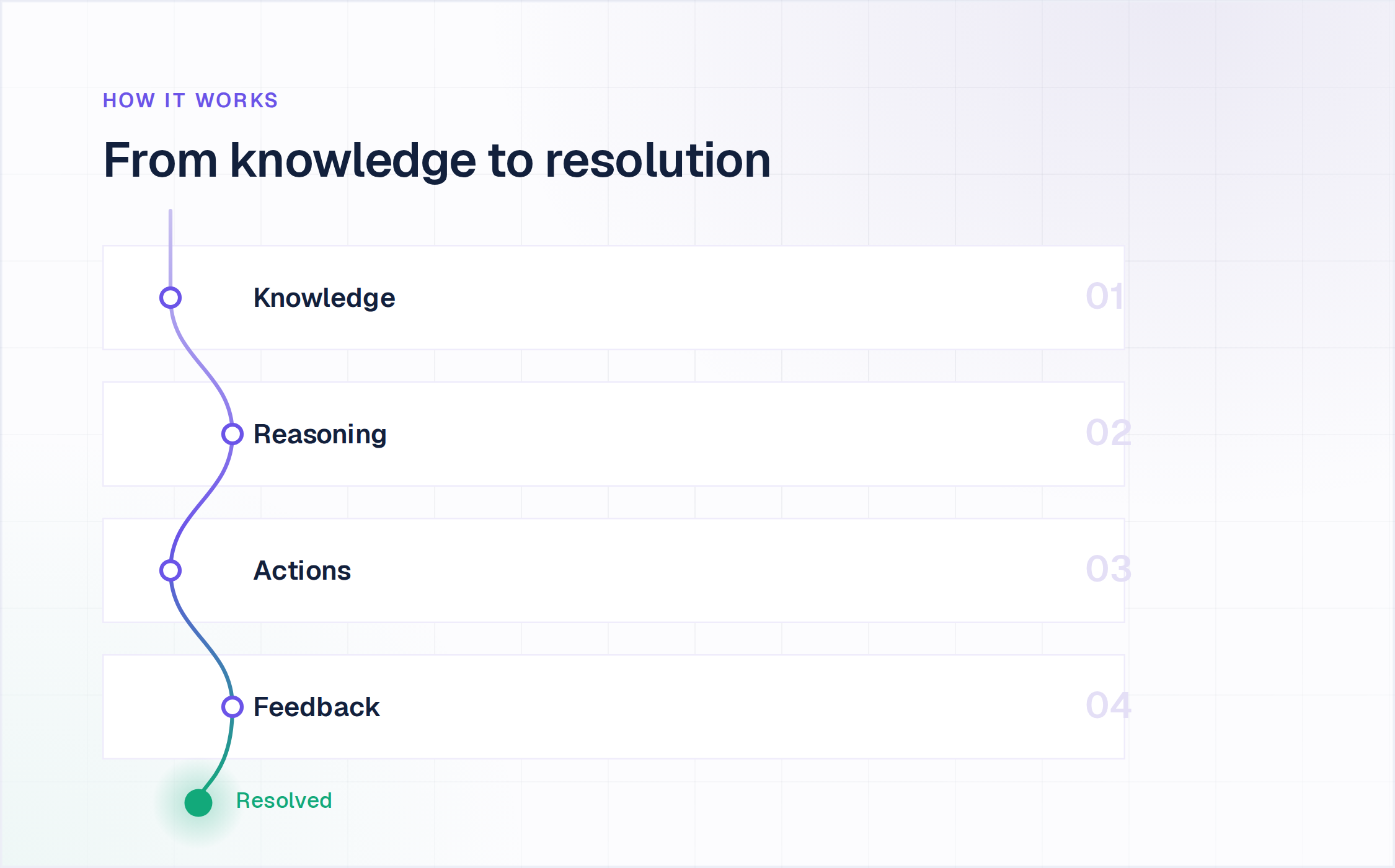
This architecture enables the autonomous handling of support requests from initial understanding through to resolution, with appropriate human oversight for quality control.
Curious how AI support agents work behind the scenes?
See how they work →Primary Use Cases of Support Agents
While implementations exist in virtually every business department, three key areas have emerged as the primary adoption targets due to their combination of clear ROI potential and well-defined knowledge requirements. AI Support Agents excel across multiple support functions within the enterprise:
Customer Support
Customer service teams get the most immediate ROI from AI support agents, since ticket volume here is typically the highest and the most repetitive. AI Support Agents enable:
- 24/7 first-line response to product and service inquiries
- Automatic classification and routing of complex issues
- Guided troubleshooting for common products problems
- Order status checking and transaction history retrieval
- Account management and profile updates
Want the customer service-specific breakdown?
Read the guide →IT Helpdesk
Within internal IT support, AI Support Agents handle:
- Password resets and account unlocks
- Software access provisioning
- Basic troubleshooting for common IT issues
- Navigation assistance for enterprise applications
- System status updates and outage information
Our breakdown of enterprise IT support covers what changes at scale, with figures from four named deployments, and our guide to the AI service desk covers what it resolves and what it costs.
Running IT support too?
See AI ITSM →HR Support
Human Resources departments leverage AI Support Agents for:
- Benefits enrollment and policy questions
- Time-off requests and approvals
- Document retrieval (pay stubs, tax forms)
- Onboarding process guidance
- Policy clarification and procedural information
These implementations reduce administrative burden on HR teams while providing employees with immediate answers to common questions.
Running HR support too?
See AI Support Agents for HR →Why Current Approaches Fall Short?
Manual ticket triage doesn't scale with support volume, and hiring ahead of demand is expensive and slow. Our comparison of automated ticketing systems prices ten tools on what each resolves without a human. Where requests arrive in chat rather than a portal, our guide to the Slack ticketing system covers setup, tools and costs. Native helpdesk AI (the AI features bundled into Zendesk, Salesforce, or Jira) is typically limited to that one platform. If a team runs Slack, an internal wiki, and a separate ticketing system, native AI can't see across all three. For what that bundled AI costs next to AI billed per resolution or per reply, see our comparison of AI help desk software.
In-house builds using ChatGPT or Claude APIs plus a RAG setup solve the demo but rarely survive contact with production. Knowledge sync across systems, hallucination control, escalation logic, audit trails, and SOC 2 evidence are all separate engineering problems that a working prototype doesn't address. And the security review at the end of that work is usually where an internal build stalls, because SOC 2 evidence and access controls are not something a retrieval prototype produces.
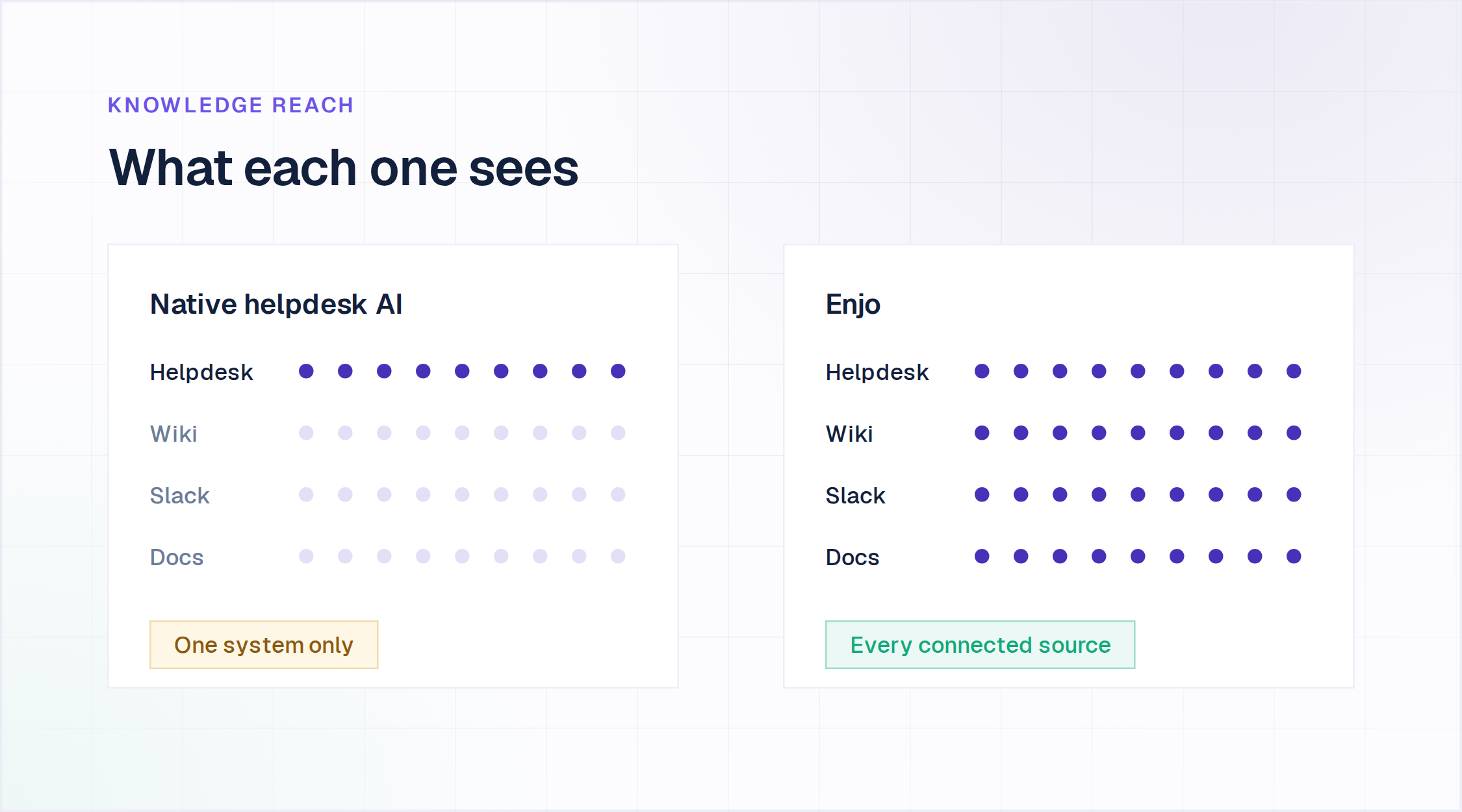
How Enjo Handles This?
Studio
Studio is the visual builder inside the Enjo AI agent where teams design, test, and deploy its tools and flows, with Playground and Bulk Testing to validate responses before anything reaches production. Aptean took its initial cohort live in a single day and now resolves 300K+ cases a year with Enjo AI, trained on 5M+ documents, volume equivalent to 120 agents handled by AI.
Agents built in Studio deploy across Slack, Microsoft Teams, and the website widget. The same setup powers an AI website chatbot on your own site. For a ranked comparison, see the 10 best AI chatbots for customer service.
AI Actions
AI Actions is how the agent works in other systems during resolution. In Jira and Jira Service Management it creates, updates, transitions, comments on and assigns work items; in ServiceNow it creates, looks up and updates tickets; in Salesforce it looks up and updates cases and records; in Okta it unlocks accounts and provisions access. Custom API and webhook actions cover any other system. Every action is configured, authorized, bounded by Guardrails and recorded in the audit trail, rather than left as a drafted reply for a human to copy over.
Escalation
A rule-based escalation engine defines when, how, and where the AI hands off to a human, with the full conversation history attached, so a human agent starts where the AI left off instead of asking the customer to repeat themselves.
Training
The Training module improves outcomes over time via examples, feedback loops, and tuning signals, so accuracy compounds with usage instead of staying fixed at whatever the initial setup achieved. Effective training draws on AI knowledge bases, not just the underlying model's general conversational ability.
Want the full step-by-step training process?
Read the training guide →Insights
Visual dashboard shows performance metrics in plain language, automated alerts highlight areas needing attention, built-in suggestions for improving agent responses, and a collaborative workspace supports team-based agent management.
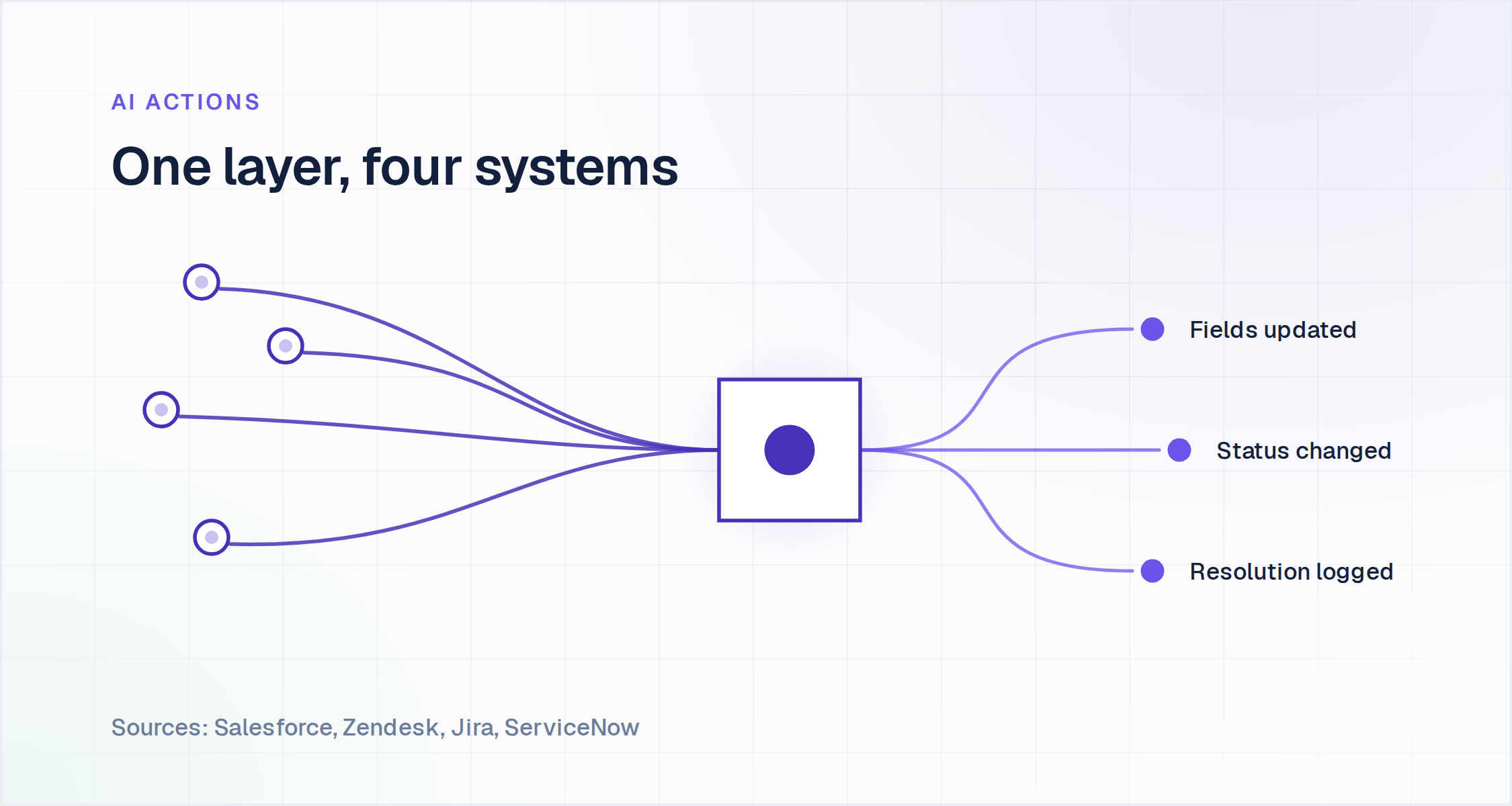
Implementation Overview
Despite the sophistication of underlying AI technology, implementation success correlates more strongly with preparation quality than with model selection or technical specifications. Successfully deploying AI Support Agents requires careful planning and execution across several key dimensions:
Data Requirements
The foundation of any effective AI Support Agent is high-quality knowledge. Organizations must prepare:
- Comprehensive documentation covering products, services, and policies
- Structured FAQ content addressing common questions
- Historical support ticket data (ideally with resolution notes)
- Process and workflow documentation for automated actions
Technical Setup
Implementation typically involves:
- Knowledge base integration and initial training
- System integrations with ticketing platforms and enterprise applications
- User interface configuration (chat, messaging platforms, email)
- Security controls and access management
- Testing environments for validation before production deployment
Rollout Strategy
Most successful implementations follow a phased approach:
- Pilot with limited scope and supervised operation
- Expansion to handle specific, well-documented use cases
- Progressive addition of more complex scenarios
- Continuous improvement based on performance data
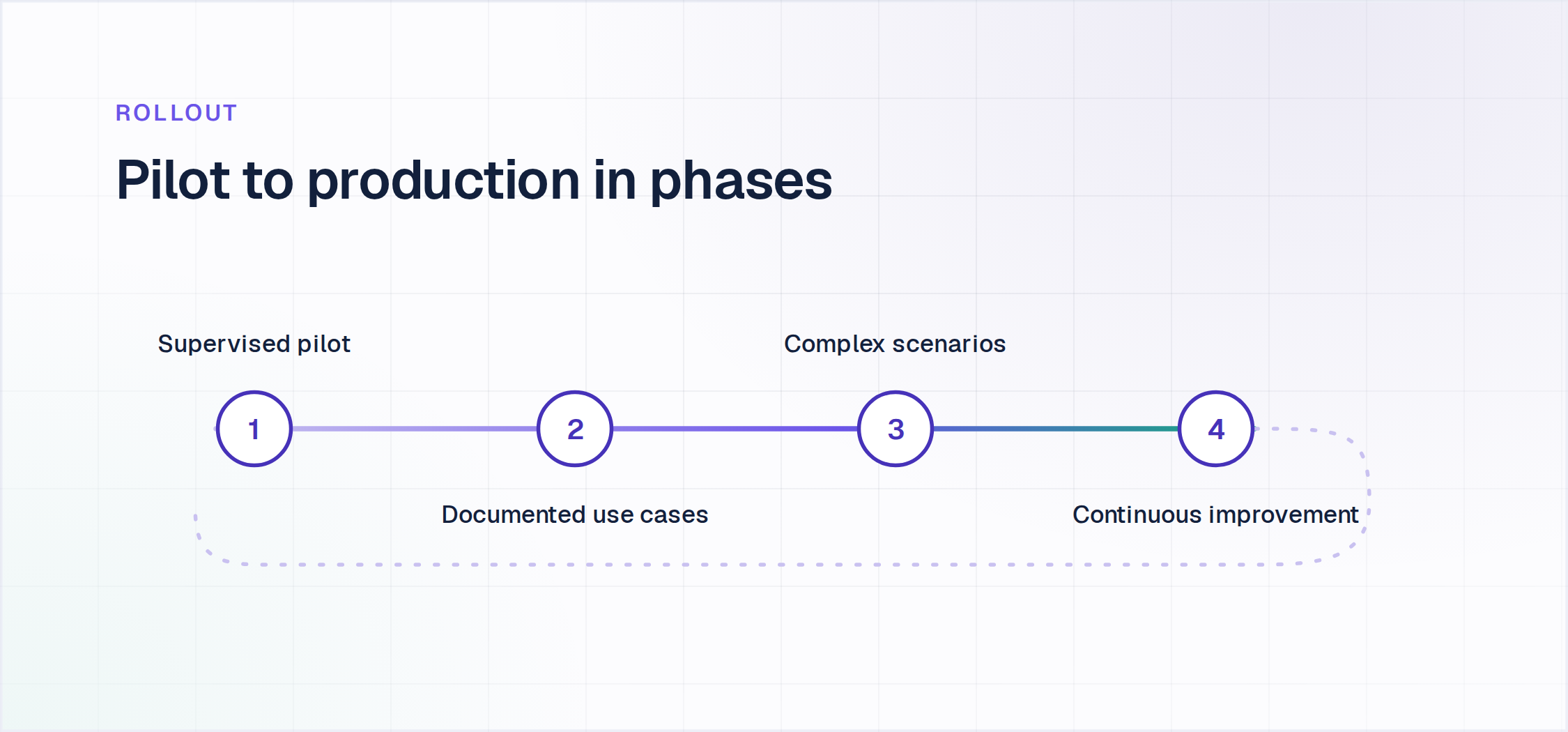
Change Management
Ensuring adoption requires:
- Clear communication with both support teams and end-users
- Training for support specialists on working alongside AI
- Feedback mechanisms to identify and address issues
- Regular reviews and performance assessments
Ready to plan your own implementation?
See the implementation guide →How to Train AI Support Agents?
Effective training represents the critical differentiator between AI Support Agents that merely respond and those that autonomously resolve. While the underlying language models provide conversational capabilities, AI knowledge bases determine actual resolution effectiveness. Our comparison of AI knowledge base software shows what ten of them do with a question their content cannot answer.
Knowledge Base Preparation
- Auditing existing documentation for accuracy and completeness
- Structuring content for optimal retrieval and relevance
- Creating documentation for common but undocumented processes
- Establishing maintenance workflows for knowledge updates
Want the full guide to training your AI support agents?
Read the training guide →Quality Control Mechanisms
- Defining confidence thresholds for autonomous resolution
- Establishing human review processes for uncertain cases
- Creating feedback loops for continuous improvement
- Setting up monitoring for accuracy and resolution rates
Governance Framework
- Developing clear policies for appropriate AI agent use
- Establishing oversight responsibilities and audit trails
- Creating escalation paths for complex or sensitive issues
- Defining measurement standards for performance evaluation
Accuracy on in-scope scenarios tracks the quality of the indexed knowledge more than the choice of model, which is why the knowledge audit belongs before the pilot rather than after it.
How to Evaluate AI Support Agents
Weigh integration depth (native or middleware?), resolution vs. drafting (does it resolve the request or only suggest a reply?), setup time (non-technical or engineering-required?), escalation quality, multilingual depth, security posture (SOC 2, ISO 27001, GDPR?), pricing transparency, and deployment speed against your own stack and volume.
Selection criteria should include integration capabilities, enterprise security controls, training requirements, and specific functional needs based on use cases. Our ranking of customer service automation software applies those same criteria to ten named platforms, with pricing and honest trade-offs for each. Run the shortlist on your own systems rather than in a vendor demo: ask for the list of write actions rather than read actions, confirm which of your knowledge sources the tool can actually index, and watch one escalation land in the queue your team works.
Curious how other AI support agents stack up?
See the top platforms →Enjo connects directly to the customer service automation systems that teams already run. While many AI agents offer basic API connections, Enjo provides native integrations that remove data silos and workflow handoffs.
Enjo's AI Actions module works directly in Jira, ServiceNow, Salesforce, Okta, Entra ID and Google Workspace, and escalates into Zendesk, ServiceNow, Salesforce Service Cloud, Jira Service Management or Freshservice with the full conversation, account context and suggested next steps, rather than relying on middleware. See Enjo's full integrations list.
- AI Actions: retrieves case data and executes updates in the connected helpdesk without a separate integration layer
- Agent Assist: embeds inside the agent's existing workspace (Salesforce, Zendesk) instead of requiring a separate tool
If you are comparing vendors rather than the category, we ranked ten ai customer support software on pricing, knowledge reach and whether they resolve end to end. For help desks and shared inboxes as well as AI agents, our ranking of the best customer service software compares ten tools on price, channels and AI.
Troopr Labs holds SOC 2 Type II, ISO 27001 and GDPR compliance, with the report and certificate available on request, which is what a CISO review turns on.
Unlike competitors that require complex middleware or custom development, Enjo's plug-and-play architecture enables deployment in days rather than months.
Tracking Performance After Deployment
Effective evaluation combines operational metrics with financial indicators to create a complete picture of transformation progress. This comprehensive approach ensures continuous improvement while validating investment decisions against tangible results.
A proper evaluation framework should incorporate metrics across several complementary dimensions:
Volume Metrics
- Ticket deflection rate: Percentage of inquiries fully resolved by AI
- Automation rate: Proportion of total support volume handled autonomously
- Escalation rate: Percentage of AI interactions requiring human intervention
Efficiency Metrics
- Mean Time to Resolution (MTTR): Average time from request to resolution
- First Contact Resolution (FCR): Percentage of issues resolved in first interaction
- Agent productivity: Support volume handled per human agent
Quality Metrics
- Customer Satisfaction (CSAT): User ratings of AI-provided support
- Resolution accuracy: Correctness of solutions provided
- Knowledge gap identification: New issues requiring documentation
Business Impact
- Cost per ticket: Total support cost divided by volume
- Support capacity: Maximum volume manageable with current resources
- ROI: Cost savings and efficiency gains versus implementation investment
Organizations should establish baseline measurements before implementation and track trends over time, with quarterly reviews to identify optimization opportunities.
Looking for free customer service software options?
See the best free tools →Cost Effectiveness
One of the biggest advantages of AI support agents is how they stretch your budget further without compromising service. Instead of scaling your team headcount every time ticket volumes increase, AI handles a large share of routine queries at almost no extra cost.
Think of it this way: once the system is set up, the cost of handling the next ticket is close to zero compared to paying for another full-time agent. Even deflecting 20 to 30% of tickets adds up quickly; that’s thousands of hours of human effort freed up each quarter.
It’s not just about direct savings either. By letting AI take care of password resets or “where’s my order?” type questions, your team avoids burnout and turnover, which are expensive in their own right. Over time, the total cost of running support with AI tends to grow much slower than with a purely human team. The same math decides which chat tool you buy: our comparison of the best live chat software prices ten widgets on per-seat, per-conversation and per-resolution billing.
Not sure which metrics actually matter?
See the customer service metrics →Challenges and How to Address Them
While AI Support Agents offer significant benefits, organizations should be prepared to address several common challenges:
Hallucination and Accuracy Issues
- Challenge: AI models occasionally generate plausible but incorrect responses
- Solution: Ground every answer in your approved knowledge with a citation, validate responses at scale with Bulk Testing before launch, restrict scope with Guardrails, and review every AI decision in the audit trail
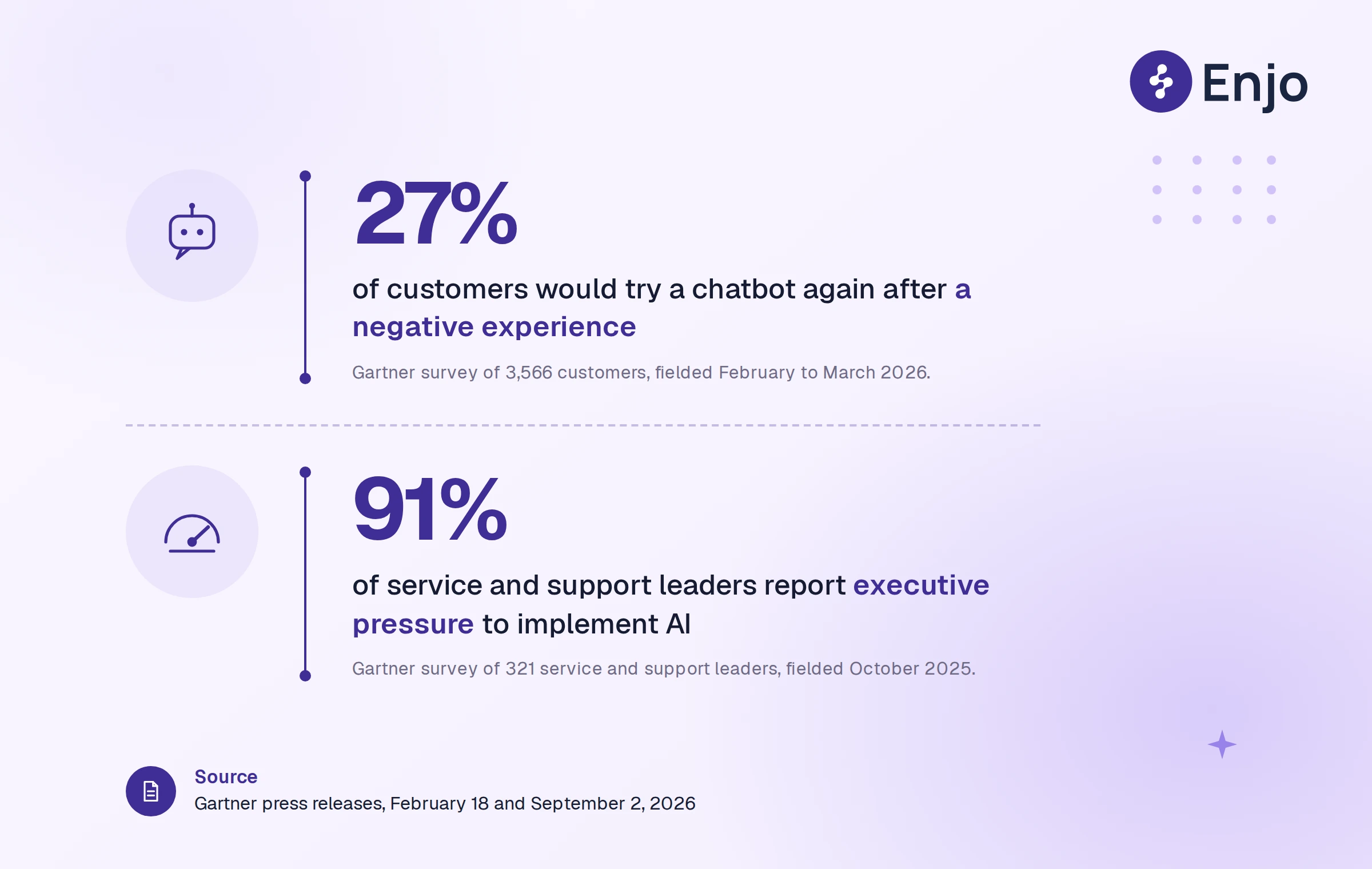
The cost of getting this wrong is not a single bad answer: a Gartner survey of 3,566 B2B and B2C customers, published in September 2026, found that only 27% would try a chatbot again after a negative experience, so reliability within a narrow scope beats reach across a wide one.
Poor Data Preparation
- Challenge: Incomplete or outdated knowledge bases lead to gaps in AI capabilities
- Solution: Invest in knowledge audits, structured content creation, and regular maintenance processes
Want to build a knowledge base that actually holds up?
See the knowledge base creation guide →Integration Limitations
- Challenge: Lack of API access to legacy systems limits automation potential
- Solution: Connect systems outside the standard integration list through custom API and webhook actions, so the agent acts in legacy tools without a middleware layer or a migration
Change Resistance
- Challenge: Support teams may view AI as a threat rather than a tool
- Solution: Focus on augmentation rather than replacement messaging, involve agents in training, and highlight high-value work opportunities. The work splits cleanly: the AI Support Agent resolves the repetitive volume, and your team takes the exceptions with the full conversation, account context and suggested next steps already attached.
Scope Management
- Challenge: Attempting to automate too much too quickly leads to poor performance
- Solution: Begin with well-defined, high-volume use cases and expand methodically based on success
Ethical and Privacy Concerns
- Challenge: Customer and employee data require careful handling
- Solution: Implement strict data governance, minimize sensitive data usage, and maintain transparency about AI capabilities
Organizations that proactively address these challenges achieve significantly higher success rates and faster time-to-value from their implementations.
Want to see the common pitfalls before you hit them?
See the challenges →Why Enjo Stands Out?
In the evolving landscape of AI Customer Support Agents, Enjo separates itself on four things a buyer can check:
Proven at Enterprise Scale
- Aptean: initial cohort live in a single day, 5M+ documents indexed, 300K+ cases resolved with Enjo AI every year, volume equivalent to 120 agents handled by AI
- Built by Troopr Labs, with 600+ enterprise deployments and 99.9% uptime over 7 years
- Snap, DoorDash, Roku, Snowflake, Wayfair, Delivery Hero and Rakuten are among the companies in the portfolio
End-to-End Resolution with Control
- Resolves requests autonomously, escalates exceptions with full context
- Connects to enterprise systems through AI Actions, not generic API middleware
- Every action is auditable
Security and Compliance
- SOC 2 Type II compliant, ISO 27001 certified, GDPR compliant
- Role-based access management (RBAC) and audit logs
Named Modules, Not Buzzwords
- Bulk Testing: validates AI responses for accuracy and coverage at scale before they reach production
- Guardrails: agent-level restrictions extending global compliance controls
- Training: improves outcomes via examples, feedback loops, and tuning signals
Want the broader customer service automation picture?
Read more →AI Support Agent Trends in 2026
The AI Customer Support Agent landscape continues to evolve. Key trends defining the space in 2026 include:
Multi-Agent Systems
Rather than relying on a single AI agent, organizations are implementing specialized agents for different functions, working together as a coordinated system. These multi-agent setups include:
- Triage agents that classify and route requests
- Specialized domain agents with deep expertise in specific areas
- Orchestration agents that coordinate complex workflows
- Oversight agents that monitor performance and ensure quality
Autonomous Workflows
Advanced AI customer support agents are moving beyond conversation to execute complex, multi-step processes without human intervention. This includes:
- Cross-system operations involving multiple enterprise applications
- Decision-making based on business rules and policies
- Handling of exception cases through predefined alternatives
- Completion of entire support processes from request to resolution
Enterprise LLM Adoption
As organizations grow more sophisticated in their AI strategies, many are deploying:
- Private LLM instances with enterprise-specific training
- Domain-adapted models focused on internal terminology and processes
- Hybrid approaches combining public and private model capabilities
- Specialized models for specific business functions
Proactive Support Models
The most advanced implementations are shifting from reactive to proactive support by:
- Identifying potential issues before they affect users
- Recommending process improvements based on support data
- Delivering personalized guidance based on user behavior patterns
- Preemptively resolving anticipated problems
These trends indicate a maturing market moving from basic automation toward truly intelligent support systems that fundamentally transform enterprise operations.
Want to see where AI support agents are headed in 2026?
See the trends →Conclusion
AI Support Agents represent a fundamental shift in how enterprises manage support functions. By automating routine inquiries and resolving common issues autonomously, they reduce operational costs while improving service quality.
As adoption matures through 2026, the capabilities of these systems continue to expand. Organizations that deploy AI customer service agents are achieving support scale that would be financially prohibitive through traditional staffing alone.
Frequently Asked Questions
How long does it take to deploy an AI support agent?
Timelines vary by scope, but Aptean took its initial cohort live in a single day, and Amber Group went from POC to full production in 5 weeks. Most teams run a supervised pilot before expanding to broader use cases.
What happens when the AI can't resolve a request?
It escalates to a human, and the human receives the full conversation, account context and suggested next steps, in Enjo Inbox or the helpdesk your team already works. The human starts where the AI left off, and the resolution feeds back into the agent's knowledge.
Is AI support agent data secure?
Enjo is SOC 2 Type II compliant, ISO 27001 certified, and GDPR compliant, with role-based access controls and a full audit log on every conversation and action.
What is an AI customer support agent?
An AI customer support agent is a system that uses an LLM plus your enterprise knowledge to understand customer requests, reason through multi-step resolutions, and take action in your connected helpdesk, not just answer from a script.
How much does an AI support agent cost?
Many AI support agents bill by usage rather than per seat. Fin charges $0.99 per outcome, Zendesk $1.50 to $2.00 per automated resolution beyond a per-agent allowance, and Agentforce $2 per conversation. Enjo prices per AI reply: free for 200 replies a month, then $95 a month for 1,000 replies, with unlimited human agent seats.
What are the top AI support agents?
The AI support agents most teams shortlist in 2026 are Enjo, Fin, Zendesk AI agents, Agentforce, Decagon, Sierra, Ada, Forethought and Moveworks. The list above sets out what each is built for and how it bills; the real test is running your own requests, knowledge and escalations through each one.
What is the difference between an AI agent and a chatbot?
A chatbot follows a script or matches keywords to articles. An AI agent reasons about the request, plans the steps, takes actions in connected systems and hands off to a human with the full context when it cannot finish. The table above sets the two side by side with rule-based automation.
Will AI agents replace human support agents?
No. AI agents take the repetitive load so people work the cases that need judgment. At Aptean, Enjo handles a volume equivalent to 120 agents, and the team spends its time on the requests that need a person. Every escalation reaches a human with the full conversation, account context and suggested next steps.
What's the best or most cost-effective AI support agent?
The most cost-effective AI support agent is the one whose bill follows resolved volume rather than headcount. Enjo is priced per AI reply, not per seat, with unlimited human agent seats on published plans, and Enjo for your helpdesk resolves inside Salesforce, Zendesk, Jira, or ServiceNow with no migration. The evaluation criteria above apply the same checks to Forethought, Ada, and Agentforce.
How do I choose an AI agent for support tickets?
Weigh integration depth with your current helpdesk, whether it resolves requests end to end or only drafts replies, setup time without an engineering team, and whether the vendor is shipping updates at a reasonable pace; see the evaluation criteria and market comparison sections above.
Does an AI support agent replace my existing helpdesk?
No. Enjo for your helpdesk runs inside Salesforce, Zendesk, Jira, or ServiceNow. It resolves requests in the channels your team already uses, and anything it cannot resolve escalates into your existing helpdesk with the full conversation, account context and suggested next steps, so no migration is required.