Transform complex support workflows
How to Create a Knowledge Base for B2B Support
TL;DR
- The knowledge base is now the enterprise brain that powers AI assistance, not a static article library.
- For 2026, support quality depends on machine-readable structure, not volume of documentation.
- AI-native KBs integrate into Slack, Teams, and product UIs, users no longer “visit” help centers.
- Teams need systematic governance, metadata discipline, and RAG-friendly formatting.
Zero-touch support becomes achievable only when the KB becomes a living operational system, not a publishing destination.
What You’ll Learn
- Why the AI knowledge base has become the primary interface for AI-powered support.
- How the shift from static documentation to AI-operated knowledge happened.
- What an AI-native KB looks like and how it changes customer service.
- The structures, metadata, and governance you need for machine readability.
- How support leaders can evaluate platforms, avoid legacy traps, and future-proof decisions.
- How to design a KB that reduces escalations and improves resolution time across channels.
- A practical, step-by-step plan for building or modernizing your KB.
A decade ago, a knowledge base was a convenience, something that made your help center look complete.
For 2026, it is something else entirely: the control plane for support, the intelligence layer behind AI agents, and the single biggest determinant of whether your customer or employee receives an instant answer or waits in a queue.
Support now operates where work happens: inside Slack, Microsoft Teams, email threads, or embedded chat widgets. The modern user does not navigate to a help center; they ask a question inside their workflow. That question is intercepted by an AI agent. The quality of the agent’s response depends entirely on how well your knowledge base is structured and governed.
If you treat documentation as an afterthought, your AI will hallucinate, contradict itself, or escalate unnecessarily, and if you treat documentation as infrastructure, the AI will resolve issues with high accuracy, consistency, and confidence.
This guide shows you how to design a knowledge base built for AI-native operations, not static publishing.
Introduction
Why Knowledge Bases Became Mission-Critical for 2026
Support organizations hit a breaking point between 2024-2026. Ticket volume rose, complexity increased, and users expected instant resolution everywhere. Meanwhile, teams faced:
- Spiralling escalation costs
- Inconsistent answers across channels
- Long onboarding cycles for new agents
- And the inefficiency of tribal knowledge locked in chats, PDFs, and slides
When LLM-driven support automation began to mature, companies realized something essential:
Automation is only as good as the knowledge it sits on.
A knowledge base stopped being a content project and became an operational system. It is now the engine that:
- Powers AI agents
- guides support workflows
- Drives internal IT and HR self-service
- Enables consistent customer-facing answers
- Anchors every troubleshooting or onboarding process
In other words, the KB became infrastructure.
Enjo in practice: A global enterprise used Enjo to unify knowledge scattered across Confluence, SharePoint, and internal wikis. Within weeks, Enjo was resolving >40% of repetitive IT issues directly in Slack/Teams, without requiring a single article rewrite.
The Shift From “Static Docs” to Dynamic, AI-Operated Knowledge Systems
The legacy model assumed that users willingly visit a help center, read articles, and fix their own issues. This no longer matches reality.
Users now expect:
- Conversational answers
- Personalized instructions
- Immediate clarity
- And zero manual searching
The modern KB exists behind the scenes, powering retrieval pipelines that feed answers directly where users are working. Instead of:
“Here’s the article.”
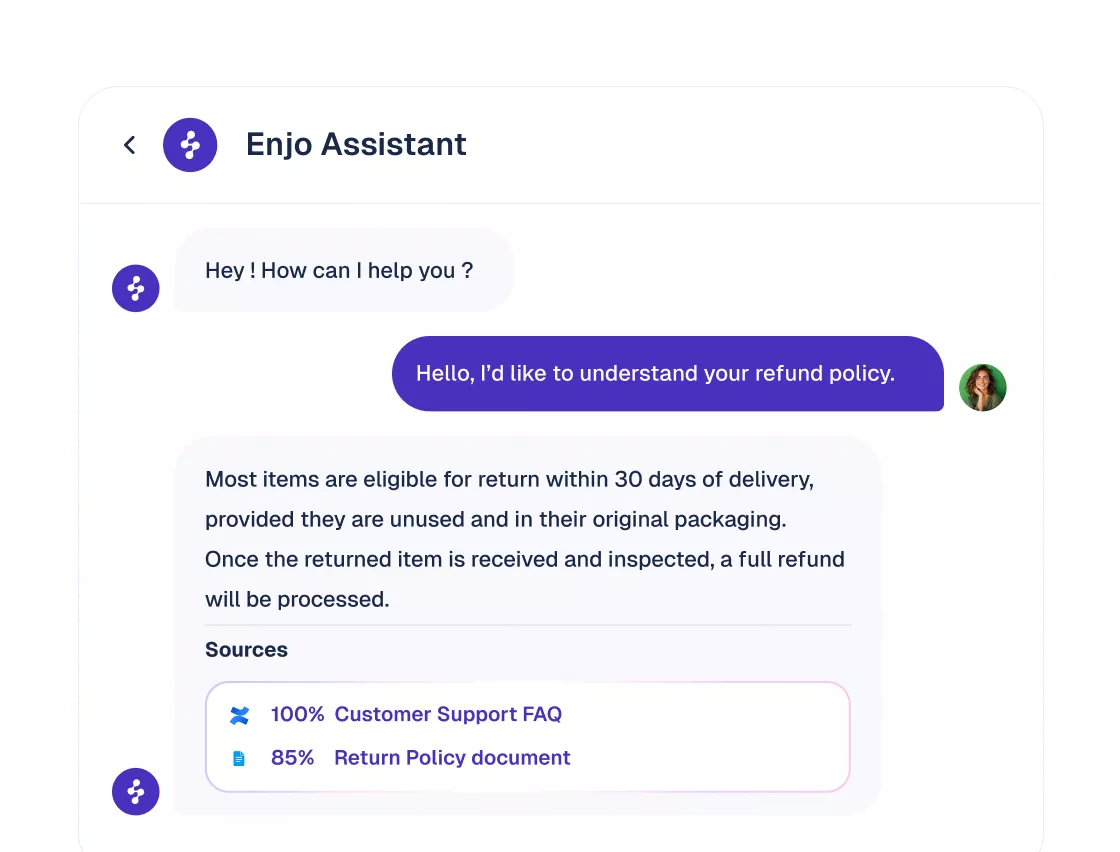
AI-native systems produce:
“Here’s the answer, already interpreted and contextualized for your role.”
This requires a KB optimized not for human browsing, but for machine interpretation. Headings, chunks, metadata, and semantic structure matter more than prose length or design.
In effect, the knowledge base evolves from a destination to a backend system, the API for your organization’s institutional knowledge.
The Support Cost Problem (Escalations, Volume, Training)
Support costs increased sharply due to three compounding forces:
- Escalations grew more expensive.
A single unclear article can trigger dozens of unnecessary human handoffs. - Volume shifted from simple to technical.
Users want clear answers on configuration, permissions, integrations, and troubleshooting. - Training cycles lengthened.
Support agents must know more systems, more workflows, and more exceptions than ever.
The hidden cost is inconsistency. Two agents giving slightly different answers erodes trust. AI agents giving different answers in Slack vs. website chat erodes trust even faster.
Impact of KB Quality on AI-Powered Support
| Messy, Unstructured Knowledgebase | Clean, AI-Ready Knowledgebase |
|---|---|
| AI agents hallucinate due to ambiguous or conflicting content | AI agents give grounded, consistent answers across channels |
| Duplicate articles cause inconsistent responses | Single-source-of-truth reduces confusion and rework |
| Policies vary across teams and tools | Unified guidelines ensure predictable, compliant support |
| AI retrieval pulls irrelevant or outdated chunks | Machine-readable structure maximizes retrieval accuracy |
| Escalations increase because agents lack confidence | More issues resolved at first contact by AI or humans |
| Support behavior becomes unpredictable across Slack, Teams, and web channels | Users receive the same answer regardless of who or where they ask |
| Training cycles become long and inefficient | Faster onboarding and better agent performance |
| Rising ticket volume from repeated questions | Higher deflection and fewer repetitive queries |
| Follow-up messages multiply due to unclear guidance | Clear, procedural content reduces back-and-forth |
| Operational costs grow due to human escalation load | Measurable savings from zero-touch resolutions |
This is why the knowledge base has become the single highest-leverage investment for support and IT operations.
Learn more: What’s next for Support Automation
Why a Knowledge Base Matters for B2B Support
An AI knowledge base answers questions from these articles with citations, and our AI knowledge base guide explains how that retrieval and upkeep work. This guide covers the articles themselves.
The Function of a Knowledge Base in Modern Support
A modern knowledge base goes beyond “documentation.” It serves three intertwined functions:
1. Operational Memory
It captures procedures, exceptions, troubleshooting logic, and role-based rules across departments.
2. AI Input Layer
Every AI agent, whether embedded in Slack, Teams, web chat, or your product, relies on the KB to generate grounded answers.
3. Consistency Engine
It ensures customers and employees receive the same correct answer regardless of who responds or where the question was asked.
In B2B environments, where issues have more complexity and more impact, this consistency is essential.
A strong KB becomes the foundation for:
- Customer self-service,
- Internal IT automation,
- Sales and CS enablement,
- Developer documentation,
- Onboarding paths,
- Policy communication.
It is the common language your organization uses for problem-solving.
How Knowledge Base Quality Affects Resolution Time
Resolution time is a direct function of how quickly a user can get an accurate, context-aware answer. In human-led support, great KBs reduce how often agents need to search, verify, or escalate. In AI-led support, great KBs determine whether the agent:
- Retrieves the right content,
- Interprets it correctly,
- Avoids hallucinations,
- And responds confidently.
Resolution time drops not because users read faster, but because AI reads better.
Examples:
- A policy with clear role-based instructions allows an AI agent in Slack to answer instantly without opening a ticket.
- A troubleshooting guide with environment-specific steps enables the agent to pick the correct resolution path.
- A workflow documented with explicit conditions (“If A, then B”) allows deterministic automation, with no human review.
When the KB is well structured, the AI becomes predictable. When the KB is weak, automation becomes impossible.
For deeper guidance on training AI, see: How to Train AI Support Agents →
Why Customers Expect Instant Answers in 2026
Customer expectations evolved faster than support teams. The rise of consumer AI assistants normalized:
- Real-time clarifications,
- Conversational troubleshooting,
- Immediate next steps,
- Context remembering.
If a user gets instant support inside a gaming app or banking app, they expect the same level of responsiveness from B2B platforms. But “instant” does not only mean “fast.” It means:
- No switching tabs,
- No deciphering articles,
- No searching through nested categories,
- No waiting for a human.
This is why the KB is now the center of service experience. AI agents are only as fast and accurate as the KB they pull from.
What “AI-Native” Knowledge Bases Mean
The Difference Between AI-Assisted and AI-Native
Most systems today claim to be “AI-powered,” but the distinction between AI-assisted and AI-native could not be more consequential.
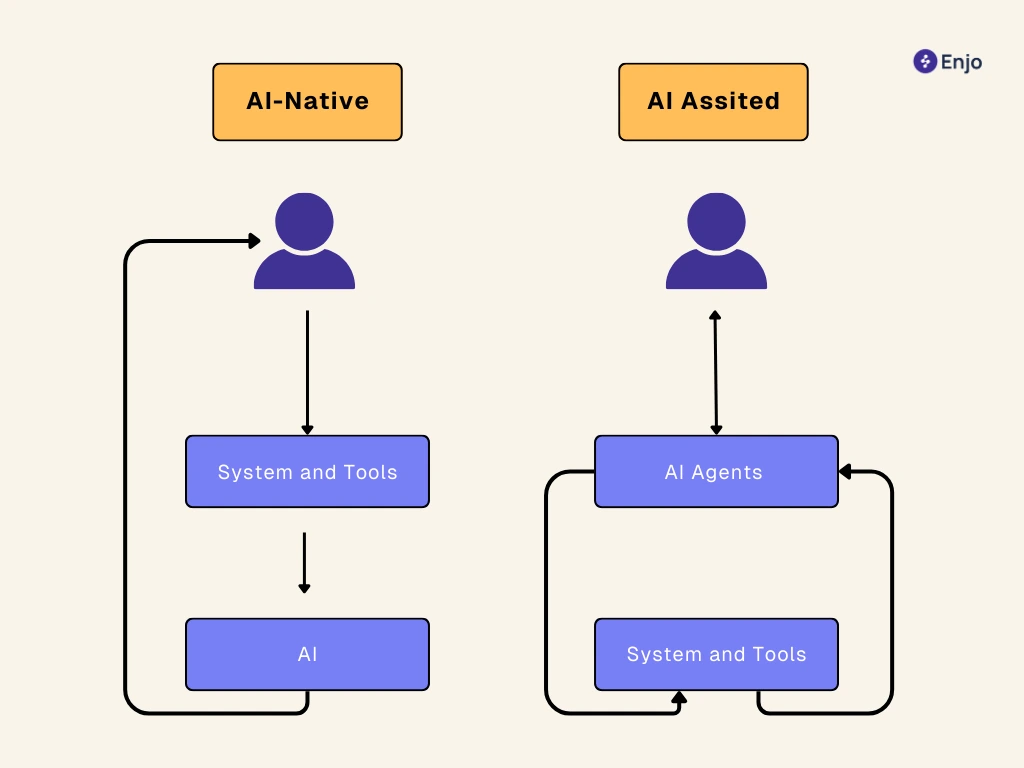
An AI-assisted knowledge base improves the editorial experience, suggesting tags, autocompletes titles, or surfaces related articles. The human is still the primary operator. The KB remains something users visit and read.
An AI-native knowledge base flips the model entirely. Here, the AI is the primary operator. Humans rarely visit the knowledge base itself because the AI retrieves fragments, synthesizes them, and delivers a final answer in the channel where the question originated.
This changes the role of documentation:
- Articles are no longer the “final product.”
- Articles become raw knowledge objects designed for decomposition and reassembly by an AI reasoning layer.
- Structure, metadata, and clarity determine whether the system performs as intended.
Think of it as the difference between a library and a compiler. The librarian helps you find a book; the compiler converts code into something executable. An AI-native KB compiles your institutional knowledge into operational output.
AI-Assisted vs. AI-Native Knowledgebase
| AI-Assisted (Legacy) | AI-Native (2026) |
|---|---|
| AI helps authors | AI resolves user questions |
| Users must visit a help center | Users get answers inside Slack/Teams/UI |
| Semantic search | Full RAG pipelines with contextual ranking |
| Content migration required | Connects to Confluence, SharePoint, and Notion instantly |
| Static publishing | Live knowledge powering workflows |
| Human escalations common | Zero-touch resolution becomes standard |
In an AI-native world, knowledge is not browsed, it is executed.
Read in detail: AI-Native vs AI-Assisted Knowledge Bases -->
How AI Agents Interpret, Retrieve, and Synthesize Knowledge
AI agents do not read articles the way humans do. They digest:
- Headings
- Bullet structure
- Preconditions
- Dependencies
- Exception cases
- Metadata fields
They rely on Retrieval-Augmented Generation (RAG), which functions like a well-tuned ingestion engine:
- Query Understanding: The agent interprets user intent (“reset VPN password,” “configure SAML,” “refund policy for enterprise plan”).
- Retrieval: It fetches relevant semantic chunks from the KB, not entire articles.
- Ranking: More relevant, newer, or policy-aligned content outranks generic material.
- Synthesis: The LLM synthesizes a grounded answer without hallucinating.
- Execution: If the KB defines an action (e.g., creating a Jira ticket, starting an approval), the AI triggers it deterministically.
- Reflection: The agent logs what worked, what failed, and where knowledge gaps exist.
When a team structures documentation cleanly, with predictable templates, explicit steps, well-defined roles, and environment-specific conditions, the AI’s reasoning ability becomes remarkably consistent. It stops “guessing.” It starts performing. This is why the best AI support agents feel reliable: their underlying KB is predictable.

Why Structural Quality of KB Articles Matters More Now
There is a misconception that modern LLMs “don’t need structure.” The opposite is true. The more capable the model, the more it depends on clean, unambiguous inputs.
As AI-native support systems scale across Slack, Teams, websites, and product UIs, any ambiguity multiplies:
- A missing step results in a broken workflow.
- A contradictory policy produces inconsistent answers.
- A long paragraph without headings creates retrieval noise.
- A mixed audience article (admins + end users) confuses role-based logic.
This is why the highest-performing teams for 2026 use rigid documentation standards:
- Short paragraphs (2 to 4 lines),
- Precise, scannable headings,
- Environment-specific variations (“Mac,” “Windows,” “Prod,” “Staging”),
- Explicit rules (“Admins only”),
- Exceptions listed separately (“If you see Error 409…”),
- Metadata that clearly defines version, owner, and lifecycle.
Better structure is not overhead. It is the single greatest multiplier of AI accuracy.
For examples of modern KB structure, see: The Best Knowledge Base Software →
AI-Native KB = The New Operating System of Customer Support
For 2026, the knowledge base is no longer a passive catalog. It is the operating system of your support engine.
A modern support interaction looks like this:
- User asks a question in Slack or in your website widget.
- The AI agent retrieves the correct KB fragments.
- The agent synthesizes a response, grounded in policy and context.
- If needed, it opens a ticket, kicks off an approval, or updates a system.
- Everything is logged and auditable.
- Insights flow back into the KB.
Support now runs through the knowledge base, not on top of it.
- IT teams use it for provisioning and troubleshooting.
- HR teams use it for onboarding and policy communication.
- Customer support teams use it for deflection and resolution.
- Dev teams use it for API and product documentation.
- Finance uses it for approval rules and process consistency.
- Every department touches the KB. Every system relies on it.
Core Components of an AI-Native Knowledge Base
Content Architecture
A high-performance KB begins with intentional architecture.
This includes:
- topic hierarchies that make sense to both humans and AI,
- predictable folder structures,
- reusable article templates,
- granular permissions,
- and clear ownership.
The goal isn’t just organization, it is semantic clarity. A well-architected KB accelerates RAG performance because content is separated into logical units. AI models can’t parse chaos. They thrive on predictable patterns. The most effective architectures resemble modular software design: small, single-purpose components that can be combined into more complex answers.
AI Reasoning Layer
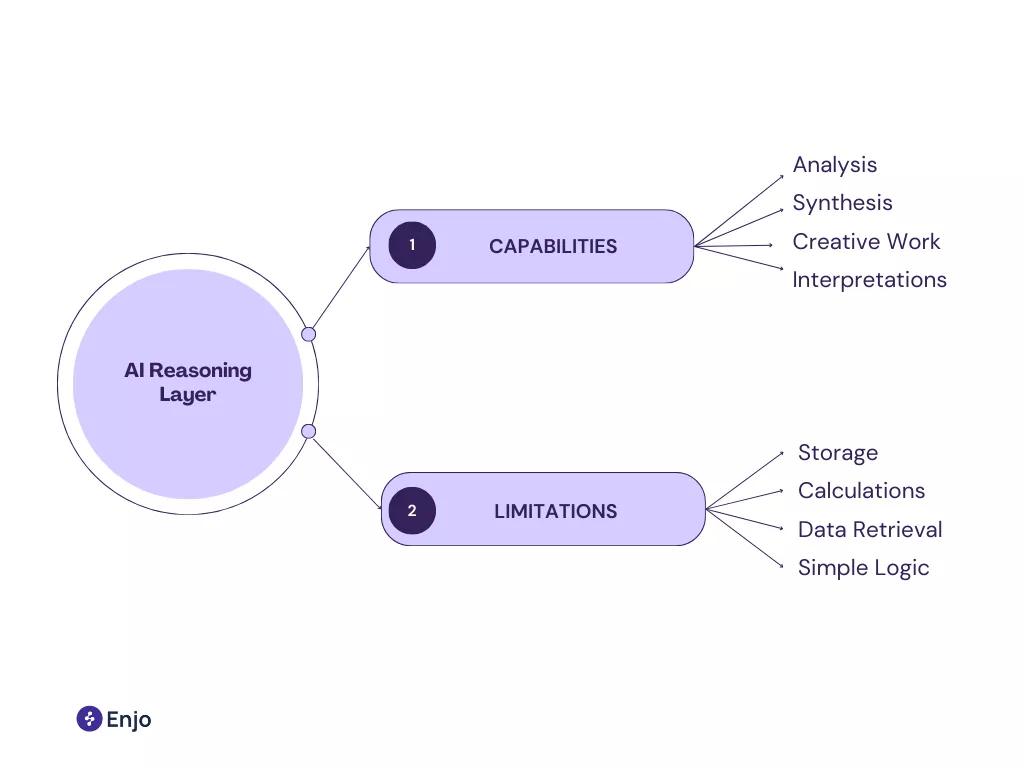
The reasoning layer is the “brainstem” between the KB and the user.
It is responsible for:
- Intent classification,
- Chunk retrieval,
- Ranking,
- Grounded synthesis,
- Permission checks,
- Action execution.
This layer differentiates AI-native platforms from legacy KB tools.
Enjo, for example, pairs LLM reasoning with deterministic workflows. The model decides what needs to be done; deterministic logic ensures it is done correctly. This combination avoids the unpredictability of fully generative systems by giving AI both freedom and constraints.
Without a reasoning layer, the KB becomes a static library again. With one, it becomes operational.
Version Control and Governance
Governance determines whether your knowledge base remains trustworthy. For 2026, governance is no longer “nice to have”, it is mandatory.
High-performing teams enforce:
- RBAC and SSO with Okta or Azure AD
- Draft/publish lifecycles
- Peer review and approvals
- Change logs linked to audit trails
- Retirement policies for outdated content
- Policy/version alignment across systems
As AI becomes the primary interface, governance becomes a safety mechanism. A single outdated policy in the KB can be amplified instantly across Slack, Teams, and your website. The KB is now a compliance surface, not just a content surface.
Analytics & Diagnostic Tooling
AI-native KBs allow support leaders to measure:
- What content drives the most resolutions
- Where the AI gets stuck or asks for help
- Which articles produce the most escalations
- Which search terms fail
- Where documentation contradicts itself
- Where workflows break due to incomplete instructions
This is where AI-native systems outperform legacy KBs. They reveal knowledge gaps automatically.
Enjo in practice:
Enjo’s AI Insights surface unresolved questions and auto-generate draft articles, turning user feedback into KB improvements.
Explore in docs →
Choosing the Right Platform for Your Knowledgebase
Key Evaluation Criteria (2026 Edition)
Selecting a KB platform is a strategic decision that impacts your support architecture for years. The right platform is not the one with the prettiest help center. It is the one that operationalizes knowledge.
Core evaluation criteria include:
- Machine readability: clean content, stable metadata, exportable structures
- AI reasoning quality: retrieval accuracy and grounded synthesis
- Integrations: Slack, Teams, JSM, ServiceNow, Confluence, SharePoint
- Governance: RBAC, SSO, versioning, audit trails
- Security: SOC 2 Type II, encryption in transit/at rest
- No-migration models: connect existing sources instead of rebuilding
- Channel flexibility: Slack/Teams, web chat, product UI
- Workflow automation: ticketing, approvals, provisioning
- Scalability: supports IT, HR, Finance, Product, and Customer Support
Companies that evaluate platforms only on help-center UI miss the point. The question isn’t how it looks. It’s how well the AI can operate on top of it.
Avoiding Legacy Traps
Legacy KBs fail for predictable reasons:
- They require full migration, forcing teams to rewrite thousands of articles.
- Their search engines are keyword-based, not semantic.
- They treat AI as a bolt-on, not the primary interface.
- They lack granular permissions, making internal use unsafe.
- They assume users visit a portal, not chat inside Teams.
The biggest trap is adopting a tool that publishes articles but does not support automation. In 2026, knowledge without automation is dead weight.
Future-Proofing: What You’ll Need for 2026 and Beyond
A future-ready KB needs:
- Ingestion of PDFs, videos, diagrams, and long-form content
- Permissions tied to HRIS roles
- Ability to expose and hide knowledge dynamically
- Multi-modal retrieval
- Continuous learning from unresolved queries
- Cross-system workflow orchestration
- Real-time freshness indicators for the AI
- Content lifespan management
By 2026, the success metric will not be page views. It will be: “What percentage of questions were resolved without showing the user an article?”
This is the future support leaders are building toward.
Best Practices for Building and Maintaining a Modern Knowledge base
Keep Content Clear and Structured
Clarity is not cosmetic; it’s functional.
AI systems interpret structure before they interpret meaning. When articles follow consistent patterns, retrieval becomes more accurate and LLM synthesis more stable.
The strongest teams in 2026 use a single article template across all functions. They break long instructions into independent steps, eliminate ambiguous phrasing (“usually,” “sometimes,” “if needed”), and separate policy from procedure.
A well-structured article becomes a reliable data object. A loosely written one becomes a liability.
Maintain a Single Source of Truth
Fragmented documentation is the root cause of bad support experiences. IT has its Confluence wiki. The product has its Notion pages. HR hides its policies in Google Drive. Engineering stores tribal knowledge in Slack threads.
This fragmentation creates two problems:
- AI retrieval becomes noisy because the same topic exists in multiple systems.
- Human support becomes inconsistent because every agent references a different version of the truth.
A modern knowledge base unifies these sources by reference, not migration.
Instead of copying everything into one tool, leading platforms (including Enjo) connect Confluence, SharePoint, Google Drive, Notion, Zendesk, and others into one permission-aware layer. Your KB becomes a hub, not another silo.
Review, Improve, and Update Regularly
Knowledge naturally decays.
Systems change, policies evolve, product surfaces move, and procedures get optimized. Teams that don’t review KB content regularly create a time bomb for AI support agents, outdated content will be confidently retrieved and inaccurately interpreted.
High-performing organizations adopt:
- Quarterly KB audits
- SME-driven review loops
- Governance rules for retiring stale content
- Analytics-driven updates
When you treat the KB as a live operational system instead of a library, your AI stays honest.
Design for Both AI and Human Readers
AI-native does not mean AI-only. The best KBs serve two audiences:
- Humans need clarity, context, and navigation.
- AI systems need clean chunking, metadata, and predictable structure.
This hybrid approach ensures that:
- Agents can quickly reference the KB during live support.
- AI systems can break articles into atomic knowledge units.
- Updates improve both human and AI-guided resolution.
A KB designed for only one audience degenerates quickly. A KB designed for both becomes strategically valuable.
Conclusion
The Knowledge Base Is Now the Center of Customer Experience
For years, support teams treated documentation as an afterthought, something that lived next to the support process. For 2026, it is the process.
The knowledge base determines:
- How quickly users receive answers
- How consistently your teams respond
- How far can AI scale your support operations?
- How much human escalation do you avoid?
- How predictable your workflows are across Slack, Teams, and the web
Teams that invest in a modern, AI-native knowledge base gain a compounding advantage.
Every question answered, every workflow documented, and every insight fed back into the KB makes the entire system smarter.
AI Makes Documentation a Strategic Asset, Not a Cost Center
An AI-native KB is not a help center. It is an enterprise operating layer. When the KB becomes machine-readable, permission-aware, and connected to workflows, documentation stops being just “content.” It becomes:
- Automation fuel
- Compliance infrastructure
- Onboarding acceleration
- The backbone of every support interaction
This transformation is already happening across IT, HR, Finance, and customer-facing teams. Organizations that embrace this shift now will outperform those that continue treating documentation as a publishing project.
Final 5-Item Action Checklist
- Audit your existing knowledge sources. Identify where content lives, who owns it, and where duplication exists.
- Adopt a single article structure. Ensure every team uses the same templates and metadata patterns.
- Connect your KB to operational channels. Slack, Teams, your website widget, and product UI should all read from one source.
- Implement governance and versioning. RBAC, approval workflows, and audit trails keep content accurate as AI scales.
- Deploy AI insights loops. Use unresolved queries to automatically improve and expand your knowledge base.

FAQ
1. What is a knowledge base (KB)?
A knowledge base is a structured system containing procedures, policies, and troubleshooting steps used by both AI and human agents to answer questions consistently and accurately. For 2026, it functions as the operational brain behind automated support.
2. How is an AI-native KB different from a traditional help center?
A traditional KB expects users to read articles. An AI-native KB is designed for AI to interpret, retrieve, and synthesize answers inside channels like Slack, Teams, and web chat.
3. What makes KB content “machine-readable”?
Machine-readable content uses consistent headings, clear chunking, explicit steps, and metadata that help RAG pipelines retrieve and interpret the correct information.
4. Do I need to migrate all my documentation into one place?
No. Modern tools like Enjo follow a no-migration model, connecting to Confluence, SharePoint, Notion, Google Drive, and other systems to unify knowledge without rewriting.
5. How does a KB reduce support escalations?
Consistent, well-structured content improves AI accuracy and agent confidence. This lowers escalations by ensuring users receive correct answers on the first attempt.
6. What governance is required for an enterprise KB?
RBAC, SSO, version control, approval workflows, audit logs, and regular review cycles to ensure accuracy and compliance.
7. How do I measure KB performance?
Use analytics such as deflection rate, AI success rate, search gaps, repeated queries, and workflow completion metrics to evaluate coverage and accuracy.