


Transform complex support workflows
The Definitive Guide to Customer Service Automation (2026)
Support volume grows with every customer you add; the team answering it does not. The first generation of automated customer service managed that gap by deflecting people: canned replies, decision-tree chatbots and links to help articles, with anyone who gave up counted as a success. Gartner predicts that by 2028, at least 70% of customers will use a conversational AI interface to start their customer service journey, and McKinsey estimates generative AI applied to customer care could deliver value equal to 30 to 45% of current function costs. Automation is no longer a side project; it is becoming the operating layer of customer service.
This guide is written for support leaders deciding where automation actually holds up under load, and it draws on production deployments rather than vendor promises. Aptean, an enterprise ERP provider with 600+ support reps, resolves 300K+ cases a year with Enjo, 37% of them fully by AI.
Customer service automation guide: capabilities, architecture, implementation roadmap, and the metrics that prove ROI.
What is Customer Service Automation?
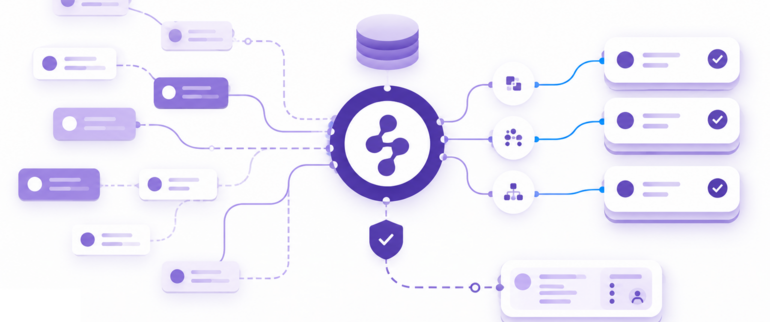
Customer service automation is the use of software to receive, resolve, and follow up on customer requests with minimal human involvement. The current generation pairs AI agents with your knowledge sources and workflow rules: routine requests get resolved end-to-end, and the exceptions reach a human with context attached. You will also see it called automated customer service, customer care automation, or customer support automation; the mechanics are the same. Website chat is usually the first channel teams automate, and our ranking of the best live chat software covers which tools resolve there without a human ever joining.
The useful distinction in 2026 is not human versus bot: it is deflection versus resolution, and it is the same line that separates adequate from great customer service. A deflection bot points the customer at an article and records the interaction as handled, whether or not it helped. A resolution agent answers the actual question, completes what the request needs, and escalates when it is not confident. This guide assumes you want the second kind.
At a capability level, modern customer service automation can:
- Understand natural language and customer intent in real time
- Pull accurate answers from your help center, product docs, and internal systems
- Take action autonomously, from issuing refunds to updating orders
- Learn and improve from every interaction
- Hand off to human agents with the full conversation and context when an issue needs a human touch
The goal is to amplify your support team, not replace it. By automating the routine inquiries that dominate support volume, you free your agents for the complex, high-value conversations that drive loyalty and revenue. If you are already at the shortlist stage, our ranked comparison of customer service automation software covers how each platform prices that automation at volume.
Customer Service Automation Examples
These are the customer service automation examples that pay off in production. The strongest deployments combine several, and each depends on the AI reaching beyond a single system.
An AI agent resolving end-to-end. A customer asks about a refund. The AI identifies the order, checks the return policy, confirms eligibility, processes the refund in the connected payment system, and sends a confirmation. A chatbot would have surfaced a refund policy article; an AI agent completes the refund.
Automated triage, tagging and routing. Every inbound request is classified and routed the moment it arrives, so no human reads a message just to decide who should read it. Priority signals get caught too, so a payment failure does not wait behind a how-to question.
Self-service that actually resolves. A customer searches your help center for "downgrade my plan." Instead of ten articles with the word "plan" in them, AI search returns a direct answer with steps specific to their account type. The ticket never gets created. What decides whether that holds up is freshness, and our breakdown of help center software covers why static knowledge bases stop deflecting.
Agent Assist in the live workflow. This is one of the things that separates great customer service from adequate. For requests that need a person, AI surfaces a summary of the customer's history, suggests a reply grounded in how similar cases were resolved, detects negative sentiment, and offers one-click translation. The agent keeps the judgment and stops retyping the same answers.
Automated approvals. Some requests are really approval workflows: a refund above a threshold, a plan exception. Automation collects the approval in chat with nudges and reminders instead of a thread of forwarded emails. Kraken saves 450 hours a month on approval workflows Enjo automates.
Proactive status notification. When a known issue is live, affected customers hear about it before they write in. One proactive incident update can remove hundreds of duplicate requests from the queue.
Order status lookups. A customer asks where their order is. The agent looks up the order in the connected system and replies with the carrier status and expected delivery date, and no ticket is ever created.
Password resets and access requests. The agent verifies the requester, triggers the reset or access change through the identity system, such as Okta or Entra ID, and confirms in the same conversation.
After-hours coverage. Requests that arrive overnight get answered from the same knowledge the day team uses. Anything that needs a person waits in Inbox with the conversation attached, ready at the start of the next shift.
Knowledge articles drafted from resolved tickets. When an agent resolves something the knowledge base doesn't cover, the conversation becomes a draft Help Center article for review, so the next customer gets the answer without opening a ticket.
More Reading: Complete Guide on AI Chatbot
Advantages of Customer Service Automation (At Scale)
Customer service automation delivers clear advantages as organizations scale, extending far beyond cost reduction and ticket deflection.
Scalability without proportional costs: automation absorbs volume growth without matching headcount growth, so support capacity stops being a hiring problem. Aptean handles volume equivalent to 120 agents with AI. Four deployments and the numbers behind them are collected in our breakdown of the benefits of AI support agents.
Consistency across global operations: automated systems deliver identical service quality whether customers write in from New York, London, or Singapore, eliminating variability in multi-regional operations.
Data-driven optimization: every automated interaction generates insight about customer needs, product issues, and process inefficiencies, feeding continuous improvement of both products and support operations.
Competitive differentiation: comprehensive automation sustains 24/7 support coverage that smaller competitors cannot match.
The most successful implementations treat automation as a strategic platform rather than a cost-cutting tool: core support infrastructure that the rest of the operation builds on.
Read More: Automating ITSM for Enterprise
Why Automate Customer Service?
The case for automated customer service has moved from operational preference to business necessity. Support volumes keep climbing while customer patience for slow resolution keeps shrinking, and hiring cannot close that gap alone. The teams that automate the routine load are the ones whose humans still have time for the conversations that need judgment.
The organizations that get the architecture right report step-change results. Aurora, a 2,500-employee autonomous vehicle company, reaches 63% autonomous resolution with Enjo. At Kraken, response times fell from 2 to 3 days to minutes after automating the repetitive load.
Where Customer Support Automation Lands First, by Industry
Support automation lands first where volume is high and the resolution is rule-bound. E-commerce automates order status, delivery updates and returns first. SaaS teams start with account changes, access requests and how-to questions that resolve straight from product docs. Financial services run balance checks and card controls through automated flows with strict guardrails and a full audit trail, and telecom walks customers through connectivity diagnostics before a human ever joins.
How Does Customer Service Automation Work?
What changed is grounding. Large language models can now read a request the way a person would, and grounding pins their answers to your documentation, your policies and your past resolutions instead of the open internet. Modern systems stack three layers on that foundation: a knowledge layer that indexes the content answers come from and keeps it in sync with source systems, a language layer, the AI agent itself, that reads the request and drafts a grounded answer with a citation, and an orchestration layer that handles everything around the answer: actions in connected systems, guardrails, routing, and the decision about when a human takes over.
A refund-status request shows the flow. The agent reads the message, pulls the refund policy from the knowledge layer, looks up the payment record, and replies with the status plus the policy citation. If the customer disputes the outcome, the orchestration layer escalates with the conversation and context attached. Each human response then feeds back into training, which is how these systems improve without a rebuild.
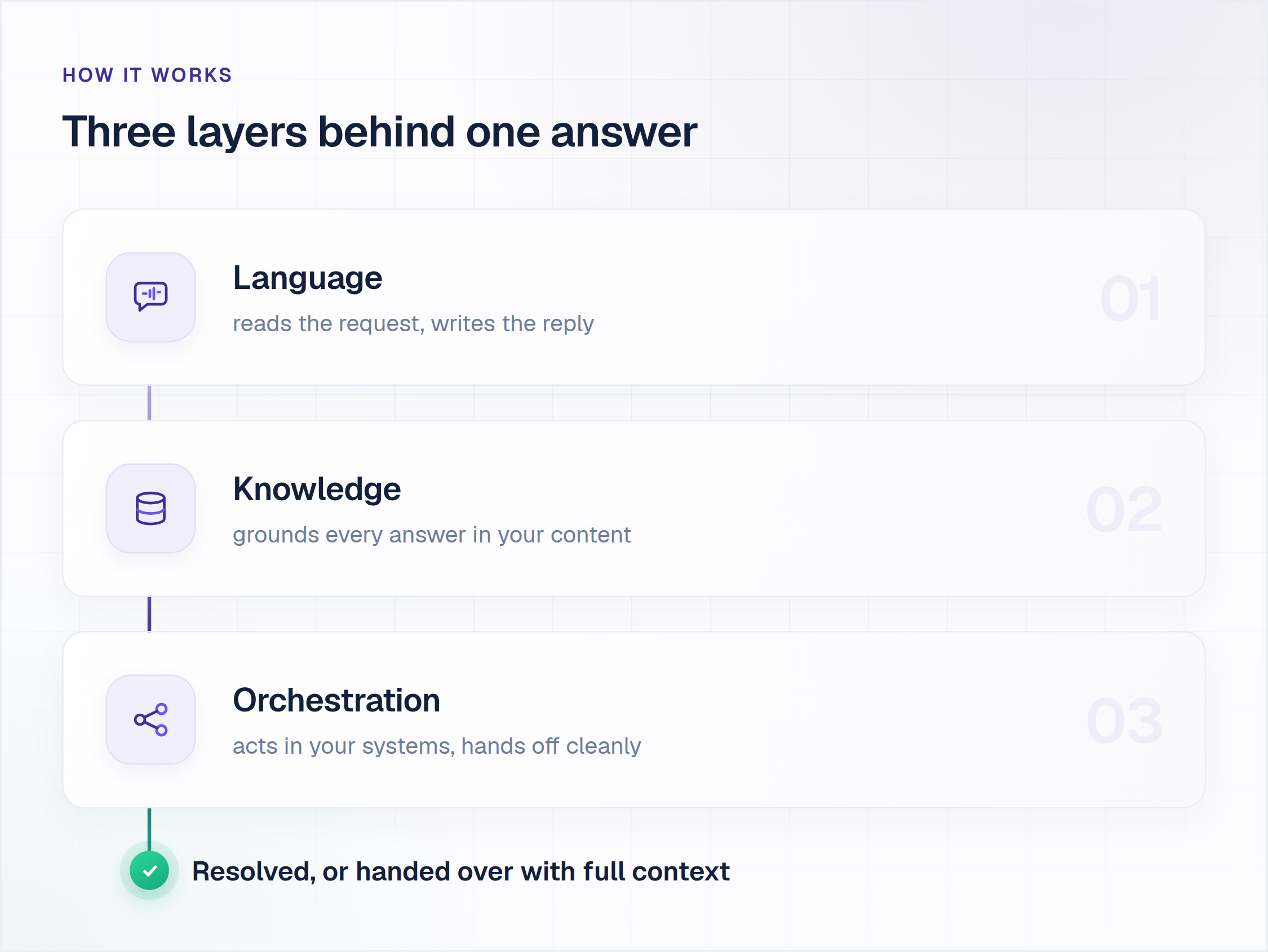
The deployments that succeed treat these layers as one system rather than assembled point solutions. Aptean is what that looks like in production: 5M+ documents unified across Salesforce case feeds, knowledge bases and SharePoint into one index, with 83% faster access to knowledge inside and outside Salesforce.
How cleanly a platform holds context across a channel switch varies more than any vendor page admits, which is why we ranked the omnichannel customer service software that keeps the thread intact.
More Reading: AI customer support software for Customer Service
Where Customer Service Automation Goes Wrong
Most failed support automation projects are not technology failures. They are architecture and planning failures, and most teams evaluating automation in 2026 carry scar tissue from one of these.
Scripted bots that dead-end
Decision-tree chatbots handle the first exchange and collapse on the second, because scripts cannot cover how customers actually phrase things. The result is a bot customers learn to type "agent" at. That gap is the whole of the chatbot vs conversational AI question.
The knowledge silo problem
This is the most common reason automation stalls. The AI is connected to a single knowledge source, typically the helpdesk's own knowledge base, but the answers customers need live across five or six systems: a wiki, a drive, past tickets, product documentation. The AI can only answer what it can see, so deflection plateaus no matter how good the model is.
Skipping escalation design
The AI will not resolve everything, so the question is what happens when it can't. If the escalation path dumps the customer into a generic queue with a blank ticket, the human starts from scratch and the customer repeats themselves. What context transfers, where the ticket lands, and how it is prioritized matter as much as the AI's resolution rate.
Deflection dressed up as success
A dashboard can report high deflection while customers quietly churn. If a vendor reports deflection without resolution, ask what happened to the deflected.
The maintenance tax and the in-house build
Flows built during a consulting engagement decay the day the consultants leave, and in-house builds stall on data quality, parsing edge cases and internal politics. A production build needs knowledge sync, hallucination control, escalation logic and audit evidence before security signs off, which is why teams missing a dedicated ML team and a 12-month runway usually end up buying. Customer support automation that needs a dedicated team to babysit it has moved the work, not removed it.
Half of how to automate customer service well is knowing these failure modes in advance. We cover the deployment side in our guide to challenges in customer service automation.
How to Automate Customer Service in 6 Steps
Enjo is an AI Support Agent built agent-first: you configure the agent and its knowledge before you configure a ticket queue, and the queue exists for the exceptions. The platform ships around the agent: Inbox where humans work escalations, Help Center for customer self-service, and Insights for measurement, all included on the free plan. Deployment runs in days when the knowledge already exists in connected sources: Aptean took its initial cohort live in a single day, and Amber Group reached full production in 5 weeks.
Sequence matters more than tool count, and knowing how to automate customer service is mostly knowing the order. Here is what works in production, with the Enjo module that does each job.
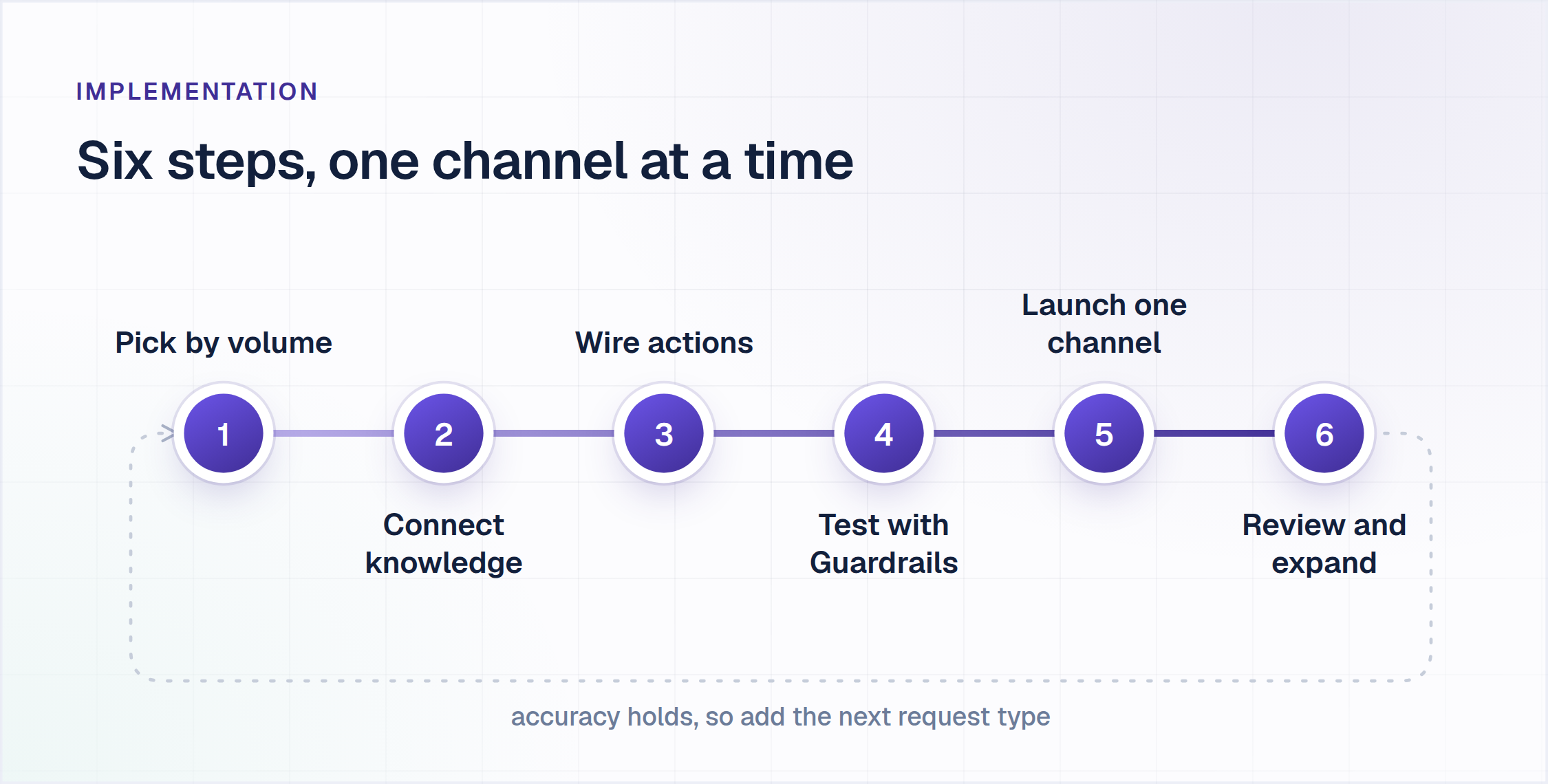
1. Pick request types by volume, not by ease. Pull 90 days of history and rank intents by frequency. A small set of informational requests (order status, how-to, policy questions) usually carries a disproportionate share of volume, and informational requests automate before transactional ones.
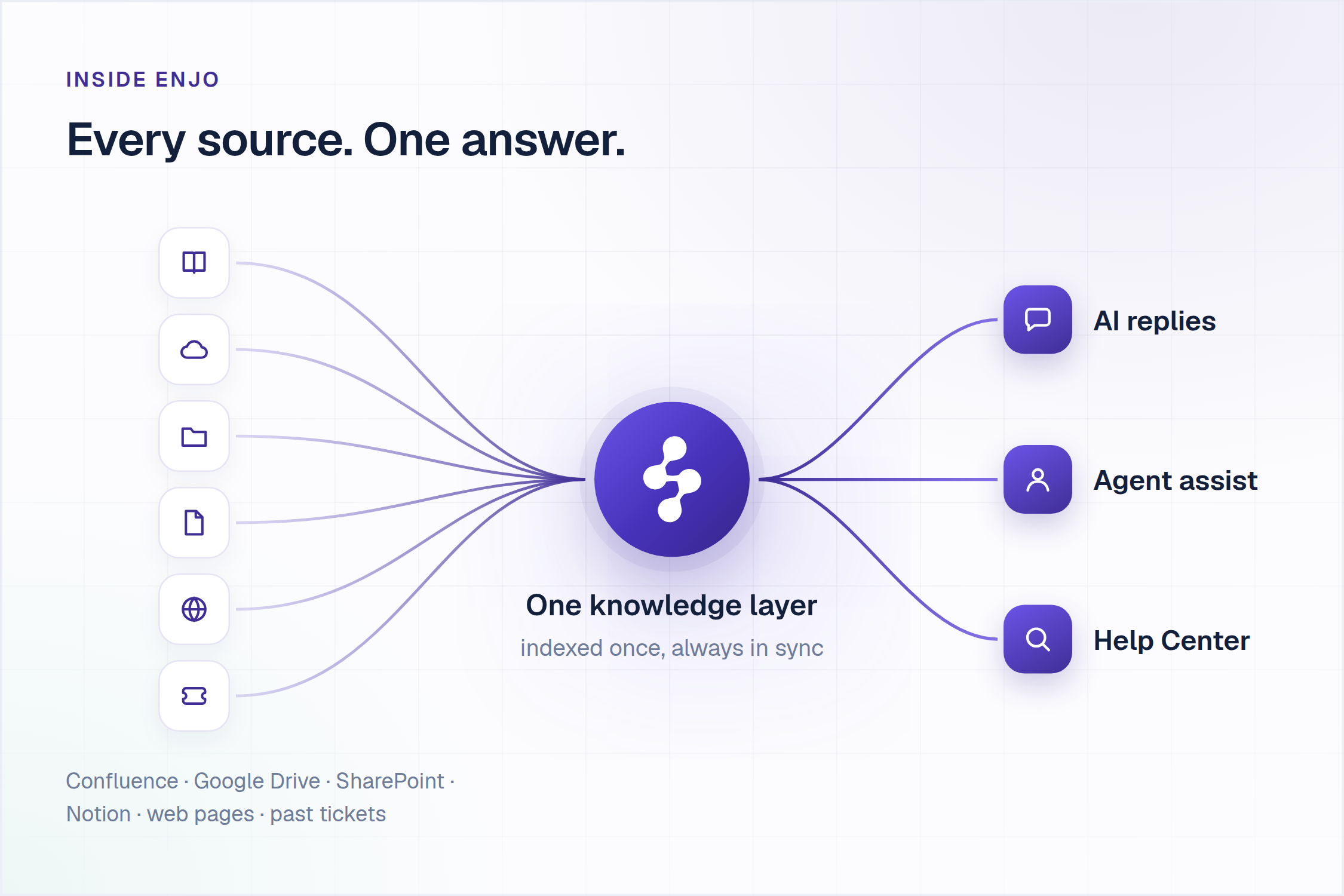
2. Connect the knowledge that answers them. Enjo's Knowledge hub connects the sources you already have: Confluence, Google Drive, SharePoint, Notion, web pages, and past tickets from systems like Zendesk and Salesforce Service Cloud. Answers, Enjo's native Q&A base, holds the curated responses your team wants stated exactly one way. Every source feeds one index, and that same index grounds the AI agent, the suggestions human agents see, and the Help Center customers search: what the AI says is what agents see is what customers find, with a citation on every response.
3. Wire the actions and the routing. Answering is half a resolution; the other half usually lives in another system. AI Actions lets Enjo query and update connected systems during the conversation, looking up a case in Salesforce, checking a payment in Stripe, or calling a custom API, while AI Flows chains multi-step automations with explicit fallbacks when confidence drops. The Workflows module automates the queue work around the agent (triage, tagging, routing, approvals, follow-ups), and Customer Context carries account attributes into answers and routing.
4. Test against history before customers see anything. Bulk Testing validates the agent against large sets of real past requests, measuring accuracy, consistency and coverage before launch, and the failures usefully map your knowledge gaps. Guardrails restrict what the agent can say and do, and the Audit Log keeps a searchable history of every response and action.
5. Launch one channel with escalation on. Start where your demand concentrates: website chat through the Enjo widget, the Help Center portal, Slack Connect shared channels, Slack, or Microsoft Teams. Every low-confidence answer escalates into Inbox with the full conversation, account context and suggested next steps, so nothing dead-ends and the human can act in one read.
6. Review weekly, expand on evidence. Insights reports what resolved, what escalated and which gaps recur, by request type, and the Training loop learns from your team's normal replies. Add the next request type when accuracy holds; expansion on evidence beats a big-bang rollout.
What not to automate. Angry customers mid-escalation, judgment calls like goodwill refunds outside policy, anything legally or contractually sensitive, and any request type without a documented answer. Automating these does not save time; it manufactures escalations with a worse starting point.
| Automate First | Keep Human |
|---|---|
| Order, case and refund status checks | Goodwill exceptions outside policy |
| How-to and policy questions | Angry or churn-risk conversations |
| Approval collection and reminders | Legal, compliance and billing disputes |
| Receipt confirmation and follow-ups | Anything without a documented answer |
| CSAT surveys after resolution | Novel bugs and first-time incidents |
The Core Benefits of Automating Customer Service
The benefits show up in the numbers only if you measure the right ones, and the customer service KPIs you agree on before deployment decide whether the framework proves anything afterwards.
Resolution rate is the headline metric: the share of requests the AI resolved end to end, with no human touch and no customer bounce-back. Deflection rate is not the same number, and the gap between the two is where bad automation hides. Delivery Hero averaged 30% deflection after rollout; track deflection alongside resolution and treat a widening gap as a warning.
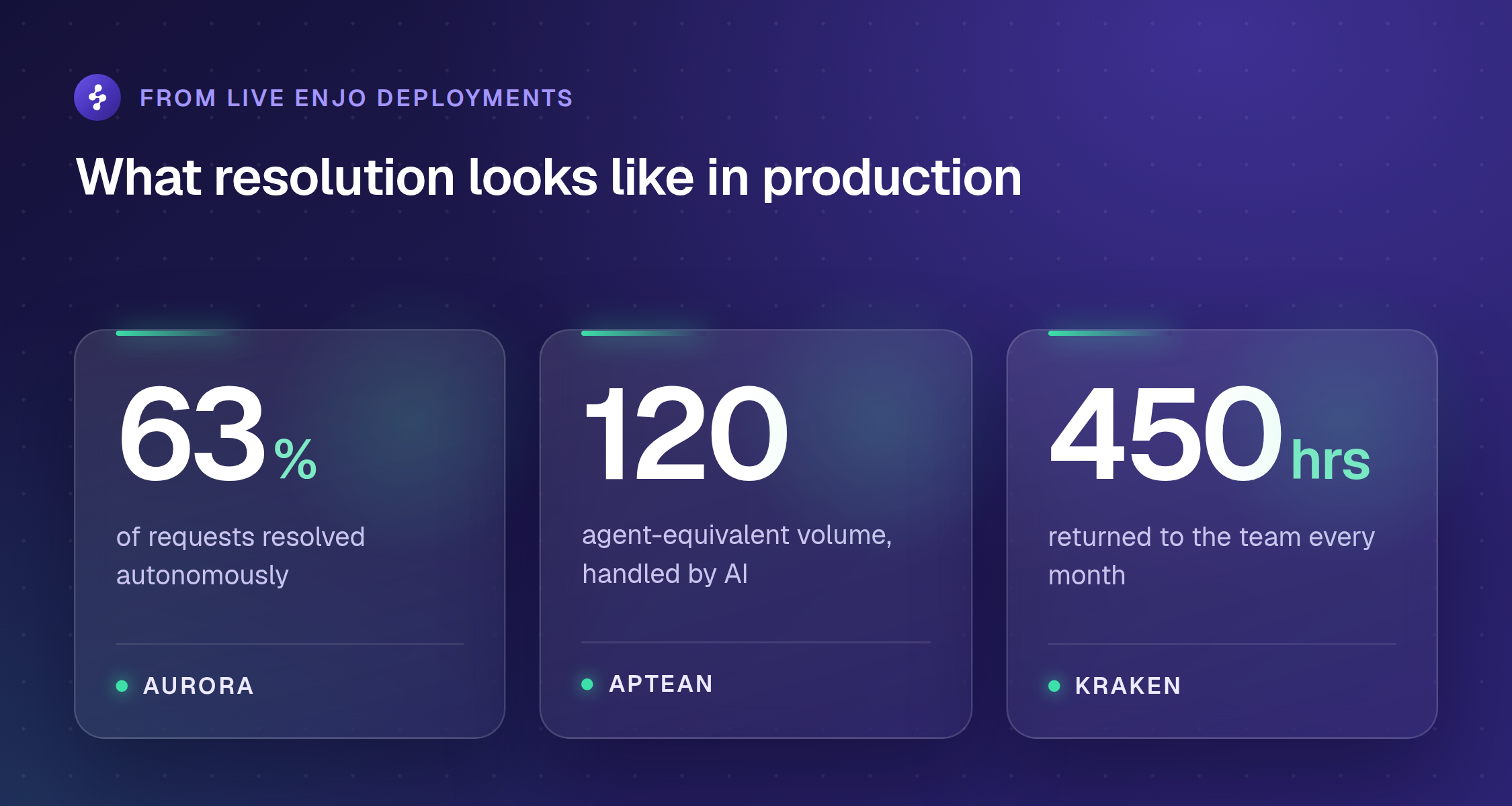
Measure customer satisfaction separately for AI-resolved and human-resolved requests, because blending them hides problems in both directions. The production bar is real: Aurora recorded a 60% ESAT improvement alongside 45% faster resolution, and Kraken reached 95% satisfaction with 80% of requesters self-serving their queries. Escalation quality belongs in the same review: how often a human has to restart a conversation the AI began tells you whether handoffs carry real context.
Cost per resolution and time to resolution round out the core set, with platform costs included in the math rather than direct labor savings alone. Usage-priced automation changes that math structurally, since capacity stops scaling with seats; Executive Insights in Enjo reports the same data as ROI, with time saved, cost savings and the drivers behind them.
Learn how to choose the best AI Chatbot for Customer Support Automation.
Further Reading: Top Metrics to Consider for Measuring Customer Service Success
How to Evaluate Customer Service Automation Platforms
Category shortlists are long and demos are rehearsed, so evaluate against the mechanics that decide production outcomes. Our comparison of the best customer service automation software runs these criteria against ten tools, and the agentic AI tools for help desk automation ranking applies the same resolution test on the IT side; here is the short version. If the shortlist is specifically AI customer service software rather than a full automation platform, our ranked comparison of ten tools scores each one on resolution depth and real cost at volume.
1. Grounding with citations. Every answer should name its source. If you cannot trace an answer, you cannot trust it at scale.
2. Action breadth. Can it check and update the systems your resolutions actually touch, or only answer questions? Resolution requires action, not information alone.
3. Escalation quality. Ask to see exactly what the human receives on handoff: full conversation and account context, or a one-line ticket.
4. Pre-launch testing. Bulk validation against your real historical requests, not a demo on the vendor's sample data.
5. Guardrails and audit. Restrictions on what the AI can say and do, and a searchable record of what it said and did.
6. Security and compliance. SOC 2 Type II, ISO 27001, GDPR. Ask for current evidence, not marketing claims. Enjo is SOC 2 Type II compliant, ISO 27001 certified, and GDPR compliant. Troopr Labs, the company behind Enjo, has 600+ enterprise deployments and 99.9% uptime over 7 years across its products; the details live on Enjo security.
7. Pricing model. Per-seat licences plus per-resolution AI fees compound as you grow; usage-based pricing scales with the work actually done. Run the math at twice your current volume. Enjo prices per AI reply with a permanent free tier, and on its documented basis, a 10-person support team handling 3,000 conversations a month, that model runs at a tenth of the cost of leading incumbent platforms.
8. Time to launch. Days versus months is an architecture property, not a project-management outcome. Ask for a reference who went live inside a week.
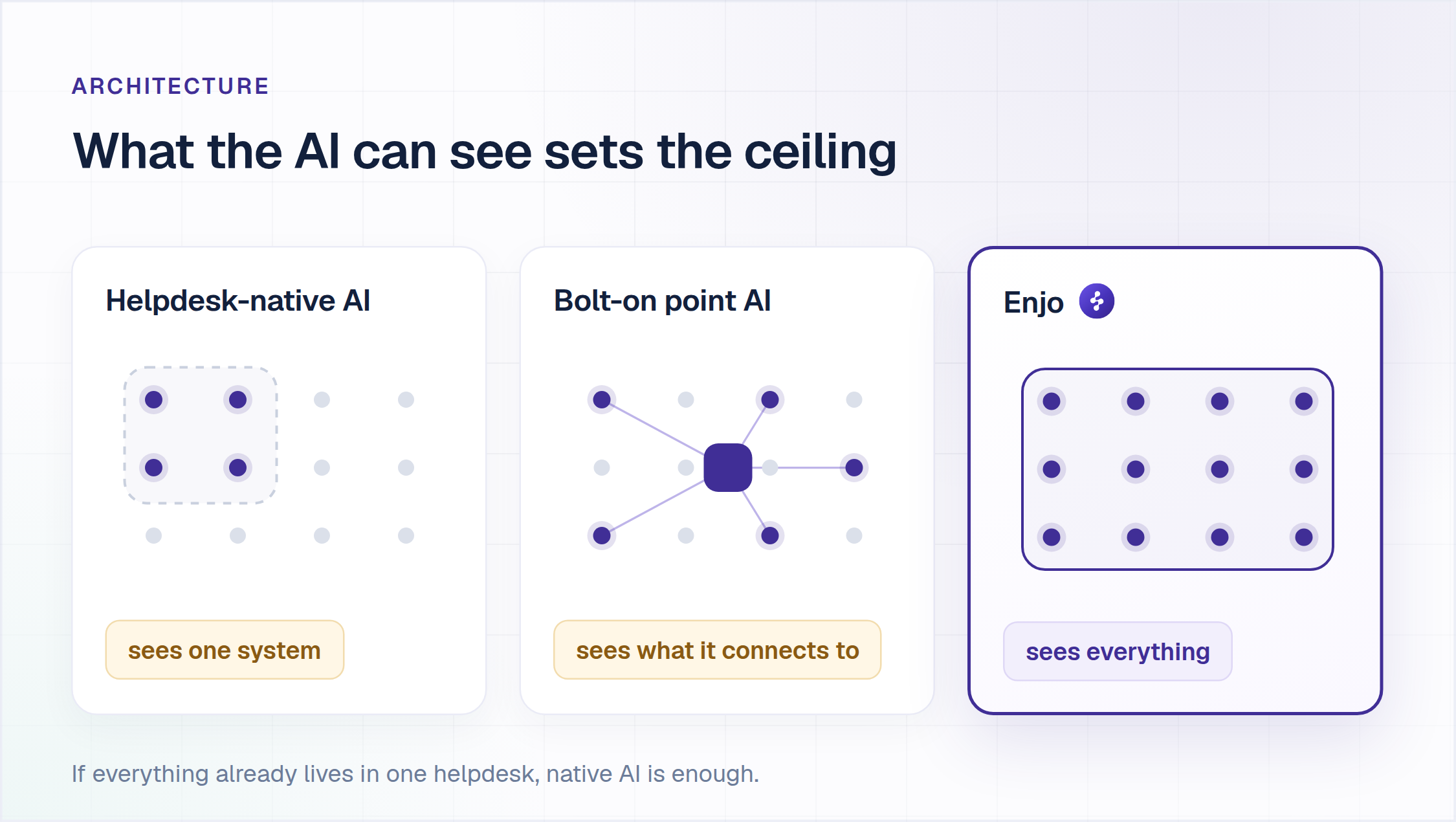
Architecture is the highest-order criterion, because it sets the ceiling on knowledge reach and action depth. The category splits three ways.
| Approach | Where Answers Come From | What It Is Built For | The Trade-Off |
|---|---|---|---|
| Helpdesk-native AI (Agentforce, Zendesk AI, Freddy) | The helpdesk's own knowledge base and platform objects | Teams whose entire support universe already lives inside that one system | Knowledge outside the platform stays invisible to the AI |
| Bolt-on point AI (purpose-built agents and overlays) | Its own content store plus connected sources | Teams standardized on that vendor's stack who need one strong channel | The investment ties to the substrate, and inbox, self-service and analytics remain separate tools |
| Agent-first platform (Enjo) | One knowledge layer indexing your docs, wikis, drives and past tickets across systems | Teams that want resolution end to end without assembling point tools | Enjo Platform is built agent-first, so Inbox is the helpdesk for escalations rather than the primary work surface. Teams that want a ticket queue first with AI attached later are describing the legacy model. |
Architecture decides the ceiling before configuration does, so run one check on your own queue. Take your last twenty resolutions and count how many needed an answer or an action from a system your helpdesk does not own. That count is the share of your volume a platform-native AI cannot reach.
The moment knowledge and actions span systems, which is where most support teams actually live, the architecture question decides your resolution ceiling. Our comparison of automated ticketing systems prices ten tools on what each resolves without a human. For the full suites on each side of that split, see our ranking of the 10 best customer support software.
What to Expect Going Forward
Gartner predicts that by 2029, agentic AI will autonomously resolve 80% of common customer service issues without human intervention, reducing operational costs by 30%. Zendesk's research finds 70% of CX leaders plan to integrate generative AI into many customer touchpoints within two years. Directionally, that matches what deployments already show: the resolvable share widens as agents chain more actions.
Autonomous Multi-Agent Systems
Single agents are becoming orchestrated ecosystems: triage agents that classify and route, domain agents with deep expertise in billing or technical support, orchestration agents that coordinate workflows across systems, and quality agents that monitor consistency. The platforms closest to that today are compared in our breakdown of the AI customer support software, scored on whether they resolve or only deflect.
Relevant Reading: 10 customer service mistakes that cost you customers
Predictive and Proactive Support Models
Analytics across customer behavior, product usage, and system performance will flag problems before customers experience them, so support reaches out with the fix rather than waiting for the complaint. The economics change with it: success gets measured by prevention effectiveness alongside resolution speed.
Advanced Integration and Business Process Automation
Customer service AI is becoming the orchestration layer for broader business processes: a delayed-shipment inquiry triggers a logistics investigation, a proactive update, and a compensation workflow without a human stitching the steps together. The integration surface decides how far that reaches; Enjo's 100+ integrations span ticketing systems, knowledge sources, channels, and action targets. None of it is set-and-forget: the teams winning with automation run it as an operated system that learns from every human response.
Further Reading: AI Support Agent Trends in 2026

Frequently Asked Questions
What is the difference between a chatbot and customer service automation?
A chatbot answers questions from a script or knowledge base. Customer service automation is the broader system: AI agents that resolve end-to-end, automated ticket routing, cross-system actions, context-aware escalation, agent assist, self-service content management, and analytics. A chatbot is one component, not the whole picture.
What is a key benefit of agentic AI in customer service automation?
The biggest benefit of agentic AI is speed with autonomy: it can understand a customer's issue, pull context from your systems, and take action, resolving routine queries in seconds rather than minutes. Gartner predicts agentic AI will autonomously resolve 80% of common customer service issues by 2029, cutting response times, enabling 24/7 support, and freeing your team for complex, high-value conversations.
How much does automated customer service cost?
The pricing model matters more than the list price: per-seat plans charge for every human agent and often meter AI per resolution, while usage-based plans charge for AI replies. Enjo's published plans run from a permanent Free plan (200 AI replies a month, unlimited human agent seats) to Starter at $95/month for 1,000 replies, Standard at $295/month for 3,000, and a custom Enterprise plan on yearly billing. On the documented basis of a 10-person team handling 3,000 conversations a month, one usage-based plan replacing per-seat licences plus per-resolution AI fees works out to roughly a tenth of the cost of leading incumbent platforms.
How long does it take to deploy customer service automation?
It depends on the platform and the state of your knowledge. Aptean, an enterprise with 3,500+ employees and 80+ products, took its initial cohort live with Enjo in a single day, and Amber Group reached full production in 5 weeks. Helpdesk-native AI with consulting requirements can take months. Ask any vendor for a named reference customer's deployment timeline.
What is the best AI for customer support?
Run three checks on anything you shortlist, on your own systems rather than the vendor's demo data. Ask for the list of write actions, not read actions, because reading a ticket is not resolving a request. Ask where your knowledge lives and whether the tool indexes all of it, because answer quality is capped at what it can reach. Ask to see one escalation land in your queue carrying the full conversation, the account context and suggested next steps. Enjo answers all three: the agent is configured first, grounds every answer in your knowledge with a citation, and resolves requests end to end, including actions in connected systems. Aurora, a 2,500-employee autonomous vehicle company, reaches 63% autonomous resolution with Enjo. Those three checks are most of how to automate customer service without regretting the vendor choice. On the internal side the equivalent question is what an AI service desk resolves and what it costs.
Start where the volume is. Automation earns its keep on the requests your team answers every day, and the fastest way to evaluate it is on your own queue rather than in a demo. Enjo's Free plan includes 200 AI replies a month, unlimited human agent seats and the Help Center, with no credit card; when the replies run out, requests auto-escalate to your team in Inbox and nothing is dropped. Enjo is built by Troopr Labs, with 600+ enterprise deployments and 99.9% uptime over 7 years across its products.



