Transform complex support workflows
AI-Native vs AI-Assisted Knowledge Bases: The Architectural Shift That Matters in 2026
AI knowledge bases have moved beyond “faster search” and “smarter FAQs.” In 2026, the real divide is architectural. Some systems bolt AI on top of a traditional content store; others are designed so AI is the operating layer itself. The difference decides search quality, maintenance effort, cost at scale, and whether AI can automate entire workflows, not only answer queries.

TL;DR
- AI-assisted systems add machine learning to legacy content structures. They improve retrieval but keep manual-heavy workflows.
- AI-native systems use semantic architectures built for reasoning, action, and continuous learning from the start.
- The correct choice depends on your scale, query complexity, governance posture, and automation requirements.
What You’ll Learn
- How AI-assisted tools work today, and where their limitations show up.
- The architectural principles behind AI-native knowledge systems.
- Practical criteria to evaluate both models using real operational constraints.
- How modern retrieval, permissions logic, and ranking signals change resolution accuracy.
- When AI-assisted suffices and when AI-native creates step-change efficiency.
- Migration patterns used by IT, HR, and Ops teams moving to AI-native platforms.
Defining AI-Assisted Knowledge Base
AI-assisted knowledge bases promise intelligence, but the “AI” is usually an enhancement layer sitting atop a traditional wiki, CMS, or document repository. Understanding this foundation is key to setting realistic expectations for search accuracy, maintenance, and automation.
Read our in depth guide into AI Knowledge Base ->
Add-on ML models on top of traditional KBs
Most AI-assisted platforms retrofit features onto a legacy content model. They layer in:
- ML ranking models
- Answer summarization
- Entity extraction
- A conversational UI
But the core object remains unchanged: structured articles, categories, and tags. Because the AI is external to the content architecture, it must constantly translate between semantic representations and rigid formats designed for human authors.
Why this matters operationally
- Context bridges fail when the model cannot map unstructured text to the KB’s predefined schema.
- Cross-repo knowledge becomes harder to unify because each source has its own hierarchy.
Latency increases as the system moves between vector search, keyword indexes, and documents.
Action Tip: Audit your stack by checking whether “AI features” require separate configuration, training, or enrichment. If yes, you’re likely working with a bolt-on architecture.
Keyword search is still dominant
Even with embeddings available, most AI-assisted systems prioritize keyword-based retrieval because:
- Their indexing layer is optimized for text search engines (e.g., Elasticsearch).
- Semantic retrieval is added as a secondary mechanism due to performance or cost.
- Permissions checks rely on the original keyword-based index.
This means relevance still depends on:
- Exact phrasing
- Proper tagging
- Cleanly maintained categories
- Rigid article segmentation
From an operations standpoint, this forces support teams into continuous SEO-like cleanup: renaming articles, adjusting keywords, and maintaining long-tail variants purely to help search behave.
Manual authoring + rigid structures
Because the underlying model is document-centric, organizations must maintain:
- Article templates
- Hierarchies
- Labels and tags
- Versioning flows
- Review cycles
AI-assisted platforms may offer draft suggestions or rewrite improvements, but they do not create or maintain knowledge autonomously. The KB still requires:
- Humans to spot duplicates
- Humans to fix inconsistencies
- Humans to update outdated steps
- Humans to link related content
This manual load compounds as teams scale across IT, HR, Finance, and Engineering.
A reproducible workflow to reduce manual load (How-To)
Step-by-step cleanup cycle (45–60 minutes)
- Export search logs for the last 30 days.
- Identify top 20 failed queries.
- Map each query to an article or create a new placeholder.
- Add synonym tags directly to the existing article metadata.
- Rewrite article intros to front-load task verbs and entities.
- Reindex the KB manually (if the platform requires it).
This process stabilizes keyword-dominant search but does not eliminate the underlying architectural issue.
Defining “AI-Native” Knowledge Bases
AI-native platforms start from a different assumption: knowledge isn’t static content to retrieve; it’s an operating substrate for reasoning and action. The system’s architecture is built around semantic representations, continuous learning, and execution layers that run workflows directly in the channels where work happens.
Retrieval-first → Semantic reasoning → Action
AI-native systems organize data around a semantic layer - not pages, tags, or categories. They treat knowledge as an interconnected graph of facts, procedures, entities, and real-world objects. This structure unlocks a three-step pipeline:
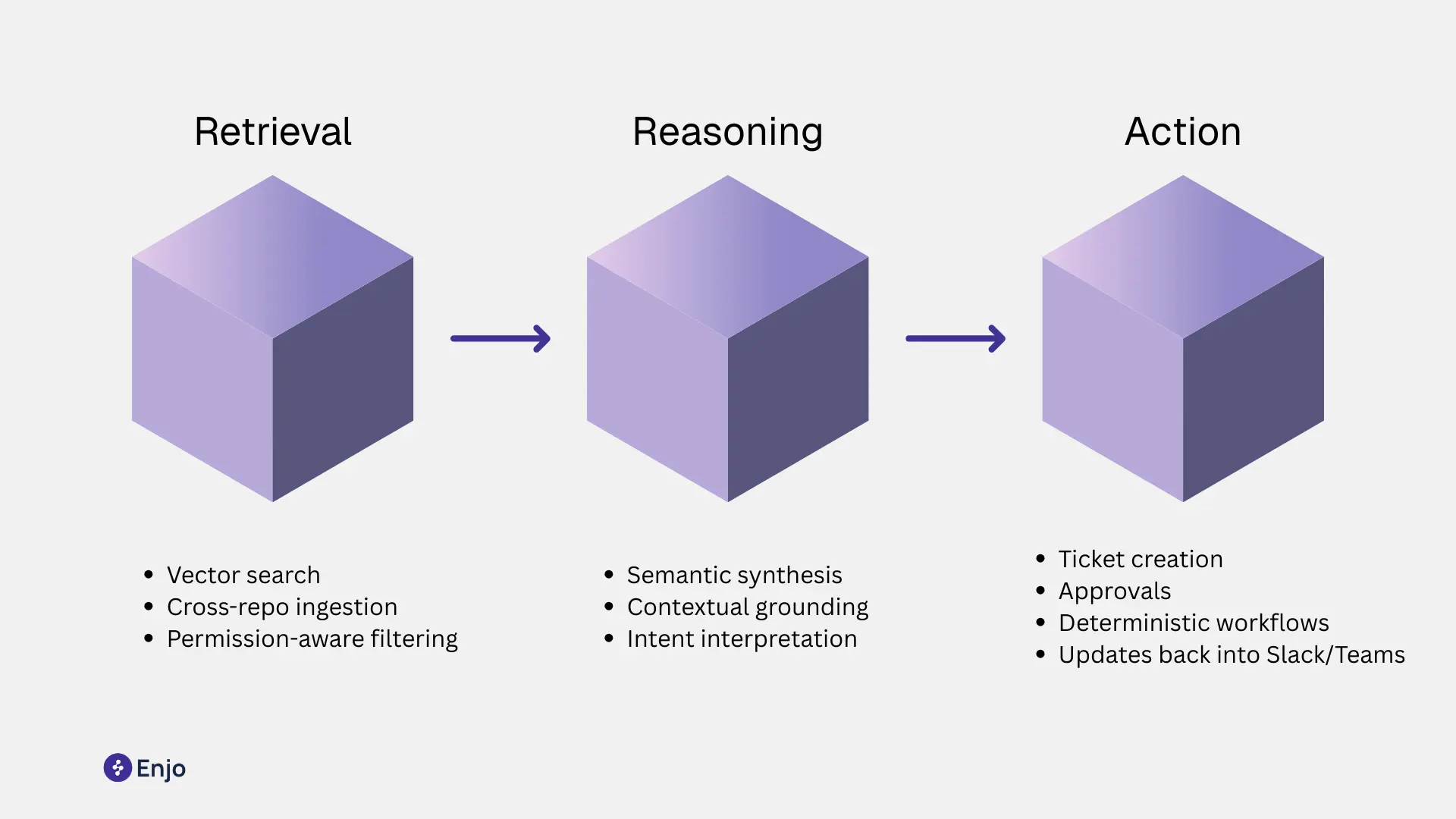
1. Retrieval-first:
The system searches the vector space directly, pulling meaningfully related fragments across all sources - Confluence, SharePoint, Notion, PDFs, videos, and structured systems.
2. Semantic reasoning:
LLMs synthesize and interpret the retrieved fragments. They infer intent, fill gaps, check consistency, and reconcile context (e.g., a user’s role, recent actions, or system state).
3. Action:
Instead of returning documents, the system executes steps using deterministic connectors or no-code actions. Examples include:
- Creating or updating Jira or ServiceNow tickets
- Triggering provisioning flows
- Routing approvals
- Updating records
- Posting updates inside Slack or Teams threads
Outcome: the knowledge base becomes an active system that moves work forward, not a passive archive.
To see semantic retrieval tied to actions, check the AI flow to understand how workflows execute inside Slack or Teams.
Self-improving feedback loops
AI-native systems integrate learning into the architecture rather than adding analytics as a separate feature.
What continuous learning looks like
- Every query produces structured signals: intent type, retrieved fragments, reasoning depth, final action.
- Each resolved or failed interaction feeds the ranking, retrieval, and summarization layers.
- Administrators can mark answers as “correct,” “needs update,” or “off-policy,” and the system tunes itself immediately.
- Drift detection flags outdated steps, unused content, or contradictory guidance.
This loop runs without manual content audits or SEO-style tuning.
A reproducible admin practice (How-To)
Weekly AI-native tuning cycle (10-15 minutes)
- Open the system’s interaction review dashboard.
- Sort by “low confidence actions” or “escalated queries.”
- For each item, annotate: correct, missing info, or wrong source.
- Let the platform update retrieval weights and content mappings automatically.
- Run the built-in diff to verify no regressions in top intents.
This replaces the heavy manual cleanup cycles required in AI-assisted systems.
Agentic Workflows built on top of retrieval
AI-native knowledge bases power agents, not chatbots. Agents handle end-to-end workflows using a blend of:
- Understanding: semantic retrieval and contextual grounding.
- Policy compliance: permission checks, role-based constraints, and safe reasoning boundaries.
- Execution: deterministic actions that produce audit logs, ticket updates, or workflow runs.
- State management: remembering past steps and maintaining the chain of thought internally while keeping outputs controlled.
The key is retrieval-conditioned action: agents decide what to do based on live knowledge, not hardcoded intents. This matters for IT and HR Ops because workflows change weekly. Updating a page in Confluence should immediately update the agent’s behavior, without retraining.
Start Creating your AI Knowledge Base with our guide -->
Example: Enjo’s Deflect → Triage → Resolve → Reflect loop
Enjo applies an AI-native architecture through a four-phase loop that runs inside Slack, Teams, and web channels. For how that loop behaves specifically for AI agents in Slack and Teams, see the internal support layer breakdown.
1. Deflect
Retrieve up-to-date, permission-aware information across all connected knowledge sources. Provide precise answers or relevant steps within the conversation.
2. Triage
If the query requires action, classify intent, confirm details, and understand user context (role, department, past activity).
This reduces misrouted tickets, especially in complex IT and HR environments.
3. Resolve
Run deterministic workflows:
- Create/update Jira or ServiceNow tickets
- Trigger provisioning flows
- Route approvals
- Post updates back in-channel
Execution happens inside the same thread, with audit trails and RBAC controls built in.
4. Reflect
Capture outcomes. Log success/failure signals, escalation reasons, and content mismatches.
The system uses these signals to refine retrieval, ranking, and workflow mappings.
Explore the case studies to see how distributed IT teams use this loop to resolve repetitive requests at scale.

Architectural Differences That Matter
Architecture dictates whether AI can reason, act, and improve — or whether it remains a bolt-on enhancement. This section breaks down the practical differences teams experience when systems scale to thousands of documents, multiple knowledge sources, and role-based access constraints across IT, HR, Finance, and Ops.
Each subsection includes a diagnostic test or configuration tip to make the guidance reproducible.
Indexing vs Vector-space models
Traditional knowledge bases use inverted indexes: lists of keywords mapped to documents. AI-assisted platforms often keep this structure and layer embeddings on top. As a result, the system switches between two incompatible retrieval modes:
- Keyword → exact matches
- Embeddings → semantic similarity
Because the index was never built for semantic reasoning, performance degrades as content volume grows.
AI-Native: Unified vector-space architecture
AI-native systems store knowledge as vectors in a semantic space, not as keyword-in-document mappings. Each fragment, paragraphs, procedures, definitions is encoded into embeddings. This enables:
- Meaning-level retrieval across all sources
- Smooth handling of synonyms, intent, or partial phrasing
- Flexible unification of structured and unstructured knowledge
Diagnostic Test
Search for a query with no keyword overlap with the article title.
- If the system fails or pulls unrelated results, the index is keyword-dominant.
- If it pulls meaning-aligned content, the KB uses a true vector-first design.
RAG vs Hybrid Retrieval
Retrieval-Augmented Generation (RAG) is now standard, but implementations vary widely. Most AI-assisted systems run single-source RAG: they pull from one repository at a time, usually their native KB.

AI-native: hybrid, cross-repo retrieval
AI-native systems retrieve across Confluence, SharePoint, Notion, PDFs, spreadsheets, tickets, and more, within a single query. They apply hybrid scoring:
- Semantic vectors to find meaning
- Symbolic rules to enforce policy
- Metadata signals to prioritize recency, ownership, or confidence
- Permissions filters before reasoning
This creates higher accuracy and safer outputs.
Configuration Tip
If your environment has >3 knowledge sources, configure RAG to:
- Normalize metadata (owner, team, last modified).
- Apply consistent permissions constraints across all repos.
- Set separate confidence thresholds for “informational” vs “actionable” queries.
These steps help avoid hallucinations and ensure consistent grounding.
Permissions-aware reasoning
AI-assisted tools often check permissions after retrieval. That means the model may reason over content the user should not see, even if the final answer is restricted.
This creates compliance and correctness issues.
AI-native: permissions-aware at retrieval and reasoning time
AI-native systems embed RBAC or ABAC rules into the retrieval layer. The model only sees content the user is authorized to access. This ensures:
- No leakage of restricted procedures
- No unauthorized workflow triggers
- Higher accuracy because reasoning uses the correct context
Learn more about RBAC and ABAC - here
Caching, recency, and ranking signals
AI-assisted systems often fetch from a static index with periodic reindexing. Recency is not a core signal. This causes:
- Outdated answers
- Incorrect state-based instructions
- Slow updates after policy changes
AI-native: dynamic ranking and recency-aware reasoning
AI-native systems consider multiple live signals:
- Document recency
- Source reliability (e.g., Confluence admin pages vs ad-hoc wikis)
- Historical answer accuracy
- User role and intent patterns
- Workflow success rates
Because ranking and reasoning are tied to real usage data, answers stay aligned with current policies.
Configuration Tip: Recency Thresholds
Set recency thresholds for high-sensitivity categories such as:
- IT access procedures
- HR policy changes
- Finance approval steps
Thresholds help enforce that the system prioritizes the latest version and flags stale content.
Operational Differences
AI-assisted and AI-native systems create very different operational realities. The differences show up in day-to-day maintenance, documentation effort, governance needs, and the cost curve as usage scales.
Maintenance load
AI-assisted tools need recurring manual upkeep, tag cleanup, category tuning, synonym mapping, and periodic reindexing. Retrieval quality depends heavily on this hygiene.
AI-native systems reduce ongoing effort because ranking, drift detection, and relevance tuning adjust automatically from real interaction data.
Quick test:
Check how often your team edits categories or adds synonyms. High frequency is a strong AI-assisted signal.
Required authoring effort
AI-assisted systems rely on structured, human-written articles. Updating them is slow, especially when workflows change.
AI-native platforms treat knowledge as fragments rather than articles. They can synthesize answers, generate variants for different roles, and highlight missing steps.
Practical tip:
Adopt a “fragment-first” structure, store steps and definitions in small units. AI-native platforms assemble the final answer automatically.
Governance implications
AI-assisted governance sits outside the AI: admins review updates, monitor exposure risks, and enforce permissions manually.
AI-native platforms enforce permissions at retrieval time, apply policy rules during reasoning, and surface compliance issues through built-in drift detection.
Outcome: fewer manual checks, safer outputs.
Cost and scalability differences
AI-assisted systems become expensive as content grows:
- More manual curation
- More article rewrites
- Additional tooling for workflow automation
- Higher reindexing and enrichment costs
AI-native systems scale differently because tuning, synthesis, and intent resolution improve automatically. They consolidate channels (Slack, Teams, Web) and reduce escalation volumes.
Key KPIs:
- First-contact resolution
- Manual escalations per 100 queries
- Drift rate
- Cost per automated resolution
Track these monthly to quantify the operational gap.
Further Reading: Why AI-Powered Knowledge Bases Are the Backbone of Modern Support ->
How to Choose Between AI-Assisted vs AI-Native Knowledge Bases
Frequently Asked Questions
What is the difference between AI-native and AI-assisted knowledge bases?
AI-assisted systems bolt machine learning onto a legacy content store. AI-native systems use a semantic architecture built for retrieval, reasoning, and action from the start, which reduces maintenance and improves accuracy as usage grows.
Does an AI-native platform require more training data?
No. AI-native systems rely on retrieval, not model training. They use your connected sources, Confluence, SharePoint, Notion, PDFs, tickets without needing custom datasets or fine-tuning.
Can teams migrate from an AI-assisted tool to an AI-native system?
Yes. Migration usually involves connecting existing sources, indexing content at fragment level, validating high-volume intents, and running a short pilot. No article rewrites are required.
How do security and permissions differ between the two models?
AI-assisted tools often apply permissions after retrieval, which risks partial exposure. AI-native platforms enforce RBAC or ABAC rules at retrieval and reasoning time, ensuring the model never sees unauthorized content.
Is “knowledge-based artificial intelligence” the same as a knowledge base?
Not exactly. Knowledge-based AI refers to systems that use structured knowledge, embeddings, or graphs to reason. A knowledge base is the underlying store. AI-native platforms combine both: semantic knowledge storage with real-time reasoning and workflow execution.