Transform complex support workflows
AI Knowledge Base: What It Is, How It Works and How to Keep It Current
By Yoshi Bansal, Product Manager at Enjo.
An AI knowledge base answers plain-language questions from your own content, cites the article behind each answer, and shows which questions it could not answer. The last part matters most: an AI knowledge base is only as good as its freshest article, and its failures show which articles to fix.
Most support teams are already behind. In a Gartner survey of 187 customer service and support leaders, published in December 2024, 61% said they had a backlog of articles to edit. More than one-third had no formal process for revising outdated articles. Put retrieval on top of that backlog and the AI answers fluently from the stale version, citing it as if it were current.
Enjo Help Center is this guide's worked example of the fix. It generates articles from a website URL or connected docs and turns unanswered questions into draft articles for review. The same index grounds Enjo, the AI Support Agent, in Slack, Microsoft Teams and website chat.
The Free plan includes Help Center, 200 AI replies a month and unlimited agent seats, with no credit card. Enjo is SOC 2 Type II, ISO 27001 and GDPR compliant. Troopr Labs, the company behind Enjo, has 600+ enterprise deployments and 99.9% uptime over 7 years.
This guide covers how retrieval and citations work, what happens when the AI cannot answer, and how to keep an AI knowledge base current.
What Is an AI Knowledge Base?
An AI knowledge base uses semantic search and retrieval-augmented generation (RAG) to answer questions in plain language from your own content: help articles, internal docs and past conversations. Every answer cites the article it came from. Questions it cannot answer are surfaced, so the content owner knows which article to write or fix.
Vendors also call it knowledge base AI, an AI-enabled knowledge base or an automated knowledge base. The label matters less than two behaviors: whether each answer shows its source, and whether each failure reaches a person.
AI Knowledge Base vs Traditional Knowledge Base
A traditional knowledge base stores articles and waits for a reader to find the right one. An AI knowledge base reads the question, retrieves passages by meaning and writes the answer with a citation. Natural language processing (NLP), the branch of AI that lets computers understand and generate human language, handles the first step.
| Dimension | Traditional Knowledge Base | AI Knowledge Base |
|---|---|---|
| Finding answers | Browse categories or type keywords. | Ask a question in plain language. |
| Retrieval method | Keyword match on titles and tags. | Semantic search over embedded passages. |
| Multi-document answers | Reader opens and combines articles. | One answer drawn from several passages. |
| Citation | The article is the answer. | Each answer cites the articles it used. |
| Gap detection | Search logs, reviewed by hand. | Unanswered questions surfaced to the owner. |
| Maintenance model | Scheduled reviews by writers. | Gap detection flags what to fix. |
Adding a chat box to a traditional knowledge base changes the first row of that table. The maintenance row stays manual until something detects gaps and source changes, which is the architectural split our explainer on AI-assisted knowledge bases walks through.
"Knowledge Base in AI" vs an AI Knowledge Base
In AI research, a knowledge base first meant something narrower. An expert system pairs a knowledge base, an organized collection of facts about one domain, with an inference engine that applies if-then rules to reach an answer. Stanford's Dendral, begun in 1965 to analyze chemical compounds, is a classic early example.
An expert system's facts and rules were acquired from human experts through interviews and observation, and a major system held thousands of rules. An AI knowledge base keeps knowledge in plain language instead, as articles, docs and tickets, and a language model retrieves and cites it. Both designs separate the knowledge from the engine that reasons over it, so both are only as good as the knowledge they hold. Searches for "knowledge base in artificial intelligence" mix both meanings, and the rest of this guide covers the second.
How an AI Knowledge Base Works
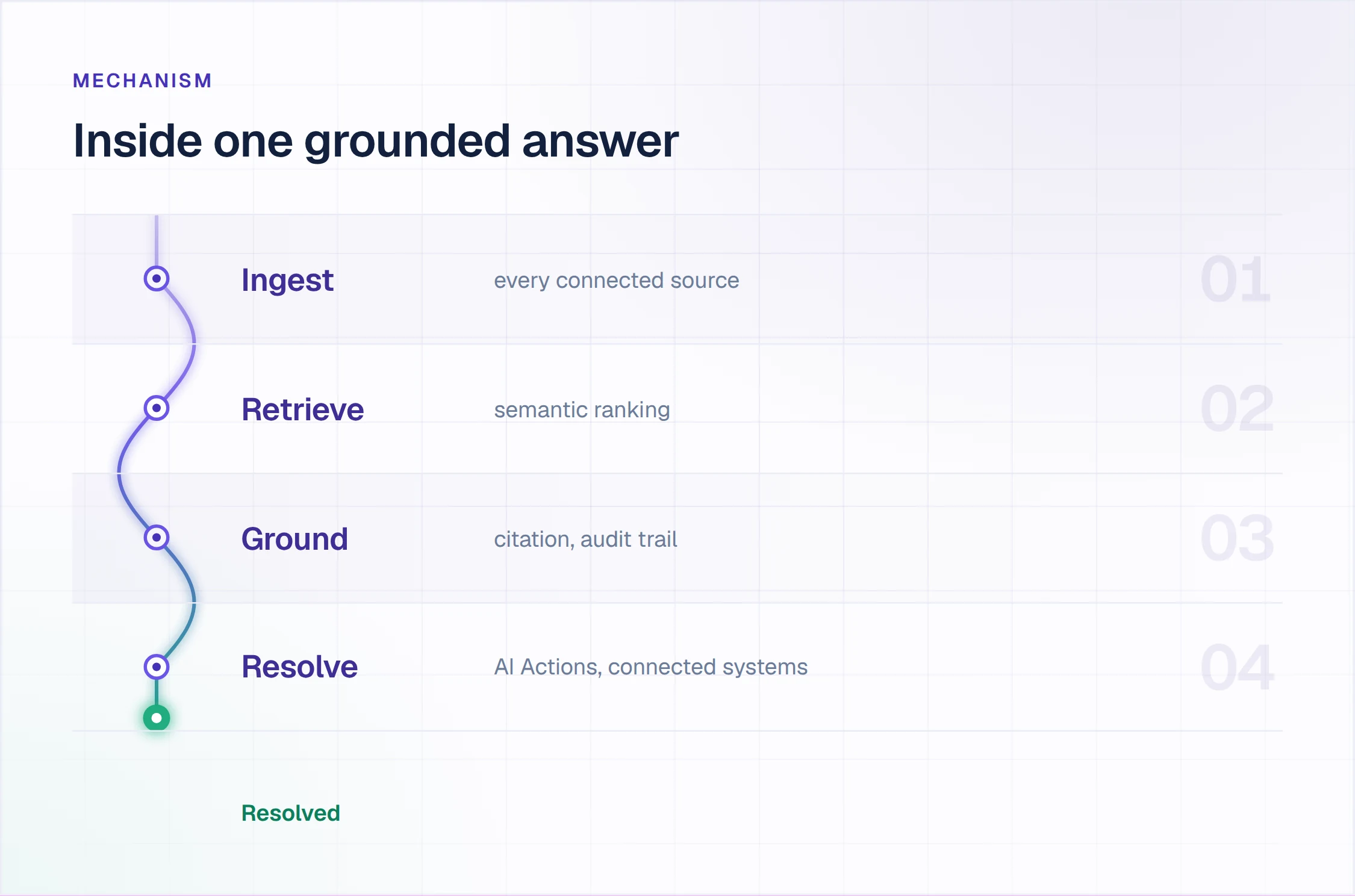
Five mechanisms sit behind every answer: ingestion, semantic search, retrieval-augmented generation, permissions and gap detection. The first four produce the answer; the fifth keeps the next one correct.
Ingestion and Connectors
Ingestion turns scattered content into one searchable index. Connectors pull documents from the systems where they already live, split long documents into passages and index each passage. The sync schedule then sets how current the index is: a daily sync picks up yesterday's edit, while a one-time import keeps the version it copied.
Enjo syncs sources such as Confluence, Google Drive, SharePoint, OneDrive, Notion and Guru daily, plus past tickets or cases from Jira, Zendesk, ServiceNow and Salesforce Service Cloud. Web pages, uploaded files (PDF, DOCX, audio and video) and Slack channel history are indexed once.
Semantic Search and Embeddings
Semantic search matches meaning instead of exact words. Each passage is converted into an embedding, a list of numbers that places similar meanings close together, and stored in a vector database. At question time the question gets its own embedding, and the database returns the passages whose vectors sit nearest to it.
That is how "I can't get into the VPN" can find an article titled "Resetting remote access credentials" with no word in common. Exact strings such as error codes and SKUs still suit keyword matching, so hybrid search runs both methods and merges the results.
Retrieval-Augmented Generation and Citations
Retrieval-augmented generation hands the retrieved passages to a language model, which writes the answer from them. The 2020 paper that named the technique paired a language model with a searchable vector index of Wikipedia. The authors pointed to provenance, knowing where an answer came from, as a problem that retrieval helps solve.
In a knowledge base, provenance is the citation. A requester, or your compliance lead, can open the article behind any answer and check it. In Enjo Help Center, the AI Assistant is the portal's search widget: requesters ask in plain language and get a direct, cited answer from published articles. Answers are grounded in your knowledge with citations, Guardrails screen what the AI takes in and sends out, and the audit trail records what it said.
Permission-Aware Answers for Employees and Customers
One index can serve two audiences when every answer respects who is asking. Customers on the portal see public articles, while employees in Slack or Microsoft Teams may need runbooks and HR policies that customers never see.
In Enjo Help Center, Audience Targeting sets article visibility by plan, role, segment or login state. The same index answers requesters in the Help Center portal, website chat, Slack, Microsoft Teams and Slack Connect shared channels, so what the agent says is what requesters find. Organizations building an employee-only version will find permissions and identity compared tool by tool in our review of internal knowledge base software.
Gap Detection and the Feedback Loop
Gap detection turns failed answers into a work queue. A question the AI cannot answer usually means an article is missing, or an article exists and is wrong. A feedback loop routes that signal to a person, and the person's resolution becomes the draft of the missing article.
Enjo Help Center's Self-Improving Loop runs this: unanswered portal questions escalate to your team, and resolved conversations auto-draft new articles for review. Performance Insights reports accuracy, feedback and resolution gaps, which shows the owner where answers fall short.
Types of Content an AI Knowledge Base Answers From
An AI knowledge base can answer from any content it can turn into text and index. Each type below answers a different kind of question.
- Policies and SOPs: "What's our VPN access policy for contractors?" returns the relevant clause from a long policy document, with the policy cited.
- FAQs and troubleshooting flows: "Why can't I access the VPN?" returns the troubleshooting steps themselves.
- Long-form technical documentation: product docs, API references and runbooks become answerable in plain language, passage by passage.
- Past tickets and resolved conversations: the answers your team already gave, which often record the current fix before any article does.
- Uploaded files: PDFs, DOCX files, audio and video, indexed from their extracted text or transcripts.
- Slack channel history: answers buried in threads, indexed so they stop depending on who remembers them.
Unstructured content such as PDFs and Slack threads goes through the same pipeline as articles: text is extracted, split into passages and embedded. Short sections under descriptive headings retrieve better than one long page, because retrieval works passage by passage.
Benefits of an AI Knowledge Base
The benefits come from one index answering everywhere and from the loop that keeps it current.
- One place to ask: in a Gartner survey of 4,861 digital workers, 47% struggled to find the information they needed to do their jobs well. The survey, run in late 2022 and published in 2023, found the average knowledge worker used 11 applications, up from 6 in 2019. One index across those systems removes the question of which tool holds the answer.
- The repeat load moves to the AI: password reset steps, access questions and billing how-tos get answered where they were asked, and your team works the cases needing judgment.
- The same answer in every channel: when the portal, website chat, Slack and Microsoft Teams read one index, a requester gets one answer wherever they ask.
- Escalations arrive ready to work: the person who takes over receives the full conversation, account context and suggested next steps.
- Writers review instead of drafting: articles drafted from resolved conversations and refreshed against current sources turn the writer's job into editing and approving.
What Happens When an AI Knowledge Base Cannot Answer
Every AI knowledge base meets questions its content does not cover. It fails in four recognizable ways, and each needs a different response.
- No relevant passage: the index holds nothing on the topic. A well-built system says so and hands off instead of guessing.
- A stale passage: the index holds an old answer, and the AI repeats it with a citation that makes it look verified. This is the most expensive failure, because nothing looks wrong.
- Conflicting passages: two articles disagree, such as last year's and this year's refund policy, and the answer blends them or cites the wrong one.
- A request that needs a person: the docs explain the policy, but the fix needs access, an approval or judgment.
Guardrails decide which of these the requester sees. In a well-built system, they turn an empty retrieval or a request that needs a person into a handoff.
In Enjo, the handoff lands in Enjo Inbox with the full conversation, account context and suggested next steps. On a Jira connection the escalation becomes a Jira work item, and on ServiceNow it becomes a ServiceNow ticket, with the same context attached. Guardrails screen AI inputs and outputs, and the audit trail records what the AI answered.
The escalated question also becomes raw material. Once your team resolves it, the resolution is the first draft of the missing article, which is where the loop in the next example starts.
A Worked Example: From Question to New Article
Take a hypothetical software company running its customer help center on Enjo Help Center. Its billing collection includes an article, "How to download invoices," with three steps.
- A covered question gets a cited answer. A customer types "Where do I get last month's invoice?" into the AI Assistant on the portal. The answer gives the steps from "How to download invoices" and cites the article.
- An uncovered question escalates. Another customer asks whether invoices can be exported as a CSV for an accounting system. No article covers CSV export, so the question escalates to Enjo Inbox with the full conversation, account context and suggested next steps.
- The resolution becomes a draft. A support agent confirms the export path and replies. When the conversation is resolved, the Self-Improving Loop drafts a new article, "How to export invoices as CSV," for review.
- A person reviews, then publishes. The docs owner checks the steps, adds a screenshot and publishes it; nothing goes live without that review. The next customer who asks gets an answer from the new article, with the citation, on the portal and in website chat.
- The product changes, and so does its source. Two months later, the export button moves to a new Reports page. The product spec in Google Drive is updated, and the daily sync carries the change into the index that grounds every answer.
- A refresh, reviewed before it ships. The owner runs Help Center Agent's "Refresh an outdated article" template, which compares the article against the current product and sources. The proposed edits appear in the Review changes panel, and the Agent Activity log records the run.
No step depended on someone remembering to reread an article. The loop surfaced the gap and the change, and a person approved every edit before it reached a requester.
Why AI Knowledge Bases Go Stale, and How to Keep One Current
Every knowledge base starts current and drifts from there. Products ship, policies change and features get renamed, while the article written at launch still reads as true.
A stale article fails twice. The requester who reads it on the portal gets the wrong steps. Then the AI grounded in it repeats the error in website chat, Slack or Microsoft Teams, with a citation that makes it look checked.
Calendar reviews do not scale with a growing article set, so an automated knowledge base moves the owner's time from rereading to reviewing flagged changes. Enjo Help Center runs that loop in five parts.
- Article Generation creates the first drafts: from a website URL, connected docs in Notion, Google Drive, Confluence or SharePoint, or ticket patterns in Zendesk, Intercom or Freshdesk.
- Daily source sync keeps the index current: connected sources re-sync every day, so an edit made in Confluence or Notion reaches the agent's answers without a re-import.
- The Self-Improving Loop finds the gaps: unanswered portal questions escalate to your team, and resolved conversations auto-draft new articles for review.
- Help Center Agent does the updating: it creates and updates articles from templates, free-form prompts and your connected sources. It also runs bulk operations in natural language, such as rewriting or reorganizing a whole collection. Its "Refresh an outdated article" template flags content that no longer matches the product.
- Review comes before anything goes live: Help Center Agent's changes wait in the Review changes panel until you publish. The Agent Activity log records each run with its prompt, the article produced or updated, its source and the time.
The owner's week changes shape. Instead of rereading every article on a schedule, they review the drafts and flags the loop produced, then read the unanswered questions to plan what to write next.
What to Measure
Five numbers show whether the loop is working. Track the trend from your own baseline; a target borrowed from another company tells you little.
- AI resolution rate: conversations resolved without a handoff, divided by all conversations the AI handled.
- Unanswered rate: questions escalated because no content covered them, divided by all questions asked.
- Gap-to-article time: days from the first unanswered question on a topic to the published article that answers it.
- Helpfulness by article: the share of answers requesters rate as helpful, grouped by the article cited.
- Refresh rate: the share of articles checked against their sources since the last product release.
In Enjo, Global Insights covers topics, sentiment and AI outcomes, and Performance Insights covers accuracy, feedback and resolution gaps. For the refresh rate, the Agent Activity log records each Help Center Agent run with the article and the time.
Types of AI Knowledge Base Tools and What Each Is Built For
Tools sold as AI knowledge bases follow five designs. Each is built for a different owner, and each design decides where the maintenance work lands.
Help Centers Bundled With a Helpdesk Suite
Built for: support teams already working requests in a helpdesk who want articles, agent tools and reporting from one vendor. AI search and AI agents answer from the suite's knowledge base, and some suites add connectors that bring in documents from elsewhere.
Scope: The help center is packaged and priced as part of the helpdesk plan, and it is designed around that helpdesk's tickets and agents.
Documentation Platforms
Built for: teams publishing product documentation, with authoring, review workflows, localization and publishing controls at the center. AI features add search, chat and writing help on top of the article set.
Scope: The design centers on the editor, so how current the content stays depends on the documentation team's review process.
Collaboration Wikis With AI Search
Built for: employees writing and editing internal pages together. AI search and chat answer from those pages and, in some wikis, from connected apps.
Scope: Answers reflect the pages as they stand, and with many authors, current and outdated pages sit side by side until someone prunes them.
Enterprise Search Across Systems
Built for: finding content across many workplace tools at once, with answers limited to what each user may already see. It indexes drives, wikis, tickets and chat in place.
Scope: It answers from content where it lives, so there is no published, requester-facing article set, and a stale source gets fixed in its own tool.
Help Centers Built Around the Maintenance Loop
Built for: the team that owns a help center and needs it to stay current without a content operations team. Enjo Help Center is this design. Article Generation, the Self-Improving Loop and Help Center Agent run on the same index that grounds Enjo in Slack, Microsoft Teams and website chat.
Scope: Enjo Help Center is built around the maintenance loop rather than the authoring editor. Articles are generated from a URL or connected docs. Unanswered questions draft new articles for review, and the same index that answers requests keeps the portal current, which is the point rather than a limit.
For named tools in each design, compared on unanswered questions and AI pricing, see our review of AI knowledge base software.
How to Evaluate an AI Knowledge Base: Five Checks on Your Own Docs
Product pages list semantic search and a row of connectors. Five checks, run on your own documentation rather than in a demo, show whether a tool keeps answers current or only indexes them.
- Sources and sync. Connect the two systems where most answers live, edit one document, and ask about the change the next day. If the old answer comes back, the index is only as current as its last import.
- Citations. Ask ten questions your team answers every week and open the source behind each answer. An answer with no source, or a source that does not contain the answer, counts as a failure.
- The unanswered question. Ask something your docs do not cover and follow where it goes. A person should receive it with the full conversation attached; an entry in a search log counts as a failure.
- Stale-article detection. Change a step in a source document and see whether the tool flags the article that repeats it. If nothing flags it, the old step keeps getting served until someone notices.
- Channels. Ask the same question on the portal, in website chat, and in Slack or Microsoft Teams. Different answers, or no answer outside the portal, mean more than one index to maintain.
Enjo Help Center answers all five on the docs you already have.
- Sources and sync: Confluence, Google Drive, SharePoint, Notion and Guru, among other sources, sync daily into one index, and web pages and uploaded files are indexed once.
- Citations: the AI Assistant answers from published articles with the source cited. Answers are grounded in your knowledge, with core Guardrails from Starter and the audit trail with QA review flows on Standard.
- The unanswered question: it escalates to Enjo Inbox with the full conversation, account context and suggested next steps.
- Stale-article detection: connected sources sync daily, and "Refresh an outdated article" checks any article against the current product and sources.
- Channels: one index answers in the Help Center portal, website chat, Slack, Microsoft Teams and Slack Connect shared channels.
If a permanent $0 plan is part of the brief, our guide to free knowledge base software covers plans that stay at $0 with no end date. For the wider category, including internal wikis and customer help centers, see our comparison of knowledge base software.
How to Build an AI Knowledge Base With Enjo Help Center
Five steps take existing docs to a live Help Center.
- Sign up with a work email. Enjo reads the email domain to identify your company and scans your website to pre-fill the agent. The onboarding flow then sets up the AI agent and your Help Center.
- Generate the first articles. Article Generation drafts articles from your website URL, connected docs or ticket patterns. Existing articles import from Intercom, Notion, Confluence and Zendesk Help Center, and Templates and Collections set the structure.
- Connect the sources the agent reads. Add the systems your team already maintains, such as Confluence, SharePoint or past tickets, so answers come from them on a daily sync. Then ask the questions your team answers most and open each cited source.
- Brand, target and publish. Appearance sets your branding and a custom domain on a subdomain through a CNAME record, with SSL provisioned automatically. SEO settings cover the meta title, meta description, URL slug and URL aliases that 301 to the article. Audience Targeting decides who sees each article, and nothing goes live without review.
- Run the loop from day one. Point website chat, Slack and Microsoft Teams at the same index. Unanswered questions start drafting articles through the Self-Improving Loop, and after each release, Help Center Agent's "Refresh an outdated article" checks what changed.
Same-day go-live is feasible, and the Free plan needs no credit card. For the content side, see our guide on how to create a knowledge base.

Where Requesters Use an AI Knowledge Base
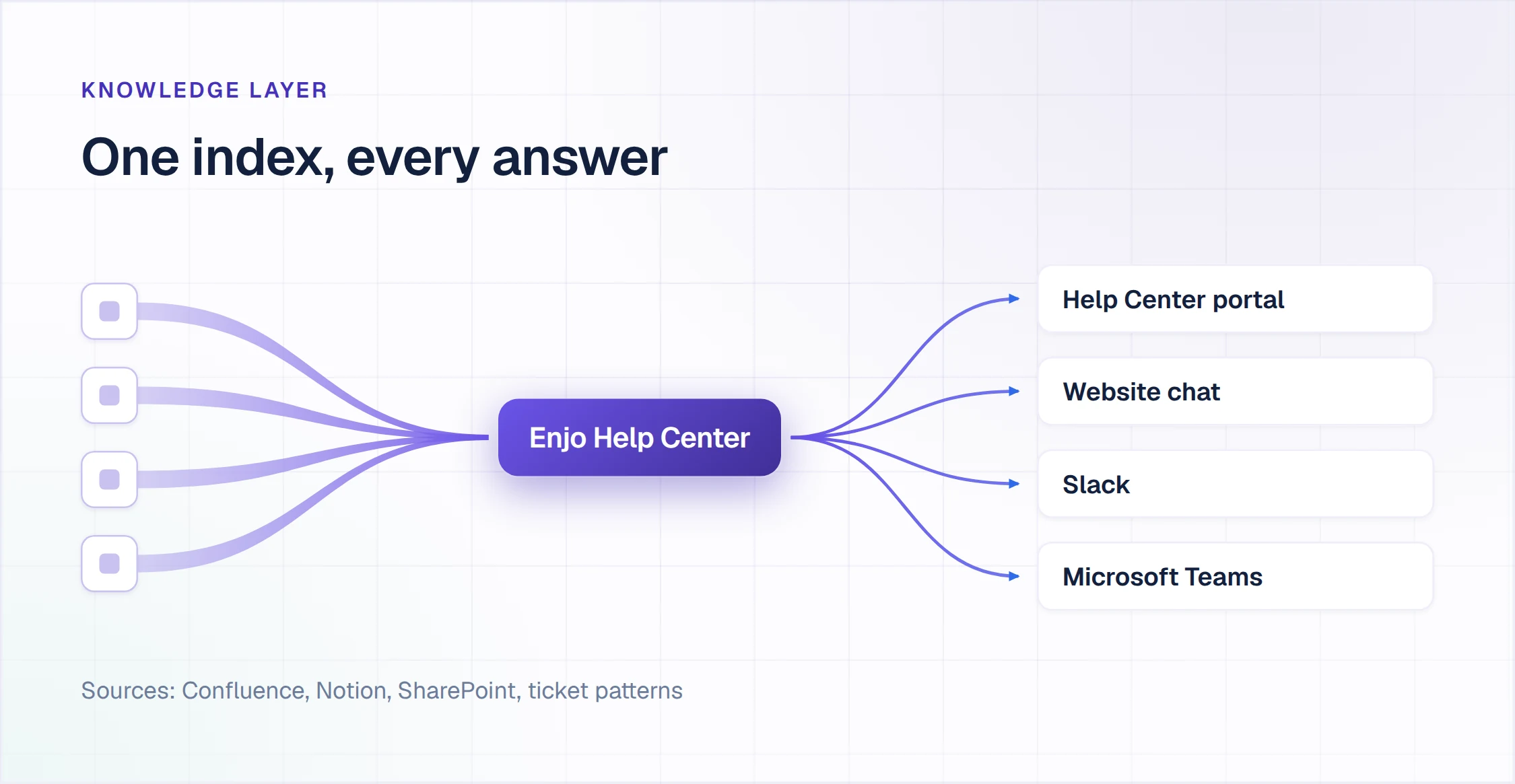
Requesters ask in the tools they already have open. One index answers in each of these places.
- Help Center portal: the AI Assistant answers searches with the source cited, beside the browsable articles.
- Website chat: Enjo answers on your site from the same articles and hands off to your team when it cannot.
- Slack: employees ask Enjo where they already work and get the answer in the conversation.
- Microsoft Teams: employees at organizations that run on Teams get the same answers there.
- Slack Connect shared channels: customers who share a channel with your team get answers there, from the same index.
Each channel reads the same articles, so an update published once changes the answer everywhere. Organizations that already answer questions in Slack can start from our Slack wiki guide. If the customer portal is the priority, our review of help center software compares what AI answers cost on each portal. On the customer side, the portal and website chat are where self service customer service happens, and both answer from the same articles.
Frequently Asked Questions About AI Knowledge Bases
What is an AI-based knowledge base?
An AI-based knowledge base is a collection of your own content that answers questions in plain language using semantic search and retrieval-augmented generation. It cites the article behind each answer and surfaces the questions it could not answer, so an owner can close the gap.
Does ChatGPT have a knowledge base?
ChatGPT does not come with your company's knowledge base, but OpenAI offers ways to give it your own material. A custom GPT can use up to 20 uploaded Knowledge files, and Projects keep related files, chats and instructions together. On ChatGPT Business, Enterprise and Edu, company knowledge answers from connected apps, can cite its sources and reaches only what each user may already view.
Those details come from OpenAI's help center, checked on 30 September 2026. An AI knowledge base does a different job: it publishes reviewed articles to requesters, cites them in every answer and routes unanswered questions back to the content owner.
How does an AI knowledge base differ from a traditional one?
An AI knowledge base answers the question itself, with a citation, while a traditional knowledge base waits for the reader to find the right article. It retrieves the relevant passages by meaning and writes the answer from them. It also changes upkeep: unanswered questions and source changes show which article to fix, where a traditional knowledge base relies on scheduled reviews.
What are some examples of AI knowledge bases?
Enjo Help Center is one: it generates articles from a URL or connected docs, answers on its portal with citations, and drafts new articles from resolved conversations. Zendesk Knowledge is the knowledge base inside Zendesk's customer service platform, with AI answers on help center searches and knowledge connectors for Google Drive, Confluence and SharePoint.
Document360 is a knowledge base platform whose Eddy AI adds AI search, an AI chatbot and an AI writing agent. In Confluence, Rovo Search and Rovo Chat answer from pages and connected apps. Glean lists 275+ connectors to workplace apps and shows each user only what they are allowed to see. Product details were checked on each vendor's own site on 30 September 2026. Our comparison of AI knowledge base software sets ten of these tools side by side on what each one does with a question its content cannot answer.
How often should an AI knowledge base be updated?
Sync its sources at least daily and update an article whenever a question goes unanswered or its source changes. A quarterly review can find problems months late, while a daily sync and an unanswered-question queue surface them the next day. In Enjo, connected sources such as Confluence, Google Drive and Notion sync daily. The Self-Improving Loop drafts articles from resolved conversations, and "Refresh an outdated article" checks an article against the current product.
Can an AI knowledge base restrict who sees what?
Yes. Visibility can follow who is asking, so the public, employees and customers on a given plan each see different articles. In Enjo Help Center, Audience Targeting sets article visibility by plan, role, segment or login state. Enjo's security controls also include Guardrails on AI inputs and outputs and full audit logs.
How much does an AI knowledge base cost?
AI knowledge bases are priced per author seat, per agent seat, per AI resolution or per AI reply, so the unit matters as much as the rate. Enjo prices per AI reply, with unlimited human agent seats on published plans, and Help Center is included on every plan. An AI reply is one response sent by Enjo's AI agent to a requester.
The Free plan is $0 a month with 200 AI replies and needs no credit card. At the Free limit, requests auto-escalate to human agents in Inbox, so no request is dropped.
Starter is $95 a month for 1,000 AI replies and adds AI Actions and core Guardrails. Standard is $295 a month for 3,000 AI replies and adds advanced Guardrails and the audit trail with QA review flows. Enterprise is custom and billed yearly, and current details are on the Enjo pricing page.
Turn Your Docs Into an AI Knowledge Base
Connect the sources your team already maintains and review the first drafts. From then on, the Self-Improving Loop turns each unanswered question into a draft article that waits for your review.