Transform complex support workflows
8 Best Fin AI Alternatives for Enterprise Support Teams in 2026
The best Fin AI alternatives in 2026 are Enjo, Zendesk AI, Salesforce Agentforce, Ada and Sierra, along with Decagon, Freddy AI and an in-house build, compared below on true cost, knowledge reach and setup time. Most teams still search for Intercom Fin alternatives, since Intercom only renamed itself Fin in May 2026.
Fin bills $0.99 per outcome, so a team resolving 3,000 conversations a month pays $2,970 in AI fees alone, and Fin has been part of Salesforce since September 2026. The strain shows up in production, when the knowledge an AI support agent needs sits in Confluence, SharePoint and past tickets it cannot reach. This guide compares eight options on what decides the choice: which systems each agent can act in, which knowledge it reads, and what it costs at your volume, with pricing checked on each vendor’s own page.
Why Teams Look for Fin Alternatives
Most teams looking into Fin AI alternatives aren't replacing a broken product. Instead, the search usually kicks off when three specific issues arise.
Outcome-based pricing starts to sting. Fin charges $0.99 per outcome, and an outcome is a resolution, a procedure handoff or a disqualification, per Fin's outcome billing documentation. Standalone deployments start at a $49 monthly base plan covering 50 resolutions, with everything above that at $0.99 each. There are no published volume discounts and no cap. If your team is resolving around 3,000 inquiries a month, that adds up to $2,970 in AI fees before you even consider the cost of an Intercom seat. For teams that are ramping up automation quickly, this pricing model can outpace their budget in no time, making the numbers feel pretty uncomfortable. Learning how to control AI agent costs becomes a real priority at this stage.
The knowledge base isn’t solely within Intercom. Fin relies on the information you connect to the platform. If your team’s key knowledge resides in Confluence, Salesforce case histories, past Zendesk tickets, or a Jira archive, the AI’s effectiveness is limited to what Intercom can actually process. Often, the real limitation isn’t just the AI itself but the data it can access.
The workflows often span multiple systems. A straightforward access request might involve checking Jira for approvals, updating a Salesforce record, and confirming Okta permissions, all before anyone can actually resolve the issue. While Fin excels at managing conversations, many enterprise support requests require actions that extend beyond Intercom’s ecosystem, and that’s where conversation-first AI reaches its limits.
If website chat is where most of your requests arrive, our ranking of the best live chat software compares free plans and real cost at 5 and 15 agents.
Most AI customer service platforms look similar in a demo. The differences usually appear later, during deployment, scaling, integrations, pricing reviews, and real production workflows. These are the areas enterprise teams tend to evaluate most closely before committing to any customer support automation platform.
- Knowledge architecture: Can the AI read from every source your team actually uses, i.e., Confluence, SharePoint, Google Drive, past tickets in other systems, or only from the platform's own knowledge base?
- Pricing model at your volume: Map the pricing model to your actual monthly interaction count. It is because Per-resolution and per-conversation models behave very differently at scale than flat-rate or per-reply models.
- Helpdesk flexibility: Does the AI agent require you to use a specific helpdesk, or does it sit on top of whatever you already run without forcing migration? This matters if your helpdesk strategy is not settled.
- Human agent workflow: What happens when the AI customer support agent cannot resolve an issue? Does the escalation include full context, or does the human agent have to start over?
- Time to production: Enterprise teams have been burned by long implementation cycles. Some platforms require months of onboarding, historical ticket training, and dedicated support before going live, while others can deploy in days.
- Security and compliance posture: SOC 2 Type II, ISO 27001, and GDPR are the minimum bar for enterprise procurement. The team should evaluate where inference happens, what data leaves your environment, and who has access.
What the Salesforce Acquisition Means for Fin Buyers
Salesforce completed its acquisition of Fin (formerly Intercom) on September 10, 2026, for about $3.6B, three months ahead of its original timeline. Fin now sits inside Salesforce AI Labs, alongside Agentforce, and continues to serve its existing customers.
For a team choosing Fin to get away from helpdesk-native AI, that changes the question. Fin’s roadmap, pricing and integrations now sit inside Salesforce’s. If your helpdesk is Zendesk, Freshworks or HubSpot, ask each vendor on this list where its roadmap will sit a year from now. Enjo is helpdesk-agnostic: your knowledge, flows and training stay portable if you change helpdesk vendors.
1. Enjo: Best for teams that need AI across multiple helpdesks and knowledge sources
What it is:
Enjo is an AI support agent and customer service automation platform that adds AI-driven resolution on top of helpdesk systems like Salesforce, Zendesk, Jira Service Management, and ServiceNow. It can also serve as a standalone helpdesk via Enjo Inbox, giving teams flexibility without forcing a migration from their current tech stack.
Best for: Mid-market to enterprise teams running Salesforce or Zendesk who need an AI customer service platform that reads knowledge from outside the helpdesk and can take cross-system actions. Also relevant for teams running customer support in Slack Connect shared channels, where a Slack and Teams AI agent resolves requests inside the thread.
Key capabilities:
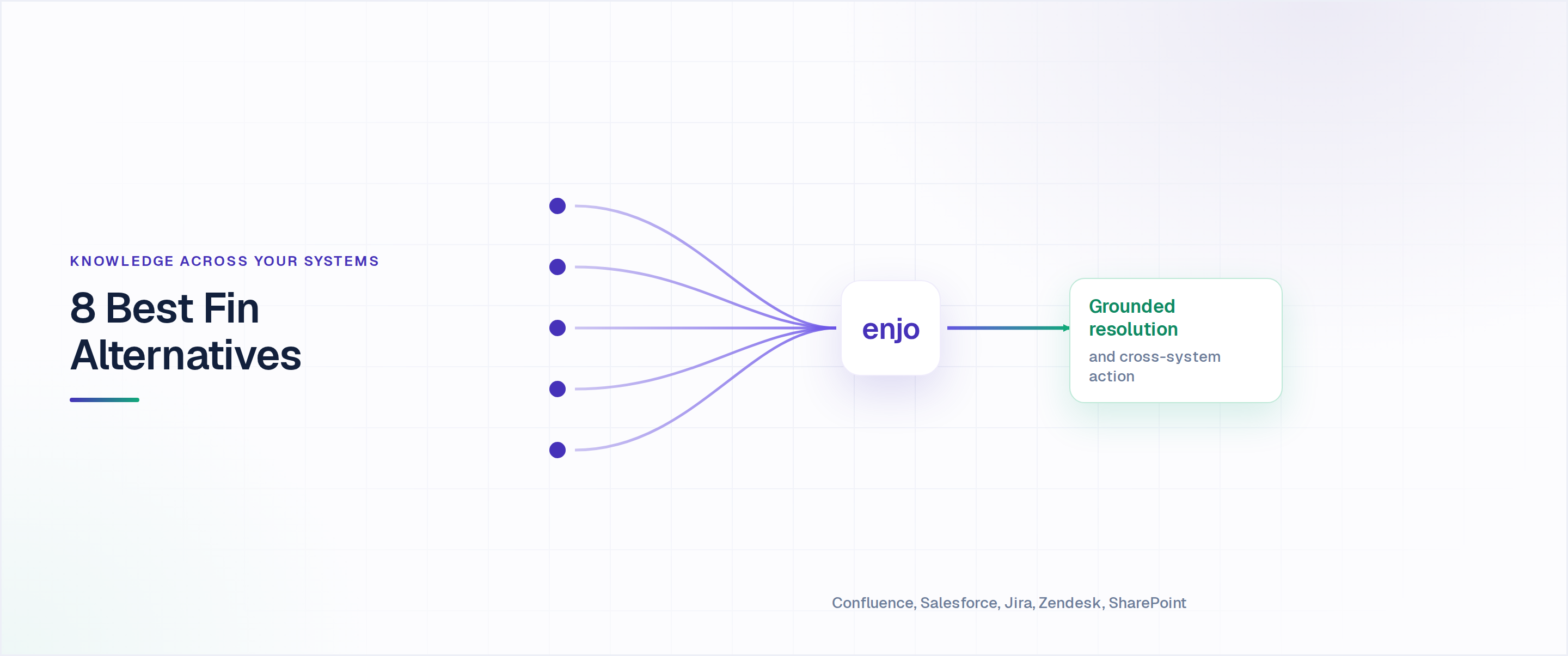
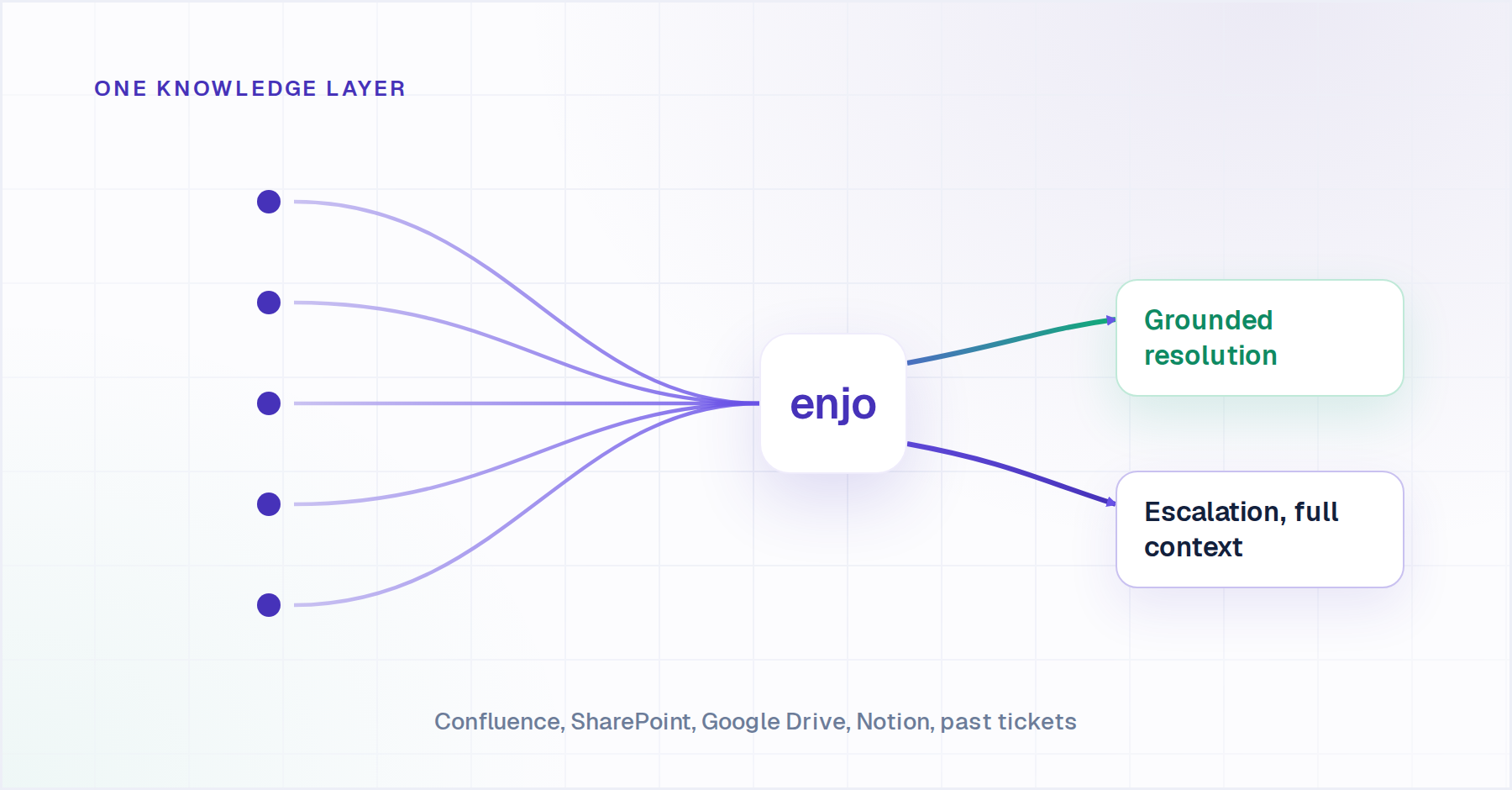
- AI Agents resolve requests end-to-end using a unified knowledge layer that spans Confluence, SharePoint, Google Drive, Notion, past tickets across Jira, Zendesk, and Salesforce. The AI pulls context from the same fragmented knowledge sources human teams already rely on.
- AI Actions connect to Okta, Jira, Salesforce, ServiceNow, Azure AD, and custom APIs so the agent can take actions during resolution, not just answer questions. Password resets, access provisioning, order lookups, and case updates happen inside the conversation.
- AI Flows manages multi-step workflows involving approvals, routing, and actions across systems. When a request involves multiple systems or approval steps, AI Flows manages the sequence rather than handing it back to a human.
- Agent Assist embeds AI inside the human agent's workspace in Salesforce Cases, Zendesk, Jira Service Management, and ServiceNow. Case summaries, reply suggestions, sentiment detection, and knowledge retrieval surface in context without requiring agents to switch platforms.
- Enjo Inbox is a standalone helpdesk for teams that want to consolidate rather than layer. It includes SLAs, workload management, omnichannel threads, and full AI triage, with unlimited human-agent seats on every plan.
- The Help Center is a customer-facing, AI self-serve portal. Articles generate themselves from connected docs and resolved tickets. Unanswered portal questions escalate to the team; resolved conversations can be turned into draft knowledge articles for review.
- Studio is the visual builder where teams design, test, and deploy AI tools and flows without engineering involvement. Guardrails, escalation rules, personas, and bulk testing are all configurable from the same interface.
Why Enjo is the best Fin Alternative: Fin works best within the Intercom ecosystem, while Enjo is designed to layer AI onto the systems teams already use. The platform connects knowledge across tools, supports actions outside the helpdesk, and embeds AI directly into existing agent workflows, rather than requiring teams to switch platforms. That flexibility matters for teams managing support across Slack, Salesforce, Jira, and ServiceNow.
Proof: Aptean, an enterprise ERP software company with 3,500+ employees and 15,000+ customers, deployed Enjo in a single day. Enjo now resolves 300K+ cases a year at Aptean, 37% of them fully by AI, drawing on 5M+ documents across Salesforce, SharePoint and its knowledge bases. Enjo is SOC 2 Type II compliant, ISO 27001 certified and GDPR compliant. Troopr Labs, the company behind Enjo, runs 600+ enterprise deployments with 99.9% uptime over 7 years.
Pricing: Usage-based, priced per AI Reply (not per seat, not per resolution). All plans include unlimited human agent seats. Free tier: $0/month, 200 AI Replies/month, no credit card. Starter: $95/month, 1,000 AI Replies. Standard: $295/month, 3,000 AI Replies. Enterprise: custom. Additional AI Replies cost $0.05 each on paid plans. Current pricing at enjo.ai/pricing.
Scope: Enjo is an AI layer, not a ticketing platform. It does not replace the helpdesk as the system of record, which is the point rather than a limit.

.png)
2. Zendesk AI (including Forethought AI Agents by Zendesk): Best for teams fully committed to the Zendesk ecosystem
What it is: Zendesk AI is the company’s native AI customer support platform, expanded further through Zendesk’s acquisition of Forethought in March 2026. It focuses on automated resolution, ticket triage, and agent assistance directly within the Zendesk ecosystem.
Best for: Customer support teams already standardized on Zendesk Suite that want AI capabilities without introducing another platform or workflow layer. Also applicable for teams evaluating Forethought specifically as of March 2026, that product lives inside Zendesk.
Key capabilities:
- AI Agents handle automated responses and deflection before tickets reach a human agent. More advanced plans support multi-step workflows, API-based actions like order lookups, and conversational intake flows.
- Copilot is Zendesk’s embedded agent-assist layer. It provides ticket summaries, suggested replies, macro recommendations, and contextual guidance directly inside the agent workspace.
- Intelligent Triage automatically classifies tickets by intent, language, and sentiment, helping teams route requests and automate repetitive support workflows at scale.
- Forethought AI Agents adds deeper enterprise automation capabilities, including Autoflows for multi-step resolution workflows and fine-tuned AI models trained on historical support data.
Pricing: Zendesk Suite plans with AI agents start at $55/agent/month (billed annually). Copilot is a separate add-on at $50/agent/month. Suite Enterprise and Forethought AI Agents are custom-quoted, with reported Forethought contracts ranging from $40,000 to $155,000 annually. Enterprise deployments typically require historical ticket data and longer onboarding timelines. Current pricing at zendesk.com/pricing.
Where it wins: Well-suited for teams already operating fully inside Zendesk, the AI experience is deeply integrated into existing support workflows, with minimal setup overhead and no need to manage a separate AI platform.
Where it falls short: Zendesk AI works best inside the Zendesk ecosystem. Knowledge and workflows outside Zendesk often require additional integrations, which can become limiting for teams operating across multiple systems. The Forethought acquisition also raises long-term questions for organizations that are not committed to Zendesk as their primary support platform.
3. Agentforce (Salesforce): Best for teams whose entire support workflow lives in Salesforce
What it is: Agentforce is Salesforce’s native AI support agent built directly into Service Cloud. It handles automated resolution, agent assist, and workflow actions using Salesforce customer data and workflows.
Best for: Customer support teams fully standardized on Salesforce Service Cloud that want AI deeply integrated into their existing CRM, support workflows, and customer records.
Key capabilities:
- Topics and Actions define what the AI agent can handle and what tasks it can execute. Teams configure workflows for requests like refunds, account updates, or password resets using existing Salesforce automations and workflows.
- Data Cloud integration provides Agentforce with a unified customer context spanning support history, purchases, account records, and prior interactions. The platform is designed to reason over structured CRM data, not just help-center content.
- Einstein Copilot provides AI-generated summaries, reply suggestions, and next-best-action recommendations directly inside the Service Cloud agent workspace.
- Self-Service Portal extends the AI experience into customer-facing support journeys, allowing users to resolve requests, check case status, and escalate issues without leaving the Salesforce environment.
Pricing: Salesforce Agentforce pricing is consumption-based, starting at $ 2 per conversation for customer-facing agents, or $500 per 100,000 Flex Credits for action-based billing. Employee-facing agent add-ons run $125/user/month. Additional Service Cloud licensing costs apply separately, and the total cost varies significantly based on action volume and use case. Current pricing at salesforce.com/pricing.
Where it wins: Best suited for organizations already deeply invested in Salesforce, Agentforce operates directly on top of existing CRM records, workflows, and Service Cloud infrastructure, without requiring an additional support platform or a separate AI layer.
Where it falls short: Agentforce is deeply tied to the Salesforce ecosystem. Teams whose support knowledge and workflows span systems like Confluence, Jira, SharePoint, or Zendesk may require additional integration work to unify context across platforms. That can become limiting for organizations running cross-system support operations.
4. Ada: Best for large consumer brands running omnichannel at scale
What it is: Ada is an enterprise AI customer service software designed for high-volume, omnichannel consumer support. It handles chat, email, voice, and SMS and integrates with 13+ helpdesk and contact center systems. It focuses heavily on customer support automation for large consumer-facing support operations.
Best for: Large consumer-brand support teams handling high interaction volumes across multiple channels, especially organizations with dedicated customer support operations teams and enterprise implementation budgets. Not well-suited for teams that need fast deployment or self-serve evaluation.
Key capabilities:
- Reasoning AI powers Ada’s customer-facing agents, enabling them to handle conversations dynamically rather than relying entirely on scripted chatbot flows. The platform is designed for complex, high-volume customer interactions where context and workflow consistency matter.
- Playbooks are Ada’s core workflow system. Teams can configure structured workflows for repeatable support requests, such as returns, billing issues, account updates, and order status checks. The AI follows those workflows, pulls customer context through integrations, and escalates with full context when needed.
- Omnichannel support spans web chat, email, voice, SMS, WhatsApp, and social channels from a centralized configuration layer. Ada integrates with major support and contact-center platforms, allowing escalations to flow into existing agent workflows.
- ACX Practice is Ada’s internal implementation and optimization team, included with enterprise deployments. They support onboarding, workflow configuration, and ongoing optimization, which is valuable for large organizations but can feel heavy for smaller teams wanting faster iteration cycles.
Pricing: Ada does not publish pricing. Contact Ada directly at ada.cx for a quote.
Where it wins: Works best for large-scale consumer support teams that need mature omnichannel coverage, especially across voice and contact-center operations.
Where it falls short: Ada is built primarily for large enterprise deployments, which makes the platform difficult to justify for many mid-market teams. The onboarding process is more extensive than that of most tools in this category, and the pricing model can become expensive at high automation volumes.
5. Sierra AI: Best for enterprises that want a fully configurable AI agent and have the engineering resources to run it
What it is: Sierra is an enterprise AI customer support tool for building and managing highly customized AI agents across customer support channels. Unlike helpdesk-native AI tools, Sierra operates as a standalone AI layer that connects to existing CX systems via APIs.
Best for: Large enterprises with dedicated engineering or AI operations teams that need deep workflow customization, persistent customer context, and advanced voice support.
Key capabilities:
- Ghostwriter is Sierra’s conversational agent builder, allowing teams to build AI customer support agents using natural-language instructions rather than traditional workflow setup. The platform is designed to reduce the operational overhead involved in building and improving AI workflows over time.
- Agent Data Platform gives Sierra agents persistent memory across conversations. Customer history, CRM records, account attributes, and operational context remain available throughout the support journey, reducing the need for customers to repeatedly re-explain issues.
- Constellation Architecture uses multiple AI models to validate responses before they reach the customer. This is designed to improve reliability and reduce inaccurate responses in high-stakes or compliance-sensitive support environments.
- Voice and payment workflows became a larger focus following Sierra’s acquisition of Receptive AI. The platform now supports conversational voice interactions and PCI-compliant payment handling directly inside AI-driven support flows.
Pricing: Sierra does not publish pricing publicly. The platform is enterprise-focused, usage-based, and sold through a sales-led process. Contact Sierra directly at sierra.ai for a quote.
Where it wins: Best suited for enterprises that need deep customization, advanced voice workflows, and AI agents tailored closely to their own operational processes. Sierra offers significantly more flexibility than most helpdesk-native AI platforms.
Where it falls short: Sierra operates closer to a managed enterprise platform than a self-serve SaaS product. Deployments often require heavier implementation support, and ongoing configuration may involve Sierra’s internal team. For organizations seeking fast deployment or lightweight operational ownership, that model can feel heavy compared with more plug-and-play alternatives.
6. Decagon: Best for enterprises in regulated environments that need tested, auditable AI behavior
What it is: Decagon is an enterprise AI customer support solution designed for organizations where AI reliability, testing, and operational control matter as much as automation itself. The platform supports chat, email, voice, and SMS workflows across enterprise support environments.
Best for: Enterprise support teams operating in regulated industries or high-stakes support environments where AI behavior needs to be audited, tested, and reproduced before deployment.
Key capabilities:
- Agent Operating Procedures (AOPs) are Decagon’s core workflow system. Teams define support procedures in natural language, allowing the AI to follow structured workflows for known scenarios instead of relying entirely on open-ended AI reasoning. This creates more predictable and auditable behavior across customer interactions.
- Watchtower and Guardrails monitor AI behavior in real time and enforce boundaries around what the agent can say or do. These controls are particularly relevant for regulated industries and compliance-sensitive support operations.
- Persistent memory allows the agent to retain customer context across conversations, including prior interactions, account history, and support records, reducing the need for customers to repeatedly explain issues.
- Simulation and testing let teams validate AI behavior against historical conversations before deployment. Organizations can identify failure patterns, refine workflows, and evaluate responses before the AI interacts with live customers.
Pricing: Decagon does not publish pricing publicly. The platform is enterprise-focused, sales-led, and typically positioned for larger support organizations. Contact Decagon directly at decagon.ai for a quote.
Where it wins: Best suited for organizations where predictability, compliance, and operational control are critical requirements, Decagon’s workflow-driven architecture and testing capabilities provide a level of oversight that many fully generative AI systems do not prioritize.
Where it falls short: Decagon operates closer to a managed enterprise platform than a lightweight self-serve product. Teams that want rapid experimentation and fast iteration cycles may find the deployment and configuration process slower than more flexible AI support platforms.
7. Freshdesk / Freddy AI: Best for teams consolidating onto a single Freshworks suite
What it is: Freddy AI is Freshworks’ native AI customer support software layer embedded across Freshdesk and Freshservice. It handles automated responses, agent assistance, ticket summarization, and workflow automation directly inside the Freshworks suite.
Best for: Customer support teams already using Freshdesk or evaluating Freshworks as an all-in-one support platform that want built-in AI customer support tools without adding another vendor or support layer.
Key capabilities:
- Freddy AI Agent handles customer-facing conversations across channels like email, chat, WhatsApp, and social messaging. It resolves requests using connected knowledge sources and escalates to human agents when needed.
- Freddy Copilot is the embedded agent-assist layer. It provides reply suggestions, ticket summaries, sentiment signals, and contextual knowledge recommendations directly inside the agent workspace.
- Freddy Insights surfaces trends across ticket volume, agent performance, and automation opportunities, helping support teams identify repetitive workflows and operational bottlenecks.
- Freshservice integration allows teams running both Freshdesk and Freshservice to route workflows between customer support and internal IT operations within the same ecosystem.
Pricing: Freshdesk plans are tiered across Growth, Pro, and Enterprise, with Freddy AI Agent sessions included from the Pro plan upward (first 500 sessions included, additional sessions charged per pack). Freddy AI Copilot is a separate add-on across all tiers. Pricing varies by region. Verify current pricing at freshworks.com/freshdesk/pricing
Where it wins: Best suited for teams looking to consolidate customer support, IT workflows, and AI capabilities into a single Freshworks platform. Freddy AI is straightforward to adopt for organizations already operating inside the Freshworks ecosystem.
Where it falls short: Freddy AI works best inside Freshworks products and workflows. Teams that rely heavily on systems such as Jira, Okta, Confluence, Salesforce, or multi-helpdesk environments may require additional custom integrations to enable deeper cross-system workflows and actions. Like Zendesk AI and Agentforce, Freddy AI functions primarily as an embedded helpdesk AI layer rather than a standalone orchestration platform.
8. In-house build: When it genuinely makes sense (and when it does not)
No alternatives list is honest without addressing the option customer service leaders hear from their internal AI teams, build it ourselves using LLM APIs and a RAG pipeline.
A prototype is not a production system. Production requires knowledge sync across systems, hallucination control, escalation logic, audit trails, SOC 2 evidence, RBAC, ticket actions, multi-helpdesk integration, and ongoing model and prompt maintenance as foundation models change. The security review alone, getting a system that handles customer data approved for production, typically takes three to six months before the first real conversation.
When is an in-house build the right call? All four conditions below must be true simultaneously. If anyone is missing, build is the wrong answer.
- The workflow logic is genuinely differentiated IP that a platform will not accommodate.
- A strong in-house ML team with production deployment experience is available.
- A 12+ month runway exists before the feature needs to be customer-facing
- No near-term compliance constraints will block the security review
If the team's actual goal is "get AI resolving tier-1 tickets before next quarter," a build is not the path.
How to Run the Evaluation on Your Own Stack
Run the same four checks on every tool on this list, on your own systems rather than in a demo.
- Ask for the write actions, not the read actions. Reading a ticket is not resolving a request. Ask which systems the agent can update, and who authorizes each action.
- Ask which knowledge sources it reads, and how often they sync. Answer quality stops at whatever the tool can reach.
- Price your real volume. Take last month's conversation count and run it through each model: per resolution, per conversation, per seat, per reply.
- Watch one escalation land in your helpdesk. It should carry the full conversation, account context and suggested next steps into the queue your team already works.
Enjo answers all four on the stack you already run. AI Actions write to Okta, Jira, Salesforce and ServiceNow. One knowledge index reads Confluence, SharePoint, Google Drive, Notion and past tickets on a daily sync. Pricing is per AI reply with unlimited human agent seats. Escalations land in Salesforce, Zendesk, Jira or ServiceNow with full context. Aptean went live with its initial cohort in a single day.
Curious how Enjo stacks up against Fin in your current setup?
Frequently Asked Questions
Q: Who are Fin AI’s competitors?
A: Fin AI’s main competitors are Enjo, Salesforce Agentforce, Zendesk AI with Forethought, Ada, Decagon and Sierra. They split into AI layers that run on top of an existing helpdesk and AI built into one vendor’s platform.
Q: What kind of company is Fin?
A: Fin is the AI customer service company formerly called Intercom, which renamed itself after its AI agent in May 2026. Salesforce completed its acquisition of Fin in September 2026.
Q: Is Fin AI any good?
A: Fin AI is strong for chat-heavy, high-volume customer messaging, and Fin’s own case studies cluster between 42% and 50% conversation resolution. The main drawbacks teams cite are per-resolution billing that rises as automation works, and knowledge that stays centred on the Fin workspace.
Q: What does Fin software do?
A: Fin is an AI agent that answers customer conversations across chat, email, voice and SMS, follows multi-step procedures written in plain language, and hands unresolved conversations to human agents. It runs standalone or on Zendesk, Salesforce, HubSpot and Freshworks.
Q: How does Fin compare with Forethought for enterprise support teams?
A: Fin is a single-product AI agent billed per resolution, sold standalone and on Zendesk, Salesforce, HubSpot and Freshworks. Forethought, now owned by Zendesk, focuses on triage, QA and resolution agents that run on Zendesk or another helpdesk. Both stay inside the helpdesk they’re deployed on, so teams that need answers from Confluence or actions in Okta and Jira often compare them with an AI layer like Enjo.
Q: Can I use a Fin alternative without leaving Intercom as my helpdesk?
A: You can use a Fin alternative without leaving your helpdesk. Most AI agents in this list operate as a layer on top of your existing helpdesk rather than replacing it. Enjo, for example, adds AI resolution on Salesforce, Zendesk, Jira, and ServiceNow without requiring migration. The AI agent and the helpdesk are separate layers; replacing the agent does not mean replacing the ticketing system.
Q: How does Fin’s $0.99/resolution pricing compare to alternatives at scale?
A: At 1,000 monthly resolutions, Fin costs $990/month in AI fees. At 5,000 resolutions, that is $4,950/month, $59,400/year in AI costs before Intercom seat fees. Enjo’s pricing is $0.05 per AI Reply on paid plans, or $295/month for 3,000 AI Replies on the Standard plan. The models are structured differently (Fin charges only on successful resolution; Enjo charges per interaction), so direct comparison requires mapping your expected resolution rate.
Q: What happened to Forethought? Is it still an independent option?
A: Zendesk completed its acquisition of Forethought on March 26, 2026, confirmed in Zendesk’s own announcement. The product is now branded “Forethought AI Agents by Zendesk.” Zendesk has stated the product will remain available to non-Zendesk customers, but the long-term roadmap implications for platform independence are not yet clear. Teams evaluating Forethought specifically for its helpdesk-agnostic positioning should verify the current product strategy before committing. If Zendesk and Intercom are both still on your shortlist, our intercom vs zendesk comparison breaks down the pricing and fit differences in detail.
Q: How long does it take to deploy an AI customer service agent in production?
A: Deployment time for an AI customer service agent varies significantly by platform. Fin (within Intercom) can be live in days. Enjo’s documented deployments run from a single day (Aptean) to five weeks (Amber Group) for full production. Ada typically requires 8-16 weeks. Forethought AI Agents by Zendesk requires 30-90 days and 20,000+ historical tickets. Implementation speed is one of the clearest differentiators between platforms in this category.
Q: Do any of these alternatives include a free tier with no credit card?
A: Enjo is the only platform in this list with a permanent free tier (200 AI Replies/month, unlimited human agent seats, no credit card required). Fin offers a 14-day free trial. Ada and Forethought require a sales process to evaluate. Zendesk AI and Freshdesk have free tiers for their core helpdesk products, but AI customer support software features typically require a paid plan.
Q: What compliance certifications should I require from an AI customer service platform?
A: The baseline for enterprise procurement is SOC 2 Type II, ISO 27001, and GDPR compliance. Beyond certifications, ask specifically where inference occurs (customer data leaving your environment), what the data retention policy is with LLM providers, and whether the vendor supports RBAC and audit logging for your security team’s review. Enjo is SOC 2 Type II, ISO 27001, and GDPR compliant. Netflix’s Senior Software Engineer specifically cited Enjo’s security clearance and stable development in a published testimonial.