Transform complex support workflows
10 Best Live Chat Software for Customer Support in 2026
Most live chat software still bills per agent, so a 15-person team on LiveChat's Team plan pays $735 a month before any AI answers a chat. The bill climbs with every hire, even as automation takes more of the queue.
I priced 10 tools at 5 and 15 agents, lined up what each free plan allows, and checked whether the AI resolves the chat or hands it off. Compare the 10 best live chat software tools of 2026 on free plans, AI that resolves chats, and real cost at 5 and 15 agents. Pricing from vendor pages.
The 10 Best Live Chat Software at a Glance
- Enjo: an AI agent answers in the chat widget and escalates into Inbox with full context, free for unlimited human agent seats.
- LiveChat: a mature chat widget and agent app, billed per person from $19 a month for one user.
- Tidio: live chat plus the Lyro AI agent, billed on conversation volume rather than seats.
- tawk.to: free live chat for unlimited agents, with AI and branding removal sold as add-ons.
- Zendesk: live chat inside the Zendesk suite, at $55 per agent a month on Suite Team.
- Fin (formerly Intercom): a customer service AI agent billed at $0.99 per outcome.
- HubSpot: free live chat for two users, tied to the HubSpot CRM.
- Crisp: flat pricing per workspace, with seats bundled into each plan.
- Zoho SalesIQ: live chat and visitor tracking priced per operator, free for three operators.
- LiveAgent: live chat plus email ticketing, from $15 per agent a month.
What Is Live Chat Software?
Live chat software puts a chat widget on your website and routes each conversation to a person or an AI agent. Your team answers from a live chat app on web, desktop or mobile, with visitor details beside each chat.
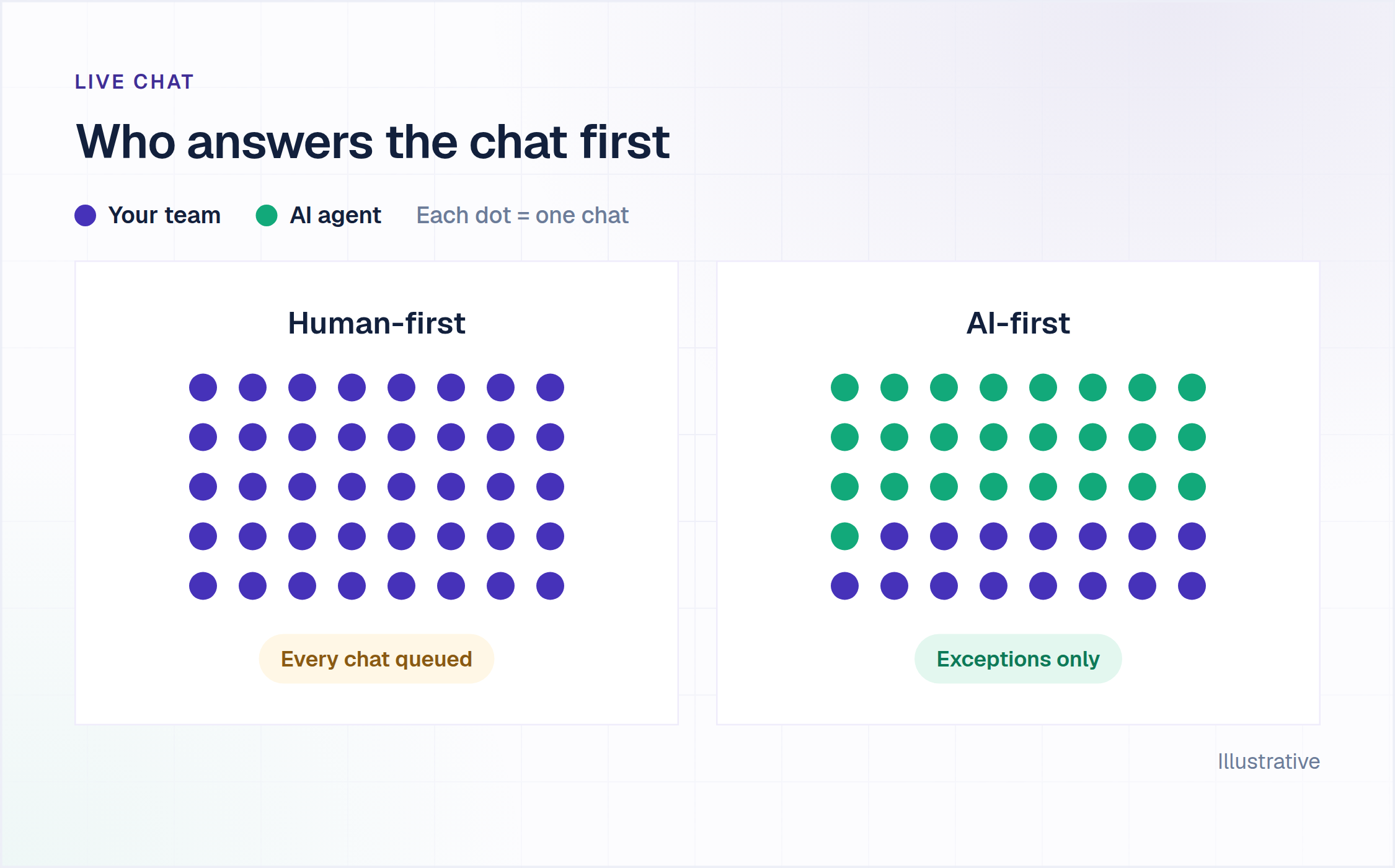
The 2026 split is what answers first. Older tools route every chat to a human and add a chatbot for FAQs. An AI Support Agent answers from your own knowledge and escalates only what it cannot resolve. Our guide to the AI chatbot for customer service covers that architecture in depth.
How We Evaluated These Live Chat Tools
Five checks, each answered from the vendor's own pricing and product pages in September 2026.
What the free plan actually allows. Free live chat software varies more than any other line on these pages. Some plans cap agents, some cap chats, and some leave out AI entirely.
Whether the AI resolves or routes. A chatbot that suggests an article has not resolved the request. We looked for an AI agent that answers in the chat and hands off only what it cannot finish.
Where requesters reach it. Website chat is the baseline. We also noted Help Center portals, messaging apps and Slack Connect shared channels where the vendor names them.
What the escalation carries. The human should receive the full conversation, the account context and suggested next steps, not a transcript to reread.
What the bill is at 5 and 15 agents. Per-agent pricing looks small at one seat. We priced every tool at two real team sizes, on annual billing where the vendor offers it.
Live Chat Software Comparison (2026)
Prices come from each vendor's own pricing page, checked between 7 and 23 September 2026, billed annually where offered. Visit each vendor's site directly to verify current rates.
Free Live Chat Software: What Each Free Plan Allows
Five tools on this list offer a permanent free plan, and they cap very different things. LiveChat, Zendesk, Fin and LiveAgent offer trials instead of a free plan.
Tidio also has a free plan, and its first 50 Lyro AI conversations are free for the life of the account.
The line that matters is what happens at the limit. On Enjo's Free plan, requests escalate to human agents in Enjo Inbox once the 200 AI replies are used. Seats stay unlimited, so no chat is dropped.
What Live Chat Software Costs at 5 and 15 Agents
Per-agent pricing turns team size into the main cost driver. This table prices the plan each vendor would put a live chat team on, before AI usage.
Annual billing where offered. Monthly billing costs more on most tools: LiveChat Team is $59 per person and HubSpot Starter is $20 per seat when paid monthly.
Enjo and tawk.to stay flat as the team grows. Enjo prices AI usage rather than seats, and every published plan includes unlimited human agent seats.
The 10 Best Live Chat Software Tools, Reviewed
1. Enjo
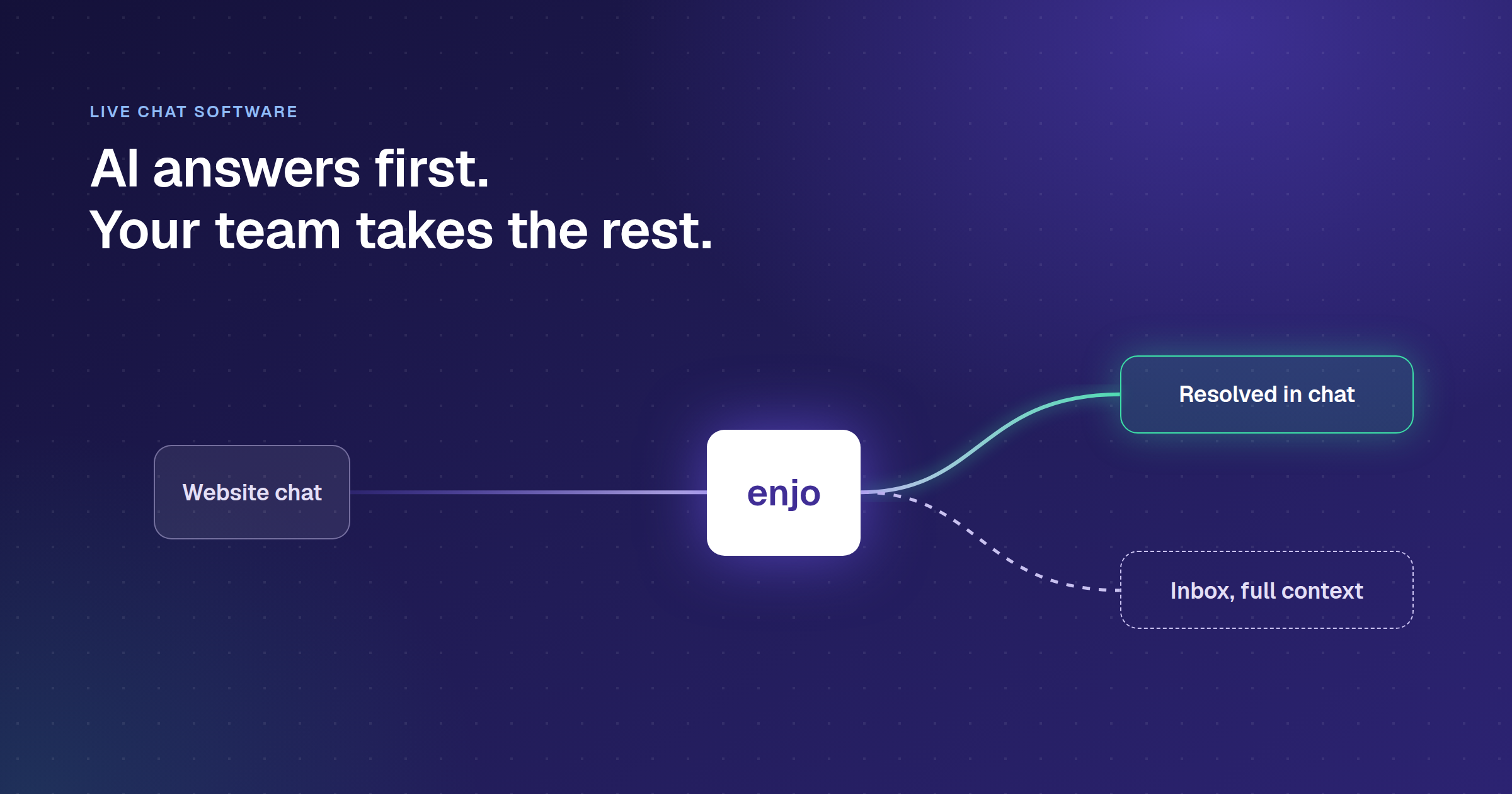
Enjo is an AI Support Agent that answers in your website chat widget and escalates into Inbox when it cannot resolve the request.
How it goes to market: Sold self-serve to support teams of any size, priced per AI reply with unlimited human agent seats and a permanent free plan.
Key capabilities:
- Answers inside the chat widget: the agent reads the question, pulls the answer from your website pages, docs and past tickets, and replies with a citation.
- Hands off with the work done: when it cannot resolve, the chat lands in Inbox with the full conversation, account context and suggested next steps.
- Runs the human queue in Inbox: round-robin or load-based assignment, SLA timers with breach alerts, saved views, and Slack Connect shared channels beside website chat.
- Drafts for your agents: Agent Assist summarizes the case, suggests a reply from prior resolutions and translates drafts in one click.
- Keeps answers and articles in sync: one index grounds the agent and the Help Center, and resolved conversations draft new articles for review.
- Brings your history across: Inbox imports past conversations from Crisp, Slack and Intercom, and tickets from Zendesk.
- Governs every reply: Guardrails restrict topics and patterns, and an audit log records each AI decision.
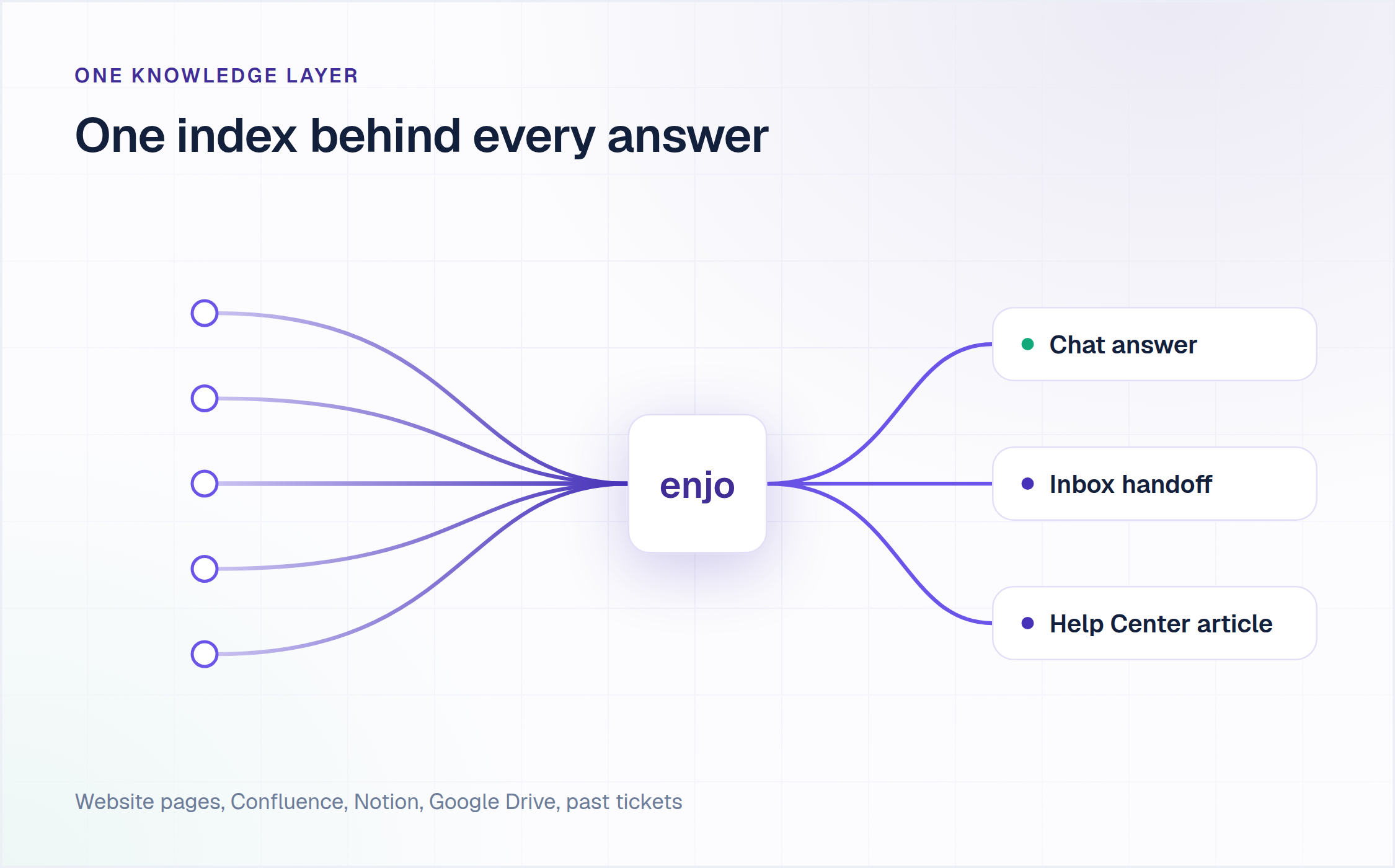
Live chat software knowledge layer: one Enjo index answers chats, hands off to Inbox and drafts Help Center articles
Pricing: Free is $0 a month for 200 AI replies, with unlimited human agent seats, AI agents and channels, plus Inbox, Help Center and Insights. No credit card. Starter is $95 a month for 1,000 AI replies and Standard is $295 for 3,000, with additional replies at $0.05 each. Enterprise is custom. Current plans are on Enjo pricing.
Scope: Enjo Platform is built agent-first. The AI Support Agent is configured before any queue exists, and Inbox is the helpdesk for escalations and human collaboration rather than the primary work surface. Teams that want a ticket queue first with AI attached later are describing the legacy model, which is the point rather than a limit.
Enjo is built by Troopr Labs, which runs 600+ enterprise deployments with 99.9% uptime over 7 years. Troopr Labs is SOC 2 Type II, ISO 27001 and GDPR compliant.
2. LiveChat
LiveChat is a live chat platform from Text, Inc., built around a website widget, an agent app and a marketplace of integrations.
How it goes to market: Sold per person on four plans to ecommerce and SaaS teams, with a 14-day trial and no free plan.
Key capabilities:
- Routes chats by page: URL rules send chats from a pricing page to sales and from a help page to support.
- Suggests replies from your content: reply suggestions draw on imported knowledge sources, 3 on Starter and 10 on Team and Business.
- Predicts staffing: the Business plan estimates how many agents your chat volume needs.
- Covers many sites on one license: the widget runs on any number of websites at no extra charge.
Pricing: Starter is $19 a month for one user, Team is $49 per person and Business is $79 per person, billed annually. Monthly billing is $25, $59 and $89. The AI Agent is sold through LiveChat's separate Text product, from $19 per user a month. Visit livechat.com directly to verify.
Limitation: Every agent account is billed whether or not it is logged in, and Starter allows one user only. Removing LiveChat branding is an Enterprise feature.
3. Tidio
Tidio is a customer service platform that pairs live chat with Lyro, an AI agent that answers from your support content.
How it goes to market: Sold to smaller teams and ecommerce stores, billed on conversation volume rather than seats.
Key capabilities:
- Learns from existing content: FAQ upload, a website scraper and Zendesk article import on every plan.
- Bills human conversations only on the base meter: a billable conversation needs a reply from a human agent, and Lyro replies do not count.
- Takes Shopify actions: native Shopify actions from the Growth plan.
- Runs Lyro on another helpdesk: Lyro works as an add-on to Zendesk or Salesforce.
Pricing: Free at $0. Starter is $24.17 a month billed annually for 100 billable conversations, Growth starts at $49.17 and Plus at $300 a month plus usage. Lyro starts at $32.50 a month for 50 Lyro conversations. Visit tidio.com directly to verify.
Limitation: Seats cap at 10 until the Plus plan, and the AI quota runs separately from the human conversation quota.
4. tawk.to
tawk.to is a free live chat platform with a chat widget, ticketing and a knowledge base, funded by paid add-ons.
How it goes to market: Free for unlimited agents, with revenue from add-ons such as AI Assist, branding removal and Hired Agents.
Key capabilities:
- Unlimited agents and chats: no cap on agents, chat volume or websites on the core plan.
- Watches visitors live: see who is on your site and which page they are viewing before you open a chat.
- Ships ticketing and a knowledge base: email tickets and a help center come with the free plan.
- Staffs your chat for hire: Hired Agents supplies trained chat operators billed by the hour.
Pricing: The core plan is $0. AI Assist, branding removal and Hired Agents are paid add-ons. Visit tawk.to directly to verify current add-on prices.
Limitation: AI answers are an add-on rather than part of the core product, so the free plan sends every chat to a person.
5. Zendesk
Zendesk offers live chat through Zendesk Messaging inside its customer service suite, alongside ticketing and AI agents.
How it goes to market: Sold inside Zendesk plan tiers per agent, with AI agents billed per automated resolution.
Key capabilities:
- One workspace for web, app and social: website chat, the mobile app SDK and social channels land in the same agent view.
- Bills AI on outcomes: an automated resolution counts only when the request resolves without a human.
- Builds multi-step actions: Action Builder chains steps across Zendesk and third-party systems.
- Covers 80+ languages: with 1,800+ apps and integrations in the marketplace.
Pricing: Suite Team is $55 per agent a month billed yearly, and Suite Professional is $115. Copilot is a $50 per agent add-on. Visit zendesk.com directly to verify.
Limitation: The per-resolution rate is not on the pricing page, so total AI cost cannot be modelled from published figures. There is no free plan, only a 14-day trial.
6. Fin (Formerly Intercom)
Fin is an AI agent for customer service messaging, sold standalone on other helpdesks and bundled with the Intercom suite.
How it goes to market: Billed per outcome, plus a seat price when run inside Intercom. Salesforce signed an agreement to acquire Fin in June 2026, and the deal has not closed.
Key capabilities:
- Bills one outcome per conversation: however many actions Fin takes, and nothing when a chat simply passes to your team.
- Runs Procedures: natural-language automations that end in a configured handoff to a human or a workflow.
- Tests before launch: simulations and regression tests run before a change goes live.
- Works on other helpdesks: including Salesforce, HubSpot, Freshworks, Front, Zoho and Gorgias.
Pricing: $0.99 per outcome. Inside Intercom, add $29 per helpdesk seat a month; on another helpdesk, a 50-outcome monthly minimum applies. A 14-day trial is available. Visit fin.ai directly to verify.
Limitation: The bill rises as the agent improves, because every extra resolution is another $0.99. There is no free plan to test on real volume first.
7. HubSpot
HubSpot Service Hub includes live chat inside the HubSpot customer platform, sharing contact records with its CRM.
How it goes to market: Free tools for two users, paid plans per seat, and AI billed through HubSpot Credits.
Key capabilities:
- Attaches chats to CRM records: every chat sits on the contact record your sales and marketing teams already use.
- Qualifies with chatflows: free chatflows ask the first questions and route the visitor to the right team.
- Runs Breeze Customer Agent: the AI agent uses 50 HubSpot Credits per conversation.
- Shares an inbox with tickets: free ticketing and shared conversations sit in one view.
Pricing: Free for up to 2 users. Starter is $7 per seat a month billed annually, or $20 monthly. Professional is $90 per seat billed annually, plus a one-time $1,500 onboarding fee. Visit hubspot.com directly to verify.
Limitation: Breeze Customer Agent sits on Professional and Enterprise, so AI answers in chat start at $90 a seat plus the onboarding fee.
8. Crisp
Crisp is a customer messaging platform with a chat widget, shared inbox, knowledge base and an AI agent called Hugo.
How it goes to market: Priced per workspace with seats bundled into each plan, plus a free plan for 2 seats.
Key capabilities:
- Bundles seats into the plan: Mini includes 4 seats, Essentials 10 and Plus 20, with extra seats at $10 each.
- Starts chats from behavior: chat triggers open a conversation based on what a visitor does on the page.
- Adds a shared email inbox: from Mini, email and chat land in one collaborative inbox.
- Meters Hugo on credits: each paid plan includes a monthly AI credit allowance.
Pricing: Free at $0. Mini is $45 a month per workspace, Essentials $95 and Plus $295. Visit crisp.chat directly to verify.
Limitation: Seat bundles create price steps. A fifth person moves the bill from $45 to $95, and an eleventh from $95 to $295.
9. Zoho SalesIQ
Zoho SalesIQ is a live chat and visitor-tracking tool that feeds chats and leads into Zoho CRM.
How it goes to market: Priced per operator with a free plan for 3 operators, and included in the Zoho One and Zoho CRM Plus bundles.
Key capabilities:
- Scores visitors and companies: lead and company scoring rank who to chat with first.
- Pushes chats into CRM: conversations and lead details flow into Zoho CRM records.
- Separates brands: each brand manages its own website, app and messaging touchpoints.
- Adds a chatbot from Basic: the Basic plan includes one custom chatbot.
Pricing: Free for 3 operators. Basic is $7 per operator a month billed annually, or $10 monthly. Professional is $17 per operator monthly. Zoho may show prices in local currency, so visit zoho.com directly to verify.
Limitation: The free plan caps at 100 operator chat sessions a month.
10. LiveAgent
LiveAgent is a helpdesk that combines live chat with email ticketing in one agent workspace.
How it goes to market: Sold per agent on three plans, with a 30-day trial and no credit card required.
Key capabilities:
- Puts chat and tickets in one queue: chats and emails arrive in the same workspace for your agents.
- Includes mobile apps: Android and iOS helpdesk apps come with every plan at no extra fee.
- Includes the API: API access and integrations are part of every subscription.
- Trials every plan: each tier can be tested for 30 days before paying.
Pricing: Small is $15 per agent a month, Medium $29 and Large $49. Visit liveagent.com directly to verify.
Limitation: There is no permanent free plan, and every agent is billed on every tier.
How to Set Up Live Chat on Your Website
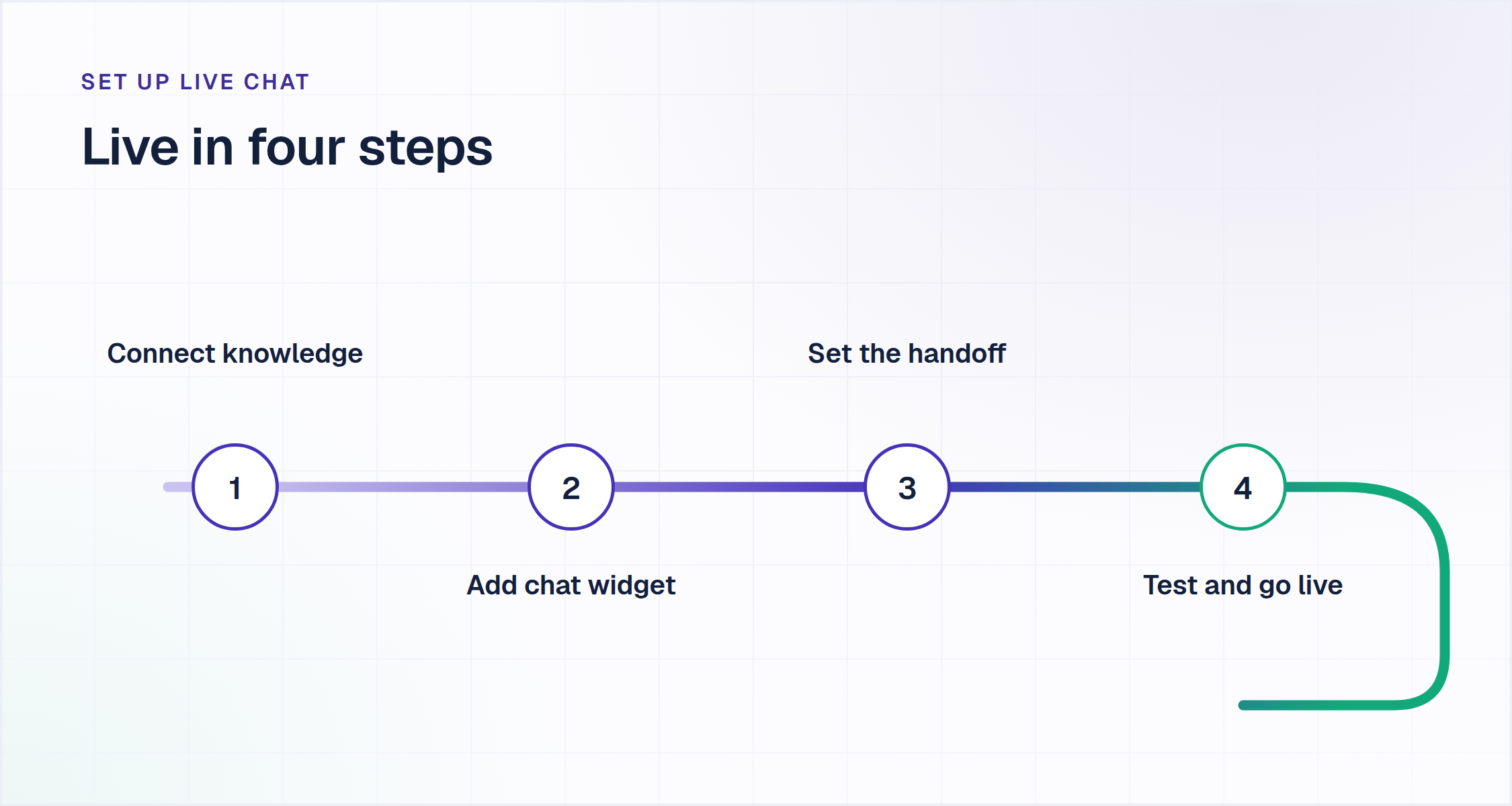
Four steps, shown here with Enjo. The same order works for most tools on this list.
- Connect your knowledge. Add your website URL and connect Confluence, Notion or Google Drive. Enjo crawls the site once and syncs connected docs daily.
- Add the chat widget. Install the Enjo website chat widget so requesters reach the AI agent from any page.
- Set the handoff. Define when the agent escalates, then set office hours and round-robin assignment in Inbox.
- Test, then go live. Run real questions through Playground and fix gaps before the widget goes public.
Our guide to the AI chatbot for website covers widget setup in more detail.
How to Run the Evaluation on Your Own Site
Run these four checks on every tool you shortlist, on your own site rather than in a demo.
- Hit the free plan's limit on purpose. Send enough test chats to reach the cap, then see whether chats drop, queue or reach a person.
- Ask a question your help center does not answer. Watch whether the AI escalates or invents an answer.
- Follow one escalation to the agent. The full conversation, account context and suggested next steps should arrive, not a bare transcript.
- Price 15 agents, not one. Take your real headcount and AI volume and run them through each pricing page.

Frequently Asked Questions
What is the best live chat software?
Enjo is our pick for the best live chat software when you want an AI agent answering first, with unlimited human agent seats on a free plan. LiveChat, Zendesk and LiveAgent center on human agents billed per seat.
Is there free live chat software with no agent limit?
Enjo and tawk.to both offer free live chat software with no agent cap. Enjo's Free plan includes 200 AI replies a month and unlimited human agent seats. tawk.to's core plan is free for unlimited agents, with AI sold as an add-on.
What is the difference between a live chat app and live chat software?
A live chat app is usually the web, desktop or mobile app your agents answer from. Live chat software is the whole system: widget, inbox, routing and reporting. LiveChat, for example, ships its live chat app on web, desktop and mobile with every plan.
How much does live chat software cost per month?
Live chat software runs from $0 to $825 a month for a 15-agent team across the plans compared here, before AI usage. Per-agent tools scale with headcount, such as LiveChat Team at $49 per person and Zendesk Suite Team at $55 per agent. Enjo prices AI replies instead of seats.
How do I add live chat to my website?
You add live chat to a website by installing the vendor's chat widget on your pages and connecting the inbox your team answers from. With Enjo, you also connect your website URL and docs first, so the AI agent answers from day one.
Can live chat software answer questions automatically?
Live chat software with an AI agent answers questions automatically from your own content. Enjo, Tidio's Lyro, Fin, Crisp's Hugo and HubSpot's Breeze Customer Agent all do this. They differ in what each answer costs and what the human receives at handoff.