Transform complex support workflows
Best Help Center Software in 2026: 9 Tools Compared on AI Cost and Upkeep
By Yoshi Bansal, Associate Product Manager at Enjo. Every price on this page was checked on the vendor's own site on 30 September 2026.
Help center software publishes the customer-facing side of support: a searchable portal of help articles and, increasingly, an AI that answers from them. It comes inside per-agent help desks, as standalone knowledge bases, or built around the maintenance loop, where Enjo Help Center sits. Enjo Help Center ranks first: AI answers come on every plan, Free included, and a question it cannot answer becomes a draft article once your team resolves it. A help desk manages the requests that reach your team; a help center exists so fewer need to.
The nine tools, in ranked order:
- Enjo Help Center: AI answers on every plan, Free included, with unanswered questions turned into draft articles.
- Zendesk: generative search answers in the help center, included with per-agent Suite plans.
- Help Scout: Docs and the Beacon widget, with AI Answers at $0.75 per resolution.
- Freshdesk: a customer portal on every plan, with Freddy AI Agent billed per session.
- Fin (formerly Intercom): a public Help Center with the Intercom helpdesk, and Fin AI Agent at $0.99 per outcome.
- Zoho Desk: Answer Bot in the help center from the Standard edition, and over 40 languages on Professional.
- HubSpot Service Hub: a knowledge base from Professional, with a Knowledge Base Agent that drafts from resolved interactions.
- Document360: a standalone knowledge base with cited AI search answers, priced by custom quote.
- Helpjuice: a standalone knowledge base with its AI Suite from $449 a month.
Each one is compared on what its AI answers cost, how its articles stay current and what its free plan includes, with prices from the vendor's own site.
Help Center vs Help Desk vs Knowledge Base vs Self-Service Portal
The four terms get used interchangeably, but each names a different job.
| Term | What It Is | Who Uses It | Typical Job |
|---|---|---|---|
| Help center | Public portal of help articles and AI answers. | Customers and end users. | Answer questions before a request is raised. |
| Help desk | Queue for requests that reach your team. | Support agents. | Assign, track and resolve each request. |
| Knowledge base | The article library behind a portal or agent. | Writers, agents and AI agents. | Store, version and publish answers. |
| Self-service portal | Help center plus account actions. | Logged-in customers or employees. | Submit requests and check their status. |
Help desk software is used to receive, assign, track and resolve the requests that reach a support team, across email, chat and messaging. Our comparison of help desk software covers that side of support.
A self-service portal adds actions to the help center, such as submitting a request or checking its status. Our review of customer self-service portals compares the tools built around that job.
Enjo keeps both sides on one knowledge index: Enjo Help Center answers on the portal, and Enjo Inbox receives the questions the portal cannot answer.
How We Evaluated Help Center Software
Each tool was judged on its help center alone, with suite features counted only where they change the help center's cost. Pricing and documentation were checked on each vendor's own site on 30 September 2026, on seven dimensions.
- Where requesters get answers: portal search, a website widget, chat, Slack or Microsoft Teams.
- What AI answers cost: included, add-on, per resolution, per outcome, per session or paid in credits.
- How articles are created: from a URL, connected docs, past tickets or a blank editor.
- How outdated articles are found: a source-change flag, an AI review or someone's calendar reminder.
- What happens to an unanswered question: a prompt to rephrase, a handoff to a person or a draft article.
- Audience and brand controls: audience targeting, multi-brand help centers and a custom domain.
- Free plan scope: what stays free, and what happens at the limit.
Upkeep carries as much weight as the editor, because content is where self-service breaks down. In Gartner's survey of 5,728 customers, only 14% of service issues were fully resolved in self-service. In 43% of cases, customers could not find content relevant to their issue. Our guide to self service customer service covers why that figure stays low.
AI answers inherit the same gap. Any AI knowledge base answers only as well as its freshest article, so this list weighs how each tool keeps articles current as heavily as how it writes them.
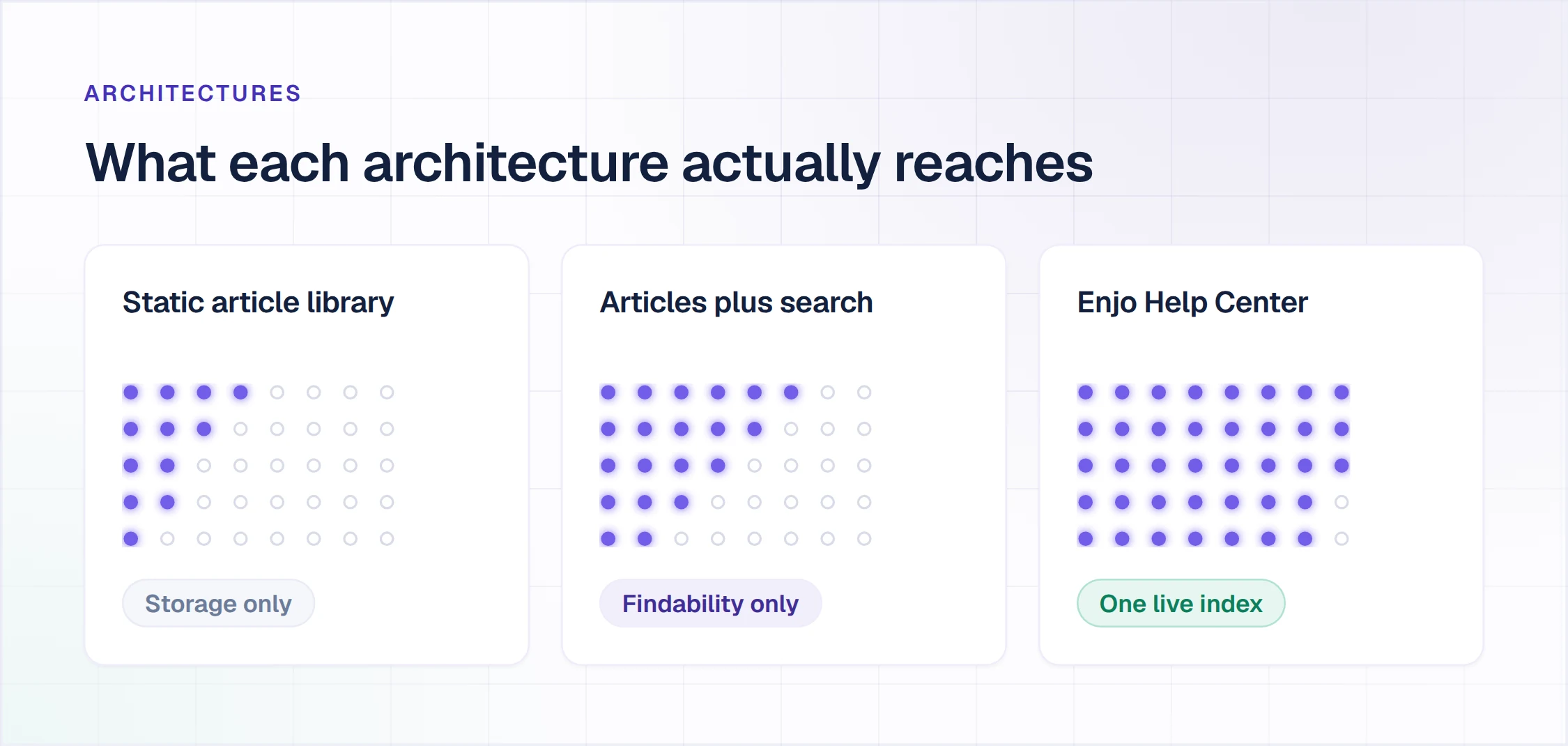
Help Center Software Compared
The table compares each tool's help center, priced at the lowest paid tier that includes one. Every cell comes from the vendor's own pages, checked on 30 September 2026.
| Tool | Help Center Sold As | AI Answers on the Portal | Free Plan | Starting Price |
|---|---|---|---|---|
| Enjo Help Center | Standalone, on every plan. | Included on every plan, Free too. | Yes, 200 AI replies a month. | $95 a month; Free is $0. |
| Zendesk | Inside Suite plans. | Generative search included; AI agents per resolution. | No; 14-day trial. | $55 per agent a month. |
| Help Scout | Docs, in every plan. | Add-on, $0.75 per resolution. | Yes; Docs capped at 10 articles. | $25 per user a month. |
| Freshdesk | Portal, in every plan. | Per session, $49 per 100. | No; 14-day trial. | $19 per agent a month. |
| Fin (formerly Intercom) | With the Intercom helpdesk. | $0.99 per outcome. | No; 14-day trial. | $29 per seat, plus outcomes. |
| Zoho Desk | From the Standard edition. | Answer Bot from Standard. | Free Edition lists no knowledge base. | INR only; USD not confirmed. |
| HubSpot Service Hub | From the Professional tier. | $0.50 per resolved conversation, in credits. | Free tools exclude the knowledge base. | $90 per seat a month. |
| Document360 | Standalone platform. | AI search included; chatbot is an add-on. | No; 14-day trial. | Custom quote. |
| Helpjuice | Standalone knowledge base. | AI Suite from the $449 plan. | No; 14-day trial. | $249 a month, 30 users. |
The 9 Best Help Center Software Tools
1. Enjo Help Center
Best for: Support teams that need help center articles kept current after launch.
Enjo Help Center is a help center that drafts its articles from content you already have and answers questions on the portal from one knowledge index.
How it goes to market: Included on every Enjo plan, from Free to Enterprise, and priced per AI reply, with unlimited human agent seats on published plans.
- AI Assistant: the search widget in the portal answers questions in plain language from published articles and cites the source it used.
- Article Generation: drafts articles from a website URL, from Notion, Google Drive, Confluence or SharePoint, or from ticket patterns in Zendesk, Intercom or Freshdesk. Existing articles import from a Zendesk Help Center, Intercom, Notion or Confluence.
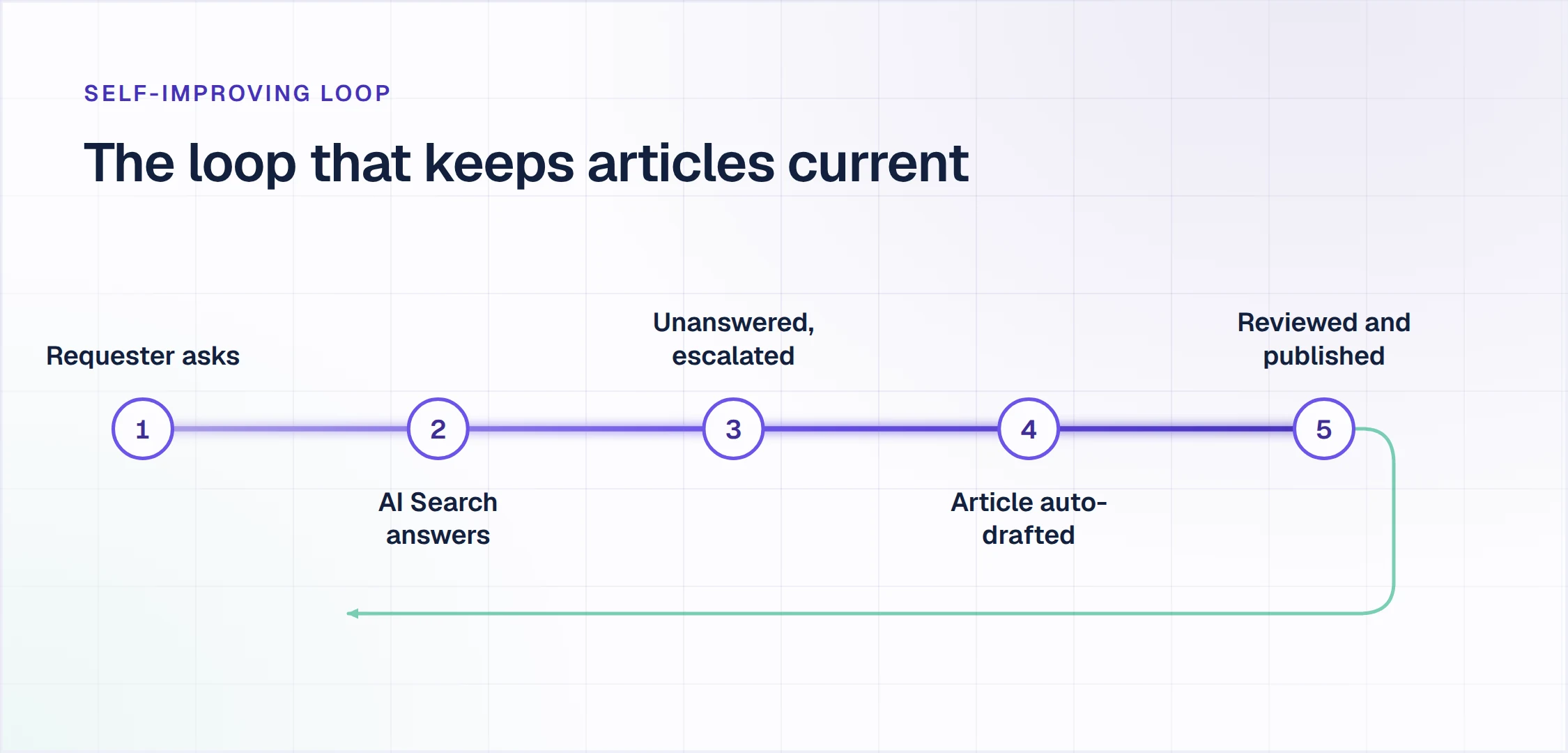
- Self-Improving Loop: a question the portal cannot answer escalates to your team in Enjo Inbox with the full conversation, account context and suggested next steps. Once it is resolved, the conversation becomes a draft article for review.
- Help Center Agent: creates and updates articles from templates, plain-language prompts and your connected sources, including bulk rewrites. Its Refresh an outdated article template checks an article against your current product and sources and flags what no longer matches. Proposed changes appear in a Review changes panel, and nothing goes live without review.
- Audience Targeting and Multi-brand: each article can be shown by plan, role, segment or login state, and separate help centers can run by product, region or audience.
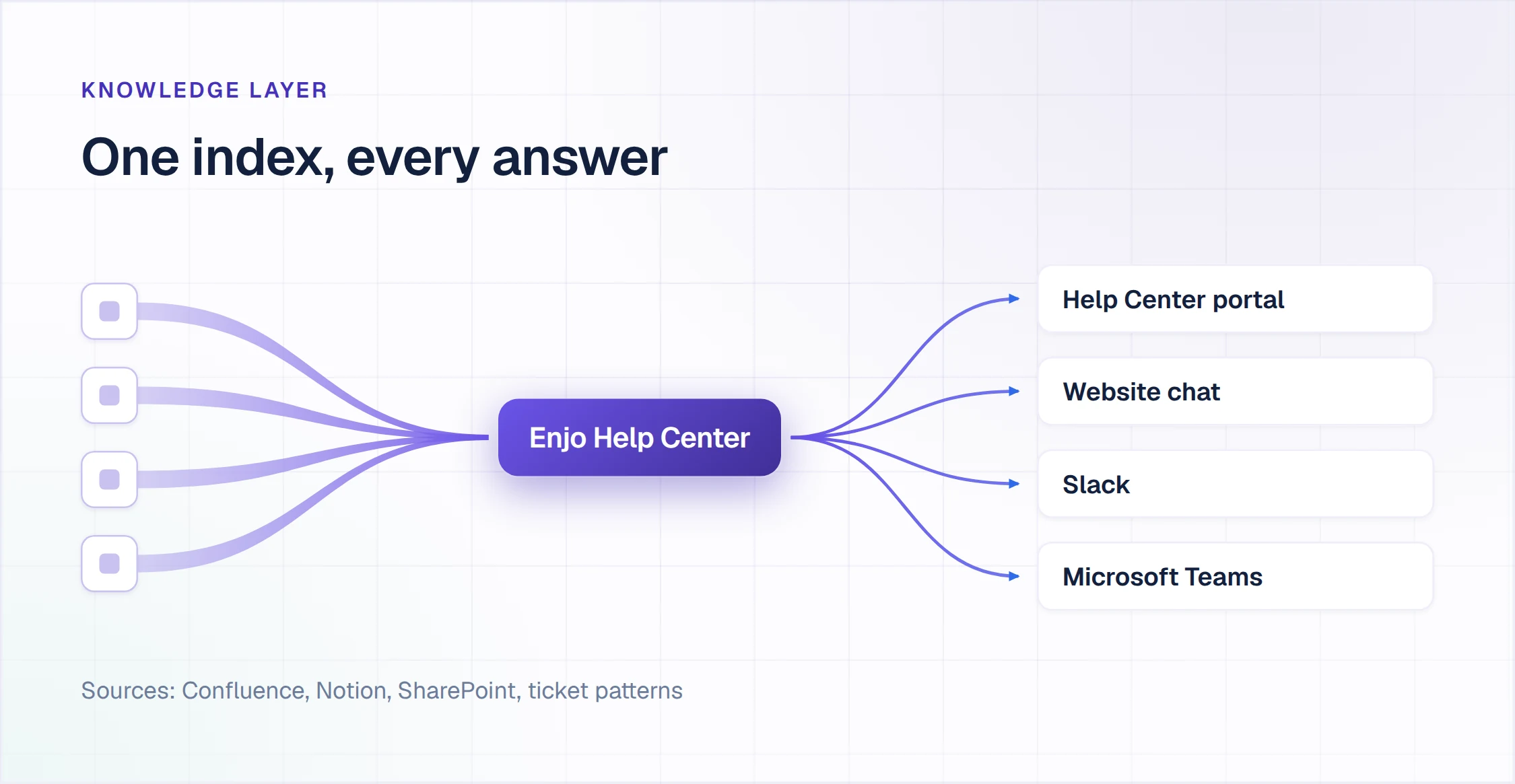
- One knowledge index: the same index grounds Enjo, the AI Support Agent, in Slack, Microsoft Teams, website chat and Slack Connect shared channels. What the agent says is what requesters find on the portal.
- Guardrails and audit logs: every answer is grounded in your knowledge with a citation, Guardrails bound AI inputs and outputs, and audit logs record each decision. Enjo is SOC 2 Type II, ISO 27001 and GDPR compliant, and Troopr Labs, the company behind Enjo, has 600+ enterprise deployments and 99.9% uptime over 7 years.
AI answers on the portal: Included on every plan, Free included, within each plan's monthly AI replies: 200 on Free, 1,000 on Starter and 3,000 on Standard.
Pricing: Free is $0 a month with 200 AI replies; Starter is $95 with 1,000; Standard is $295 with 3,000; Enterprise is custom, billed yearly. Published plans include unlimited human agent seats, and Free needs no credit card (pricing on enjo.ai, checked 30 September 2026).
Scope: Enjo Help Center is built around the maintenance loop rather than the authoring editor. Articles are generated from a URL or connected docs. Unanswered questions draft new articles for review, and the same index that answers requests keeps the portal current, which is the point rather than a limit.
Free plan, no credit card
AI answers on your help center, included from the Free plan.
The Free plan includes 200 AI replies a month, Help Center, Inbox and Insights, with unlimited human agent seats. At the limit, requests escalate to your team in Inbox, so no request is dropped.
Launch your free Help Center2. Zendesk
Best for: Teams running ticketing, messaging and the help center in one suite.
Zendesk is a customer service platform, and its knowledge base and help center, sold as Zendesk Knowledge, come with its Suite plans.
How it goes to market: Sold per agent in Support and Suite plans, paid yearly, with AI agents included in every plan and billed on automated resolutions.
- Knowledge Builder: analyzes historical tickets and business context to find common questions, suggest a structure and draft articles for review.
- Generative search: answers a question typed into help center search from one or more content sources, with the source articles available for reference.
- Knowledge connectors: bring content from Google Drive, Confluence, SharePoint and PDFs into Zendesk without migrating or copying it.
- Admin copilot: identifies content gaps, outdated articles and improvement opportunities in the knowledge base.
- AI agents: answer across messaging, email and other channels from approved Zendesk content and external knowledge sources.
AI answers on the portal: Generative search is included in every Suite plan, up to 100,000 eligible searches a month. AI agents bill per automated resolution against a per-seat monthly allowance, then pay-as-you-go at a rate the pricing page does not show.
Pricing: Suite Team is $55 per agent a month and Suite Professional $115, both paid yearly; the $19 Support Team plan does not list the knowledge base. Zendesk offers a 14-day trial and no free plan (pricing on zendesk.com, checked 30 September 2026).
Where it falls short: The help center is priced by agent seat, so its cost grows with the support team rather than with the questions it answers.
Weighing a move off Zendesk?
See our Zendesk alternatives comparison →
3. Help Scout
Best for: Support teams running a shared inbox and help docs in one tool.
Help Scout is a customer support platform with a shared inbox, a Docs knowledge base and Beacon, a help widget for your site or app.
How it goes to market: Sold per user in Standard, Plus and Pro plans, with a Free plan for up to 5 users; AI Answers is a per-resolution add-on.
- Docs sites: one on Free, two on Standard, three on Plus and five on Pro, with extra sites from $20 a month.
- Beacon: suggests and searches Docs articles inside your site or app, alongside live chat and a contact form.
- AI Answers: answers in Beacon from your Docs sites and from other public sites and documents you add as sources.
- Fallback: when AI Answers finds no answer, it prompts the visitor to try again or to reach your team by chat or email.
- Private Docs: Beacon can serve a private Docs site that only logged-in users see.
AI answers on the portal: AI Answers costs $0.75 per resolution, charged once per conversation, on paid plans after a 3-month trial.
Pricing: Free covers 5 users, 1 inbox and 1 Docs site. Standard is $25 per user a month billed monthly, Plus $45 and Pro $75, with 16% off annual billing (pricing on helpscout.com, checked 30 September 2026).
Where it falls short: The Free plan's single Docs site is capped at 10 articles.
4. Freshdesk
Best for: Per-agent help desks with a bundled customer portal.
Freshdesk is the customer support help desk from Freshworks, with a customer portal and knowledge base on every plan.
How it goes to market: Sold per agent in Growth, Pro and Enterprise plans billed annually, with Freddy AI Agent sessions and Freddy AI Copilot sold on top.
- Customer portal and knowledge base: a branded self-service destination for help articles, FAQs and categories, included from the Growth plan.
- Freddy AI Agent: answers from solution articles, public URLs, uploaded files and custom Q&As across email, webchat, WhatsApp and social channels.
- Handoff: transfers the conversation to a human agent with full context, so the customer does not repeat the question.
- Solution article generator: drafts a help article from a title and prompts, for an agent to review and refine.
- Multilingual helpdesk: listed on the Pro and Enterprise plans.
AI answers on the portal: Freddy AI Agent is billed per session: 500 one-time sessions come with a paid plan, then each pack of 100 costs $49.
Pricing: Growth is $19 per agent a month, Pro $55 and Enterprise $89, billed annually. Signup starts a 14-day Enterprise trial, and there is no free plan (pricing on freshworks.com, checked 30 September 2026).
Where it falls short: Drafting articles with AI needs the Freddy AI Copilot add-on, $29 per agent a month, on Pro or Enterprise.
5. Fin (formerly Intercom)
Best for: Teams running an AI agent billed per outcome.
Fin, the company formerly called Intercom, sells the Fin AI Agent and a helpdesk whose plan includes a public Help Center and Knowledge Hub.
How it goes to market: Fin AI Agent is billed per outcome, alone on any helpdesk or with the Intercom helpdesk at a per-seat price. Salesforce completed its acquisition of Fin on 10 September 2026.
- Public Help Center: included in the plan with the Intercom helpdesk, alongside the Knowledge Hub.
- Fin AI Agent: answers over chat, email and voice from Help Center articles, internal support content, PDFs and webpages.
- Handoff rules: you set how and when Fin triages or hands off to your team, and it hands off automatically when that is the safest option.
- Content gap recommendations: show where Fin could not answer because content was missing, unclear, duplicated or contradictory, for your team to accept or reject.
- Fin Operator: proposes new, edited or removed articles as reviewable changes, and nothing goes live until you approve it.
AI answers on the portal: Fin AI Agent costs $0.99 per outcome, such as a resolution; with any other helpdesk, a 50-outcome monthly minimum applies.
Pricing: The Intercom helpdesk is $29 per seat a month plus outcomes from $0.99; the Pro add-on starts at $99 a month. The 14-day trial needs no credit card (pricing on fin.ai, checked 30 September 2026).
Where it falls short: Content gap recommendations and Fin Operator, the tools that propose article fixes, require the Pro add-on, from $99 a month.
6. Zoho Desk
Best for: Multilingual help centers inside a per-user help desk.
Zoho Desk is the customer service help desk from Zoho, and its help center and knowledge base start on the Standard edition.
How it goes to market: Sold per user in Express, Standard, Professional and Enterprise editions billed annually, plus a Free Edition with three user licenses for email ticketing.
- Knowledge base: a repository of help articles, guides and FAQs, from the Standard edition.
- Answer Bot: answers from FAQs and knowledge base articles in the help center and in mobile apps. When it cannot answer, it offers "Chat with Agent" if live chat is enabled.
- Zia: converts conversations from your tickets into help articles.
- Multilingual and multi-brand: articles in over 40 languages from Professional, and help centers for multiple brands on Enterprise.
- Custom domain: connects your brand's support subdomain from the Express edition.
AI answers on the portal: Answer Bot comes with the Standard edition, and the pricing page shows no per-answer fee for it.
Pricing: Zoho's pricing page rendered only in Indian rupees for this check, so no US dollar figure is stated here. Paid editions start with a 15-day trial (pricing on zoho.com, checked 30 September 2026).
Where it falls short: Zia, which turns ticket conversations into articles, is listed from Professional, one edition above the first with a knowledge base.
7. HubSpot Service Hub
Best for: Service teams working on HubSpot's customer platform.
HubSpot Service Hub is HubSpot's customer service software, and its knowledge base comes with the Professional and Enterprise tiers.
How it goes to market: Sold per seat, with AI agent usage paid in HubSpot Credits that reset monthly and a required onboarding fee on Professional and Enterprise.
- Knowledge base: one knowledge base of up to 2,000 articles on Professional, and up to 100 knowledge bases with 10,000 articles on Enterprise.
- Customer Agent: answers on chat and other live channels from synced content such as knowledge base articles.
- Low-confidence handling: the Customer Agent asks the visitor to rephrase or transfers the conversation to a human agent when its confidence is low.
- Knowledge Base Agent: turns successful support interactions into articles and identifies knowledge gaps, and you review and approve each article before it publishes.
- Multilingual articles: self-serve help articles in multiple languages, optimized for search.
AI answers on the portal: The Customer Agent uses 50 HubSpot Credits ($0.50) per resolved conversation, and Professional includes 3,000 credits a month.
Pricing: Professional is $90 per seat a month on an annual commitment ($100 monthly) and Enterprise $150. Knowledge Base Agent prompts cost 200 credits ($2) each (pricing on hubspot.com, checked 30 September 2026).
Where it falls short: The knowledge base starts on Professional, which carries a required $1,500 onboarding fee.
8. Document360
Best for: Documentation teams publishing public, private or mixed knowledge bases.
Document360 is a knowledge base platform for building self-service documentation for customers and employees.
How it goes to market: Priced by custom quote after a 14-day trial, with the AI Chatbot and the AI Premium Suite sold as add-ons.
- Eddy AI Writing Agent: turns a video, audio file, document or prompt into a structured article.
- AI Search and Answer: returns a direct answer synthesized from your articles, with the sources one click away.
- Search feedback manager: collects unanswered queries, where readers describe what they were looking for.
- Duplicate detection: flags articles that say the same thing twice.
- Privacy models: public, private or mixed knowledge bases.
AI answers on the portal: AI search with cited answers is included with the plans, and the AI Chatbot is an add-on.
Pricing: The quote depends on team accounts, workspaces, languages, security needs, the privacy model and AI Premium Suite usage (pricing on document360.com, checked 30 September 2026).
Where it falls short: Every plan is a custom quote, so the cost of AI answers cannot be sized from the pricing page.
9. Helpjuice
Best for: Knowledge bases priced flat by user count.
Helpjuice is knowledge base software for help docs and internal procedures, with an AI Suite on its upper plans.
How it goes to market: Sold at flat monthly prices by user count after a 14-day trial with no credit card. A user is anyone with login credentials to the knowledge base.
- AI Search and AI Chatbot: part of the AI Suite on the $449 and $799 plans.
- AI-Support Tickets: turns support tickets into help articles using AI suggestions.
- Auto-Updating KB extension: a Chrome extension that turns a webpage, notes or an informal chat into an article on request.
- Private and Internal Sections: listed on every plan, for content kept off the public site.
- Localization and AI Article Translation: included from the $249 plan.
AI answers on the portal: AI Search and the AI Chatbot come with the $449 plan and up, with no per-answer fee shown.
Pricing: $249 a month for 30 users without the AI Suite, $449 for 100 users with it, and $799 for unlimited users (pricing on helpjuice.com, checked 30 September 2026).
Where it falls short: Readers of private sections need login credentials, so each one counts toward the 30 or 100 user limit.
What Help Center Software Costs Once the AI Is On
Take a team of 5 support agents whose help center AI answers 1,000 questions a month. Each tool below is priced in its vendor's own meter. Where a vendor bills per resolution or outcome, the figure assumes all 1,000 answers are billable, so it is a ceiling. Enjo's figure counts each portal answer as one AI reply.
| Tool | How the AI Is Billed | Base for 5 Agents | 1,000 AI Answers | Monthly Total |
|---|---|---|---|---|
| Enjo Help Center | Per AI reply; unlimited seats. | $95 (Starter). | Included in Starter. | $95. |
| Zendesk | Per agent; AI agents per resolution. | $275 (Suite Team, yearly). | $0 through generative search. | $275, plus any AI agent resolutions. |
| Help Scout | Per user; $0.75 per resolution. | $125 (Standard, billed monthly). | Up to $750. | Up to $875. |
| Freshdesk | Per agent; $49 per 100 sessions. | $95 (Growth, annual). | $490 once 500 one-time sessions are used. | $585. |
| Fin (formerly Intercom) | Per seat; $0.99 per outcome. | $145 (Intercom helpdesk). | Up to $990. | Up to $1,135. |
| Zoho Desk | Per user, priced in INR. | Not confirmed in USD. | No per-answer fee listed. | Not confirmed in USD. |
| HubSpot Service Hub | Per seat; credits per resolution. | $450 (Professional, annual). | $470 after 3,000 included credits. | $920, plus $1,500 onboarding once. |
| Document360 | Custom quote. | Quote only. | Chatbot is an add-on. | Quote only. |
| Helpjuice | Flat monthly price by users. | $449 (100 users). | Included in the AI Suite. | $449. |
The billing shape decides how the total moves. Per-seat plans grow with the support team, and per-resolution fees grow as the AI succeeds. Enjo prices the AI reply and includes unlimited human agent seats, so a sixth agent adds nothing to the bill. Our list of AI knowledge base software compares these billing models across ten tools.
When a help center platform bills its AI separately, the bill rises in the month the AI starts resolving questions. Enjo pricing lists Standard at $295 for 3,000 AI replies a month, with the same unlimited seats.
What Happens When You Outgrow a Free Plan
A free plan matters most at its edge. Enjo's Free plan includes 200 AI replies a month, and at the limit, requests auto-escalate to human agents in Inbox. Support keeps running with unlimited seats, so no request is dropped.
Help Scout's Free plan covers 100 contacts a month; at the limit, replies stop across email, chat and AI Answers in Beacon until the next cycle or an upgrade. Zoho Desk's Free Edition covers three users for email ticketing, with the knowledge base from Standard. HubSpot's free tools leave out the knowledge base, which starts on Professional.
Zendesk, Freshdesk, Fin, Document360 and Helpjuice offer 14-day trials and no free plan.
How to Test Help Center Software on Your Own Content
Run these four checks during a free plan or trial, on your own content rather than a vendor demo. Each check has a result you can see, and Enjo Help Center's answer follows each one.
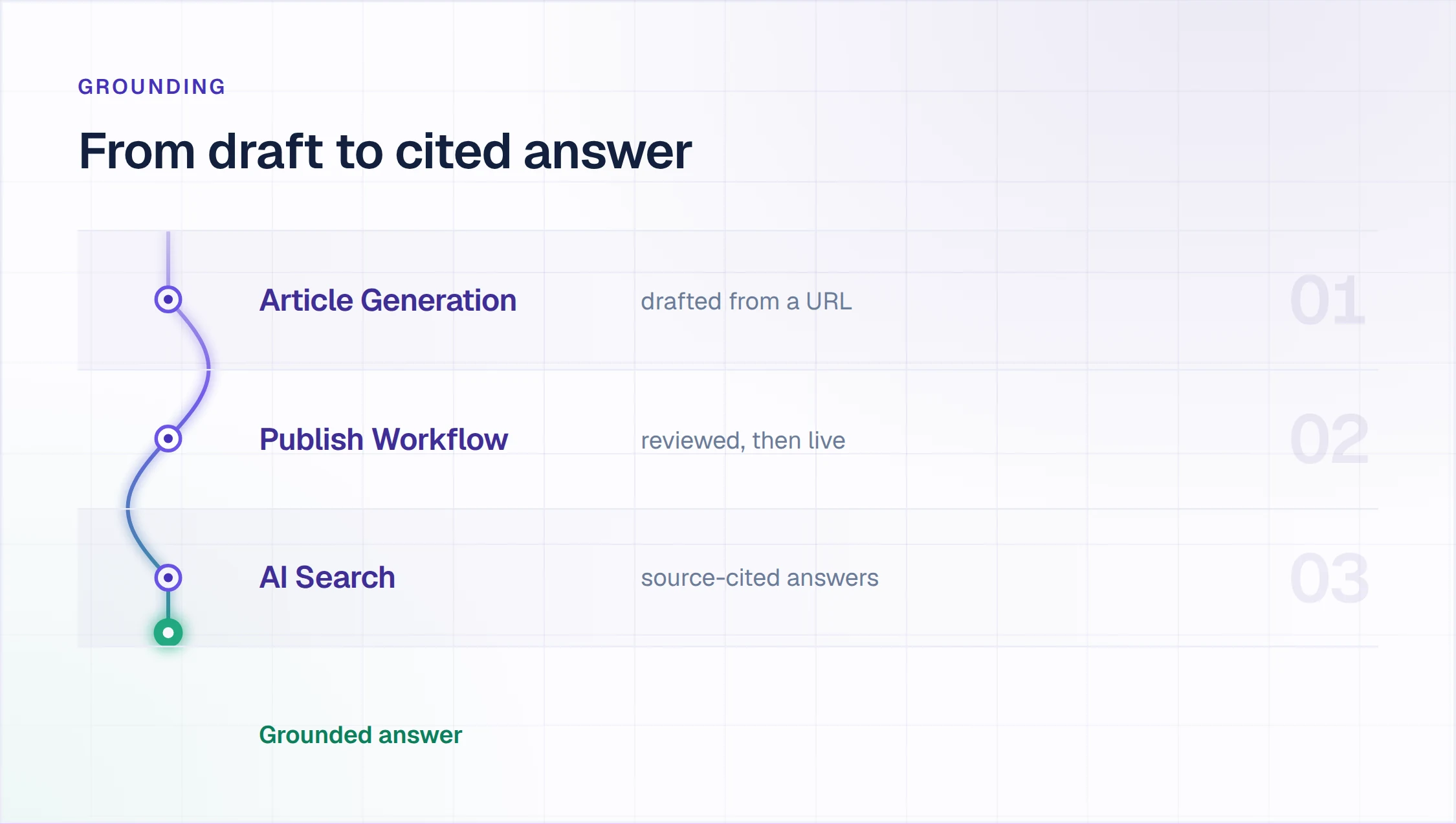
Can it draft your first articles from one URL?
Give the tool your public website URL or one folder of existing docs, then count the drafts that come back with their sources attached. A tool that opens on an empty editor leaves the first round of writing to your team.
Enjo Help Center: Article Generation starts from that URL or from the Notion, Google Drive, Confluence or SharePoint content you connect. At signup, Enjo reads your work email domain to identify the company and scans your website to pre-fill the agent.
Where does an unanswered question go?
Ask the portal a question your articles do not cover, then follow it. It can end three ways: the requester is asked to rephrase, the question reaches a person, or that person's answer comes back as a draft article.
Enjo Help Center: the Self-Improving Loop delivers the second and third endings. The question escalates to your team in Enjo Inbox with the full conversation, account context and suggested next steps, and the resolved conversation becomes a draft article for review.
Take a customer who asks how to set up SAML single sign-on when no article covers it. An agent answers in Inbox, and once the conversation is resolved, a draft titled "How to configure SAML SSO" waits for review. The next customer who asks gets the published answer.
That is the Capture practice from Knowledge-Centered Service: capture knowledge in the moment and in the requester's context, because the solution is hard to find later otherwise.
Can the software detect outdated help center articles?
Change one fact in a source document, such as a price, a setting name or a plan limit, and wait for the next sync. Then see whether the tool flags the affected article and drafts the correction, or whether a customer finds the error first.
Enjo Help Center: the Help Center Agent's Refresh an outdated article template compares an article with your current product and knowledge sources and flags what no longer matches. Articles linked to Notion, Google Drive or uploaded files are flagged when the source changes, and connected sources sync daily.
What does the month cost when the AI answers 1,000 questions?
Price the month in each vendor's meter: seats times the seat price, plus resolution, outcome, session or credit fees, plus any add-on that drafts articles. The cost table above runs that sum for a 5-agent team.
Enjo Help Center: Starter is $95 a month for 1,000 AI replies, with unlimited human agent seats. Free includes 200 AI replies, and at the limit, requests auto-escalate to your team in Inbox.
One Help Center for Customers and Employees
One help center can serve customers and employees when visibility follows the reader. Audience Targeting in Enjo Help Center shows each article by plan, role, segment or login state, so a billing article stays public while an access runbook needs a login. Multi-brand runs separate help centers by product, region or audience when they should stay apart.
The same index grounds Enjo in Slack and Microsoft Teams, so an employee who asks there gets the answer the portal gives. Employee-only deployments, where permissions and identity decide the tool, are compared on our internal knowledge base software list.
Internal wikis and customer help centers sit side by side in our guide to knowledge base software.
Frequently Asked Questions About Help Center Software
What is the best help center software?
Enjo Help Center ranks first here because AI answers on the portal are included on every plan, including Free, and unanswered questions become draft articles for review. The rest split by how the help center is sold. Zendesk, Freshdesk, Zoho Desk and HubSpot Service Hub bundle it with a help desk, and Help Scout pairs it with a shared inbox. Fin prices its AI agent per outcome, and Document360 and Helpjuice run standalone knowledge bases.
What is help center software?
Help center software publishes a searchable portal of help articles for customers, and increasingly an AI that answers from those articles and cites them. Tools range from help centers bundled with a help desk, such as Zendesk and Freshdesk, to standalone knowledge bases such as Document360. Enjo Help Center adds a maintenance loop that turns unanswered questions into draft articles.
What is the difference between help center and help desk software?
A help center answers questions before they become requests; a help desk manages the requests that still reach your team. The help center is read by customers, while the help desk is worked by agents who assign, track and resolve each request. Many suites sell both, and the help center often starts on a higher tier than the help desk.
Is there free help center software with AI?
Yes. Enjo's Free plan includes Help Center and 200 AI replies a month, with unlimited human agent seats and no credit card. Help Scout's Free plan includes one Docs site of up to 10 articles and a 3-month AI Answers trial. For every plan that stays free, including open-source options, see our comparison of free knowledge base software.
What is Zendesk used for?
Zendesk is used to run customer service: ticketing across email, messaging and voice, a help center and knowledge base, and AI agents that answer across channels. It sells per agent, from the $19 Support Team plan to Suite plans that add the knowledge base from $55 per agent a month. Its AI agents are included in every plan and billed on automated resolutions.
What is Help Scout used for?
Help Scout is used by support teams to answer customers from a shared inbox, publish help articles in Docs and offer self-service through the Beacon widget. It sells per user, with a Free plan for up to 5 users, and adds AI Answers at $0.75 per resolution. Its homepage puts its customer count at 12,000+ companies.
How long does it take to launch a help center?
Same-day go-live is feasible when the software drafts from content you already have. With Enjo, signup reads your work email domain to identify the company and scans your website, and Article Generation drafts from a URL or connected docs. The first day goes to reviewing drafts rather than writing them.
Launch Your Help Center on the Free Plan
A help center earns its place after launch, in what its AI answers cost and how its articles stay current. Run the four checks above on every tool you shortlist, with your own content and your own questions.
Free plan, no credit card
Unlimited agent seats and AI answers on every plan.
Start on the Free plan: 200 AI replies a month, Help Center, Inbox and Insights, unlimited human agent seats and no credit card. Same-day go-live is feasible.
Launch your free Help Center