Transform complex support workflows
12 Best Help Desk Software in 2026
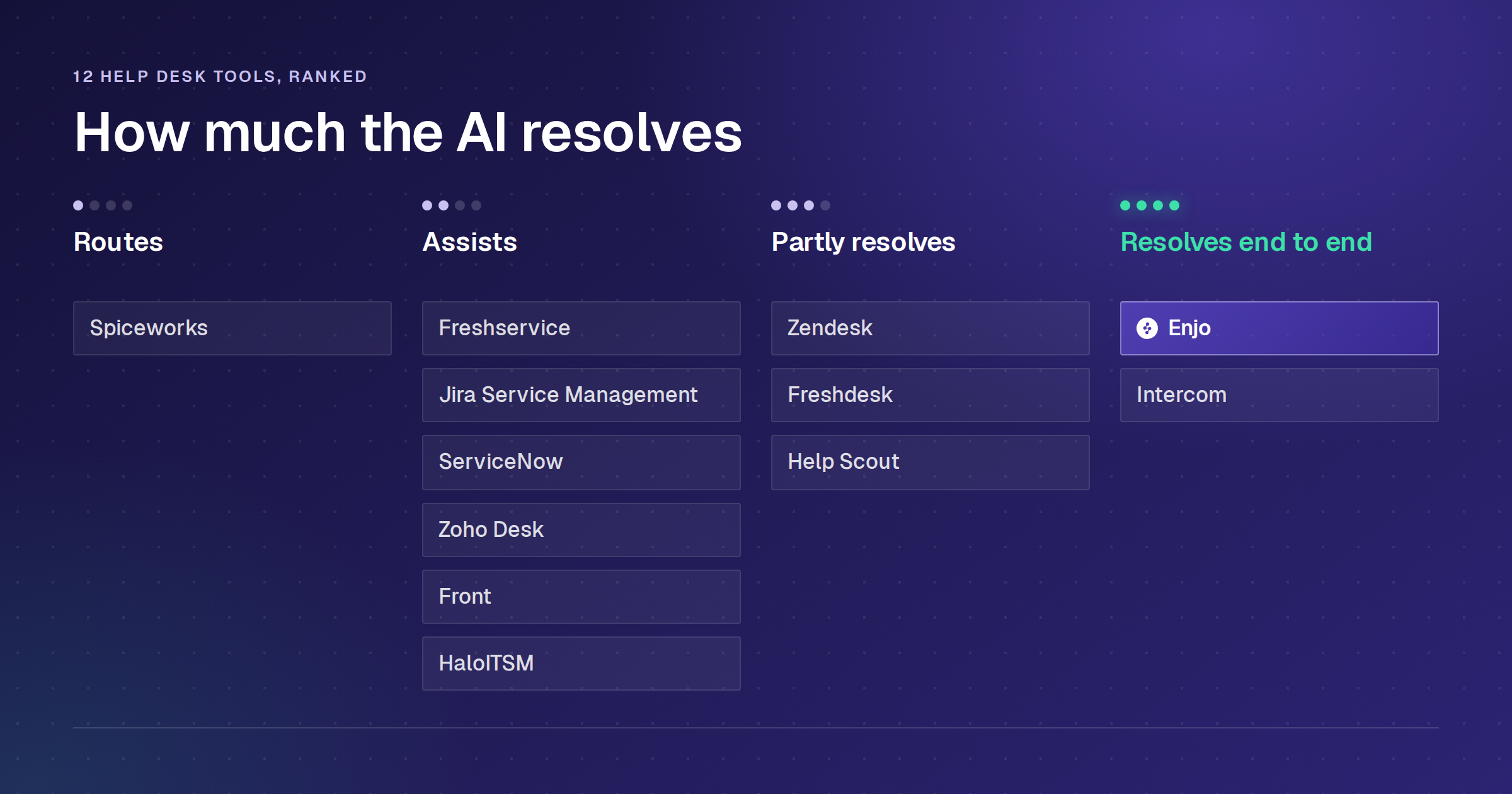
The best help desk software in 2026 splits three ways: IT service desk platforms like Freshservice and Jira Service Management, customer support suites like Zendesk and Zoho Desk, and AI layers like Enjo that resolve requests inside the help desk you already run. That third group is where help desk AI is heading, and whether a tool's AI resolves requests or only routes them is the test this guide ranks all 12 on.
So this is not a feature-count contest. Each of the twelve tools below gets an honest read, including the one thing it does badly, its current G2 rating, a side-by-side table, and the checks to run on your own stack. Where a number matters (price, resolution rate, free-tier limits), it is verified here on 2 September 2026, not lifted from a year-old marketing page.
Here is the bar for what "resolves" should mean in AI helpdesk software: the AI resolves the request end to end, with no human stepping in, instead of routing the ticket faster. This guide ranks the 12 best helpdesk software tools of 2026 by AI resolution, real cost, and whether you can launch them without a migration.
The Best Help Desk Software at a Glance
Enjo: AI resolution inside the help desk you already run
Freshservice: packaged ITSM for mid-market IT teams
Jira Service Management: Atlassian-native service desks
ManageEngine ServiceDesk Plus: ITIL processes with a free tier for small IT teams
ServiceNow: enterprise ITSM on the Now Platform
HaloITSM: all-modules ITSM in one per-agent price
Spiceworks: free, ad-supported IT ticketing
Zendesk: omnichannel customer service suites
Freshdesk: per-agent customer support ticketing
Zoho Desk: help desk inside the Zoho ecosystem
Help Scout: email-first shared inbox and Docs
Fin: AI agent for customer service messaging
How We Ranked These (and How You Should)
Forrester's June 2026 assessment found roughly three-quarters of enterprise leaders reporting agentic AI adoption while only a small minority ran it in meaningful production. A Gartner survey of 1,303 respondents published in September 2026 puts a number on the same gap: only 22% have scaled AI across multiple business units, and IT service desk automation was one of the three most pursued AI use cases at 54% while not appearing among the three use cases where the most leaders reported positive returns. That is why "does it resolve" beats "does it have AI" as a question. Gartner also predicts, in a March 2025 forecast, that agentic AI will autonomously resolve 80% of common customer service issues without human intervention by 2029, which is the direction this criterion is measuring against.
Every tool on this list was scored against the six criteria below. Pricing came from each vendor's own pricing page and G2 ratings from each product's live reviews page, both checked on 2 September 2026. Where a vendor publishes no rate, the entry says so instead of estimating.
The 12 Best Helpdesk Software in 2026
Here is the full field of the best helpdesk software, side by side. Prices below are list rates, billed annually, and verified in September 2026. Zendesk and Freshservice figures come from those vendors' own pricing pages. ServiceNow and HaloITSM publish no per-agent list price and are quote-only. Vendors revise pricing often, so confirm the current numbers on each company's own site before you buy. Pricing is per agent per month on an annual billing plan unless noted otherwise.
1. Enjo
How it goes to market: Sold to IT, HR and customer support teams that keep their existing helpdesk, priced per AI reply with unlimited human agent seats.
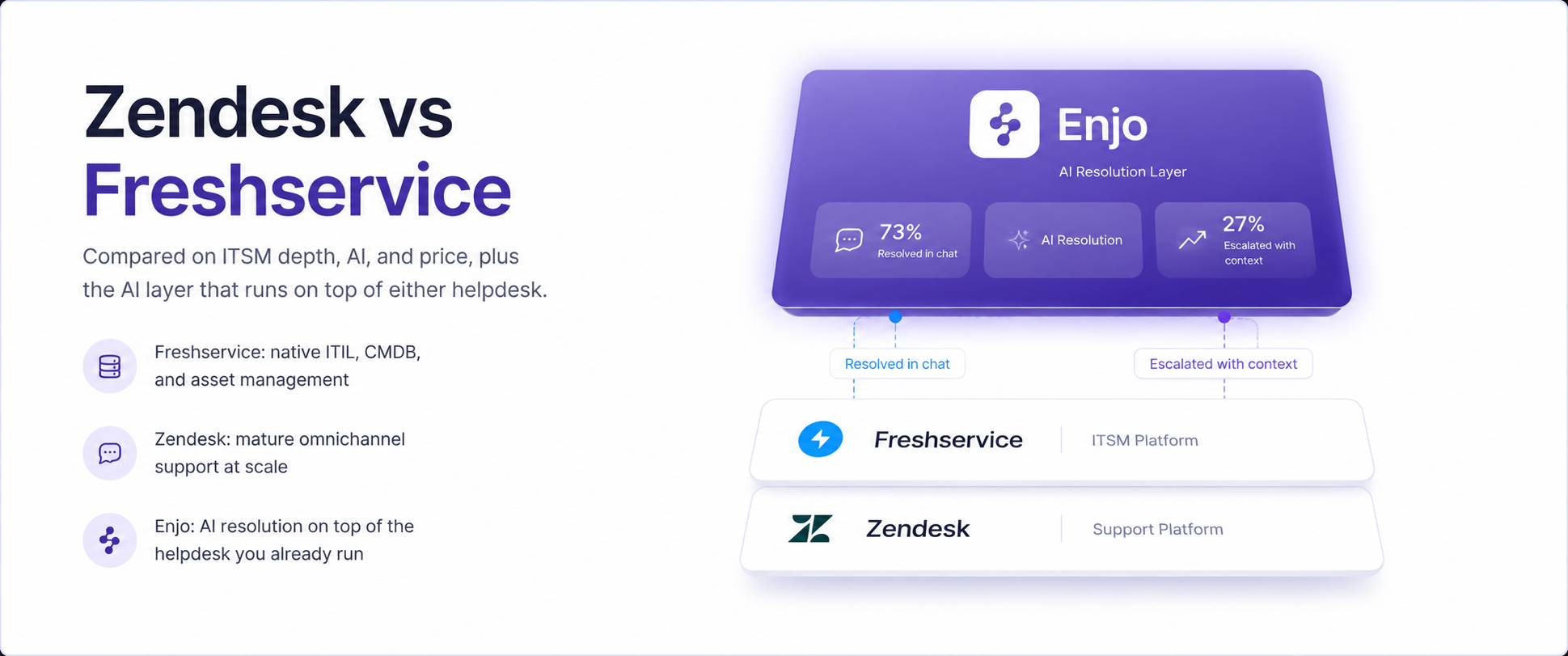
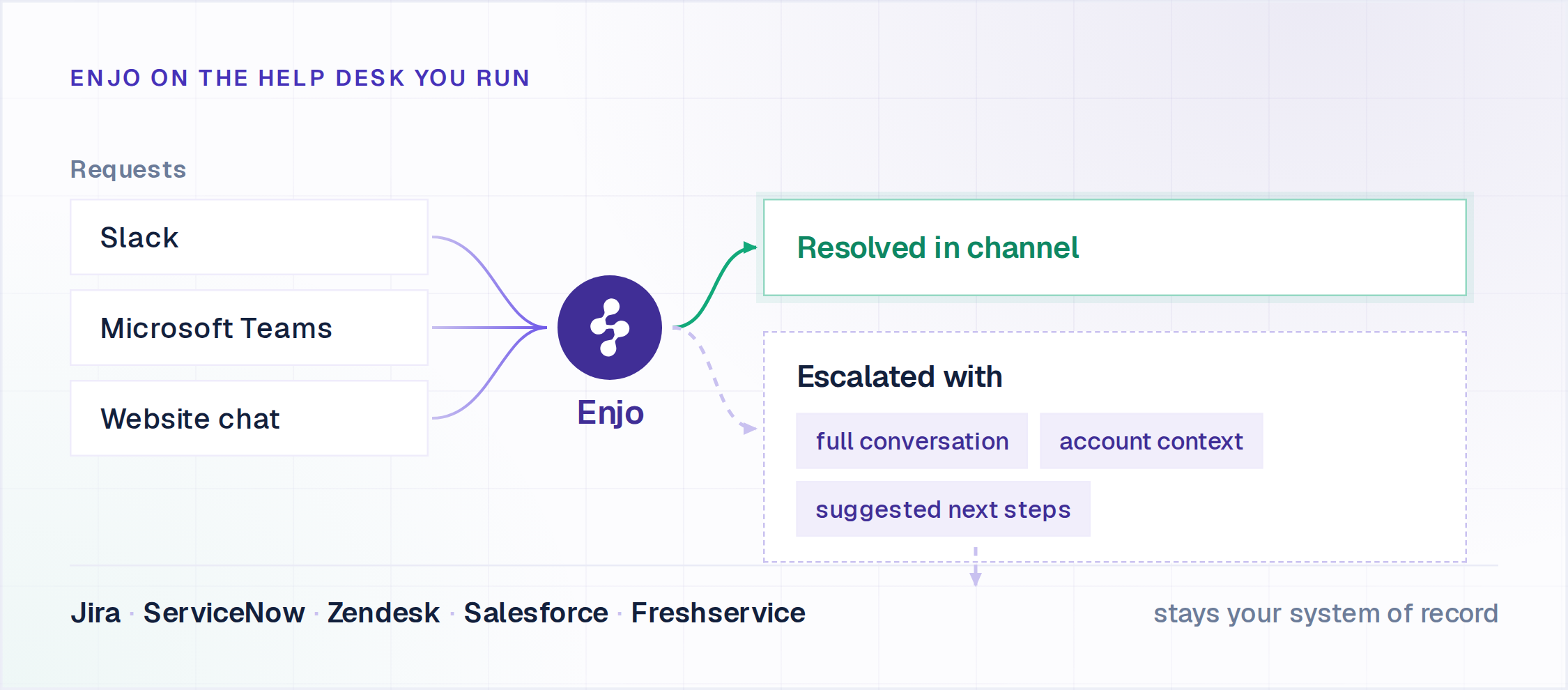
Enjo is an AI Support Agent that sits on top of the help desk you already run, resolving requests in Slack and Microsoft Teams and escalating into that same helpdesk when it cannot.
Key capabilities
- Enjo, the AI Support Agent, resolves common IT and HR requests directly in Slack and Microsoft Teams: password resets, software access, VPN issues, and onboarding questions.
- AI Actions let the agent act in Okta, Jira, ServiceNow, Salesforce, Entra ID, Google Workspace and custom APIs, rather than only answering questions.
- AI Flows run multi-step work with explicit fallbacks when the agent is not confident.
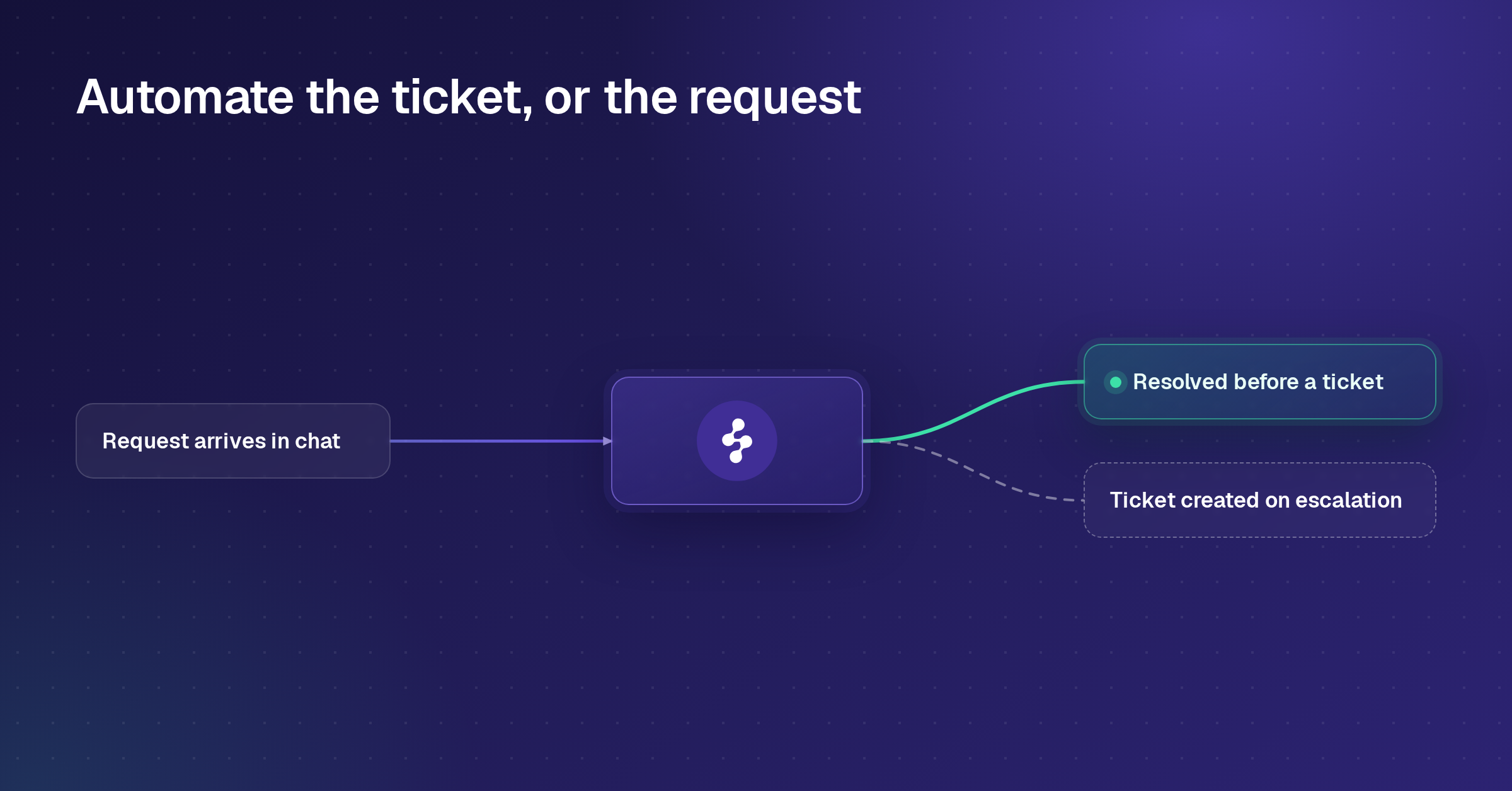
- Escalation creates a ticket in your existing help desk carrying the full conversation, the account context and suggested next steps, so a human starts where the AI left off.
- Knowledge runs one index across Confluence, SharePoint, Google Drive, Notion, Guru and past tickets from Jira, JSM, Zendesk, ServiceNow and Salesforce, synced daily.
- Agent Assist sits inside the JSM, ServiceNow and Zendesk agent views and the Salesforce case view, with case summaries, reply suggestions and a private Ask AI for the agent.
- Guardrails apply policy controls on inputs and outputs, with a citation on every answer and a full audit log. SOC 2 Type II compliant, ISO 27001 certified and GDPR compliant.
The proof is concrete. Delivery Hero runs Enjo across more than 30 Jira service desks for 95,000+ people in Slack, with 30% average deflection after rollout and 80% faster response. Aptean, a 3,500-employee ERP provider on Salesforce, had its initial customer support cohort live in a single day and now resolves 300K+ cases a year with Enjo, 37% of them fully by AI. That single day is the answer to the "AI projects take six months" scar tissue most IT teams carry. Enjo is built by Troopr Labs, which has 600+ enterprise deployments and 99.9% uptime over 7 years.
Pricing: Free plan with 200 AI replies a month, unlimited human agent seats and no credit card. Starter is $95/month for 1,000 replies, Standard is $295/month for 3,000. Pricing is per AI reply rather than per seat, so adding agents never raises the bill. Additional replies are $0.05 each on Starter and Standard.
Scope: Enjo is an AI layer, not a ticketing platform. It does not replace your help desk as the system of record, which is the point rather than a limit. The Enjo IT Service page walks through the L1 and L2 workflows in detail, including the Okta and Jira actions Enjo runs mid-conversation. HR teams run the same setup for leave, onboarding and access approvals, covered on the Enjo HR Service.

2. Freshservice
Freshservice is Freshworks' ITSM product, and it hits a sweet spot between a basic ticketing tool and a full enterprise platform.
Key capabilities
- Incident, problem, and change management.
- Asset management and a CMDB.
- SLA management and a service catalog.
- A no-code workflow builder with Freddy AI on top.
Pricing: No free plan, only a 14-day trial. Starter is $19 per agent per month billed annually, Growth is $49, and Pro is $99. Enterprise is custom-quoted with no published rate. Freddy AI Copilot is a separate add-on at $29 per agent per month. Check current pricing at freshworks.com.
Where it falls short: Like every help desk-native AI, Freddy works inside Freshworks. Mid-market IT teams almost always need cross-system actions (Okta, Jira, custom APIs) that a single-suite AI cannot reach. ITIL practices like change and problem management are also gated to the Pro tier, so the entry plan is thinner than it looks.
3. Jira Service Management
How it goes to market: Sold into existing Atlassian estates, priced per agent, with requesters free of charge.
If your engineering org already runs on Jira and Confluence, Jira Service Management is the path of least resistance.
Key capabilities
- Request, incident, change, and problem management.
- Deep links into Jira issues and Confluence knowledge.
- Automation rules and Atlassian's Rovo AI agents on the higher tier.
- Per-agent billing, with employees who submit requests free of charge.
Pricing: Free for up to 3 agents (real limits, but usable). Standard is around $20/agent and Premium around $50/agent, where the AI, CMDB, and advanced ITSM live. Enterprise is custom. Confirm at atlassian.com.
Where it falls short: The power comes with a learning curve, and teams that are not already Atlassian-native often find it unintuitive to configure. Conversational, Slack-first resolution is not its center of gravity; you reach it through add-ons. If you want employees to resolve requests in Slack rather than file portal tickets, you will be bolting that on.
4. ManageEngine ServiceDesk Plus
Best for: ITIL processes with a free tier for small IT teams
How it goes to market: Sold to IT teams per technician, on cloud or on-premises, with a free Standard edition for up to 5 technicians.
ManageEngine ServiceDesk Plus is the IT service management product from ManageEngine, a division of Zoho Corporation, sold in Standard, Professional and Enterprise editions.
Key capabilities
- Incident management, a self-service portal and a knowledge base on every edition.
- IT asset management from the Professional edition upward.
- Change, release, problem and project management included in Enterprise.
- Cloud or on-premises deployment, with no limit on the number of end users.
Pricing: Cloud editions start at $13 per technician per month for Standard, $27 for Professional and $67 for Enterprise, with a discount on yearly subscriptions. Standard is free for up to 5 technicians, and support on the free edition costs $35 per technician a year. On Standard and Professional, problem management is a $1,595-a-year add-on, and change and release management is $3,195 a year. A 30-day free trial is available. Check current pricing at manageengine.com.
Where it falls short: Change and problem management are paid add-ons below Enterprise, so the ITIL process set costs more than the entry price suggests. Professional and Enterprise also license IT assets alongside technicians, so the bill grows with the estate as well as the team.
5. ServiceNow
How it goes to market: Sold to organizations standardized on the Now Platform, quote-only, priced per fulfiller with Now Assist as a usage-based add-on.
ServiceNow is the enterprise ITSM platform, full stop, and it is consistently the best IT service desk software choice once you need real depth at large scale.ServiceNow is the enterprise ITSM platform, built for large organizations that need deep process control across functions.
Key capabilities
- Deep ITSM with a real CMDB and change advisory workflows.
- An enterprise workflow engine that spans functions.
- Now Assist and Virtual Agent for AI.
- Extensive enterprise integrations.
Pricing: Quote-based, with no public pricing. ServiceNow publishes no per-fulfiller rate and no implementation figure, so both come out of a quote rather than off a page, with Now Assist AI as a usage-based add-on on top. Like Jira, fulfillers are billed and requesters are free. There is no free tier with a path to production. Pricing is only available by quote at servicenow.com.
Where it falls short: Virtual Agent is locked to ServiceNow's data, runtime, and licensing tier, so a mid-market team inherits enterprise complexity and enterprise pricing to use it. It is widely considered overbuilt for teams that only need solid ITSM, and the implementation cost alone prices out most companies under a few thousand employees.
6. HaloITSM
How it goes to market: Sold to ITIL-aligned IT teams as an all-modules-included license, quote-based per agent.
HaloITSM covers ITIL processes with almost every module included in the base license, deployable in cloud or on-premises.
Key capabilities
- Incident, problem, change, and release management.
- A CMDB and unlimited assets.
- Broad ITIL coverage with all modules bundled.
- Cloud or on-premises deployment.
Pricing: Roughly $49 to $70 per agent per month with all modules included, with discounts kicking in above 100 agents. It is quote-based with a free trial, but no permanent free plan. Pricing is by quote at www.usehalo.com/it-service-management.
Where it falls short: Breadth comes at the cost of setup complexity. Reviewers consistently warn that you should budget for an implementation partner because the platform is powerful but raw in terms of configuration. And the pricing is quote-based, so you cannot size a deal from the website. Slack-first conversational resolution is not its strength.
7. Spiceworks
How it goes to market: Sold free and ad-supported to very small IT teams, with a paid tier that removes ads.
Spiceworks Cloud Help Desk is the long-running free option for small IT shops, and its Core tier still costs nothing.
Key capabilities
- Basic ticketing.
- Asset tracking and inventory.
- Alerts and reporting.
- Unlimited end users, free.
Pricing: Core is free and ad-supported. A Premium tier launched in 2025 for $6/agent/month that removes ads and adds a few features. Details are at spiceworks.com.
Where it falls short: The feature set is minimal. Reviewers point to limitations such as single-photo uploads, no rich text, no ticket linking, and limited customization, and some are unhappy that the new paid tier charges for what used to be free. There is effectively no modern AI resolution here. It is a starting point teams outgrow fast.
8. Zendesk
How it goes to market: Sold as an omnichannel suite subscription priced per agent seat, with Copilot as a separate per-agent add-on.
Zendesk is the most widely adopted customer support suite in the category, and it scales to large support operations.
Key capabilities
- Email, chat, voice, and messaging in one workspace.
- One of the largest app marketplaces in the category.
- A mature reporting and analytics layer.
- AI agents and Copilot that deflect and assist.
Pricing: No free plan. On the customer service ladder, Support Team is $19 per agent per month paid yearly, Suite Team is $55, Suite Professional is $115, and Suite Enterprise plus Copilot is quote-only. Suite Growth is no longer listed on the public customer service pricing page. The catch most teams miss: Copilot, the add-on that carries the strongest AI, is $50 per agent per month on top of your Suite plan, and AI agent usage is billed per automated resolution beyond the plan allowance. Confirm current rates at zendesk.com.
Where it falls short: Built-in AI reads Zendesk's own knowledge base and acts on Zendesk objects, so the moment you need it to pull from Confluence or take action in Okta, you are doing integration work. The per-agent model plus the AI add-on also adds up fast. For a Zendesk-only shop on suite billing, that is fine; for everyone else, it is a ceiling.
9. Freshdesk
How it goes to market: Sold to small and mid-sized support teams as a per-agent Freshworks subscription, with Freddy AI and bot sessions billed separately.
Freshdesk is the customer-support sibling of Freshservice, and it is one of the easiest help desks to launch.
Key capabilities
- Email and social ticketing.
- Automations and a knowledge base.
- Freddy AI for assist and deflection.
- Fast setup, live in an afternoon.
Pricing: A free plan exists for up to 2 agents, though it is now a time-limited starter rather than the open-ended free tier it used to be. Growth is $19/agent, Pro $55, Enterprise $89. Freddy AI Copilot and customer-facing bot sessions are billed separately. Verify current terms at freshworks.com.
Where it falls short: Same single-suite AI ceiling as the rest of the help desk-native crowd, and the free plan strips out automation, SLAs, and reporting, so most teams need a paid tier within weeks. The jump from Growth to Pro for round-robin routing and CSAT surveys is steep. If Freshdesk is the tool you are trying to leave rather than the one you are choosing, compare the nine best Freshdesk alternatives on free tier, AI pricing and switch cost.
10. Zoho Desk
How it goes to market: Sold on price into the Zoho ecosystem, per agent, with the Zia AI assistant on the top tier.
Zoho Desk is the value pick, and if you already use Zoho CRM, Projects, or Books, everything connects natively.
Key capabilities
- Multichannel ticketing.
- Workflow automation and blueprints.
- SLAs and the Zia AI assistant.
- The lowest per-agent prices on this list.
Pricing: Free for up to 3 agents (email ticketing only). Express is $7/agent, Standard $14, Professional $23, and Enterprise $40, where Zia AI lives. Confirm at zoho.com.
Where it falls short: The AI features are gated to the top Enterprise tier, and Zia is lighter than the dedicated AI platforms higher on this list. The integration advantage is scoped to the Zoho ecosystem, so outside it that advantage mostly disappears, and the free tier is too bare to run a real desk.
11. Help Scout
How it goes to market: Sold to smaller support teams as a per-seat inbox and Docs subscription, with AI Answers billed per resolution.
Help Scout is built around email and a shared inbox that feels more like a clean version of Gmail than a heavy ticketing system.
Key capabilities
- An email-first shared inbox.
- A built-in knowledge base (Docs).
- Saved replies, light AI assist, and summaries.
- Solid reporting.
Pricing: Per seat, with a free plan covering 5 users, one Inbox and one Docs site. Standard is $25 per user per month, Plus is $45, and Pro is $75 with a 10-user minimum and no self-serve checkout. AI Answers, the feature that actually resolves customer questions, is billed at $0.75 per resolution after a 3-month free trial. Current rates are at helpscout.com.
Where it falls short: Per-seat pricing means the bill grows with every agent, and several features teams expect as standard (full reporting, SLAs, deeper AI) sit on higher tiers or as paid add-ons. If your real need is a knowledge base or a help center, buying a full per-seat help desk for the bundled KB is overkill. Channel coverage across these suites is broken down in our comparison of omnichannel customer service software.
12. Fin (formerly Intercom)
How it goes to market: Sold standalone and as a layer on other helpdesks through Fin for platforms, priced per seat plus per resolution.
Fin is the AI agent company formerly known as Intercom, which took its agent's name in a May 2026 rebrand. It sells the Fin agent standalone and as a layer on other helpdesks through Fin for platforms.
Key capabilities
- A polished, high-volume messenger and B2C chat experience.
- The Fin AI agent that resolves conversations end to end.
- A help center and workflows.
- A mature voice channel.
Pricing: No free plan. Seats run $29 (Essential), $85 (Advanced), and $132 (Expert). Fin AI is billed separately at $0.99 per resolution, in addition to seats. You can verify current rates at intercom.com.
Where it falls short: Billing is per resolution on top of seats, so the bill grows precisely as the AI gets better; a team at a few thousand resolutions a month can see AI cost exceed seat cost. Salesforce signed a definitive agreement to acquire Fin on June 15, 2026 for approximately $3.6 billion, with close expected in Salesforce's fiscal Q4 2027, which puts the product's roadmap destination inside Agentforce.
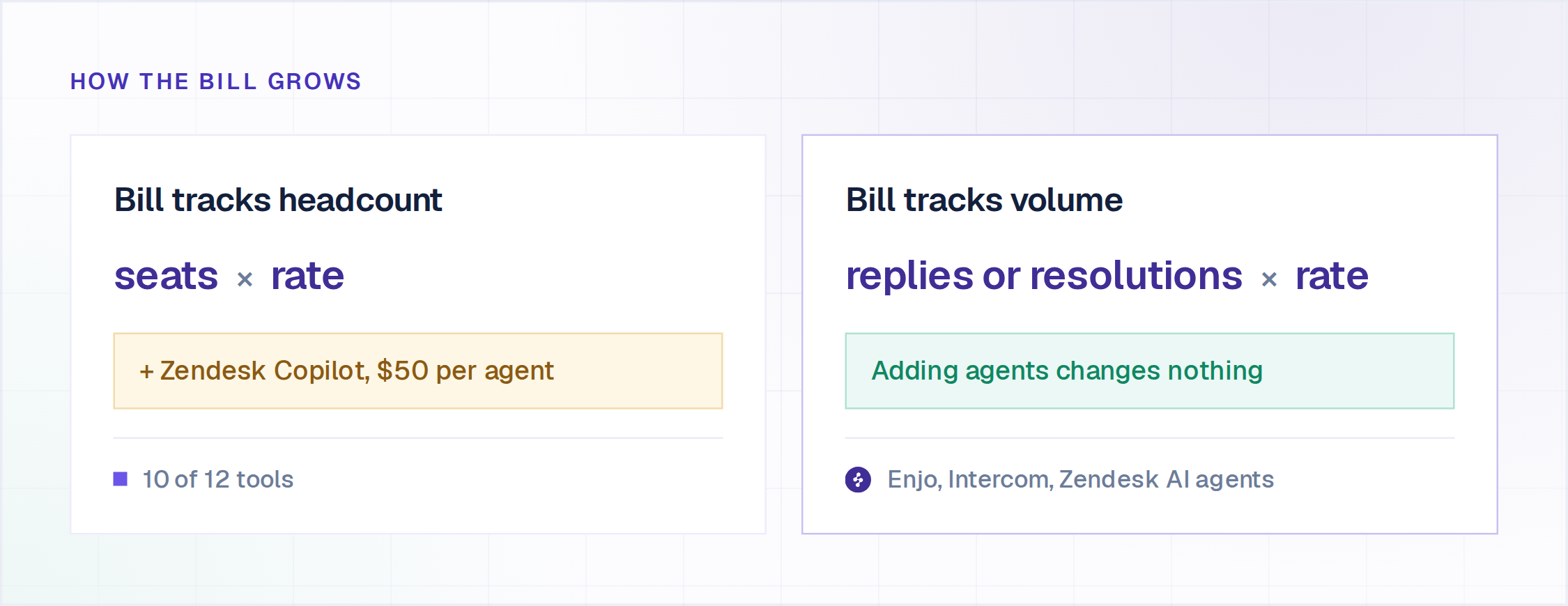
What 10 Agents Actually Cost Per Month With AI Switched On
The sticker price per seat leaves out the AI line, so here is the same team priced on each tool. The basis is 10 human agents handling 3,000 conversations a month, with the AI fully resolving 1,000 of them wherever AI is billed per resolution.
Zendesk also bills AI agent resolutions beyond the plan allowance, which this total leaves out. Double the team to 20 agents and every per-seat row doubles its seat cost, while the Enjo row stays at $295, because Enjo pricing is per AI reply with unlimited human agent seats. Additional replies are $0.05 each on Starter and Standard.
How to Choose the Right Help Desk Software?
Start with two questions, in this order: where do your requests arrive, and how much of the work can you hand to AI without rebuilding your stack?
If you are already on ServiceNow or Jira and want to add AI without paying for a higher platform tier, prioritize adding AI on top of what you have rather than switching tools. Enjo has a dedicated setup for Enjo for ServiceNow and Enjo for Jira. The same applies if you run Zendesk or Salesforce instead, Enjo plugs into Enjo for Zendesk and Enjo for Salesforce just as directly, no migration either way.
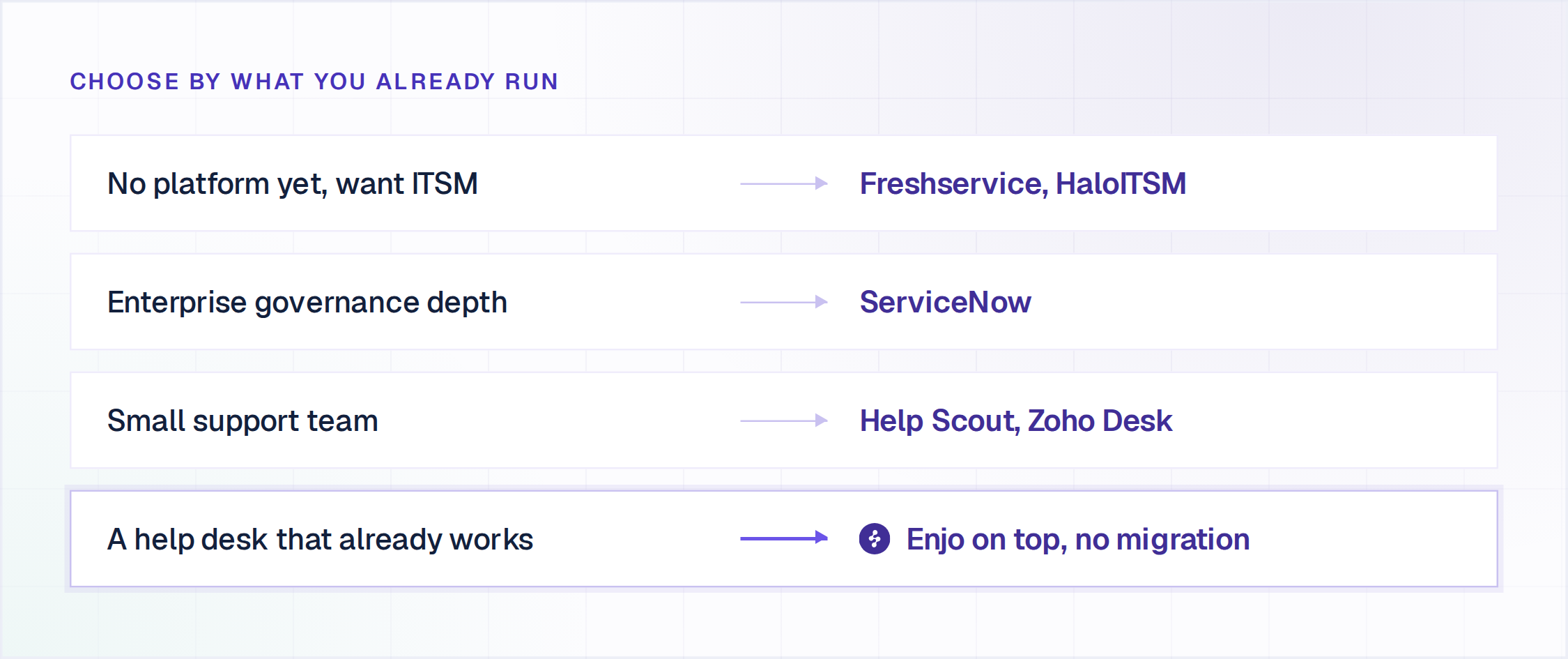
If you do not have a platform yet, the field splits on architecture rather than on team size. Freshservice and HaloITSM package ITIL processes into a single license. ServiceNow scopes its AI to the Now Platform's data, runtime and licensing tier. Help Scout and Zoho Desk price per seat with AI on higher tiers, and Fin bills per resolution on top of seats. Run the same three checks on whatever you shortlist, on your own systems rather than in a vendor demo. Ask for the list of write actions rather than read actions, because reading a ticket is not resolving a request. Ask whether the tool reads every source your answers actually live in, because answer quality is capped at whatever it can reach. Ask to see one escalation land in your helpdesk carrying the full conversation, the account context and suggested next steps.
If your team lives in Slack or Teams and you want requests resolved where they are asked, without a migration, that is exactly what Enjo is built for. The same pattern shows up in our roundup of AI support agents.
The honest meta-point: most teams do not actually need to replace their help desk. They need it to resolve more on its own. AI helpdesk software can help teams do that without replacing the underlying platform. Sorting these tools by that lens, rather than by feature count, is how you avoid a six-month service desk automation project that ends where you started.
The Bottom Line
The best helpdesk software in 2026 is not the one with the longest feature list. It is the one that resolves the most, without you lifting a finger. If you take one thing from this list: buy for resolution, not feature count, and do not replace a help desk that works just to get AI on top of it.
For most IT and HR teams, the fastest path to fewer manual tickets is to add an AI layer to the stack you already run and prove it on real requests before you commit a dollar. The case studies show what that looks like in production. If ticket automation specifically is the decision, not the full help desk platform, our dedicated comparison of AI ticketing systems covers that narrower angle.

Frequently Asked Questions
What is help desk software?
Help desk software captures, tracks, and resolves support requests from one place, usually through ticketing, automation, and a knowledge base. The 2026 dividing line, and exactly what separates the best helpdesk software from the rest, is whether the tool simply routes tickets to humans or actually resolves them with AI before a person is involved. For a fuller breakdown, see our guide to service desk automation.
What is the best helpdesk software in 2026?
There is no single winner, because the answer depends on where your requests arrive and how much of the work you want AI to resolve. The category splits three ways in 2026: enterprise ITSM platforms built around process depth, customer support suites built around a per-agent ticket queue, and AI layers that resolve the request before it becomes a ticket. Enjo sits in the third group and runs on top of Jira, ServiceNow, Zendesk, Salesforce or Freshservice, so weight resolution depth, which knowledge sources the tool can read, and Slack and Teams coverage before you weight feature count.
What is the difference between a help desk and a service desk?
A help desk resolves individual requests and incidents. A service desk is broader ITSM, adding asset, change, and problem management. IT teams usually need service-desk depth; most customer support teams do not.
Is there free help desk software?
Yes. Enjo's free tier includes 200 AI replies a month and unlimited human seats with no credit card, and you can see the limits on the pricing page. Spiceworks offers a free ad-supported tier, and Zoho Desk and Freshdesk have limited free plans, all with the usual automation caps.
Do I have to replace my current help desk to add AI?
No. Enjo adds AI resolution on top of Jira, ServiceNow, Zendesk, Salesforce, or Freshservice and escalates by creating a ticket with full context when it cannot resolve, so you get the AI without running a migration. You can also automate ticketing right inside Slack with a slack ticketing system. Escalations land in the queue your team already works, with the conversation and account context attached.