Transform complex support workflows
Best HR Ticketing Systems in 2026: 8 Tools Compared on Approvals, Lookups and Price
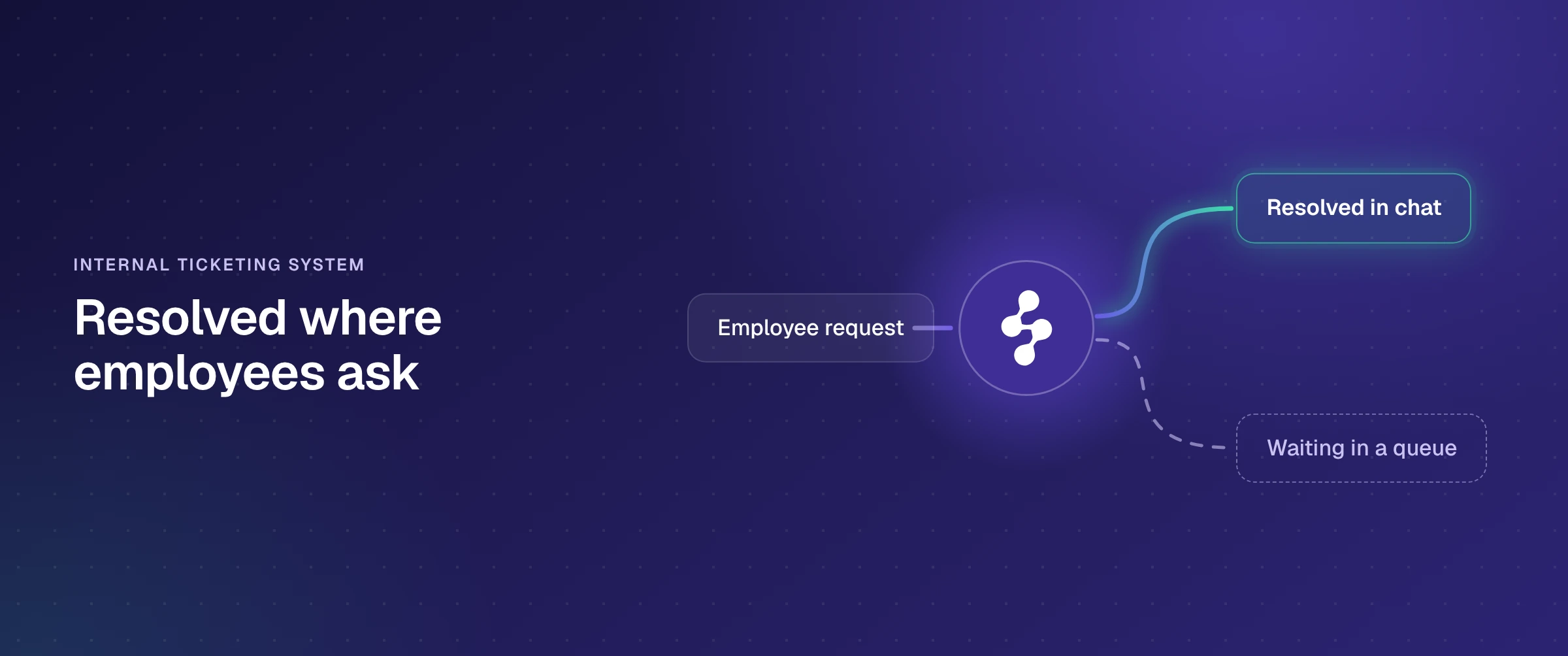
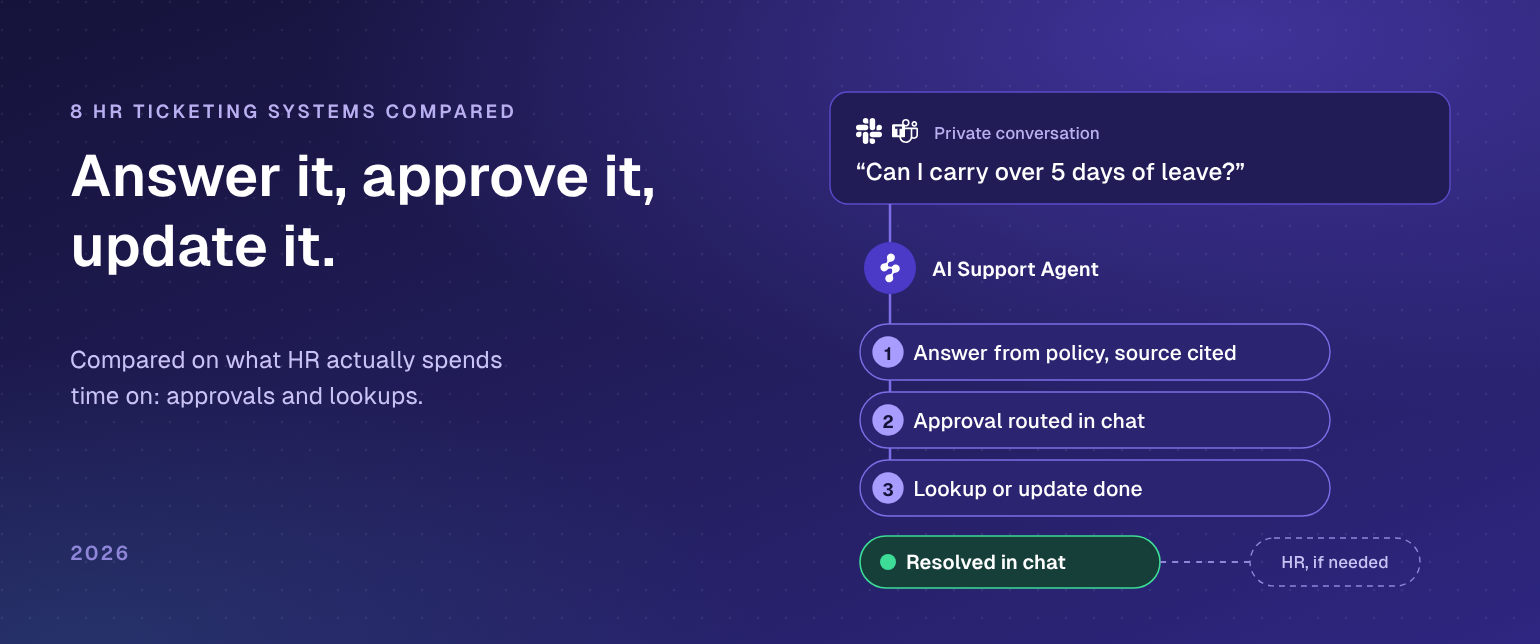
An HR ticketing system turns what employees ask HR for (leave, payroll, benefits, onboarding, policy) into tracked requests with an owner, a status and a history. In 2026 the options split three ways: HR modules on an IT service desk (Jira Service Management, ServiceNow HR Service Delivery, Zendesk, Freshservice), help desks and case tools set up for HR (HappyFox, Dovetail), and chat-first tools that take requests in Slack and Microsoft Teams (Siit, Enjo Platform). Enjo Platform sits in the chat-first group and is built agent-first: its AI Support Agent finishes the request in the conversation, answering from your policy library with a citation and routing the approval, and hands HR the full conversation when a person is needed.
Most lists judge these tools on how neatly they log a question. HR's hours go elsewhere: the leave approval waiting on a manager, the balance or payslip someone has to look up, the onboarding step that needs IT. Below, 8 HR ticketing systems are compared on where employees ask, how approvals and lookups get done, and what they cost, with every price checked on the vendor's own page on 19 October 2026, followed by 5 checks to run on a month of your own HR requests before you buy.
The 8 best HR ticketing systems at a glance
- Enjo Platform: resolves HR requests in Slack DMs and Microsoft Teams, routes approvals in Slack, and escalates to HR in Inbox with the full conversation.
- Jira Service Management: HR request types on Jira workflows, with approvers answering from email, Slack or Microsoft Teams.
- ServiceNow HR Service Delivery: HR case and knowledge management with Employee Center, on the ServiceNow AI Platform.
- Zendesk for employee service: Zendesk's agent workspace for IT and HR, with approvals made from the ticket.
- Freshservice: an IT service desk that adds HR through department workspaces and a separate Business Agent License.
- Siit: a request queue for IT and HR that runs in Slack and Microsoft Teams, priced per admin.
- HappyFox: a configurable ticketing help desk with HR ticket forms and Smart Rules for approvals.
- Dovetail: HR case management with employee relations case files and a full audit trail.
What an HR ticketing system has to handle
An HR ticketing system (also sold as HR help desk software, HR case management or HR service delivery software) gives every employee request one record: who asked, what they need, who owns it, what was decided and when. Nothing lives only in someone's DMs, and HR can finally count what it handles.
Logging a request is the easy part. What separates these tools is how much of the request they finish, and that depends on which kind of request it is.
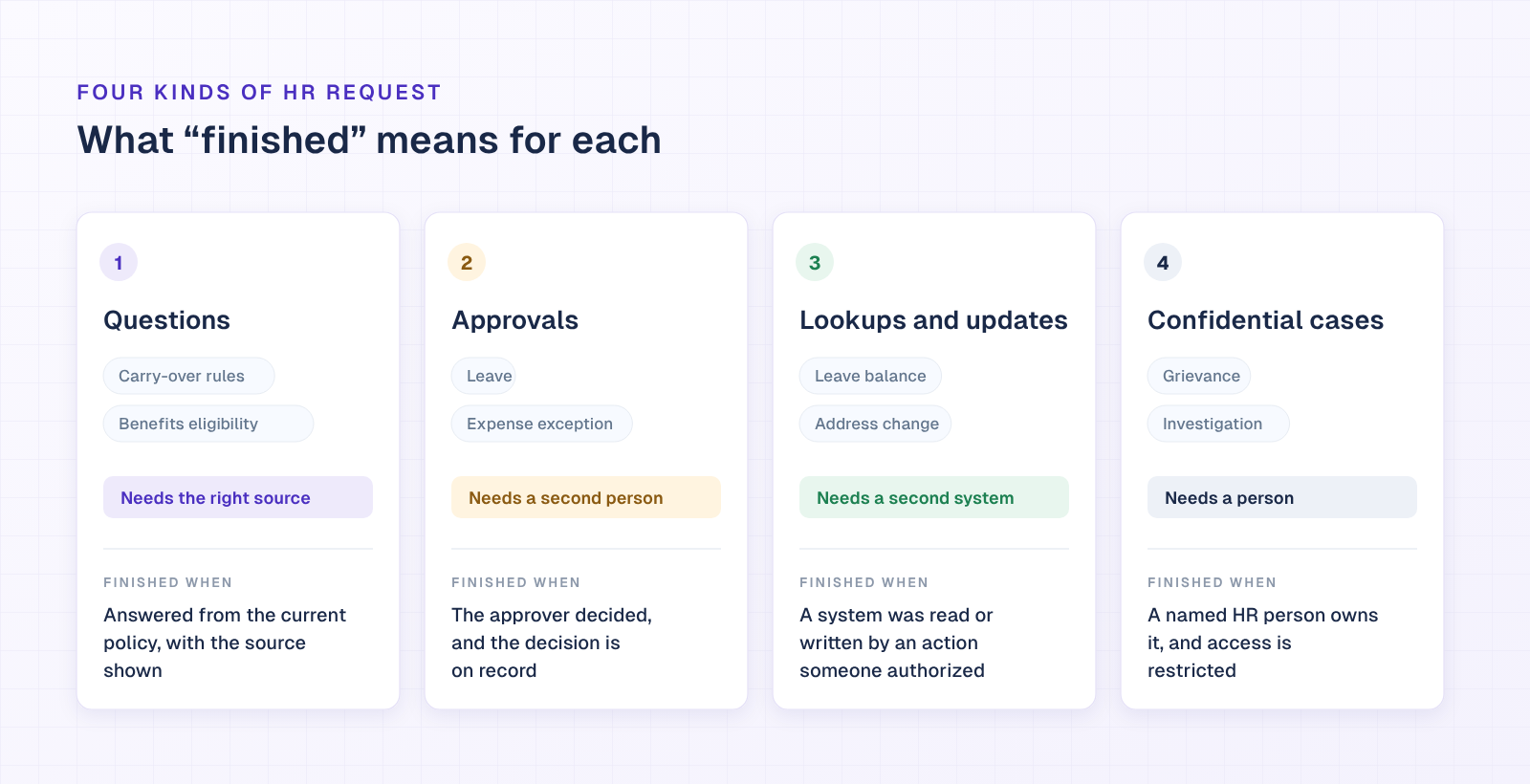
- Questions: carry-over rules, parental leave policy, benefits eligibility. Finished when the answer matches the current policy and shows where it came from.
- Approvals: leave, an expense exception, equipment or access for a new hire. Finished when the right approver has decided and the decision is on record.
- Lookups and updates: a leave balance, a copy of a payslip, an address change. Finished when a system was read or written by an action someone authorized.
- Confidential cases: grievances, investigations, accommodation requests. Finished by a person, with access limited to the people who need it.
A tool that handles only the first kind deflects questions and leaves most of the work where it was. Answering is half the job; the other half is the approval, the lookup or the update behind the answer, because each one needs a second person or a second system. Ask every vendor below to show you one request of each kind, start to finish.
How we compared these HR help desk tools
Every tool was checked on its vendor's own pages on 19 October 2026, on six facts a buyer can verify:
- Where employees ask: Slack, Microsoft Teams, email or a portal, and whether a private question stays private.
- What it reads: the handbook and the policy library in SharePoint, Confluence or Google Drive, plus past requests.
- What it does beyond answering: approvals, lookups and updates in other systems, and who authorizes each action.
- What an escalation carries: whether the HR person receives the whole conversation or has to ask the employee again.
- Confidentiality: role-based access, private notes and an audit trail for sensitive cases.
- How the bill grows: per agent, per admin, per AI resolution or per AI reply, and what happens when HR adds a person.
Review scores and feature counts are left out. Neither tells you whether a leave request gets finished.
HR ticketing systems compared
| Tool | Built Around | Where Employees Ask | Starting Price | Free Plan |
|---|---|---|---|---|
| Enjo Platform | AI agent first, Inbox for escalations | Slack, Teams, website chat, Help Center | $95/month (Starter) | Yes, 200 AI replies a month |
| Jira Service Management | Request queues on Jira workflows | Portal, email, Slack, Teams, widget | $26.90/agent/month at 10 agents | Yes, up to 3 agents |
| ServiceNow HR Service Delivery | HR cases on ServiceNow AI Platform | Employee Center portal, Otto for HR | Not published | No |
| Zendesk for employee service | Agent ticket workspace | Email, portal, Slack and Teams apps | $29/agent/month | No, 14-day trial |
| Freshservice | IT service desk, HR workspaces | Portal, email, chat, Slack, Teams | $19/agent/month; HR seats $49 | No, 14-day trial |
| Siit | Slack and Teams request queue | Slack, Teams, email, portal | $23/admin/month | No, 14-day trial |
| HappyFox | Configurable ticketing help desk | Email, portal; Slack, Teams via add-on | $24/agent/month | No, 14-day trial |
| Dovetail | HR case management | Employee portal, email | Not published | No |
Starting price is the lowest paid plan on each vendor's own pricing page (atlassian.com, zendesk.com, freshworks.com, siit.io and happyfox.com), checked 19 October 2026, on annual billing except Jira Service Management (monthly billing, Atlassian's calculator at 10 agents). Enjo Platform is priced per month for the workspace, with unlimited human agent seats.
The 8 best HR ticketing systems in 2026, reviewed
Each entry follows the same shape: what the tool is, how it is sold, four capabilities described as behavior, pricing from the vendor's own page, and one limitation (Enjo Platform carries its scope in that slot).
1. Enjo Platform
Best for: HR teams whose employees already ask in Slack or Microsoft Teams
Enjo Platform is a support platform built around an AI Support Agent, with Inbox for escalations, a Help Center portal and Insights. It is first on this list for one capability: the agent finishes HR requests inside a private Slack conversation, answering from your policy library with a citation and routing the approval in the chat, and hands HR the full conversation when a person is needed. It is sold as a free plan teams set up themselves, priced by AI usage rather than seats, with unlimited human agent seats on every published plan.

- Private conversations: employees can ask Enjo in a Slack DM instead of a public channel. When a person is needed, Enjo escalates to Enjo Inbox with the full conversation, context and suggested next steps, and Inbox assigns it to someone on the HR team.
- Answers grounded in the policy library: the agent reads the handbook and policies where they already live (Confluence, SharePoint, Google Drive, Notion or Guru, synced daily, plus uploaded PDFs) and every answer carries a citation. Guardrails restrict what it may answer, with full audit logs, and it learns from how your HR team responds.
- Approvals finished in the chat: Approval Flow puts leave, expense and exception approvals in front of the approver in chat, tied to the request, and Workflows handles the routing and the follow-ups until the decision is in.
- Lookups and actions in other systems: AI Actions runs the actions you configure, such as access provisioning in Okta or Entra ID and account and group management in Google Workspace when someone joins, and custom API and webhook actions reach systems without a named connector. Each action is authorized, bounded by Guardrails and recorded in the audit trail.
When a request needs a person, it lands in Inbox with the full conversation, the requester's account context and suggested next steps, so the employee never repeats themselves. Kraken, the cryptocurrency exchange, runs Enjo for HR in private Slack conversations with automated approval workflows: response times fell from 2 to 3 days to minutes, and the approval workflows save the HR team 450 hours a month (read the case study).
Pricing: Free is $0 a month with 200 AI replies, unlimited human agent seats, unlimited AI agents and channels, Inbox, Help Center and Insights, and no credit card. Starter is $95 a month for 1,000 AI replies and adds AI Actions; Standard is $295 a month for 3,000 AI replies. Extra replies on Starter and Standard are $0.05 each, and at the Free limit requests escalate to your team in Inbox, so nothing is dropped. Details are on Enjo pricing.
Scope: Enjo Platform is built agent-first. The AI Support Agent is configured before any queue exists, and Inbox is the helpdesk for escalations and human collaboration rather than the primary work surface. Teams that want a ticket queue first with AI attached later are describing the legacy model, which is the point rather than a limit.
2. Jira Service Management
Best for: HR teams on an Atlassian stack
Jira Service Management is Atlassian's service management product, sold in Atlassian's Service Collection, with templates for HR as well as IT. It is sold per agent with a free plan for small teams, and employees who raise requests don't need a license.
- Intake on five channels: employees raise requests by email, Microsoft Teams, Slack, an embedded widget or the help center portal, and HR works them in queues with SLAs.
- Approvals in the workflow: an approval step can sit on any status of a request type's workflow. Approvers answer from the help center, the email, or Slack or Microsoft Teams, and don't need a Jira Service Management license.
- HR templates: the Free plan includes HR templates with request types, workflows and automation already configured, plus an embedded knowledge base that recommends relevant articles to employees.
- AI on higher plans: Standard adds Rovo Agents, search and chat. The virtual service agent, which answers requests conversationally, comes with Premium and Enterprise, with 1,000 assisted conversations a month included and more from $0.30 each.
Pricing: Free for up to 3 agents. At 10 agents on monthly billing, Standard is $26.90 and Premium $61.60 per agent a month; on annual billing, 10 agents cost $2,700 (Standard) or $6,200 (Premium) a year, on Atlassian's pricing calculator.
Limitation: the virtual service agent is not included on Free or Standard. It starts at Premium, and assisted conversations above 1,000 a month are billed on top.
3. ServiceNow HR Service Delivery
Best for: enterprises standardized on ServiceNow
HR Service Delivery is ServiceNow's HR case and knowledge management application on the ServiceNow AI Platform, with Employee Center as the employee portal and Otto for HR as the conversational front door. It is sold to organizations on the ServiceNow platform, through ServiceNow's sales team.
- Case and knowledge management: one place for HR to resolve cases, with AI agents managing routine requests, running playbooks and escalating complex issues to people.
- Lifecycle workflows: AI agents start workflows and update systems across the employee lifecycle, from hiring to exit.
- Self-service: employees search, ask, speak or type in one place, for anything from payroll to leave requests.
- Approvals: AI agents handle approvals and admin tasks, and managers get one place for tasks and team approvals.
Pricing: ServiceNow publishes no price for HR Service Delivery; it is quoted by sales.
Limitation: there is no published plan or price. HR Service Delivery is bought through ServiceNow sales and runs on the ServiceNow AI Platform, so its knowledge, runtime and licensing are ServiceNow's.
4. Zendesk for employee service
Best for: IT and HR teams already on Zendesk
Zendesk for employee service is Zendesk's ticketing platform packaged for internal IT and HR teams as the Employee Service Suite. It is sold per agent seat in three published tiers, with AI agents billed per automated resolution above each plan's allowance.
- Intake: email on every plan, a self-service employee portal and service catalog from Suite Growth, and Slack and Microsoft Teams apps for creating, viewing and updating tickets without leaving chat.
- Tasks and approvals: from Suite Growth, approval requests are made and tracked from the ticket, with task templates that walk agents through common request types.
- AI agents: each plan includes automated resolutions (5 per agent a month on Suite Team, 10 on Growth and Professional, up to 10,000 a year). More cost $1.50 each committed or $2.00 pay as you go.
- HR system apps: the Zendesk Marketplace includes apps for Workday, Slack and Microsoft Teams, and APIs cover custom integrations.
Pricing: Suite Team $29, Suite Growth $59 and Suite Professional $99 per agent a month on annual billing ($39, $79 and $125 month to month). Enterprise is quoted. 14-day free trial.
Limitation: the employee portal and approvals start on Suite Growth, so an HR team that needs approvals pays at least $59 per agent a month on annual billing, before any automated resolutions above the allowance.
5. Freshservice
Best for: IT-led service desks extending to HR
Freshservice is Freshworks' IT service management desk, which HR, finance, facilities and legal teams join through their own workspaces. It is sold per agent, with a Business Agent License priced for non-IT teams such as HR.
- Intake: email, phone, chat, a widget and the support portal on every plan, plus ServiceBot on Microsoft Teams and Slack for creating and updating tickets.
- Multi-approval workflows: Workflow Automator builds approval chains in a drag-and-drop editor, with execution logs for each run.
- Department workspaces: each team gets its own workspace with its own admin control and data privacy, which keeps HR requests apart from IT's.
- Freddy AI: Copilot is a $29 per agent a month add-on on Pro and Enterprise. The Freddy AI Agent, which resolves queries on chat and messaging apps, is part of Enterprise.
Pricing: Starter $19, Growth $49 and Pro $99 per agent a month billed annually; Enterprise is quoted. HR agents can be added on the Business Agent License at $49 per agent a month. 14-day free trial.
Limitation: the Freddy AI Agent comes only with Enterprise, which has no published price, and each Enterprise license includes 1,200 AI Agent sessions a year.
6. Siit
Best for: Slack and Teams-first internal service teams
Siit is a request management platform for IT, HR and other internal teams that collects and answers requests in Slack and Microsoft Teams. It is sold per admin (the people who manage and resolve requests), in three published plans plus Custom.
- Chat intake: a Slack bot and a Microsoft Teams bot collect requests, alongside email and a self-service portal with a service catalog.
- Request approvals: an approval step inside a workflow holds the next action until a manager or stakeholder validates it.
- People workflows: actions trigger when someone joins, moves or leaves (from the HRIS or directory) or on dates such as a start date or work anniversary. HRIS integrations start on Standard.
- AI: Assist answers from docs and builds workflows; the AI Agents that handle tasks and route requests come with Pro.
Pricing: Essentials $23, Standard $45 and Pro $89 per admin a month billed annually; Custom is quoted. 14-day free trial.
Limitation: the AI Agents start on Pro ($89 per admin a month). Essentials and Standard include Assist, capped at 10 conversations per admin a week.
7. HappyFox
Best for: HR teams that want configurable ticket forms and rules
HappyFox Help Desk is a ticketing and knowledge base system that HappyFox sets up for HR with ticket forms, routing rules and workflows. It is sold per active agent, or as a flat annual fee with a ticket allowance for larger teams, with AI and the Slack and Teams assistant sold as separate products.
- Leave and onboarding forms: pre-configured ticket forms for leave requests, with routing that assigns leave approvals to managers, and onboarding checklists that auto-assign IT provisioning tickets.
- Approvals through Smart Rules: Smart Rules and Workflows trigger approvals for benefits processing, training requests and exit clearances, with real-time SLA monitoring on each request.
- Confidential notes: sensitive employee concerns are auto-categorized and discussed in private internal notes.
- HRIS integrations: ADP, BambooHR, Workday and DarwinBox, to sync employee records with requests.
Pricing: Basic $24 (up to 5 agents), Team $49 and Pro $99 per agent a month billed annually; Enterprise Pro is quoted. HappyFox AI starts at $14 per agent a month, and Assist AI, the Slack and Teams assistant, at $1 per user a month. 14-day free trial, no credit card.
Limitation: AI, web messaging, Workflows and BI are separate products with their own pricing, and so is the Slack and Teams assistant, so the help desk plan is not the whole bill for HR support in chat.
8. Dovetail
Best for: enterprise HR case and employee relations work
Dovetail is HR case management and employee portal software built for HR teams rather than adapted from an IT service desk. It is sold to enterprise HR and HR shared services teams through a sales conversation.
- Case console with employee data: when a case opens, HR sees the employee's core HCM data, any existing case and matching knowledge results on one screen.
- Employee relations files: workplace conflicts, grievances, disciplinary actions, discrimination and harassment cases are documented in the same system.
- Audit trail: every case interaction is logged with who made the change, when, and the previous and updated values.
- GDPR controls and HR Copilot: employee purge, data redaction, legal hold and retention policies, plus a generative AI copilot with pre-built intents and workflow automation.
Pricing: not published; Dovetail quotes through its contact form.
Limitation: there is no published pricing, so every deployment starts with a sales quote.
How to choose an HR ticketing system: 5 checks on a month of your own requests
Demos run on the vendor's sample data. These checks run on yours. Export last month's HR requests from wherever they arrived (the HR channel, DMs to people on the HR team, the shared inbox), sort them into the four kinds above, and put the same five checks to every tool on your shortlist.
- Where did they arrive? Count how many came through Slack or Microsoft Teams, and how many of those were DMs. Ask each vendor to take one of those requests in the same place, privately, without sending the employee to a portal.
- Are the answers right? Take your ten most frequent questions and compare each answer with the current policy document. Every answer should name its source, and a policy update should change the answer without anyone rewriting a reply.
- Do approvals finish? Pick five approvals (leave, an expense exception, equipment for a new hire) and run each one end to end: who gets asked, where, what reminder they get, and where the decision is recorded.
- Who acts on lookups and updates? Pick five lookups or updates. For each, name the system the tool reads or writes, the action that does it and who authorized that action, then find the entry in the audit log.
- What does HR receive on escalation? Escalate two confidential requests. The HR person should get the whole conversation, the requester's context and suggested next steps, and nobody outside the case should be able to open it.
Then price that same month on each plan: seats times agents (or admins), plus any AI fees for the volume you just counted.
How Enjo Platform answers the five checks
- Where they arrive: employees can keep a sensitive request out of public channels by asking Enjo in a Slack DM. Escalations reach Enjo Inbox with the full conversation, and RBAC sets roles and permissions across modules, data and actions.
- Right answers: every answer is grounded in your knowledge, with citations, and the index syncs daily from Confluence, SharePoint, Google Drive, Notion and Guru, so a changed policy reaches the answers at the next sync.
- Approvals: Approval Flow and Workflows run the approval in chat, tied to the request, with follow-ups until the approver decides.
- Lookups and updates: AI Actions runs only the actions you configure, each authorized, bounded by Guardrails and recorded in the audit trail.
- Escalation: requests that need a person land in Inbox with the full conversation, account context and suggested next steps, and role-based access control limits who can open them.
Enjo is SOC 2 Type II, ISO 27001 and GDPR compliant, with TLS 1.2+ in transit and AES-256 at rest, and Troopr Labs, the company behind it, has 600+ enterprise deployments and 99.9% uptime over 7 years. On price, Enjo Platform charges per AI reply rather than per seat, so adding someone from HR to Inbox adds nothing to the bill, and the Free plan's 200 AI replies a month are enough to run these checks on real requests. The Enjo HR support page lists the HR requests it handles.
Frequently asked questions
What is an HR ticketing system?
An HR ticketing system is software that records every employee request to HR as a ticket with an owner, a status and a history, so questions, approvals and cases are tracked to a finish instead of living in inboxes and DMs. Most add a knowledge base or portal for self-service, routing rules, SLAs and reports on request volume and resolution time.
What is the difference between an HR ticketing system and HR case management software?
They overlap, and vendors often use the terms for the same product. HR ticketing usually means high-volume requests (questions, approvals, updates) worked in a queue; HR case management usually means longer, confidential matters such as employee relations cases, with case files, restricted access and a full audit trail. Dovetail and ServiceNow HR Service Delivery describe themselves as case management, while Jira Service Management, Zendesk and Freshservice come from ticketing.
Can an HR ticketing system work inside Slack or Microsoft Teams?
Yes, in three different ways. Some tools let employees create and track tickets from a Slack or Teams app (Zendesk, Freshservice's ServiceBot, Jira Service Management). Some run the whole request queue from chat (Siit). Enjo Platform resolves the request in the conversation itself, answering from your policies and routing the approval in Slack, and escalates to HR in Inbox only when a person is needed.
Is there a free HR ticketing system?
Yes. Jira Service Management is free for up to 3 agents, and Enjo Platform has a permanent Free plan with 200 AI replies a month, unlimited human agent seats, Inbox, Help Center and Insights, with no credit card. Zendesk, Freshservice, Siit and HappyFox offer 14-day free trials rather than free plans.
How do you keep HR tickets confidential?
Limit who can see each kind of request, keep sensitive conversations out of public channels, and log every change. In practice that means role-based access by team, private notes on cases and an audit trail. Employees can ask Enjo in a Slack DM instead of a public channel. When a case needs a person, Enjo escalates it to Enjo Inbox with the full conversation, context and suggested next steps, and Inbox assigns it to someone on the HR team. RBAC sets roles and permissions across modules, data and actions, and every action Enjo takes in a connected system is recorded in the audit trail.
Can one employee ticketing system handle HR and IT requests?
Yes. Jira Service Management, ServiceNow, Zendesk, Freshservice and Siit all sell to both IT and HR, usually with separate queues, workspaces or permissions per team. Enjo Platform includes unlimited AI agents on every plan, so IT and HR can each run their own agent with its own escalation rules in one workspace.
How much does an HR ticketing system cost?
Published prices on 19 October 2026 run from $19 to $99 per agent a month on annual billing for Freshservice, Zendesk and HappyFox, $23 to $89 per admin a month for Siit, and $26.90 to $61.60 per agent a month for Jira Service Management at 10 agents on monthly billing. ServiceNow and Dovetail quote on request. Enjo Platform charges by AI usage instead: $0, $95 or $295 a month for 200, 1,000 or 3,000 AI replies, with unlimited human agent seats.
When should HR move from email and Slack DMs to a ticketing system?
When requests get lost, get answered twice or get different answers from different people, or when nobody can say how many requests HR handled last month. Each of those means the volume has outgrown inboxes. The cost of waiting is volume nobody measures: the repeat-question rate stays unknown until something counts it, and a tool that captures requests where they already arrive starts that count on day one.
How long does it take to set up an HR ticketing system?
It depends less on the tool than on what it has to connect to. Logging requests from email or a portal can start as soon as the tool is configured; answering from your policies starts once the policy sources are connected and indexed; approvals and actions in other systems take longest, because each one has to be configured and authorized. Roll it out in that order, and measure the first month before adding the next kind of request.