Transform complex support workflows
Best Helpdesk Ticketing System 2026: 14 Free and Paid Tools
Choosing a helpdesk ticketing system comes down to two decisions most buying guides skip: how the vendor bills you, and whether the AI resolves requests or just routes them to a person faster. Everything else is a feature list. The billing model decides whether your cost tracks headcount or request volume, and the AI question decides whether automation reduces work or relocates it. Gartner's survey of 321 service leaders found 91% under pressure from their executives to implement AI, which is why every tool below now claims it. Below, fourteen free, open source and paid systems compared on real 2026 pricing and what the AI actually resolves.

The Short Version
A helpdesk ticketing system captures support requests from email, chat and messaging, tracks them to resolution and reports on the queue. The category splits three ways in 2026: per-seat platforms that bill by headcount, open source tools that trade license cost for hosting work, and usage-priced platforms that bill by AI volume. Enjo Platform sits in the third group and is the only system here that includes AI replies and unlimited human agent seats on a permanent free plan.
- Enjo Platform: per AI reply, not per seat, with unlimited human agent seats on every published plan
- Zendesk: omnichannel suite billed per agent, with AI resolutions metered on top
- Freshdesk: per-agent suite with Freddy AI sessions metered past the included 500
- Zoho Desk: native connection to CRM, Books and Analytics for teams already on Zoho
- Help Scout: email-first shared inbox with AI resolutions billed per resolution
- Hiver: support workflows that run inside Gmail with no separate destination
- Front: email, chat and SMS in one workspace with per-channel plan gating
- osTicket: open source and self-hostable with no per-agent licensing at any scale
- Jira Service Management: Atlassian's service desk on the Jira issue engine, free for 3 agents
- ServiceNow: enterprise service management on the Now Platform, priced by quote
- HubSpot Service Hub: ticketing built on the HubSpot CRM, free for 2 users
What Is a Helpdesk Ticketing System?
A helpdesk ticketing system converts incoming support requests into trackable tickets, assigns ownership, and moves each one through to resolution. Requests arrive by email, live chat, a web form, a messaging channel or a portal, and the system gives every one of them a status, an owner and a history.
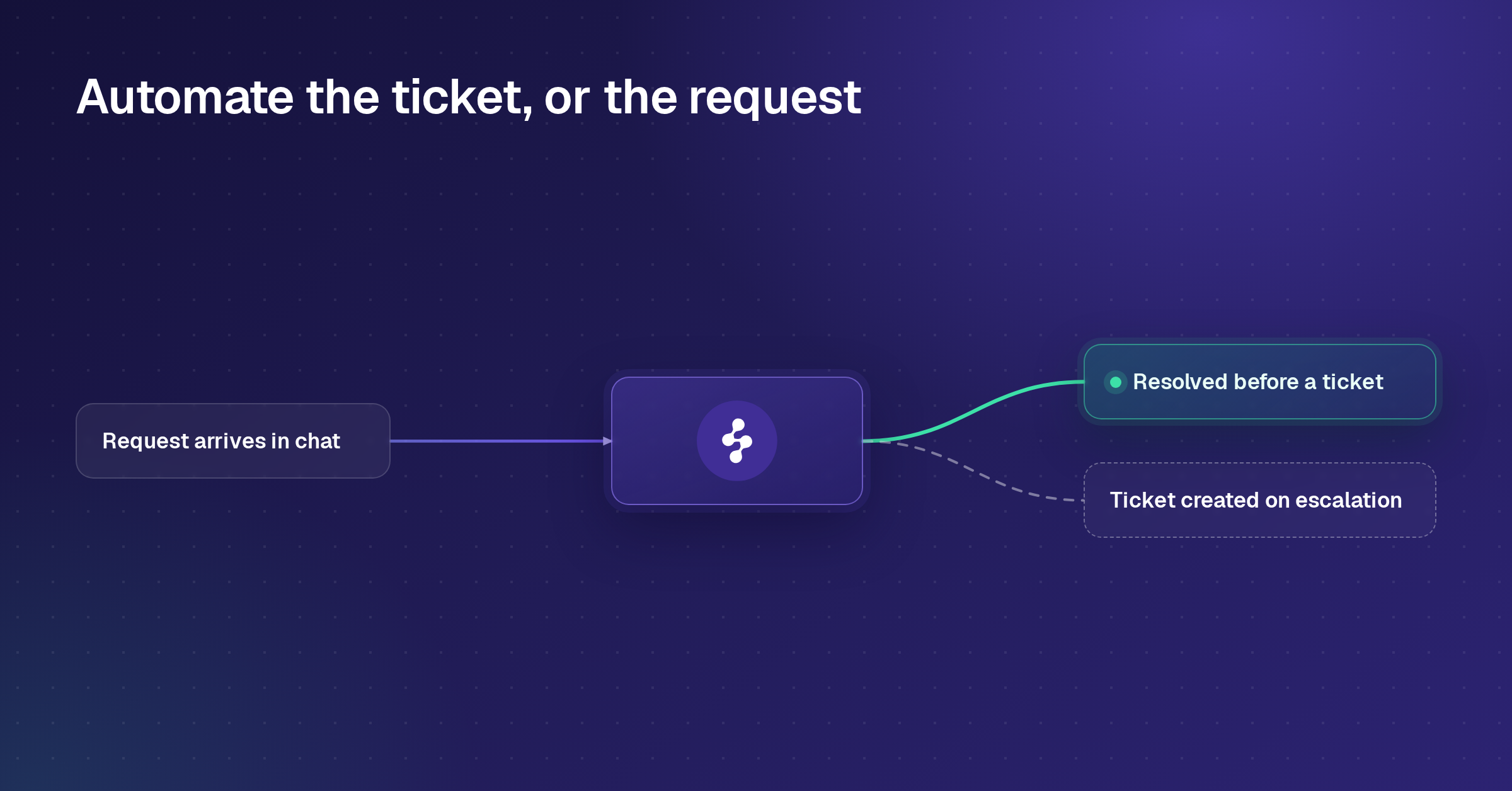
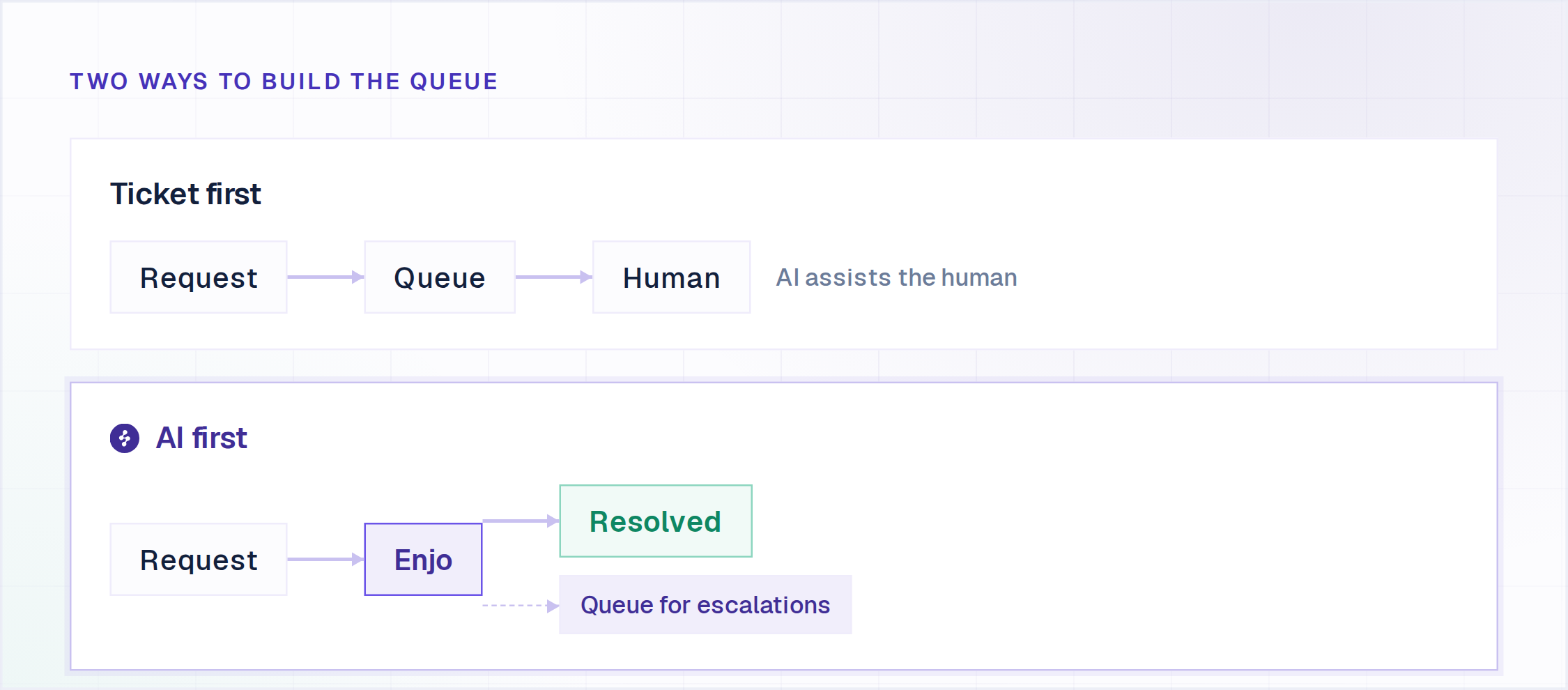
The category covers both customer-facing support and internal IT and HR service desks. The core capabilities are shared: intake across channels, routing and assignment, SLA timers, a knowledge base for self-service, and reporting on volume and response time. What separates the tools in 2026 is what happens before a ticket exists. Systems with a genuine AI layer resolve a share of requests without creating a ticket at all, which changes both the queue and the bill.
For the wider category including enterprise ITSM platforms, see the full best help desk software comparison.
How We Evaluated These Helpdesk Ticketing Systems
Five criteria decided the ranking, weighted toward what changes month to month rather than what looks good on a features page.
Pricing model. Per seat, per AI resolution, or self-hosted. This decides whether the bill grows with headcount or with request volume, which matters more over a two-year horizon than the sticker price on any single tier.
AI resolution depth. Does the tool resolve the request, or route it to a human faster? Most vendors in this category now claim AI. Few resolve a request end to end without a person stepping in. Forrester's June 2026 assessment found roughly three-quarters of enterprise leaders reporting agentic AI adoption, while only a small minority had it running in meaningful production beyond what the authors call agentish chatbots. Our comparison of AI ticketing system options goes deeper on where that line falls.
Seat minimums and hidden gates. Several tools cap free seats, force jumps across seat blocks, or meter AI separately from the seat price. All three quietly inflate the real cost.
Setup time. Whether a team can be live in an afternoon, or needs a hosting decision and an implementation plan first.
Security posture. SOC 2, GDPR and audit logging, since any team handling requester data has to answer this eventually, usually the first time an enterprise prospect sends a security questionnaire.
3 Free Helpdesk Ticketing Systems (Including Open Source)
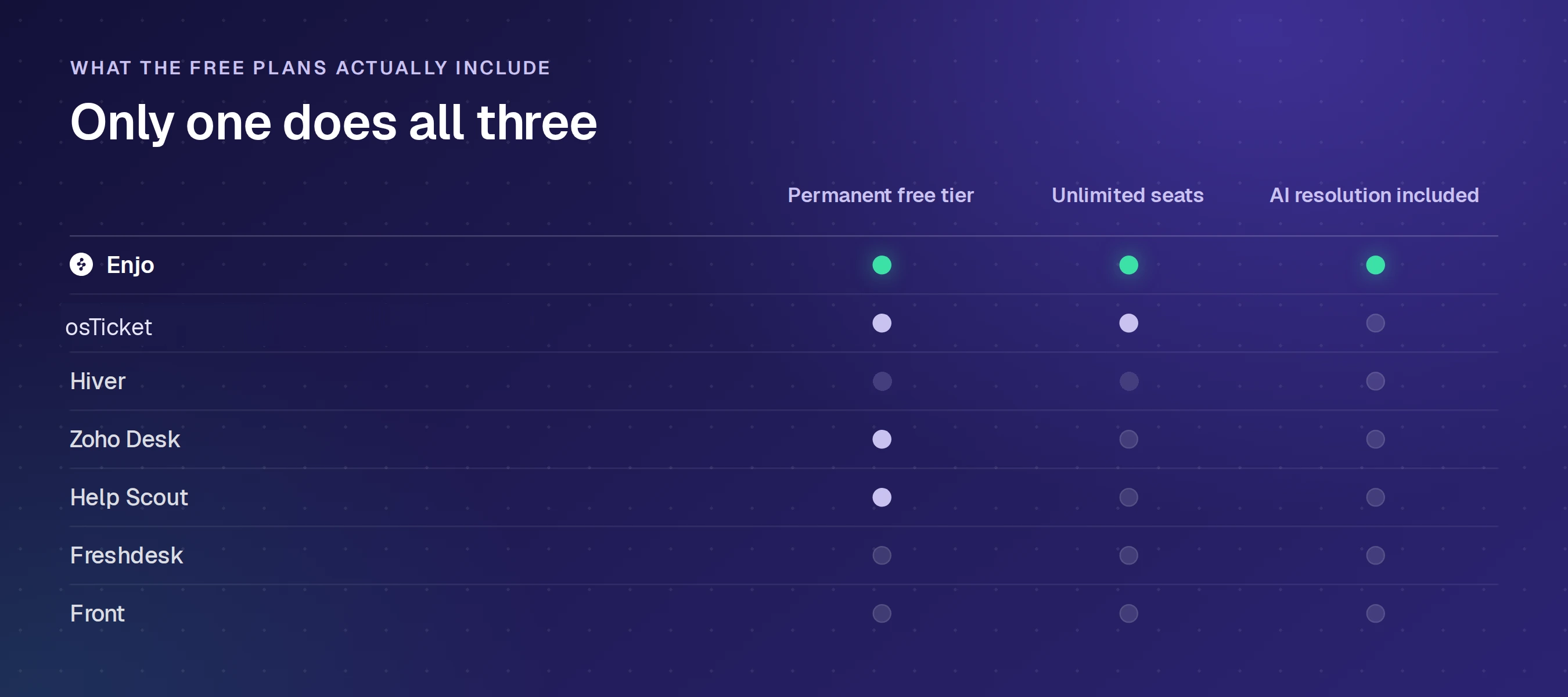
Free splits two ways in this category, and they cost very different things. A hosted free tier costs nothing and caps what you get. Self-hosted open source costs nothing to license and everything to run: a server, a database, upgrades, backups, and somebody who owns security when it breaks at 2am. Both routes are below with the exact terms each vendor publishes.
Raiseaticket
A hosted helpdesk that gives away the complete core product and limits capacity rather than capability.
Free terms: $0 with 5 agents and 500 tickets a month, no credit card and no expiry clock. Email and portal ticketing, SLA policies with operating hours and breach reminders, reports, knowledge base, CSAT, MFA and role-based access, plus Slack and Teams notifications are all included free.
Where it falls short: single sign-on, advanced automation, asset and change management, the REST API and a custom branded domain are all premium. At 500 tickets, email intake pauses until the count resets while the portal stays open.
FreeScout
A free, open-source shared mailbox and help desk written in PHP on Laravel, light enough for shared hosting.
Free terms: the core is free and open source with unlimited agents, tickets and mailboxes.
Where it falls short: much of what a team treats as standard ships as a separately purchased module rather than in the free core, including the knowledge base, live chat, the end-user portal, workflows and SLA, API and webhooks, and SAML SSO. Modules are lifetime licences for one instance and payments are non-refundable.
Zammad
An open-source ticketing system under the AGPLv3 licence, built on Ruby on Rails, with a hosted option sold separately.
Free terms: download and run it on your own servers at no licence cost, with no agent cap and no ticket cap.
Where it falls short: Zammad states on its own pricing page that in the self-hosted version you are responsible for updates, backups and availability. Vendor support is a paid contract; the free route is community support through the forum and GitHub.
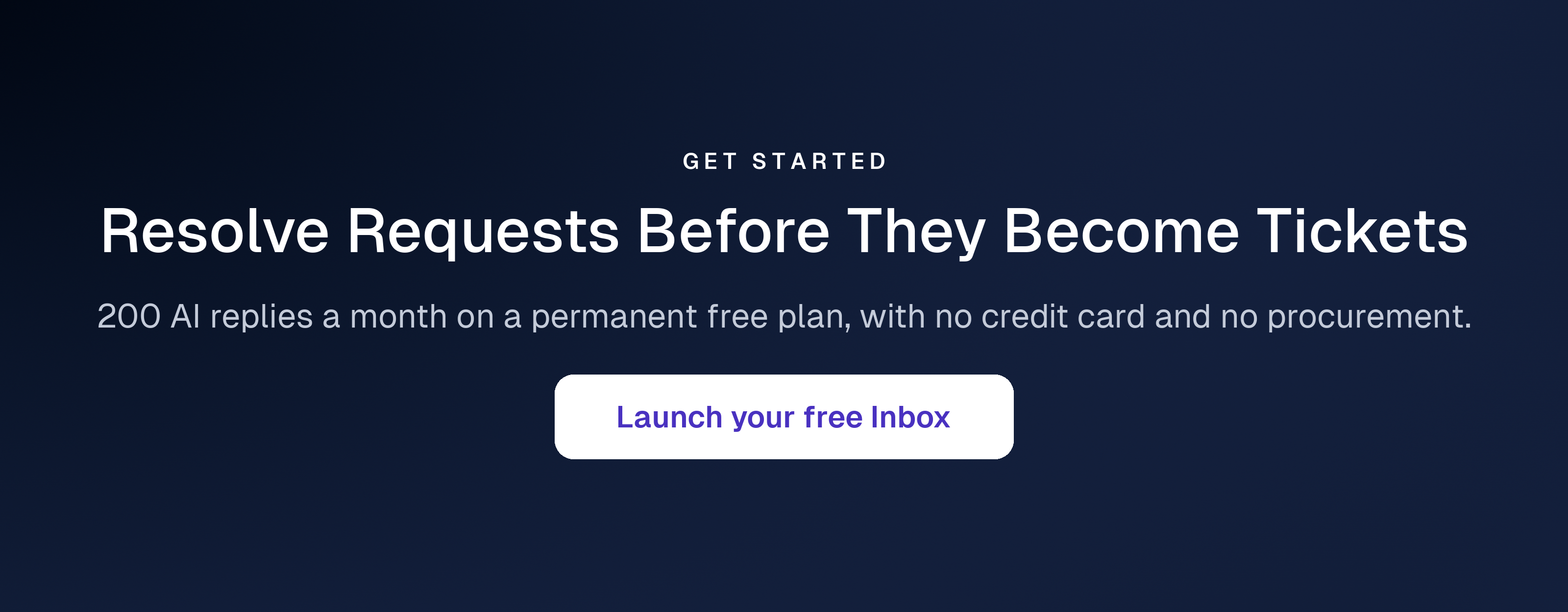
Enjo has a permanent free plan that includes AI resolution, rather than selling it as an add-on above it. $0 a month, 200 AI replies, unlimited human agent seats, no credit card and no expiry. At the reply limit, requests escalate to human agents in Inbox on those same unlimited seats, so nothing stops working.
It is hosted rather than self-hosted, so it sits outside this section's open-source route. Paid plans start at $95 a month for 1,000 AI replies. Full entry in the comparison below.
Free and self-hosted both work while volume is low and the questions are simple. The calculation changes the moment the goal is reducing ticket volume rather than organising it, because every self-hosted option above asks you to supply the AI yourself. The comparison below adds the paid platforms and prices what AI actually costs on each. For a wider list of free-only options, see our free ticketing systems roundup.
The 11 Helpdesk Ticketing Systems With Paid Plans
| Tool | Where It Runs | Pricing Model | Starting Price | Free Tier |
|---|---|---|---|---|
| Enjo Platform | Slack, Microsoft Teams, website chat, Help Center portal | Per AI reply | Free, then $95/mo | Yes, 200 AI replies, unlimited seats |
| Zendesk | Zendesk web app, email, messaging, voice | Per agent plus per AI resolution | $19/agent | No, 14-day trial |
| Freshdesk | Freshdesk web app, email, social | Per agent plus AI sessions | $19/agent | No, 14-day trial |
| Zoho Desk | Zoho Desk web app, email, chat, social | Per agent | USD not published | Yes, 3 users |
| Help Scout | Help Scout web app, email, live chat | Per user plus per AI resolution | $25/user | Yes, 5 users, 100 contacts |
| Hiver | Gmail, or standalone Omni workspace | Per seat, 2-seat minimum | $25/seat | No, 7-day trial |
| Front | Front web app, email, chat, SMS | Per seat plus AI add-ons | $25/seat | No, 14-day trial |
| osTicket | Self-hosted, or SupportSystem cloud | Self-hosted or per agent | Free, or $12/agent | Yes, self-hosted |
| Jira Service Management | Portal, email, Slack, Microsoft Teams, widget | Per agent | $20/agent | Yes, 3 agents |
| ServiceNow | Now Platform, employee portal, email | Quote-based licensing | Not published | No |
| HubSpot Service Hub | HubSpot CRM, email, live chat, calling | Per seat plus onboarding fees | Free, then per seat | Yes, 2 users |
Starting prices verified from each vendor's own pricing page in September 2026. Zendesk, Freshdesk, Hiver and Front figures are annual-billing rates; Help Scout figures are the monthly rate, with annual 16% lower; Jira Service Management figures are the monthly rate.
1. Enjo Platform
A support platform where the AI Support Agent is configured first and Inbox exists for escalations and human collaboration.
Key capabilities
- Enjo, the AI Agent, resolves common requests directly in Slack, Microsoft Teams, website chat and the Help Center portal, rather than drafting a reply for a human to send.
- Inbox gives the team a unified queue with workload management, SLA timers and saved views once a request escalates, carrying the full conversation, account context and suggested next steps.
- AI Actions run real operations in connected systems during a conversation: ticket creation and updates in Jira or ServiceNow, account unlock and access provisioning in Okta, identity lookups in Entra ID, plus custom API actions.
- Pricing is per AI reply rather than per seat, so adding a sixth or seventh agent never raises the bill.
- Unlimited human agent seats and unlimited AI agents on every published plan, including Free.
- Guardrails enforce accuracy and policy on AI inputs and outputs from the Starter plan up, with a citation on every response and a full audit log.
- SOC 2 Type II compliant, ISO 27001 certified and GDPR compliant. Troopr Labs, the company behind Enjo, has held 99.9% uptime over 7 years across 600+ enterprise deployments.
Pricing: Free plan with 200 AI replies a month, unlimited seats, no credit card. Starter is $95/month for 1,000 replies. Standard is $295/month for 3,000 replies. Additional replies are $0.05 each on Starter and Standard.
Scope: Enjo Platform is built agent-first. The AI Support Agent is configured before any queue exists, and Inbox is the helpdesk for escalations and human collaboration rather than the primary work surface. Teams that want a ticket queue first with AI attached later are describing the legacy model, which is the point rather than a limit.
2. Zendesk
An omnichannel support suite that runs email, messaging, voice and social in a single agent workspace.
Key capabilities
- Omnichannel routing across email, messaging, live chat, telephony and social, unified in one agent workspace.
- Zendesk Explore reporting, with custom reports and skills-based routing from the Suite Professional tier.
- A marketplace of 1,800+ apps, partners and integrations.
- Action Builder for multi-step automation flows across Zendesk and third-party systems.
Pricing: Support Team is $19/agent/month paid yearly for ticketing only. Suite Team is $55 and Suite Professional is $115. Suite Enterprise plus Copilot is quote-only. Copilot is a $50/agent/month add-on, and the Workforce Engagement Bundle another $50. Verify at zendesk.com.
Where it falls short: AI agents are billed by automated resolution on top of the seat price, so the bill rises as automation succeeds. Adding Copilot and the Workforce Engagement Bundle to a Suite Professional seat takes the per-agent cost from $115 to $215 a month before a single AI resolution is charged.
3. Freshdesk
A long-established customer support suite built for teams that want a full-featured helpdesk without a steep learning curve.
Key capabilities
- Email and social ticketing with automations, a customer portal and a built-in knowledge base.
- Freddy AI Agent included on every tier with the first 500 sessions covered.
- Intelligent routing and multiple SLA policies from the Pro tier.
- Fast setup, typically live the same day.
Pricing: Growth is $19/agent/month billed annually, Pro $55 and Enterprise $89. Additional Freddy AI Agent sessions are $49 per 100 sessions. Freddy AI Copilot is $29/agent/month on Pro and Enterprise. Verify at freshworks.com.
Where it falls short: The free plan no longer appears on Freshdesk's public pricing page, so the entry point is now a 14-day trial rather than a standing free tier. AI sessions past the included 500 are metered separately, and day passes, connector tasks and MCP actions are each billed on top. If Freshdesk is the system you are moving off, our comparison of the best Freshdesk alternatives covers 13 options, including self-hosted ones, on free terms and what AI adds to each bill.
4. Zoho Desk
A multichannel help desk that connects natively to the rest of the Zoho suite, including CRM, Books and Analytics.
Key capabilities
- Multichannel ticketing across email, live chat, WhatsApp, Instagram, Facebook Messenger, Telegram and X.
- Blueprint, a drag-and-drop automation builder for structured resolution processes.
- AI Agents on every paid tier with up to 30M free tokens a month, plus generative AI on a bring-your-own-key basis from Express.
- Zia AI, telephony and multi-department support from the Professional tier.
Pricing: A Free Forever edition covers three users with email ticketing. Paid tiers run Express, Standard, Professional and Enterprise, billed per user per month with up to 34% off annual billing. Light users are charged separately on Professional and Enterprise. Confirm current figures at zoho.com.
Where it falls short: Zia AI, live chat and skill-based routing are gated to the upper tiers, so a team that needs any of them lands well above the entry price. The Standard tier caps at 5 users, and unlimited users only start at Professional.
5. Help Scout
An email-first shared inbox that reads more like a clean email client than a heavy ticketing system. Teams comparing inbox-first tools should also see our email ticketing system comparison.
Key capabilities
- A shared inbox with saved replies, collision detection and unlimited tags on paid plans.
- Docs, a built-in branded knowledge base, plus Beacon, an embeddable help and chat widget.
- AI Assist on all paid plans, with AI Drafts and AI Summarize on Plus and Pro.
- Live chat, SMS, WhatsApp, Instagram and Messenger across paid plans.
Pricing: A free plan covers 5 users, 1 inbox and 100 contacts a month. Standard is $25/user/month, Plus $45 and Pro $75, with annual billing 16% lower. AI Answers, the feature that resolves requester questions, is billed separately at $0.75 per resolution. Check current rates at helpscout.com.
Where it falls short: Per-user pricing means the bill grows with every hire, and AI resolution is a metered add-on rather than part of the seat. Pro carries a 10-user minimum, and extra inboxes and Docs sites cost $10 and $20 a month each beyond the plan allowance.
6. Hiver
A support layer built for teams that run support out of Gmail, now also sold as a standalone omnichannel platform called Hiver Omni.
Key capabilities
- Runs directly inside Gmail as a shared inbox, or as a separate Omni workspace that works with Outlook and other providers.
- AI Agents and AI Copilot bundled from the entry Growth tier with no separate AI add-on.
- Customer portal, Slack channel support, SLAs and CSAT surveys from the Pro tier.
- SOC 2 Type II, ISO 27001, GDPR, CCPA and HIPAA compliance.
Pricing: Growth is $25/user/month on annual billing ($35 monthly), Pro $55 ($65) and Elite $85 ($95). Voice is a $30 per seat add-on. A 7-day trial of Elite is available. Confirm current rates at hiverhq.com.
Where it falls short: The free plan no longer appears on Hiver's pricing page. Paid plans start at a 2-seat minimum and then scale in blocks of 5, so a 7-person team has to buy 10 seats. SLAs, CSAT and the customer portal are gated to Pro and above.
7. Front
A shared inbox that blends email, chat and SMS into one workspace, aimed at teams that outgrew a shared Gmail account.
Key capabilities
- Unified inbox with internal comments, shared drafts and assignment rules.
- A no-code public knowledge base, customizable from the Professional tier.
- AI Topics on every plan, with Copilot, Smart QA, Smart CSAT and Autopilot available as add-ons.
- SSO and SCIM from the Professional tier, with custom roles on Enterprise.
Pricing: Starter is $25/seat/month billed annually and capped at 10 seats with a single channel type. Professional is $65 up to 50 seats, and Enterprise is $105. Copilot and Smart QA are $20/seat/month each, Smart CSAT $10, and Autopilot starts at $0.05 per conversation. Confirm at front.com.
Where it falls short: No free plan, only a 14-day trial. The Starter tier supports one channel type at a time, so a team adding chat to email has to move to Professional at $65. AI features remain add-ons below Enterprise.
8. osTicket
An open source helpdesk ticketing system, self-hostable at no license cost, with an optional managed cloud edition.
Key capabilities
- Fully open source with no per-agent licensing at any scale on the self-hosted edition.
- Ticket intake from email, web forms and phone into a single queue, with auto-assignment by department.
- A requester portal where end users track ticket status, plus a knowledge base for self-service.
- A managed cloud edition powered by SupportSystem with backups, uptime guarantees and phone support.
Pricing: Free to download and self-host with community support. The cloud-hosted edition starts at $12/agent/month with a 30-day trial. A virtual appliance edition is quote-only. Confirm at osticket.com.
Where it falls short: Self-hosting means the team owns the web server, PHP and database stack, security patching and uptime. There is no AI resolution layer, so every request reaching the queue is handled by a person.
9. Jira Service Management
Atlassian's service desk, built on the Jira issue engine and sold as part of the Atlassian Service Collection to IT and internal service teams.
Key capabilities
- Requests arrive through a customer portal, email, Slack, Microsoft Teams or an embedded widget, including on the free plan.
- Configurable forms, workflows and queues for triaging incoming work.
- An embedded knowledge base that recommends articles to deflect requests.
- Rovo Agents, search and chat for AI-assisted support from the Standard plan.
Pricing: Free for up to 3 agents. Standard is $20/agent/month and Premium $51.42/agent/month on monthly billing, with annual billing saving up to 17%. Confirm at atlassian.com.
Where it falls short: Advanced incident, problem and change management and the virtual service agent start at Premium. The virtual service agent includes 1,000 assisted conversations a month, then bills from $0.30 per conversation. The free plan stops at 3 agents.
10. ServiceNow
An enterprise service management platform on the Now Platform, covering IT, HR and customer service workflows in one system of record.
Key capabilities
- ITIL-aligned incident, problem, change and request management.
- Now Assist, ServiceNow's generative AI, working inside platform workflows.
- An employee service portal and catalog for self-service requests.
- Cross-department workflows that route one request across IT, HR and facilities.
Pricing: ServiceNow does not publish pricing. Licensing is quoted through sales, and Now Assist is sold inside ServiceNow's licensing tiers.
Where it falls short: deployments typically run through an implementation partner over months rather than days, and AI capability depends on the licensing tier purchased.
11. HubSpot Service Hub
HubSpot's customer service product, built on the HubSpot CRM so every ticket carries the contact's deal and marketing history.
Key capabilities
- Ticketing and calling on Starter, with live chat included and HubSpot branding removed.
- A help desk workspace, knowledge base, customer portal and feedback surveys from Professional.
- Customer Agent, HubSpot's AI agent, from Professional, running on HubSpot Credits (3,000 included on Professional, 5,000 on Enterprise).
- Skill-based routing, conditional SLAs and capacity limits on Enterprise.
Pricing: Free for up to 2 users, with no credit card required. Starter, Professional and Enterprise are priced per seat, and Professional and Enterprise both carry a required one-time onboarding fee. Confirm current pricing at hubspot.com.
Where it falls short: the knowledge base, customer portal and help desk workspace start at Professional, so the free and Starter plans cover ticketing without self-service. Customer Agent draws down HubSpot Credits, and both upper tiers add a one-time onboarding fee.
Helpdesk Ticketing When Requests Arrive in Slack and Microsoft Teams
Internal IT and HR requests rarely start in a portal. They start as a message in Slack or Microsoft Teams, and a helpdesk ticketing system that only watches email and a web form misses them until someone copies the message across by hand. The IT manager thread ranking for this search opens with exactly that problem: requests getting lost between email, chat and the queue.
Enjo resolves those requests where they are asked, in Slack channels, direct messages and Microsoft Teams. The AI Support Agent answers from your connected knowledge with a citation, runs the configured action in the connected system, and creates a ticket only when a person needs to step in. When it does, the human receives the full conversation, account context and suggested next steps, so the requester never repeats the question. BookMyShow captures 100% of internal requests through Slack automation, with zero manual ticket creation.
Elsewhere on this list, chat is mostly an intake or notification surface: Raiseaticket sends Slack and Teams notifications on its free plan, Hiver adds Slack channel support from its Pro tier, and Jira Service Management takes requests from Slack and Teams on every plan while keeping its virtual service agent, the part that answers them, on Premium.
How to Choose a Helpdesk Ticketing System
Run these five checks on your own systems rather than in a vendor demo. They separate the tools faster than any feature matrix, and getting the AI question wrong is expensive to undo: Gartner's September 2026 release, drawn from a survey of 3,566 customers, found only 27% would try a chatbot again after a negative experience. An AI layer that answers confidently but incorrectly costs more than no AI layer.
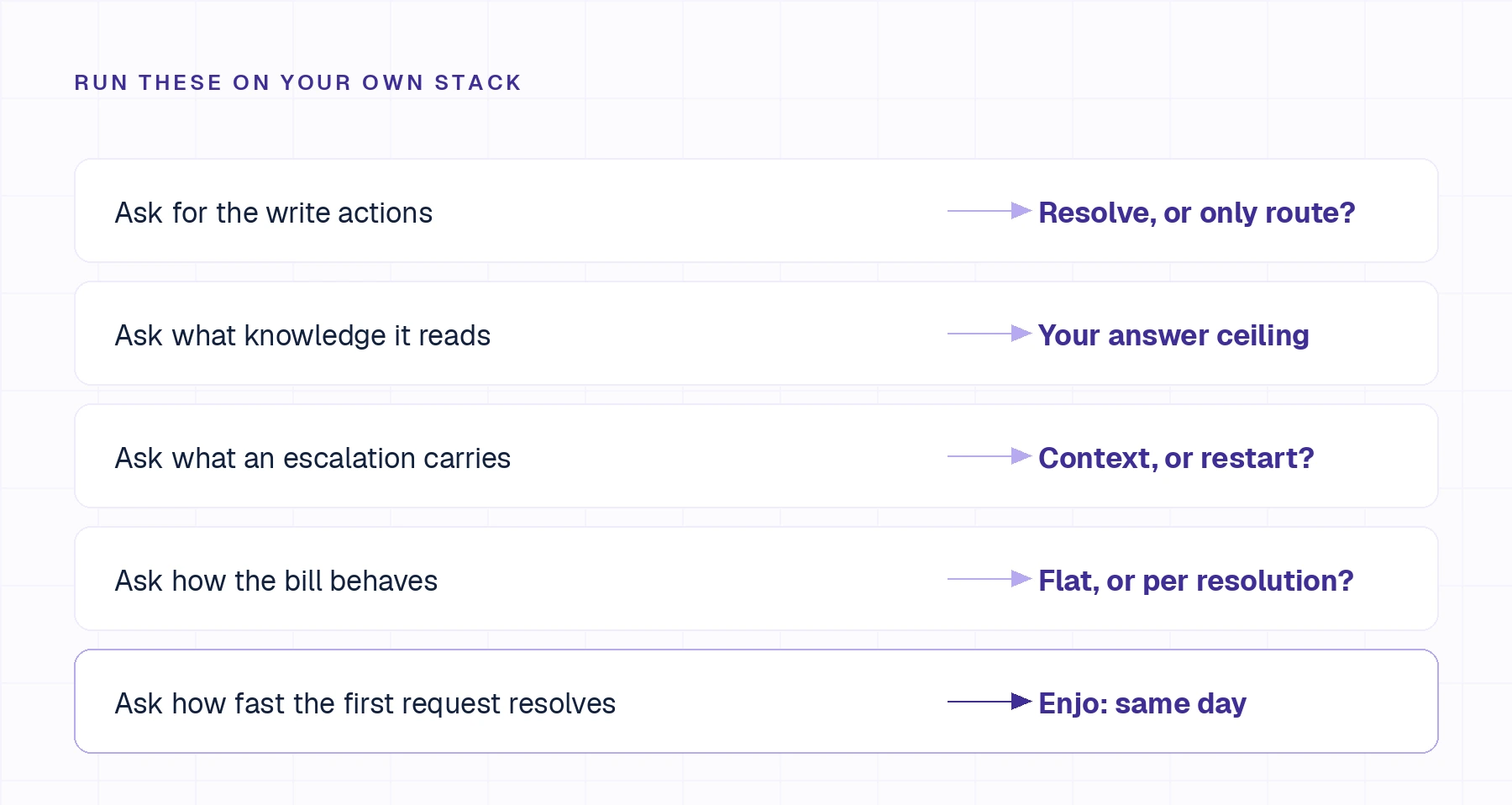
Ask for the list of write actions, not read actions. Reading a ticket is not resolving a request. A system that can look up an order but cannot issue the refund has moved the work, not removed it. Enjo's AI Actions create and update tickets in Jira and ServiceNow, unlock accounts and provision access in Okta, manage groups in Google Workspace, and reach anything else through custom API and webhook actions, each explicitly configured, authorized and recorded in the audit trail.
Ask where your knowledge lives and whether the tool reads all of it. Answer quality is capped at whatever sits inside the systems the tool can reach. Enjo indexes Confluence, SharePoint, Google Drive, Notion, Guru, past tickets across Jira, Zendesk, ServiceNow and Salesforce, plus web pages and uploaded files, into one index that grounds the AI, the agent workspace and the Help Center portal with no drift between them. Our ranking of AI customer support software covers where that line falls across the category.
Ask what an escalation carries. Watch one land in the queue your team actually works. In Enjo, the human receives the full conversation, account context and suggested next steps, so nobody restarts the diagnosis.
Ask how the bill behaves when automation starts working. Per-resolution and per-session models raise the bill at exactly the point the AI succeeds. Enjo prices per AI reply with unlimited human agent seats on every published plan, so hiring never moves the number and the forecast holds.
Ask how long until the first request is resolved end to end. Enjo's free plan needs no credit card and no procurement cycle, and Aptean took its initial cohort live in a single day at 3,500+ employees.
If the constraint is that headcount is unpredictable, a usage-priced or self-hosted system removes the seat variable entirely, one with an AI layer and one without. If the budget constraint is absolute, our roundup of free ticketing systems covers the options that stay free permanently. For IT-led service desks with asset and change management requirements, see our comparison of IT service management system options.
Frequently Asked Questions
What is the best helpdesk ticketing system?
The ranking turns on two things: how the vendor bills and whether the AI resolves requests or only routes them. On both, Enjo Platform ranks first here. It prices per AI reply rather than per seat, includes unlimited human agent seats on every published plan, and resolves requests in Slack, Microsoft Teams, website chat and the Help Center portal before a ticket exists.
What is a helpdesk ticketing system?
A helpdesk ticketing system captures support requests from email, chat, web forms and messaging channels, converts each into a trackable ticket with an owner and a status, and reports on the queue. It is used by both customer support teams and internal IT and HR service desks. For teams focused on customer-facing support, our ranking of the best customer service ticketing systems compares 15 tools.
What is the best free helpdesk ticketing system?
Enjo, if the goal is fewer tickets rather than a cheaper queue. Its free plan is permanent, with 200 AI replies a month, unlimited human agent seats and no credit card, and AI resolution is included on that plan. For ticketing without AI, Raiseaticket's hosted free plan covers 5 agents and 500 tickets a month, while Zammad, FreeScout and osTicket are free to self-host, with the team taking on hosting and maintenance in exchange.
What is the difference between a helpdesk ticketing system and full help desk software?
A helpdesk ticketing system focuses on capturing, tracking and resolving support requests. Full help desk software often adds broader service-desk capabilities such as asset management, change management and multi-department workflows. Most teams need the former; larger IT operations often need the latter.
Is an open source helpdesk ticketing system worth it?
It depends on whether someone can own hosting, security patching and upgrades. osTicket removes per-agent licensing entirely, but self-hosting is an operational commitment rather than a free lunch, and there is no AI resolution layer included.
How much does a helpdesk ticketing system cost for a 7-person team?
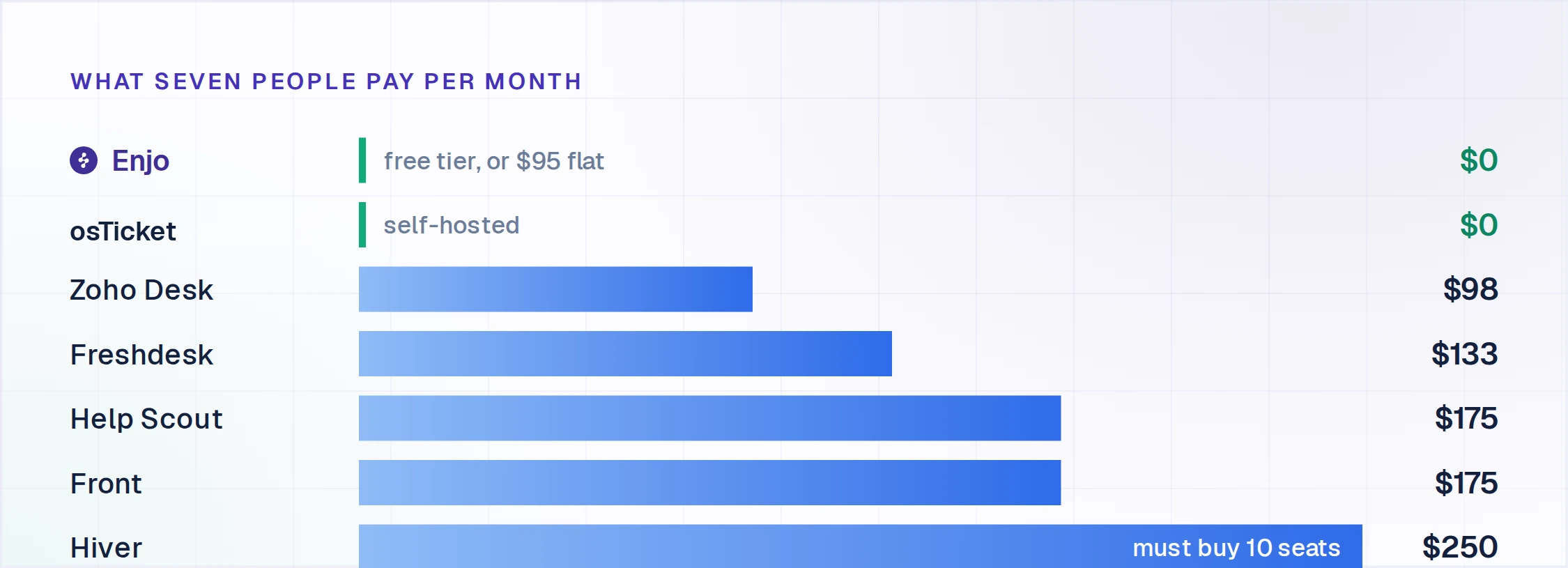
On Freshdesk Growth at $19 per agent, seven seats run $133/month before AI sessions. On Zendesk Support Team at $19, the same team is $133/month before Copilot or per-resolution AI billing. On Help Scout Standard at $25 monthly, $175. On Hiver, seat blocks push a 7-person team to a 10-seat purchase at $250/month on Growth. On Enjo, the cost tracks AI reply volume rather than headcount, so a 7-person team fits the free tier's 200 replies or the $95/month Starter tier regardless of how many hold seats.
What should a business look for in a helpdesk ticketing system?
Seat flexibility, so you buy the seats you need rather than a rounded-up block. A genuine free tier rather than a time-limited trial. And whether AI resolution is included in the plan or billed as a separate per-resolution add-on, since that line grows as automation succeeds.