Transform complex support workflows
How to Build a Chatbot Knowledge Base in 7 Steps
A chatbot knowledge base is the set of articles, documents and past answers an AI chatbot searches before it replies. The chatbot finds the passages that match a question, writes its answer from them and cites the source, so every answer is only as good as what sits in that knowledge base and how it is written.
Most guides stop at "pick a platform and upload your docs." The work that decides whether a knowledge base chatbot answers correctly comes after that. This guide walks through the 7 steps: choosing the sources, writing articles a chatbot can find, testing with the questions people really ask, and sending the questions it can't answer to your team, with a before and after article rewrite along the way.
What is a chatbot knowledge base?
A chatbot knowledge base is the content an AI chatbot is allowed to answer from: help center articles, internal docs, past tickets, website pages and files. It is the chatbot's source of truth. The language model writes the sentences; the knowledge base decides whether they are right.
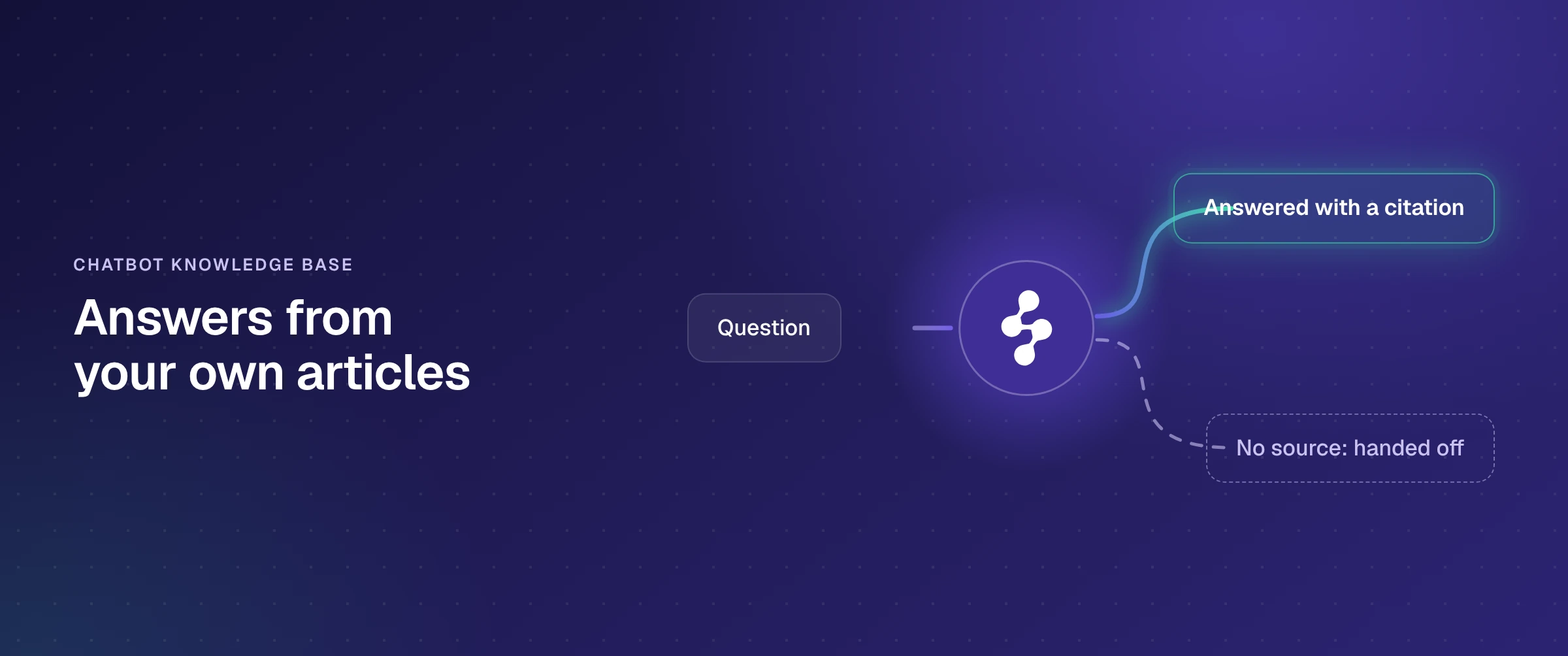
Here is what happens when a requester asks a knowledge base chatbot a question:
- The chatbot searches the knowledge base for passages that match the meaning of the question, not only its keywords.
- It writes an answer from the passages it found, in plain language.
- It cites the article or document the answer came from, so the requester and your team can check it.
- When nothing relevant comes back, a well-built chatbot says so and hands the conversation to a person instead of guessing.
That pattern is called retrieval-augmented generation (RAG), after a 2020 research paper that paired a language model with a searchable index of documents. It is why an AI chatbot with a knowledge base doesn't need to be trained on your content: it needs content it can find. For the concept in more depth, including the ways answers go wrong, see our guide to the AI knowledge base.
Knowledge base chatbot vs scripted FAQ bot
A scripted FAQ bot matches keywords or buttons to answers someone wrote in advance. It can only say what is in the script, and every new question needs a new branch. A knowledge base chatbot reads your articles at question time, so a new article becomes a new answer once it is indexed, and an edited article changes the answer. The maintenance moves from the script to the content, which is why the rest of this guide is about content.
How to build a chatbot knowledge base in 7 steps
The seven steps take you from a pile of docs to a chatbot you can put in front of requesters. Steps 1 to 4 are content work, step 5 connects the channels, and steps 6 and 7 decide what happens when an answer is wrong or missing.
1. Start from the questions people actually ask
Don't start from the docs you have. Start from the questions you get. Export the last 90 days of tickets, chats and channel messages, and group them by what the person wanted, not by the words they used. "Can't log in," "locked out" and "password not working" are one question.
Then give each group one of three labels:
- Answerable from a document: "What does the Pro plan include?" The knowledge base can resolve it.
- Needs an action or a lookup: "Where is my refund?" The chatbot needs access to a system to answer it; in Enjo, AI Actions retrieve data and run operations in connected systems.
- Needs a person: a complaint, an exception, a judgment call. The chatbot should know to hand these off.
Sort the first group by volume. Your export shows how many conversations the top 30 or 50 questions cover, and those are your launch list. Keep the list in the words people used: in step 6 it becomes your test set.
2. Choose the sources the chatbot reads
Most teams already have the answers somewhere. The decision is which sources to let the chatbot read, because each one brings its own problems. Here is what each common source gives a chatbot, what to watch for, and how Enjo keeps it in sync.
| Source | What It Gives the Chatbot | Watch For | Sync in Enjo |
|---|---|---|---|
| Help center articles | Reviewed answers written for requesters | Gaps where nobody wrote an article | Native in Help Center |
| Confluence, Notion, Google Drive, SharePoint | Internal how-tos, policies and product specs | Drafts and outdated pages read as fact | Daily |
| Past tickets and cases | How your team actually answered | Old workarounds and account details | Daily |
| Website pages | Product, pricing and policy pages | Marketing copy and pages that change | One-time crawl |
| Uploaded files | Manuals, contracts and onboarding packs | Answers locked in tables or scans | One-time upload |
| Slack channel history | Questions in requesters' own words | Half answers and side threads | One-time import |
Sync from Enjo's knowledge source list: Confluence, Google Drive, SharePoint and OneDrive, Notion and Guru re-sync daily, as do past tickets from Jira Service Management, Zendesk, ServiceNow and Salesforce Service Cloud. Web pages, uploaded files (PDF, DOCX, audio, video and more) and Slack history are one-time imports.
Two rules keep sources from spoiling answers. First, connect the system where a document is maintained, not a copy of it: a synced Confluence space stays current, while a PDF export of it starts aging the day you upload it. Second, leave out what you would never say to a requester: draft folders, retired policy pages, internal-only threads. A chatbot treats everything it can read as something it may quote.
Past tickets deserve a closer look. They are the richest source, because they show how your team really answers, and the riskiest, because they also hold the workaround from two releases ago and details about one specific account. If your team's answers live in channels, see our step-by-step guide to setting up a Slack knowledge base.
3. Decide what requesters see and what only the chatbot uses
Not every answer deserves a public article. Sort your launch list into four kinds of content before you write, because each kind lives in a different place:
- Public articles: anything a requester could browse on the help center portal, such as setup steps, plan details and policies.
- Private answers: short, specific answers the chatbot should know but that don't merit an article, such as an edge case, a one-line fact or the exact answer to a question people phrase ten ways.
- Targeted content: answers that apply only to some requesters, such as one plan, one role or signed-in users.
- Left out: anything you would not say to a requester, such as internal escalation notes or details about a specific account.
In Enjo, Help Center articles are the requester-facing layer, and Audience Targeting sets who sees each one by plan, role, segment or login state. Answers is a private Q&A knowledge base that trains and grounds the agent without appearing on the portal. Both feed the same knowledge index. Workspaces are dedicated to either employee or customer support, so employee content and customer content stay apart.
4. Write each article so the chatbot can find it
Retrieval works on passages, not whole documents. Long documents are split into smaller pieces, and the chatbot picks the pieces that best match the question. Anthropic's research on contextual retrieval shows where this breaks: a piece that reads "The company's revenue grew by 3% over the previous quarter" doesn't say which company or which quarter, so it can't be matched to the question it answers. Help articles written for people often have the same problem. The fixes are editorial:
- One question per article. "How to change the email on your account" is retrieved more reliably than "Account settings overview," which answers ten questions at once.
- Title it in the requester's words. Use the phrasing from your step 1 export. If people say "invoice" and your product says "billing statement," use both.
- Answer in the first two sentences, then give the steps. This is the inverted pyramid that Nielsen Norman Group recommends for web readers, and it helps a chatbot for the same reason: the passage it retrieves carries the answer.
- Make every section stand on its own. Name the product, plan and feature in each section instead of writing "it" or "as mentioned above." A section can be retrieved without the paragraphs before it.
- State the conditions. "Pro plan only," "admins only," "EU accounts only." A chatbot can only qualify an answer with conditions the article states.
- Keep the steps in text. Steps shown only in a screenshot are easy for a person to follow and hard for a chatbot to quote. Keep the image and write the steps beside it.
- Give each answer one home. When two articles answer the same question differently, the chatbot may cite either. Merge them and redirect the old one.
Here is one answer before and after those rules, in a help article for a fictional software product:
Account settings overview
Your account settings let you manage your profile, notifications, security and integrations. This article walks through each tab of the settings page, starting with notifications.
Three paragraphs later:
To update your email, open the Profile tab as shown in the screenshot below. Contact your admin with any questions.
Ten topics in one article, so no passage is about email
The answer sits in the fourth paragraph
The steps live in a screenshot
It never says who can make the change
How to change the email address on your account
Account owners can change the login email in Settings, Profile, Email. Members ask an account owner to change it for them. If your company signs in with SSO, the email comes from your identity provider, so your IT team changes it there.
- Open Settings and select Profile.
- Select Email, enter the new address and save.
- Open the confirmation link sent to the new address.
One question, titled in the requester's words
The answer and who can do it come first
SSO is named, so the chatbot can qualify its answer
The steps are text the chatbot can quote
An illustrative article for a fictional product. The same rewrite works for an HR policy or an IT how-to.
If you are writing the knowledge base from scratch, our guide on how to create a knowledge base covers structure and governance in more depth.
5. Point every channel at the same knowledge base
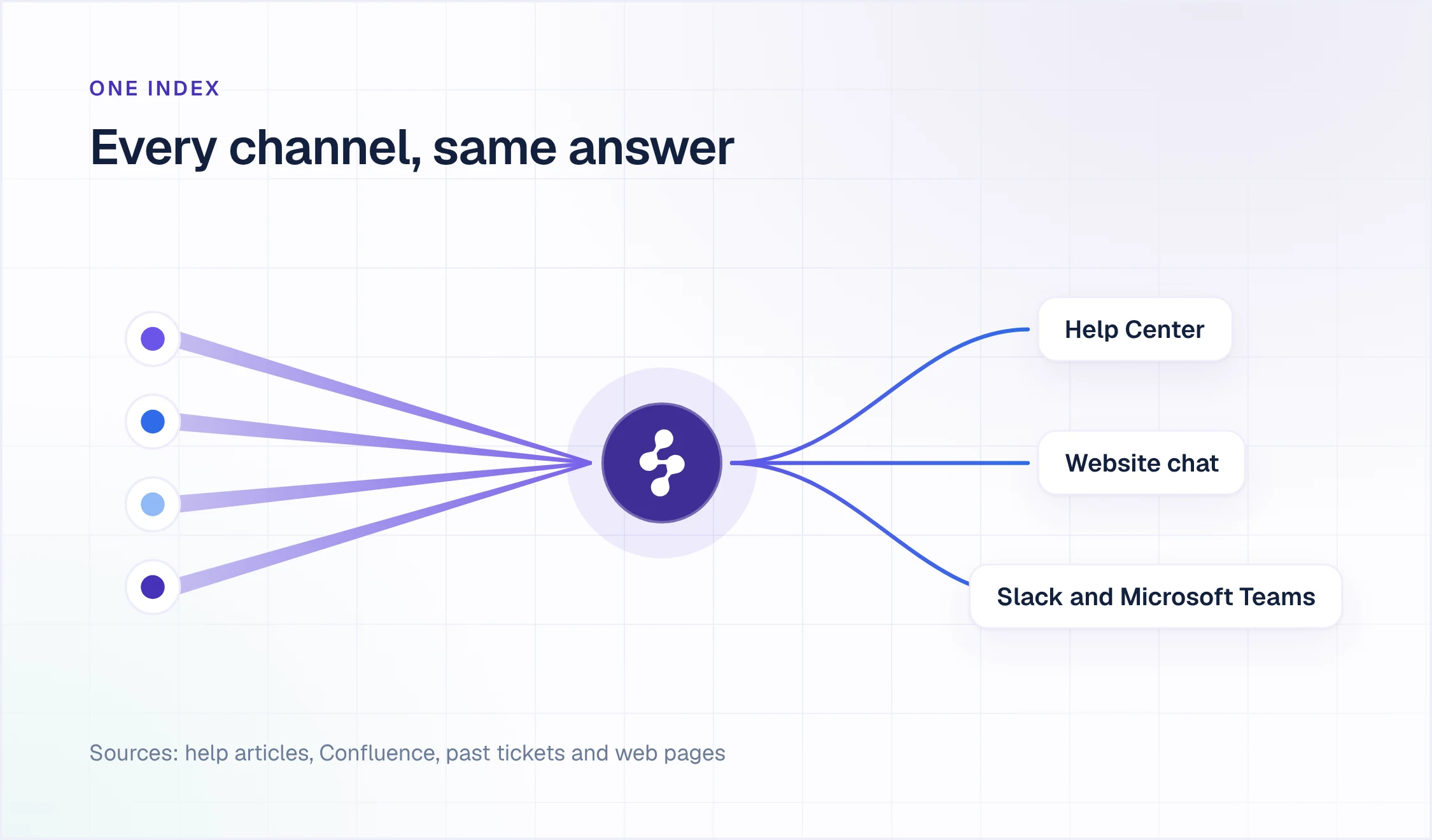
Requesters ask wherever they already are: the help center search box, the chat widget on your website, Slack or Microsoft Teams. If each channel gets its own bot with its own content, you maintain several knowledge bases and they drift apart. The bot in Slack gives last month's answer while the help center shows this month's.
Connect every channel to one index instead. In Enjo, a single knowledge index powers the AI answers, your human agents' workflow and Help Center self-service, so what the AI says is what agents see is what requesters find. The same articles answer in the Help Center portal, in website chat, in Slack and in Microsoft Teams, and a fix to one article fixes the answer everywhere. For channel detail, see our guides to setting up an AI chatbot for website visitors and to using Microsoft Teams as a knowledge base.
6. Test with real questions before launch
Take 30 to 50 questions from your step 1 list, in the words people actually used, including the vague and misspelled ones. Ask each one and score the answer. Five results cover almost every case, and each one points at a different fix:
| Result | What It Tells You | What to Fix |
|---|---|---|
| Correct and cited | The article exists and was found | Nothing; keep it in the test set |
| Correct, from the wrong article | Two articles cover the same question | Merge them and keep one home |
| Wrong or out of date | The source itself is wrong | Fix the article, not the chatbot |
| No answer, though an article exists | The article wasn't retrieved | Retitle and restructure it (step 4) |
| Answered when a person should | The topic needs a human | Add an escalation rule for it |
Fix the content first. A wrong answer with a citation points straight at the article to change, and rewording the chatbot's instructions to work around a bad article leaves the article wrong for everyone who reads it. Run the same questions again after every fix, and add each new question that slips through after launch.
In Enjo, the Playground is a sandbox for prompts, tools and policies before production, and Bulk Testing checks response accuracy, consistency and coverage at scale before launch.
7. Decide where unanswered questions go
Every knowledge base has gaps, and a new one has many. What matters is what the chatbot does at the edge of what it knows. Set three rules before launch:
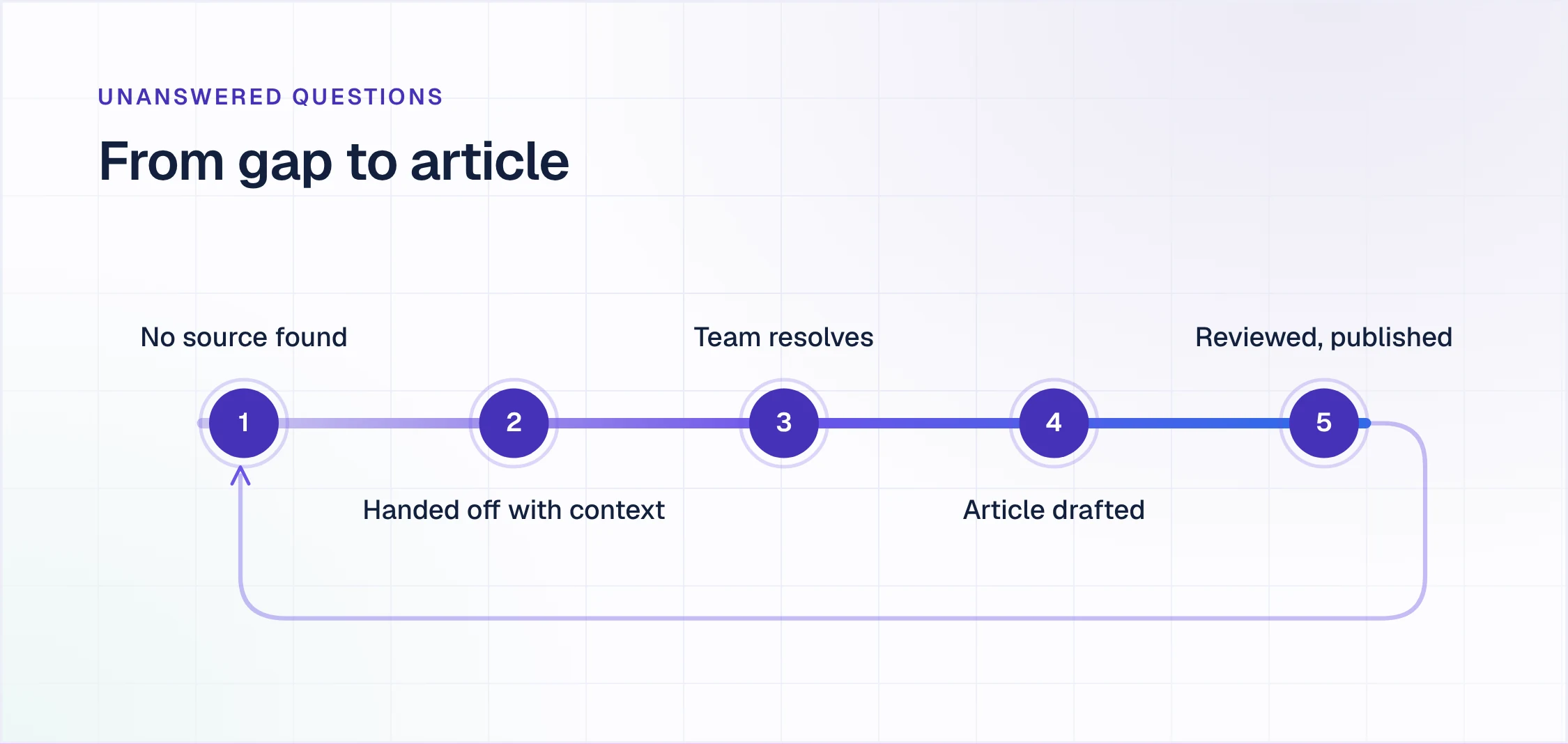
- When to hand off: no relevant source found, the requester asks for a person, or the topic is on your never-answer list, such as billing disputes, legal questions or security incidents.
- What travels with the handoff: the full conversation, the account context and suggested next steps, so the person who picks it up doesn't ask the requester to repeat anything.
- What happens after the answer: the resolution should become an article, or the same question escalates again next week.
In Enjo, Escalation rules set when, how and where the agent hands off, and what context travels. The handoff lands in Enjo Inbox with the full conversation, account context and suggested next steps. Then the Self-Improving Loop in Enjo Help Center works on the gap: unanswered questions escalate to your team, and resolved conversations auto-draft articles for review. Once you publish the draft, the next requester who asks gets the answer.
How to stop a knowledge base chatbot from making things up
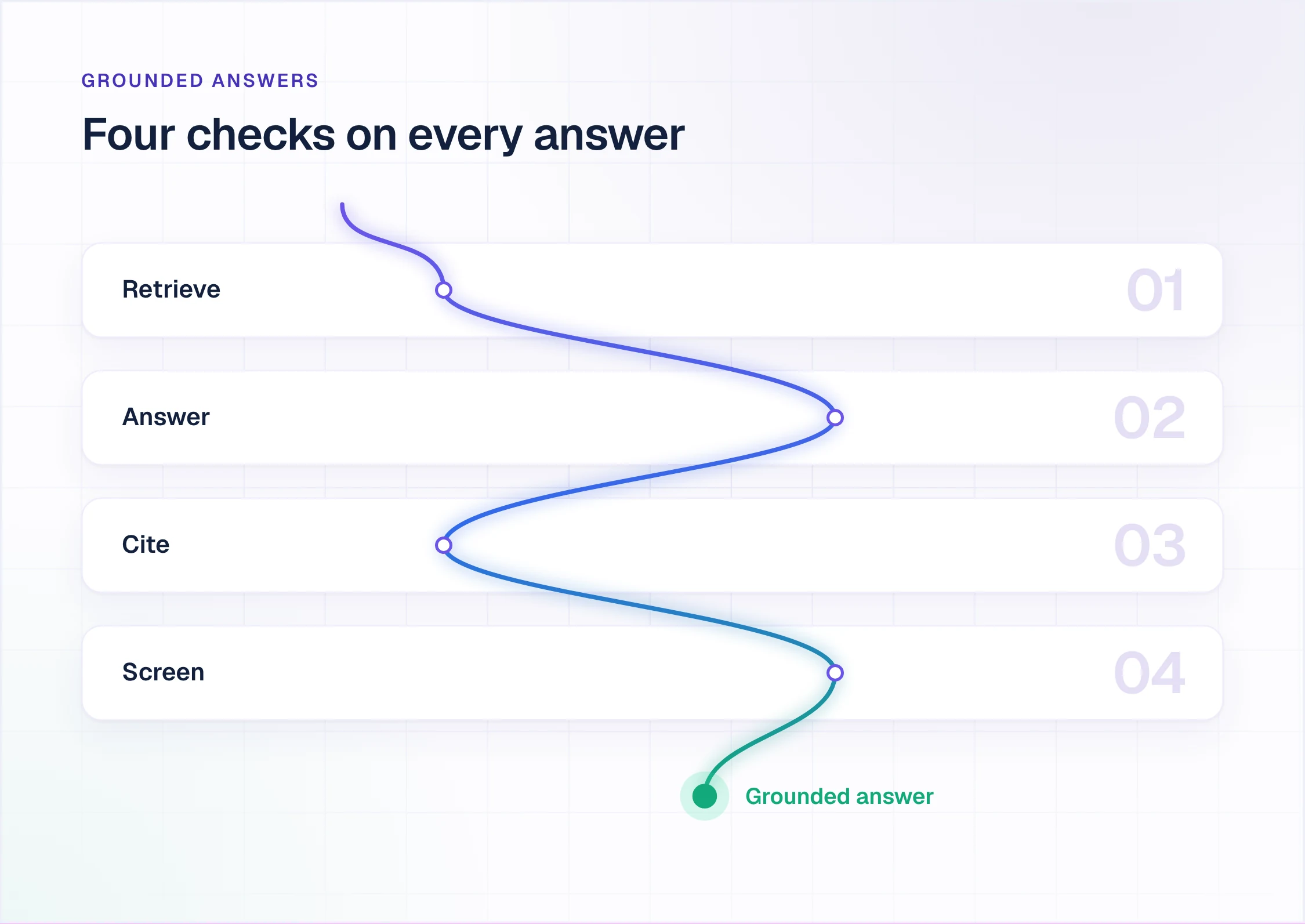
A chatbot invents an answer when it is allowed to answer without a source, or when its sources disagree. Four controls cover most of it:
- Answer only from retrieved sources. If nothing relevant comes back, the right reply is a handoff, not a best guess from the model's general knowledge.
- Cite every answer. A citation lets the requester check the source, and lets your team trace a wrong answer to the article behind it.
- Remove contradictions. Two versions of a refund policy produce blended answers, so step 4's "one home per answer" rule is an accuracy control as much as a writing rule.
- Screen inputs and outputs. Guardrails stop questions the chatbot shouldn't take and answers it shouldn't send, and an audit log records what was said.
Enjo grounds every answer in your knowledge, with citations, and pairs that with Guardrails on AI inputs and outputs and full audit logs. The agent answers from the index you control, and the citation shows which article it used, so a wrong answer is a content fix you can find, not a mystery.
How to keep a chatbot knowledge base current
A chatbot knowledge base starts drifting the day it launches. Features get renamed, prices change, a policy gains an exception, and the article still reads as true. Stale content does more damage behind a chatbot than on a help center page, because the chatbot delivers the old answer confidently, with a source attached, in every channel at once.
Tie updates to events rather than a calendar:
- Every release: find the articles that describe what changed and update them before the release note goes out.
- Every price or policy change: find every article that states the old value. In Enjo Help Center, the AI Command Center runs bulk content operations in natural language, such as updating a set of articles after a feature is renamed.
- Every source change: connected sources such as Confluence, Google Drive, SharePoint and Notion re-sync daily, but a crawled web page or an uploaded file is a one-time import. Re-import it when the original changes, or connect the system where it is maintained.
Then hold a short weekly review of three lists: questions the chatbot couldn't answer, answers requesters marked as unhelpful, and the drafts waiting for review. In Enjo, Feedback collects helpfulness signals on articles, Performance Insights shows AI accuracy, feedback and resolution gaps, and the Publish Workflow keeps every draft in review until someone approves it. Enjo also learns continuously from how your team responds to escalations, and a person still decides what goes live.
Build it yourself or start from a help center?
If you have engineers, you can assemble a chatbot knowledge base from parts: a document parser, a chunking method, an embedding model, a vector database, a language model and a chat widget. The first demo is quick to build. The production version is where the work is:
- Keeping every source in sync, including removing what was deleted at the source.
- Respecting permissions, so an employee-only answer never reaches a customer.
- Citations, a handoff that carries context, and an inbox for the person who picks it up.
- Reporting on what went unanswered, and a way to turn it into new articles.
- A security review: where the data lives, who can see it, and an audit trail of what the AI said.
A help center with a built-in AI agent ships those parts, so your team spends its time on the content. If you're comparing options, our review of help center software compares nine tools on what their AI answers cost. For what a support chatbot should resolve beyond answering questions, see AI chatbot for business.
Build your chatbot knowledge base in Enjo Help Center
Enjo Help Center is built around the parts this guide covers, so the steps map onto it directly:
- Generate the first articles. Article Generation drafts articles from your website URL, from connected docs in Notion, Google Drive, Confluence or SharePoint, or from ticket patterns in Zendesk, Intercom or Freshdesk. Existing articles import from Intercom, Notion, Confluence and Zendesk Help Center, and Templates and Collections set the structure.
- Connect the sources the agent reads. Add Confluence, SharePoint, past tickets and the other systems your team already maintains, so answers come from them on a daily sync.
- Split public from private. Publish articles to the portal with Audience Targeting, and keep agent-only Q&A in Answers.
- Answer in every channel. AI Search gives direct, source-cited answers on the portal, and Enjo, the AI agent, answers from the same index in website chat, Slack and Microsoft Teams.
- Test before launch. Run your question set through the Playground and Bulk Testing.
- Escalate with context. Questions the agent can't resolve reach your team in Enjo Inbox with the full conversation, account context and suggested next steps.
- Let the loop draft the gaps. The Self-Improving Loop drafts articles from resolved conversations, and nothing goes live until you approve it.
The Free plan includes Help Center, Inbox and Insights, unlimited AI agents, agent seats and channels, and 200 AI replies a month, with no credit card. When the 200 replies are used, requests auto-escalate to human agents and support keeps running in Inbox. Troopr Labs, the company behind Enjo, has 600+ enterprise deployments and 99.9% uptime over 7 years, and Enjo is SOC 2 Type II compliant, ISO 27001 certified and GDPR compliant. Current plans are on Enjo pricing.
Frequently asked questions
What is the knowledge base in a chatbot?
The knowledge base in a chatbot is the content the chatbot answers from: help center articles, internal documents, past tickets, website pages and files. An AI chatbot searches it for passages that match each question, writes its answer from them and cites the source. Without one, a chatbot can only answer from a script or from a language model's general training, which knows nothing about your product or policies.
How can I create a knowledge base for a chatbot?
Start from the questions people actually ask, then choose the sources, write one article per question with the answer first, connect every channel to the same index, test with 30 to 50 real questions, and set rules for what happens when there is no answer. A help center with a built-in AI agent, such as Enjo Help Center, can draft the first articles from your website URL or existing docs.
How do you train an AI chatbot with a custom knowledge base?
Most AI chatbots don't need model training to use your content. They retrieve passages from your knowledge base at question time and answer from them, a method called retrieval-augmented generation. In practice, training means connecting the right sources, structuring articles so they are found, testing with real questions and correcting the content when an answer is wrong. Enjo also learns continuously from how your team responds to escalated requests.
How many articles does a chatbot knowledge base need?
Enough to cover the questions that make up most of your volume, and no more to start. Group 90 days of tickets and chats by question and write or fix the articles for the top 30 to 50 first. A short, accurate knowledge base gives better answers than a large one full of duplicates and outdated pages, and the questions it can't answer show you what to write next.
What file formats can a chatbot knowledge base use?
It depends on the platform, but most read web pages, documents and files. Enjo indexes connected sources such as Confluence, Google Drive, SharePoint and OneDrive, Notion, Guru and past tickets on a daily sync, plus web pages by URL crawl and uploaded files including PDF, DOCX, audio and video. Whatever the format, keep the answer in text: a step that only appears in a screenshot is hard for any chatbot to quote.
How do I stop a knowledge base chatbot from making up answers?
Let it answer only from retrieved sources, require a citation on every answer, remove articles that contradict each other, and hand off when nothing relevant is found. Guardrails on inputs and outputs and an audit log of what the AI answered let you catch and trace the rest.
Can a chatbot answer from an internal knowledge base for employees?
Yes. The same steps work for IT, HR and policy questions, with the chatbot in Slack or Microsoft Teams, where employees already ask. Keep employee content separate from customer content; in Enjo, each workspace is dedicated to either employee or customer support. For tools built for this, see our comparison of internal knowledge base software.