Transform complex support workflows
The Best Free Knowledge Base Software in 2026: Free Plans and Open Source
By Yoshi Bansal, Product Manager at Enjo.
Free knowledge base software runs at $0 with no end date, as hosted plans or open source; Enjo Help Center leads with 200 free AI replies a month. On its Free plan, Article Generation drafts your first articles from a website URL, and no credit card is needed. A free trial that ends is not a free plan, so trials and time-limited programs sit in a dated ledger below.
- Enjo Help Center: 200 AI replies a month, unlimited agent seats, and first articles drafted from your website or docs.
- Notion: unlimited blocks for one person, and a block limit once two or more members join.
- Confluence: free for up to 10 users with 2 GB of storage, and every page open to every member.
- GitBook: one user, published on a GitBook subdomain, with GitHub or GitLab sync.
- Help Scout: one Docs site capped at 10 articles, with up to 5 users and 100 contacts a month.
- ProProfs Knowledge Base: one author and up to 25 pages, public or private.
- Nuclino: up to 50 items and 2 GB of storage, with publishing on paid plans.
- BookStack: an MIT-licensed wiki of books, chapters and pages, on PHP with MySQL or MariaDB.
- Wiki.js: an AGPL-licensed wiki on Node.js, with PostgreSQL recommended and Git-backed storage sync.
- MediaWiki: the GPL-licensed software behind Wikipedia, on PHP 8.3 or later with MariaDB recommended.
- XWiki: an LGPL-licensed Java wiki with over 900 extensions, including an LLM Application installed separately.
- DokuWiki: a GPL-licensed wiki that stores pages in plain text files, with no database to run.
Enjo is built by Troopr Labs, the company behind 600+ enterprise deployments and 99.9% uptime over 7 years. All 12 entries show where free stops and whether AI runs on the free plan, and a worksheet sizes self-hosting cost from each project's stated requirements.
Free Plan, Free Trial or Open Source: What Free Means in 2026
A free plan has no end date. Open-source software is free in a different way: the license costs nothing, and the server, updates and backups are yours. A free trial gives full access for a fixed period, usually 14 days, then asks you to pay.
None of the seven tools below offers a permanent free knowledge base, though several advertise a free option. Each row was checked on the vendor's own site on 30 September 2026.
| Tool | Free Option | Includes a Knowledge Base? | Ends |
|---|---|---|---|
| Freshdesk | Free Program, up to 2 agents | Yes, until the program ends. | After 6 months |
| Zoho Desk | Free Edition, 3 user licenses | No; listed from the Standard plan. | No end date |
| Bitrix24 | Free plan, 1 to 2 users | Not on the Free feature list. | No end date listed |
| Document360 | 14-day free trial | Yes, during the trial. | After 14 days |
| Helpjuice | 14-day free trial | Yes, during the trial. | After 14 days |
| Slite | 14-day free trial, no free plan | Yes, during the trial. | After 14 days |
| Guru | No free plan or trial listed | Pricing through sales only. | Not applicable |
So is knowledge base software free? Yes, when the plan has no end date or the license costs nothing, which holds for every tool ranked below. The ledger's offers end, leave the knowledge base off the free edition, or start with a sales conversation. Sources: the Freshdesk Free Program article on support.freshdesk.com and the pricing pages on zoho.com, bitrix24.com, document360.com, helpjuice.com, slite.com and getguru.com.
How We Evaluated Free Knowledge Base Software
We checked pricing and documentation on each vendor's own site on 30 September 2026, against five questions.
- Does it expire? A free plan has no end date; trials and six-month programs went to the ledger above.
- Who counts as a seat? We counted writers, readers behind a login and agents separately, because vendors cap and bill each one differently.
- Does AI run on the free plan? We recorded whether AI answers readers, drafts articles, or appears only as a trial or a paid add-on. For how each tool's AI handles questions your content cannot answer, see our comparison of AI knowledge base software.
- What stops at the limit? We noted the first limit a growing team hits (users, pages, items, articles or AI replies) and what the plan says happens next.
- Who keeps articles current? We looked for features that draft new articles or flag outdated ones from your sources and conversations.
Open-source entries add two checks from each project's own docs: the license, and the server stack you must run.
Free Knowledge Base Software Compared
These 12 free knowledge base tools are listed with hosted plans first, then open source, in the same order as the entries.
| Tool | Free Type | Where Free Stops | AI On Free | First Paid Tier |
|---|---|---|---|---|
| 1. Enjo Help Center | Hosted, permanent | 200 AI replies/month, then Inbox escalation | 200 AI replies a month | Starter, $95/month |
| 2. Notion | Hosted, permanent | Block limit at 2+ members | Limited Notion AI trial | Plus, $10/member/month, monthly billing |
| 3. Confluence | Hosted, permanent | 10 users, 2 GB, fixed permissions | None; Rovo from Standard | Standard; see atlassian.com |
| 4. GitBook | Hosted, permanent | 1 user, GitBook subdomain | GitBook Agent, 10 messages/week | Premium, $65/site + $12/user, annual |
| 5. Help Scout | Hosted, permanent | 10 articles, 5 users, 100 contacts/month | 3-month AI Answers trial | Standard, $25/user/month, monthly billing |
| 6. ProProfs Knowledge Base | Hosted, forever free | 1 author, 25 pages | Not stated on pricing page | Business; see proprofskb.com |
| 7. Nuclino | Hosted, permanent | 50 items, 2 GB, no publishing | None; Sidekick on Business | Starter; see nuclino.com |
| 8. BookStack | Open source, MIT | Your server: PHP 8.2+, MySQL or MariaDB | None built in | No license fee |
| 9. Wiki.js | Open source, AGPL v3 | Your server: Node.js 22+, PostgreSQL advised | None built in | No license fee |
| 10. MediaWiki | Open source, GPL v2+ | Your server: PHP 8.3+, MariaDB advised | None built in | No license fee |
| 11. XWiki | Open source, LGPL 2.1 | Your server: Java 21+, servlet container, database | LLM Application, separate extension | No license fee |
| 12. DokuWiki | Open source, GPL v2 | Your server: PHP 7.4+, no database | None built in | No license fee |
Checked 30 September 2026.
The Best Free Hosted Knowledge Base Plans
The seven plans below are online knowledge bases that run on the vendor's servers with no end date. Each stops at a different point: AI replies, members, users, articles, pages or items.
1. Enjo Help Center
Best for: AI-answered help centers on a $0 plan.
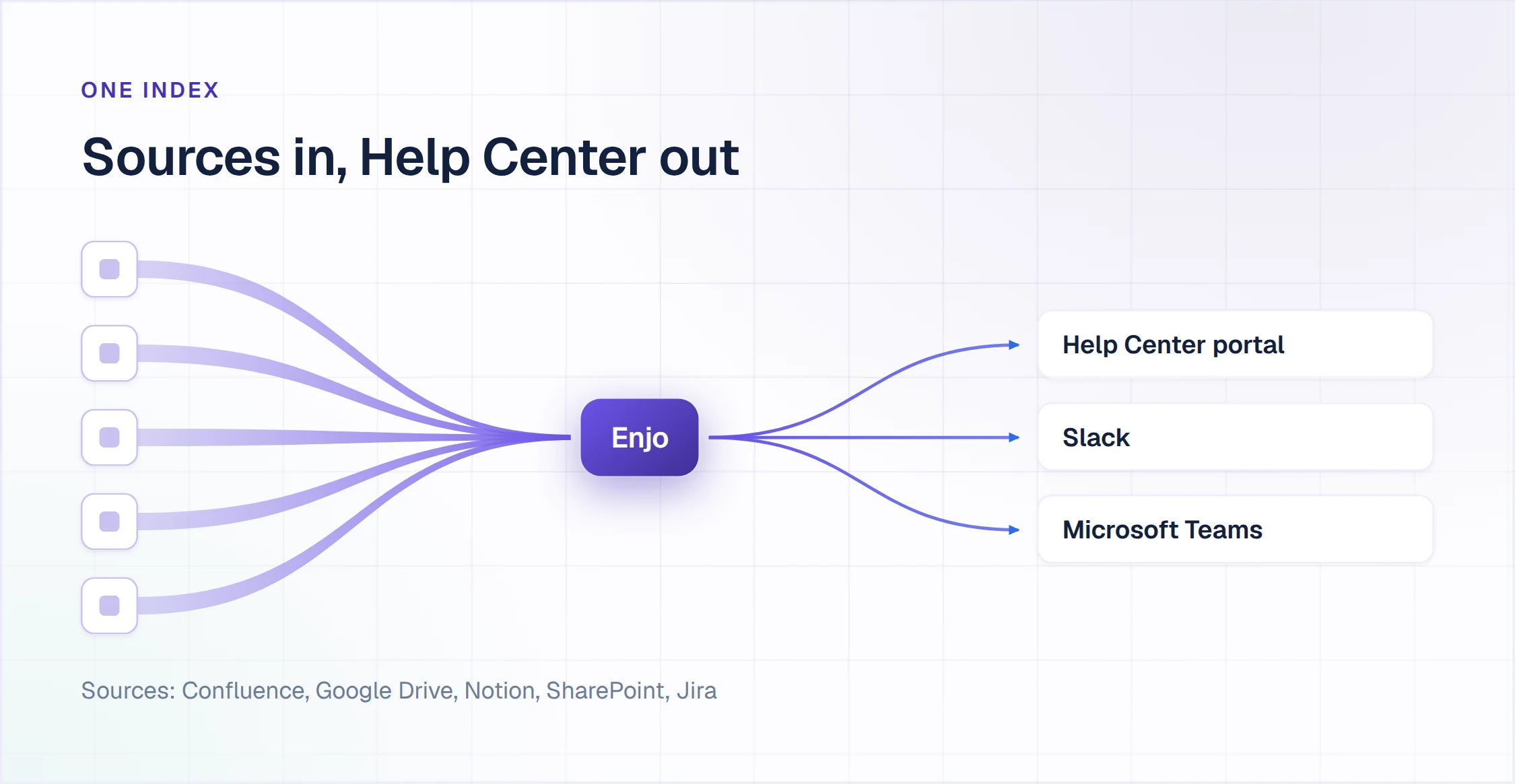
Enjo Help Center is a requester-facing help center portal that drafts articles from your existing docs and answers questions from the same knowledge index.
How it goes to market: Included on every Enjo plan from Free upward, priced per AI reply, with unlimited human agent seats on published plans.
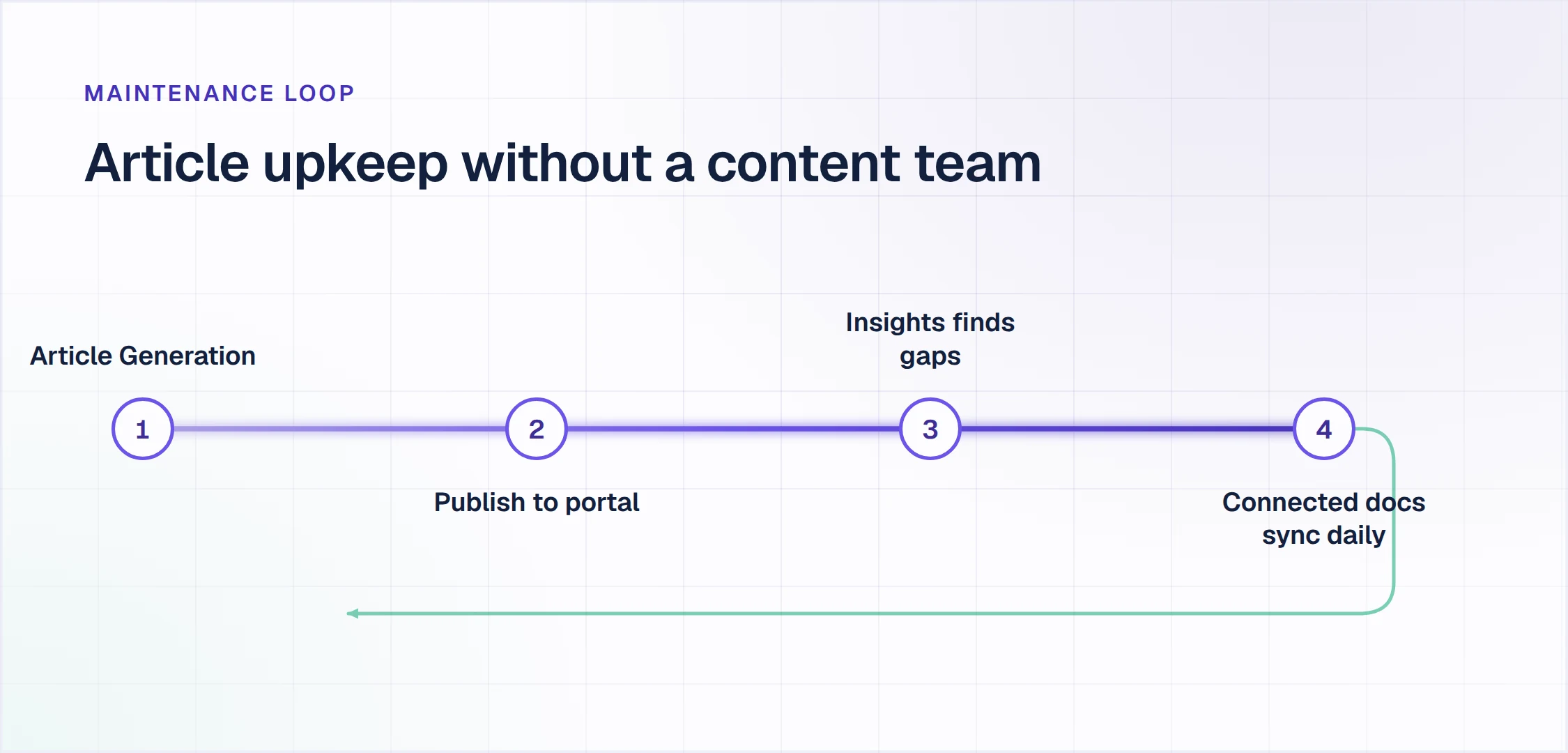
- Article Generation: drafts articles from a website URL, connected docs in Notion, Google Drive, Confluence or SharePoint, or ticket patterns in Zendesk, Intercom and Freshdesk.
- Self-Improving Loop: unanswered portal questions escalate to your team, and resolved conversations become draft articles that wait for your review.
- AI Assistant: the portal's search widget, where requesters ask in plain language and get a direct answer from published articles with the source cited.
- Help Center Agent: its Refresh an outdated article template compares an article with your current product and sources, and flags content that no longer matches. Changes wait in a Review changes panel before you publish.
- Publish Workflow: review before anything goes live, whether a draft came from Article Generation, the Self-Improving Loop or a writer.
- One knowledge index: the portal's index also grounds Enjo, the AI Support Agent, in Slack, Microsoft Teams and website chat, so what the agent says is what requesters find.
- Escalation to Enjo Inbox: a question the AI cannot resolve reaches your team with the full conversation, account context and suggested next steps.
Where the free plan stops: at 200 AI replies a month, one AI reply being one response Enjo's AI agent sends to a requester. At the limit, requests auto-escalate to your human agents and support keeps running in Inbox with unlimited agent seats, so no request is dropped. Help Center, a shared Inbox and Insights come with the plan, which has no end date and needs no credit card.
Pricing: Free is $0 a month with 200 AI replies. Starter is $95 a month for 1,000 AI replies and adds AI Actions, core Guardrails and basic Slack and Teams Insights. Standard is $295 a month for 3,000 AI replies, and Enterprise is custom, billed yearly (pricing on enjo.ai/pricing, checked 30 September 2026).
Scope: Enjo Help Center is built around the maintenance loop rather than the authoring editor. Articles are generated from a URL or connected docs. Unanswered questions draft new articles for review, and the same index that answers requests keeps the portal current, which is the point rather than a limit.
Free plan, no credit card
A $0 help center that answers from your own docs.
The Free plan includes Help Center, Inbox and Insights, unlimited agent seats and 200 AI replies a month, with no procurement step. At the limit, requests auto-escalate to your team in Inbox.
Launch your free Help Center2. Notion
Best for: Solo or small-team wikis inside a Notion workspace.
Notion is a workspace for docs, wikis, databases and projects.
How it goes to market: Sold per member per month on Free, Plus, Business and Enterprise plans, with Notion Agent included from Business.
- Pages and databases: wiki pages sit beside databases with subtasks, dependencies and custom properties, all on the Free plan.
- Basic sites: the Free plan can publish pages to the web on one notion.site domain.
- Guests and history: up to 10 guests on Free, with file uploads up to 5 MB and 7 days of page history.
- Notion Agent: chat, generate, autofill and translate run as a limited trial on Free and Plus, and are included from Business.
Where the free plan stops: blocks are unlimited for one person but limited once a workspace has two or more members. Plus lists unlimited collaborative blocks.
Pricing: Free is $0. Plus is $10 and Business is $20 per member per month billed monthly, and Enterprise is custom (pricing on notion.com, checked 30 September 2026).
Where it falls short: connecting a custom domain to a Notion Site is only available on paid plans. The add-on costs $8 per domain per month billed annually, or $10 billed monthly.
3. Confluence
Best for: Internal team spaces for up to 10 users.
Confluence is Atlassian's workspace of pages organized into spaces, with search, labels and a content hierarchy.
How it goes to market: Sold per user across Free, Standard, Premium and Enterprise cloud plans, with Rovo AI available on Standard, Premium and Enterprise.
- Spaces: organize knowledge across teams, projects and goals, found through search, labels and the page hierarchy.
- Templates: starting points that range from product requirement documents to marketing plans.
- Whiteboards and databases: an infinite canvas for brainstorming, plus databases that pull in information from Jira and third-party apps.
- Jira Service Management integration: Atlassian positions it to power a customer knowledge base with recommendations and resources.
Where the free plan stops: 10 users and 2 GB of file storage, with support from the Atlassian Community forum. Rovo starts on Standard.
Pricing: Free covers up to 10 users. Standard and Premium are priced per user, on progressive monthly pricing with volume discounts (pricing on atlassian.com, checked 30 September 2026).
Where it falls short: permissions are not customizable on Free and anonymous access is unavailable, so every member can view and edit every space, and no page can be public.
4. GitBook
Best for: Single-author technical docs synced with Git.
GitBook is a documentation platform with a block-based editor, Git sync and interactive API playgrounds.
How it goes to market: Sold per site plus per user, on Free, Premium, Ultimate and Enterprise plans.
- Git sync: the Free plan syncs content with GitHub or GitLab.
- Block-based editor: a visual editor with custom blocks, included on Free.
- API playgrounds: interactive API playgrounds are part of the Free plan.
- GitBook Agent: limited to 10 messages a week on Free.
- AI search: short answers directly from the search box, starting on Premium.
Where the free plan stops: one user, and the site publishes on a GitBook subdomain.
Pricing: Free is $0 per site. Premium is $65 per site per month plus $12 per user, billed annually. Ultimate is $249 per site per month plus $12 per user, also billed annually (pricing on gitbook.com, checked 30 September 2026).
Where it falls short: a second editor, a custom domain and AI search all start on Premium, and the reader-facing AI Assistant starts on Ultimate.
Weighing a move off GitBook?
See our GitBook alternatives comparison →
5. Help Scout
Best for: Small help centers bundled with a support inbox.
Help Scout is a customer support platform that combines a shared inbox, Docs knowledge base sites and the Beacon widget.
How it goes to market: Sold per user per month on Free, Standard, Plus and Pro plans, with AI Answers billed per resolution as an add-on.
- Docs sites: 1 Docs site on Free, 2 on Standard, 3 on Plus and 5 on Pro, with extra sites at $20 a month.
- Beacon: one Beacon on the Free plan.
- Shared inbox: one inbox on Free, with 10 saved replies and 10 tags.
- AI Answers: $0.75 per resolution on paid plans, charged once per conversation, with a 3-month free trial.
Where the free plan stops: 10 articles, up to 5 users and 100 contacts a month, with one integration and 30 days of reporting history.
Pricing: Free is $0 and needs no payment method. Standard is $25, Plus $45 and Pro $75 per user per month billed monthly (pricing on helpscout.com, checked 30 September 2026).
Where it falls short: AI Answers runs only as a 3-month trial on Free, and AI Assist, AI Drafts and AI Summarize are not on the Free plan.
6. ProProfs Knowledge Base
Best for: Single-author knowledge bases under 25 pages.
ProProfs Knowledge Base is ProProfs' software for building public or private knowledge bases.
How it goes to market: Sold with a forever-free plan for startups and micro businesses and a Business plan for established businesses, with no credit card to start.
- Unlimited knowledge bases: the Free plan lists unlimited knowledge bases and unlimited views.
- Public or private: each knowledge base can be published openly or kept private.
- Language localization: listed among the Free plan's features, alongside mobile and tablet layouts.
- AI Writer and AI Search: the product site lists AI drafting from a topic and AI search that returns an answer. The pricing page does not say which plan includes them.
Where the free plan stops: one author and up to 25 pages.
Pricing: Free costs $0 for one author and 25 pages. The Business plan's price did not display when checked, so it is not quoted here (pricing on proprofskb.com, checked 30 September 2026).
Where it falls short: a custom domain and white-label branding are sold as an add-on at $300 a year.
7. Nuclino
Best for: Small team wikis under 50 items.
Nuclino is a team workspace that brings knowledge, docs and projects together in one place.
How it goes to market: Sold per user per month on Free, Starter and Business plans, with yearly billing saving up to 25%.
- Items and canvases: up to 50 items and 3 canvases on Free, and unlimited of both on Starter.
- Storage: 2 GB in total on Free, and 10 GB per user on Starter.
- Admin tools and publishing: both are listed as Starter additions.
- Sidekick: Nuclino's AI, listed on the Business plan together with SAML single sign-on.
Where the free plan stops: 50 items, 3 canvases and 2 GB of storage, with no AI. Publishing starts on Starter.
Pricing: Free is $0. Starter and Business are priced per user per month, and Starter begins with a 14-day free trial (pricing on nuclino.com, checked 30 September 2026).
Where it falls short: there is no version history on Free, and 30-day version history starts on Starter.
The Best Free Open-Source Knowledge Base Software
These five cost nothing to license, and you run them on your own server. AI knowledge base features are rare here: only XWiki lists an AI option, the LLM Application, and it installs separately. BookStack's release notes describe an LLM query example that is not an official feature, and the other three list no built-in AI.
8. BookStack
Best for: Self-hosted wikis organized as books, chapters and pages.
BookStack is an open-source wiki that groups content into books, chapters and pages.
How it goes to market: Free and open under the MIT license, with no cost to download and install your own instance.
- Page editor: a WYSIWYG interface for writing pages.
- Search: all content is fully searchable.
- Roles and permissions: a role and permission system locks down content and actions as required.
- Sign-in: OIDC, SAML2 and LDAP for self-hosted environments.
- AI: none built in. The project's v26.05 release notes describe an LLM query example, not a supported feature.
Where free stops: at your server. BookStack's installation guide lists PHP 8.2 or later, MySQL 8.0 or MariaDB 10.6 or later, Git, Composer 2.2 or later and a PHP-compatible web server.
Pricing: no license fee; BookStack is free to download and install (license on bookstackapp.com, checked 30 September 2026).
Where it falls short: BookStack does not support shared PHP hosting, and its official install scripts cover only in-support Ubuntu LTS releases.
9. Wiki.js
Best for: Self-hosted wikis on Node.js with Git-backed storage.
Wiki.js is an open-source wiki engine built on Node.js, with several editors and pluggable search and sign-in.
How it goes to market: Released under the AGPL v3 license, with version 2.5 stable and 3.0 in beta.
- Editors: Markdown with live preview, a visual WYSIWYG editor for non-technical writers, and plain HTML.
- Sign-in: local accounts, Google, GitHub or Slack, plus LDAP, SAML, CAS, Auth0, Okta, Azure AD, OAuth2 and OpenID Connect.
- Search: built-in database search with zero setup, or Algolia, Azure Search and Elasticsearch.
- Storage sync: backup and sync to GitHub, GitLab or Bitbucket, AWS S3, Azure Blob Storage, Google Cloud Storage or SSH.
- AI: none listed on js.wiki.
Where free stops: your server needs Node.js 22 or 24, at least 1 GB of RAM on Linux and ideally 2 cores, with PostgreSQL recommended.
Pricing: no license fee under AGPL v3 (license on js.wiki, checked 30 September 2026).
Where it falls short: the docs say MySQL, MariaDB, MS SQL Server and SQLite will not be supported in the next major version. Installs on those engines would need PostgreSQL to upgrade.
10. MediaWiki
Best for: Large self-hosted wikis on the software behind Wikipedia.
MediaWiki is free, open-source wiki software written in PHP that runs Wikipedia and other Wikimedia projects.
How it goes to market: Licensed under the GNU General Public License, version 2 or later, with a large community of third-party users and developers.
- Scale: the project describes it as suitable for both small and large sites.
- Languages: localized in over 350 languages.
- Extensions: a feature-rich core that extensions build on.
- Databases: MariaDB is recommended, with MySQL, PostgreSQL and SQLite also supported.
- AI: the core project lists no built-in AI features.
Where free stops: MediaWiki 1.46 needs a web server with PHP 8.3 or later and a SQL database, with MariaDB 10.3 or later recommended.
Pricing: no license fee under GPL v2 or later (license in MediaWiki's COPYING file, checked 30 September 2026).
Where it falls short: its license extends to extensions that use MediaWiki functions or variables, which must be free software under the same or a compatible license.
11. XWiki
Best for: Self-hosted wikis with structured data and extensions.
XWiki is an open-source wiki platform written in Java, with a WYSIWYG editor, wiki syntax and rights management.
How it goes to market: Distributed under the LGPL version 2.1, with over 900 extensions covering applications, macros, skins and themes.
- Structured data: structured data and in-page scripting let teams build their own applications and macros.
- Search: advanced search is listed among the core features.
- Rights management: listed by the project as a core feature, alongside the editor and wiki syntax.
- LLM Application: a separate extension, at version 0.10, that brings large language models into XWiki. Context search needs its companion index extension.
Where free stops: your server needs a supported Java runtime (Java 21 or 25 for XWiki 18), a Servlet 5.0 container and a JDBC 4.2 database. The project sizes a small instance, up to 250 active users, at 4 GB of RAM, 2 cores and 20 GB of storage.
Pricing: no license fee under LGPL 2.1 (license on xwiki.org, checked 30 September 2026).
Where it falls short: XWiki runs on three layers you install and patch separately: a Java runtime, a servlet container and a database.
12. DokuWiki
Best for: Self-hosted wikis without a database.
DokuWiki is an open-source wiki engine that stores pages in plain text files.
How it goes to market: Distributed under GPL-2.0, with features extended through more than 900 plugins.
- Plain text storage: no database required, because pages live in plain text files.
- Search: index-based full-text search.
- Authentication backends: connect LDAP, MySQL, Postgres and others.
- Access control: access control and anti-spam measures are part of the core feature set.
- AI: none listed among DokuWiki's features.
Where free stops: your server needs any web server that supports PHP, with PHP 7.4 or later required and PHP 8 recommended, since 7.4 is end-of-life.
Pricing: no license fee under GPL-2.0 (license in the DokuWiki repository, checked 30 September 2026).
Where it falls short: WYSIWYG editing requires the Prosemirror plugin, which is installed separately from the core download.
What a Free Knowledge Base Costs to Run: Hosted or Self-Hosted
A hosted free plan costs $0 until you cross its first limit. Self-hosted open source costs $0 in license fees, and the running cost is your server plus your team's time. The worksheet below uses only limits and requirements the vendors and projects publish; you add your own prices and hourly rate.
Hosted Free Plan Worksheet
- Writers: count everyone who will edit. GitBook allows 1 user and ProProfs 1 author on Free, while Help Scout allows 5 users and Confluence 10.
- Content: count your articles. Help Scout stops at 10 articles, ProProfs at 25 pages and Nuclino at 50 items, and Notion limits blocks once two members join.
- AI answers: estimate how many questions AI should answer each month. Enjo's Free plan includes 200 AI replies, and past that point requests auto-escalate to your team in Inbox.
- Next tier: price the first paid tier for your team. Enjo Starter is $95 a month for 1,000 AI replies with unlimited agent seats. GitBook Premium is $65 per site per month plus $12 per user, billed annually.
Self-Hosted Worksheet
- Server: the monthly price of a host that meets the project's stated minimum. XWiki sizes a small instance at 4 GB of RAM, 2 cores and 20 GB, and Wiki.js asks for at least 1 GB of RAM on Linux.
- Database: included on that host or bought as a managed service. BookStack needs MySQL 8.0 or MariaDB 10.6, MediaWiki recommends MariaDB, and DokuWiki needs none.
- Updates: hours per month spent applying releases and security patches, times your hourly rate. BookStack, for example, updates from its release branch with Git and Composer.
- Backups: storage for copies, plus the hours each month to test a restore, times your rate.
- Sign-in: one-time hours to connect your identity provider. BookStack supports OIDC, SAML2 and LDAP, and Wiki.js supports LDAP, SAML, Okta and Azure AD.
- AI: XWiki's LLM Application installs as a separate extension, and the other four ship no AI to configure.
Monthly cost = server + database + backup storage + (maintenance hours × your hourly rate). Add the one-time setup hours in the first month, then set the total against the first paid tier of the hosted plan you would outgrow.
Using a Free Knowledge Base for Internal IT and HR Docs
Internal docs need two things public docs do not: per-article visibility and answers where employees ask. On Confluence Free, everyone who can log in can view, add and edit every space. BookStack adds a role and permission system and signs in through OIDC, SAML2 or LDAP, on a server you run.
Enjo Help Center's Audience Targeting sets visibility by plan, role, segment or login state, so IT and HR articles can stay behind a login. The same index grounds Enjo when employees ask in Slack or Microsoft Teams. A question it cannot resolve reaches Enjo Inbox with the full conversation, account context and suggested next steps.
Our comparison of internal knowledge base software covers article permissions, sign-in tiers and reader pricing tool by tool.
How to Test a Free Plan on Your Own Docs
Run these five checks on your own content before you commit a team to a free plan.
- Does it expire? Read the plan page for an end date, and check whether signup asks for a card.
- Who counts as a seat? List everyone who writes and everyone who reads behind a login, then compare both numbers with the plan's caps. Helpjuice, for one, counts every person with credentials to log into the knowledge base as a user.
- Does AI answer a real question? Ask one question your requesters sent last week, and note whether you get a sourced answer, a trial banner or an upgrade screen.
- What happens at the limit? Find the plan's stated behavior past the allowance, and ask whether requesters would notice.
- Who keeps articles current? Change one product detail in a source document, and see whether the tool flags the affected article or waits for someone to notice.
Enjo Help Center answers all five.
- Expiry: the Free plan has no end date and needs no credit card.
- Seats: agent seats are unlimited on every published plan, and pricing counts AI replies.
- AI answers: 200 AI replies a month, with the AI Assistant citing the source article in the portal. Starter adds core Guardrails, and Standard adds advanced Guardrails and the audit trail with QA review flows.
- The limit: requests auto-escalate to your human agents in Inbox, with the full conversation, account context and suggested next steps, so no request is dropped.
- Upkeep: Help Center Agent's Refresh an outdated article template flags what no longer matches your product and sources. The Self-Improving Loop drafts new articles from resolved conversations, and nothing goes live without review.
For paid tools past the free tier, our comparison of knowledge base software covers who reads each tool, where answers appear and cost at your team size. If you also need a free inbox and helpdesk, our guide to free customer service software covers that side.
Frequently Asked Questions About Free Knowledge Base Software
What is the best free knowledge base software?
Enjo Help Center ranks first on this list: its Free plan includes Help Center, 200 AI replies a month and unlimited agent seats, with no end date. The other hosted free plans stop at a member, user, page, item or article cap, and the five open-source wikis cost nothing to license but run on your servers.
Is knowledge base software free?
Yes, some of it is permanently free: the seven hosted plans and five open-source projects in this guide run a knowledge base at $0 with no end date. Document360, Helpjuice and Slite offer 14-day trials instead, and Freshdesk's Free Program ends after six months.
Is there free open-source knowledge base software?
Yes: BookStack (MIT), Wiki.js (AGPL v3), MediaWiki (GPL v2 or later), XWiki (LGPL 2.1) and DokuWiki (GPL-2.0) are free to download and run. Each needs a server you maintain: PHP for BookStack, MediaWiki and DokuWiki, Node.js for Wiki.js, and Java for XWiki. Only XWiki lists an AI option, through its separately installed LLM Application.
Did Freshdesk discontinue its free plan?
Freshdesk's pricing page lists no permanent free plan today, and it offers a 14-day free trial instead. Freshdesk's Free Program covers up to two agents for six months, knowledge base included, after which you must upgrade to a paid plan to continue. Growth, the first paid plan, is $19 per agent per month billed annually and includes the customer portal and knowledge base.
What happens when you hit Enjo's free AI reply limit?
Support keeps running. At 200 AI replies in a month, requests auto-escalate to your human agents, and support continues in Inbox with unlimited agent seats, so no request is dropped. Each escalation carries the full conversation, account context and suggested next steps. Starter raises the allowance to 1,000 AI replies a month for $95.
Can a free knowledge base hold internal IT documentation?
Yes, if it controls who sees each article and answers where employees ask. Confluence Free opens every space to every logged-in member, while BookStack's roles and OIDC, SAML2 or LDAP sign-in run on your own server. Enjo Help Center's Audience Targeting restricts articles by plan, role, segment or login state, and the same index grounds Enjo in Slack and Microsoft Teams.
Do free knowledge base plans let you use your own domain?
On most hosted free tiers checked here, no, while self-hosted open source runs on any domain you point at your server. GitBook starts custom domains on Premium, Notion sells a custom domain add-on on paid plans only, and ProProfs sells custom domain and white label at $300 a year. Confluence Free has no anonymous access, and Nuclino lists publishing from Starter.
Tools That Keep a Knowledge Base at $0
Seven hosted plans stay at $0 with no end date: Enjo Help Center, Notion, Confluence, GitBook, Help Scout, ProProfs and Nuclino. Five open-source projects do the same on your own server: BookStack, Wiki.js, MediaWiki, XWiki and DokuWiki. Enjo Help Center's Free plan adds AI that answers requesters: 200 AI replies a month, with Help Center, Inbox and Insights, unlimited agent seats and no credit card. At the limit, requests auto-escalate to your team in Inbox rather than going unanswered.
Free plan, no credit card
Launch a knowledge base that stays at $0.
Point Article Generation at your website or existing docs, review the drafts and publish. Same-day go-live is feasible, and the Free plan includes 200 AI replies a month.
Launch your free Help Center