.fs-cmsfilter_active span { color: black; }
table of contents

Transform complex support workflows

Deploy AI inside your existing support stack and prove business impact quickly.
Request a Demo

11 Best Email Ticketing Systems for Support Teams in 2026

If you manage a support team, you have felt this: a VIP complaint gets missed; two agents send conflicting answers to the same customer; someone asks, "Who's handling this?" and nobody knows. That's not a people problem, it's a tooling problem. An email ticketing system assigns an owner, a status, and a full conversation history to every inbound email, so nothing falls through the cracks.

This guide covers the 11 best email ticketing systems for support teams in 2026. Compare tools, pricing, and AI capabilities to find the right one.
AI Support Agents
table of contents

What is an email ticketing system?

An email ticketing system is software that pulls inbound emails from your support mailbox and converts each one into a trackable ticket. Each ticket gets an owner, a status, a priority, and a full conversation history. Agents reply from inside the system; the customer sees a normal email response and never needs to change how they contact you.

The core difference from a shared inbox: every request is visible, assigned, and tracked. Nothing falls through because nobody knew it was theirs. For teams evaluating how email fits into a broader customer service automation strategy, or considering conversational ticketing via Slack and Teams alongside email, the choice of tool matters more than the channel.
What to look for in email ticketing software?

Not every tool in this category solves the same problem. Before comparing options, get clear on these six dimensions:

1. AI capabilities. Does the tool auto-triage and suggest replies, or does it actually resolve requests without agent involvement? There is a wide gap between "AI drafts a reply for an agent to approve" and "AI resolves the request end-to-end and escalates only when it can't."

2. Pricing model. Per-seat pricing punishes growth: every time you hire a support agent, your bill goes up. Usage-based pricing (per AI interaction or per resolution) scales with value delivered. Understand which model a tool uses before you run the math at your expected team size.

3. Channels beyond email. If your customers or employees also contact you via Slack, Microsoft Teams, or a web widget, a tool that handles email only will immediately create a second queue. Check whether the platform is genuinely omnichannel or email-first with add-ons bolted on.

4. Integration depth. Can the system read your existing knowledge sources (Confluence, Google Drive, past tickets) to ground AI responses? Can it take actions in connected systems (Okta, Jira, Salesforce) or only create tickets?

5. Setup speed. Some enterprise tools take months to implement. For most support teams, the right answer is production in days, not a six-month rollout.

6. Security posture. If a CISO is in your buying committee, you need SOC 2 Type II, RBAC, and an audit log, not just SSL.

The 11 best email ticketing systems for support teams in 2026

Tool G2 Price AI Included Channels Best For
Enjo 4.8/5 $0/mo Yes — end-to-end resolution + in-ticket drafts Slack, Teams, web AI + email + Slack/Teams, no per-seat cost
Zendesk 4.3/5 $55/agent/mo Add-on: Copilot + AI Agents per resolution Chat, voice, social Enterprise, deepest email workflow depth
Freshdesk 4.4/5 $19/agent/mo Add-on: Freddy Copilot + AI Agent Chat, phone, social Mid-market, Freshworks ecosystem
Help Scout 4.4/5 $25/user/mo Add-on: AI Answers $0.75/resolution Chat (Beacon) Small CS teams, inbox + Docs
Intercom 4.5/5 $29/seat/mo + $0.99/resolution Yes — Fin AI, per resolution Chat, in-app, social B2C, high-volume messaging
Front 4.7/5 $25/seat/mo Add-on: Copilot + Autopilot SMS, social, WhatsApp Collaborative inbox, account management
Hiver 4.6/5 $25/user/mo Yes, Growth+ (baked in) Chat, WhatsApp, voice Gmail-native teams
Zoho Desk 4.4/5 $14/agent/mo Enterprise only (Zia AI) Chat, phone, WhatsApp Zoho-stack teams, lowest price
HubSpot Service Hub 4.4/5 $20/seat/mo Add-on: $1.00/conversation Chat (HubSpot) HubSpot CRM users
Jira Service Management 4.3/5 $20/agent/mo Yes, Standard+ (Rovo AI) Portal, chat IT/DevOps, Atlassian stack
HappyFox 4.5/5 $29/agent/mo Add-on: Autopilot Chat, phone, social Mid-market, SLA-focused teams

Pricing and G2 ratings verified June 2026. Annual billing rates shown. G2 ratings sourced from g2.com.

1. Enjo

What it is: An AI-native service automation platform with a built-in helpdesk (Inbox), email as a supported inbound channel, and AI that resolves requests before they become tickets.

Best for: Support teams migrating off shared Gmail or a legacy per-seat helpdesk who want AI included by default, not as a paid add-on, and a permanent free tier with no credit card or procurement cycle.

Key capabilities:

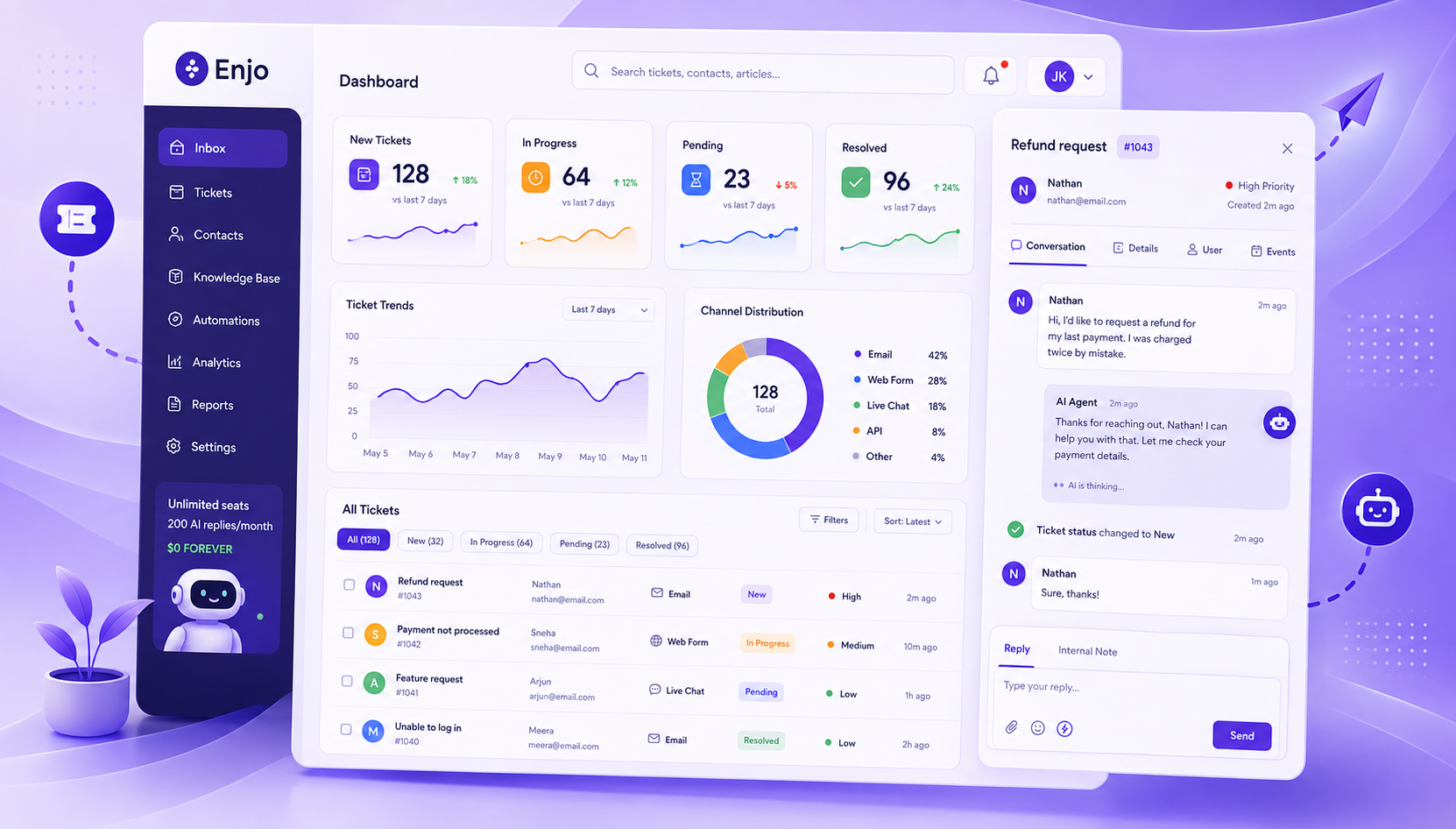
  • Enjo Inbox: unified queue across email, Slack, Teams, and web widget. Every inbound email becomes a ticket with SLA timers, collision detection, assignment rules, and full conversation history, alongside tickets from every other channel. Agents work from one queue without toggling between tools.
  • Agent Assist: in-ticket AI for every reply. When an agent opens a ticket, Agent Assist reads the inbound email, summarizes the thread, pulls relevant answers from your connected knowledge sources (Confluence, SharePoint, Google Drive, past tickets), and surfaces a suggested reply. The agent reviews, refines tone or language with one click via Reply Refinement, and sends, without leaving the ticket view.
  • AI Agents: end-to-end resolution before a human is involved. AI Agents read the inbound email, query your knowledge layer, and take actions in connected systems, unlocking an Okta account, looking up a Salesforce case, and creating a Jira ticket, without any agent involvement. When they can't resolve, they escalate to the Inbox with the full conversation attached. Agents start where AI left off, not from scratch.
  • AI Flows: multi-step logic with explicit fallbacks. Built in Studio (Enjo's visual builder) without code. Every decision is auditable; you can see exactly what path a resolution took and where it was handed off.
  • Guardrails: policy controls on what AI can say or do. Set per agent, per channel, or per topic. Prevents hallucination and policy drift. Every AI reply can be configured to require human approval before it's sent.
  • Usage-based pricing with unlimited human seats. You pay per AI Reply, not per seat. Hiring a new support agent costs nothing. The pricing model doesn't punish team growth.
  • Free tier: 200 AI Replies/month, unlimited seats, no credit card. The Inbox stays fully live after the free AI cap is hit; only AI Replies pause until the next billing cycle.
  • SOC 2 Type II, ISO 27001, GDPR. 6 years of 99.9% uptime. 600+ enterprise deployments.

Pricing): Enjo starts free, $0/month with 200 AI Replies and unlimited human agent seats, no credit card required. The Starter plan is $95/month for 1,000 AI Replies, the Standard plan is $295/month for 3,000 AI Replies, and the Enterprise plan is custom. Additional AI Replies on paid plans cost $0.05 each. Every plan includes unlimited human agent seats. For full details, visit enjo.ai/pricing.

Where it falls short: Email is a supported inbound channel in Enjo Inbox, but Enjo's deepest resolution capability is built around Slack and Teams, where AI Agents resolve requests in-channel before a ticket is ever created. Teams whose entire support motion is high-volume email-only, with no need for Slack or Teams integration, will find more email-specific workflow depth in dedicated tools like Zendesk or Freshdesk.
2. Zendesk

What it is: The category incumbent. The most feature-complete email helpdesk on the market, with the deepest email workflow configurability, a mature omnichannel stack, and the largest app marketplace of any tool in this list.

Best for: Enterprise CS teams that need fine-grained ticket routing logic, multi-brand support, and deep integration with voice and messaging, and are prepared to pay for it.

Key capabilities:

  • Intelligent routing that reads content, intent, and sentiment. Every inbound email is analyzed for topic, customer sentiment, and language before it's routed. Tickets go to the right queue and agent without manual rule-building for the most common scenarios.
  • AI Agents: autonomous email resolution billed per outcome. Zendesk's AI Agents handle customer emails end-to-end, reading the request, querying the knowledge base, applying macros, and closing tickets without human involvement. Billed per resolution, not per seat. Zendesk cites 80%+ deflection rates.
  • Agent Copilot: real-time next-best-action for every open ticket. Before the agent types a single word, Copilot has already read the ticket, surfaced the suggested reply, and identified the next-best action based on similar past resolutions. Available as a $50/agent/month add-on.
  • Trigger and automation engine: the most mature in the category. Handles SLA escalation, auto-responses, time-based follow-ups, ticket field population, and multi-step conditional logic, all without code. The configurability here is unmatched among tools in this list.
  • Omnichannel Agent Workspace. Email, live chat, messaging, voice, and social all in one interface. Agents switch channels without switching tools or losing ticket context.
  • Zendesk Guide (help center). Included in Suite plans. AI-powered search surfaces the most relevant article inside the ticket view so agents can paste answers without opening a separate tab.

Pricing: Zendesk's Suite Team starts at $55/agent/month (annual), Suite Growth is $89/agent/month, and Suite Professional is $115/agent/month. Agent Copilot is a $ 50-per-agent-per-month add-on available across all Suite plans. AI Agents are billed per resolution, in addition to the base plan. A 10-agent team on Suite Professional with Copilot runs $1,650/month before any AI resolution fees. For full details, visit zendesk.com/pricing.

Where it falls short: A 10-agent team on Suite Professional with Copilot runs $1,650/month before AI resolution fees. The sticker price and the actual price diverge significantly once AI is enabled. Teams that don't need the full omnichannel stack are paying for depth they won't use. Teams already on Zendesk who are looking to add AI resolution without switching platforms can use Enjo for Zendesk as an AI layer on top.

3. Freshdesk

What it is: A mid-market helpdesk with solid email ticketing, multi-channel coverage, and Freddy AI as a native capability, though AI is sold as a separate add-on on most plans.

Best for: Teams already in the Freshworks ecosystem or evaluating a cost-effective per-agent alternative to Zendesk for smaller teams.

Key capabilities:

  • Ticket threading that correctly groups email chains. All follow-up emails from the same customer, including CC-ed parties and forwarded threads, are automatically appended to the original ticket. No duplicate tickets from the same conversation.
  • Freddy AI Copilot: in-ticket reply drafting from past resolutions. Reads the inbound email, searches your Freshdesk knowledge base and past ticket resolutions, and drafts a suggested reply. Also auto-populates ticket fields (priority, category, type) from the email body. Available as a $29/agent/month add-on.
  • Freddy AI Agent: customer-facing email deflection billed per session. Reads inbound emails, queries the knowledge base, and replies autonomously. When it can't be resolved, it creates a ticket with the conversation attached. Priced per session pack, costs vary with volume.
  • Round-robin and skill-based routing. Distributes tickets based on agent availability, current load, or skill tag. Configurable without code on Pro and above.
  • SLA policies by ticket type and customer segment. Breach alerts fire before deadlines, not after. Configurable lead times per SLA window.
  • Collision detection. Shows a real-time indicator when another agent is already viewing or replying to the same ticket, the feature most shared inbox teams miss most on day one.

Pricing: Growth: Freshdesk offers a free program for up to 2 agents for 6 months, not a permanent free tier. After that, Growth is $19/agent/month, Pro is $55/agent/month, and Enterprise is $89/agent/month (all annual billing). Freddy AI Copilot is a $29/agent/month add-on to any paid plan. For current pricing, visit freshdesk.com/pricing.

Where it falls short: Freddy AI reads only Freshdesk's own knowledge base and ticket history. Knowledge in Confluence, SharePoint, or other systems is invisible to it. Freddy AI Agent's per-session billing makes costs variable and hard to forecast at high volume.

4. Help Scout

What it is: A clean, human-touch helpdesk built for small to mid-sized CS teams. Known for an inbox experience that feels like email, not enterprise software.

Best for: Smaller CS teams that want one tool for inbox, knowledge base (Docs), and lightweight chat, and prioritize setup simplicity over AI depth.

Key capabilities:

  • Shared inbox with full customer conversation history. Every email from a customer, across all previous conversations, not just the current ticket, is visible in a single thread. Agents see the full relationship history before they type a word.
  • Beacon: a self-service widget that reduces inbound volume. Beacon surfaces relevant Docs articles to customers before they email. When a customer submits a request through Beacon, it automatically converts into a Help Scout conversation.
  • AI Answers: customer-facing deflection billed per resolution. Reads inbound questions, searches your Docs site and connected URLs, and replies without an agent. Critical limitation: it does not learn from past ticket resolutions or agent responses, only from Docs content. No institutional knowledge of how your team has handled requests before.
  • AI Drafts: suggested replies pulled from conversation context. Reads the customer's inbound email and previous conversations, and drafts a reply for the agent to review. The suggestion draws on prior exchange tone and content, not just knowledge base articles.
  • Saved replies (Snippets) for high-frequency questions. Agents insert pre-written responses with a keyboard shortcut. The most-used feature by Help Scout teams for handling repetitive inbound emails quickly.
  • CSAT surveys are automatically triggered upon ticket closure. Available on Plus and above. Results are tied to individual agents and aggregated in the reporting dashboard.

Pricing: Help Scout's free plan includes 5 users, 1 inbox, 1 Docs site, and 100 contacts/month. Standard is $25/user/month (annual), Plus is $45/user/month, and Pro is $75/user/month. AI Answers is a separate add-on priced at $0.75/resolution, with a 3-month free trial. For full details, visit helpscout.com/pricing.

Where it falls short: Adding a 26th agent forces an upgrade from Standard to Plus, an 80% per-seat jump. AI Answers has zero access to past ticket data, so it can only answer questions your Docs site already covers. Salesforce, Jira, and HubSpot integrations are Plus-only.

5. Intercom

What it is: A messaging-first customer service platform with Fin, its AI agent, as the flagship product. Built for high-volume B2C support where fast, conversational resolution is the priority.

Best for: Teams already standardized on Intercom's messaging platform, particularly B2C companies with high email and chat volume where Fin's deflection rate justifies per-resolution billing.

Key capabilities:

  • Fin AI Agent: autonomous email and chat resolution billed per outcome. Reads inbound messages, searches your Help Center and connected knowledge sources, and replies with source citations. Fin cites the exact article or document for each answer, reducing customer follow-up from ambiguous responses. Billed at $0.99/resolved conversation.
  • Conversation routing using intent and customer attributes. Routes tickets by detected intent, account plan, company size, or any custom attribute, without manual rule-building for common scenarios. High-priority accounts can be automatically routed to senior agents.
  • Ticket management with SLA tracking inside the inbox. Email conversations convert to tickets with status, assignment, SLA clock, and snooze. Tickets and conversations share one view; agents don't switch between two interfaces.
  • Help Center with AI-powered search. Surfaces the most relevant article for each inbound question. Article performance data (which articles deflect tickets and which generate follow-ups) feeds back into the editor, so the content team can see gaps without a separate analytics tool.
  • Customer data in the ticket sidebar without a CRM integration. Account-level data (plan, MRR, usage events from the last 30 days) is automatically pulled into the ticket view for any customer using an Intercom-instrumented product. Agents have context they'd otherwise need to look up in a CRM.

Pricing: Intercom's Essential plan starts at $29/seat/month with Fin resolutions billed separately at $0.99 per resolved conversation. Advanced is $85/seat/month, and Expert is $132/seat/month. Fin resolution fees apply on top of all seat-based plans. For full details, visit intercom.com/pricing.

Where it falls short: Fin is inseparable from the Intercom platform; you can't use its resolution capability on a different helpdesk. Per-resolution billing at high volume is unpredictable; teams handling 10,000+ AI-resolved conversations/month can find that the resolution fee exceeds the base seat cost. B2B teams with knowledge outside Intercom's ecosystem or multi-system action requirements will find the platform optimized for a different use case. See the full breakdown of Intercom alternatives if per-resolution costs are a concern.

6. Front

What it is: A collaborative inbox platform for teams that treat email as a team sport, where multiple agents need to see, discuss, and co-author responses before they go out.

Best for: Account management, sales-adjacent support, and CS teams where agents collaborate heavily on replies and need shared visibility into customer relationships across email threads.

Key capabilities:

  • Shared drafts: multiple agents co-writing the same reply. Two agents can edit the same draft simultaneously before it's sent. No forwarding, no copying into Slack, the draft lives in the ticket, and the customer never sees the collaboration.
  • Internal comments are threaded inside the conversation. Agents ask questions, loop in teammates, and get approvals in a thread visible only to the team. The customer sees only the final outbound reply.
  • AI Copilot: thread summarization and reply suggestions. Reads the full email thread (including long chains) and surfaces a suggested reply and a summary so agents don't have to read 40 messages to get context. Available as a $20/seat/month add-on on Starter and Growth.
  • AI Autopilot: autonomous first-response handling. Handles common inbound emails without agent involvement, replying, closing, or routing based on intent detection. Billed at $0.89/resolved conversation as an add-on.
  • Omnichannel routing on Professional and above. Consolidates email, SMS, WhatsApp, and social into one queue with unified routing rules. Starter is email-focused.
  • Analytics by agent, team, and tag. First reply time, resolution time, and CSAT are tracked on Growth and above. Exportable to BI tools via API.

Pricing: Front's Starter plan is $25/seat/month (annual, up to 10 seats). Professional is $65/seat/month (up to 50 seats), and Enterprise is $105/seat/month. AI Copilot is $20/seat/month as an add-on on Starter and Professional, and is included in Enterprise. AI Autopilot starts at $0.05/conversation as an add-on on all plans. For full details, visit front.com/pricing.

Where it falls short: A 10-agent team on Growth with Copilot runs approximately $790/month before Autopilot resolution fees. Per-seat AI add-ons mean AI costs scale with headcount rather than with value delivered. Salesforce and Zapier integrations require Growth or above.

7. Hiver

What it is: A Gmail-native email helpdesk. Agents work entirely inside Google Workspace, no new interface, no tab switching, no change management.

Best for: Teams operating entirely in Google Workspace that want structured ticketing without adopting a separate tool.

Key capabilities:

  • Gmail-native shared inbox management. Converts shared inboxes (support@, billing@, info@) into structured queues with assignment, collision detection, and status tracking, all visible inside Gmail's existing interface. No new login, no context switch.
  • AI Agents: automated email triage and draft generation. Reads inbound emails, tags them by intent, assigns them to the right agent, and drafts an initial reply for review, without manual rule-building for common request types. Available on Pro and above.
  • AI Copilot: suggested replies with one-click translation. Reads the full email thread and surfaces a suggested reply drawing on your knowledge base and past resolutions. Translates replies into 20+ languages in one click, useful for teams with multilingual customers. Available on Pro and above.
  • SLA management with pre-breach alerts. Sets response and resolution deadlines by email tag or customer segment. Breach alerts fire before the deadline, configurable at 50%, 75%, and 90% of the SLA window. Available on Pro and above only.
  • Approval workflows for sensitive replies. Agents request sign-off on a reply before it is sent. Useful for billing adjustments, account changes, or any category where a second set of eyes is required before a response.
  • CSAT surveys triggered on ticket closure. Results tied to individual agents, aggregated in the analytics dashboard. Available on Pro and above.

Pricing: Hiver has a free plan with basic shared inbox features. Growth starts at $25/user/month (annual), Pro is $55/user/month, and Elite is $85/user/month. Plans are sold in increments of 5 seats; a 7-person team pays for 10. For full details, visit hiverhq.com/pricing.

Where it falls short: Hiver is Gmail-native; its strength is also its ceiling. Agents outside Google Workspace cannot use it. Cross-channel support (Slack, Teams, web widget) requires separate tools. SLA management, CSAT, and AI capabilities are gated at Pro ($55/user/month); Growth provides inbox structure but no measurement or AI features. The 5-seat increment pricing means a 7-person team effectively pays $78.57/user/month at Pro, not $55.

8. Zoho Desk

What it is: A helpdesk platform inside the Zoho ecosystem, with strong value for teams already on Zoho CRM, Zoho Analytics, or other Zoho products.

Best for: Zoho-stack organizations consolidating vendors, or budget-conscious teams that need multi-channel ticketing at the lowest per-seat price in this list.

Key capabilities:

  • Context-aware ticket view that automatically pulls the CRM record. When an agent opens a ticket, the customer's full Zoho CRM record appears in the sidebar: account history, open deals, previous tickets, and any custom properties. No integration setup required if you're on Zoho CRM.
  • Zia AI: sentiment detection and reply suggestions. Reads inbound emails, predicts ticket sentiment (positive, negative, neutral), tags tickets by topic, and suggests replies based on similar past resolutions. Also alerts agents when a customer's sentiment turns negative mid-conversation. Enterprise tier only.
  • Multi-channel queue with one SLA clock. Email, live chat, phone, WhatsApp, Facebook Messenger, and web form submissions all feed into a single unified ticket view. Every channel shares the same SLA rules and routing logic, with no separate queues to manage per channel.
  • Blueprint (visual workflow automation). Maps your ticket lifecycle as a flowchart. Every stage transition triggers an action: send an email, update a field, assign to a different agent, call a webhook. No code required. The most visual workflow builder in this list.
  • Cross-department ticket visibility. A ticket owned by CS can be made visible to Finance or Engineering without reassignment. Each department sees only the fields relevant to them, which are useful for billing disputes or bug reports that require multi-team input.

Pricing: Zoho Desk has a free plan for up to 3 agents. Paid plans range from Express at $7/agent/month to Standard at $14/agent/month, Professional at $23/agent/month, and Enterprise at $40/agent/month (all billed annually). Zia AI is only available on the Enterprise tier. For current pricing, visit zoho.com/desk/pricing.html.

Where it falls short: Zia AI is locked behind the Enterprise tier ($50/agent/month); teams on Standard or Professional get no AI capability. Outside the Zoho ecosystem, the CRM sidebar works with Salesforce but requires configuration. Teams not on Zoho products lose the ecosystem bundling value and pay for a helpdesk without the network effect.

9. HubSpot Service Hub

What it is: A helpdesk built on top of HubSpot's CRM. Every ticket is natively connected to a contact and company record, giving agents instant visibility into the customer's full history across marketing, sales, and support.

Best for: Teams already on HubSpot CRM or Sales Hub, where the value lies in a unified customer view across go-to-market functions, not the helpdesk features in isolation.

Key capabilities:

  • CRM-native ticket view with full go-to-market context. Every inbound email ticket sits alongside the complete customer record: all previous support conversations, marketing emails received, deals in the sales pipeline, and any custom properties. No sync required, it's the same database.
  • Customer Agent (Breeze AI): autonomous email resolution billed per conversation. Reads inbound emails and replies autonomously, drawing on your knowledge base articles and past ticket resolutions. Each resolved conversation costs 100 credits ($1.00). Included free for 14 days after purchasing Professional or Enterprise.
  • Conversation inbox with multi-inbox routing. Routes inbound emails from any connected mailbox into a shared queue with assignment, internal notes, and status tracking. Supports multiple inboxes by team or brand on Professional and above.
  • Customer portal: self-service ticket status tracking. Customers log in and see the status of all their open and closed tickets, eliminating "any update?" follow-up emails. Available on Professional and above.
  • SLA enforcement with automated escalation. Sets and tracks response and resolution deadlines by ticket priority. Escalation rules are triggered automatically as deadlines approach. Professional and above only.
  • Built-in CSAT, NPS, and CES surveys. Triggered automatically after ticket closure on Professional and above. Results tied to the customer record, support feedback visible in the same place as sales and marketing data.

Pricing: HubSpot Service Hub offers a free plan for up to 2 users, including basic ticketing. Starter is $20/seat/month (annual). Professional is $90/seat/month with a mandatory $1,500 onboarding fee. Enterprise is $150/seat/month with a mandatory $3,500 onboarding fee. Customer Agent (AI) costs $1.00 per resolved conversation (100 credits) after a 14-day trial. At 3,000 AI-resolved conversations/month, credits alone cost $3,000 on top of seat fees. For full details, visit hubspot.com/pricing/service.

Where it falls short: The jump from Starter ($20) to Professional ($90) is steep, and the mandatory $1,500 onboarding fee adds significantly to first-year cost. At $1.00 per AI-resolved conversation, high-volume AI resolution is expensive: 3,000 conversations/month = $3,000 in credits alone, on top of seat costs. Teams evaluating Service Hub solely for helpdesk features, without the CRM connection, will find better value for the dollar elsewhere.

10. Jira Service Management

What it is: Atlassian's ITSM platform, built on Jira. The go-to for IT and engineering-adjacent support teams that live in the Atlassian ecosystem and need ITSM-grade process structure alongside standard ticketing.

Best for: Internal IT, DevOps-adjacent, or engineering support teams already using Jira Software or Confluence, where native two-way linking between support tickets and development issues is the differentiator.

Key capabilities:

  • Jira-native ticket-to-issue linking. A customer reports a bug by email; the agent creates a linked Jira Software issue; the customer's service ticket auto-updates when the issue is resolved. No manual status updates, no context loss between support and engineering.
  • Rovo AI: inbound classification and knowledge-grounded reply suggestions. Reads inbound service requests, queries your Confluence knowledge base, and suggests a resolution path or reply. Also, it auto-classifies incidents by priority and impact based on the request content. Premium tier and above.
  • ITSM workflow templates out of the box. Incident management, problem management, change management, and service request workflows are pre-configured and ready to use. Teams running ITIL-aligned processes don't build these from scratch.
  • Assets (CMDB) linked directly to tickets. Tracks hardware, software licenses, and configuration items. When an agent handles a ticket, they see exactly which assets the customer owns, without opening a separate asset management tool. Premium and above.
  • Email is a standard inbound channel. Customers email the service desk address; JSM converts the message into a ticket. Agents reply from within JSM; the customer receives the reply by email. The email workflow is functional, but not the platform's primary design surface.
  • On-call scheduling and incident alerts are native to the platform. Routes P1 and P2 alerts to the right engineer with escalation policies and override rules, previously OpsGenie, now built directly into JSM.

Pricing: Jira Service Management is free for up to 3 agents. Standard is $20/agent/month (annual), which includes Rovo AI for AI-powered support. The Premium plan is $51.42/agent/month and includes Assets (CMDB), advanced incident management, and virtual service agent capabilities. Enterprise pricing is custom. For full details, visit atlassian.com/software/jira-service-management/pricing. 

Where it falls short: JSM is built for structured ITSM, not conversational CS. The interface is process-heavy, and meaningful configuration is required before it feels natural for a customer-facing support team. Marketplace apps for gaps like advanced reporting add cost beyond the base subscription. Teams without a Jira Software footprint or ITSM requirements are paying for infrastructure they won't use.

11. HappyFox

What it is: A mid-market helpdesk with solid SLA management and a dual pricing model, per-agent plans for smaller teams and unlimited-agent plans for high-volume operations that want to decouple cost from headcount.

Best for: Mid-market teams with strict SLA requirements and predictable ticket volume who want the option to move to an unlimited-agent pricing model as they scale.

Key capabilities:

  • Smart Rules with explicit execution order. Automation rules trigger on any combination of ticket fields, customer attributes, or time conditions. Rules run in a defined sequence with explicit priority, with no ambiguity about which rule fires when multiple conditions match simultaneously.
  • Collision detection with real-time agent indicators. Shows an "agent is typing" indicator in the ticket view so two agents never draft replies simultaneously. More visible than most tools in this list, the indicator appears before the second agent starts typing, not after.
  • SLA management with multi-threshold breach alerts. Tracks first response time, resolution time, and next response time independently. Breach alerts fire at configurable thresholds, 50%, 75%, and 90% of the SLA window, not just at breach.
  • Unlimited-agent plans that replace per-seat cost with ticket volume caps. Teams with large support headcounts but predictable volume often find the unlimited-agent model cheaper than per-agent pricing at scale. Starts at $1,499/month.
  • HappyFox AI Autopilot: autonomous first-response handling. Reads inbound emails, queries the knowledge base, and sends a reply or flags the suggested answer for agent review. Available as a separate add-on, not included in any base plan.
  • Internal knowledge base accessible mid-ticket. Agents search the knowledge base without leaving the ticket view. Search results appear in a sidebar panel alongside the conversation.

Pricing: HappyFox's Basic plan starts at $29/agent/month (annual, max 5 agents). Team is $49/agent/month, and Pro is $99/agent/month. The Pro tier was raised 43% in June 2025. Unlimited-agent plans start at $1,499/month. AI Autopilot is a separate add-on priced independently. For full and current details, visit happyfox.com/pricing.

Where it falls short: The June 2025 pricing restructure raised the Pro tier by 43%, putting HappyFox above Freshdesk Pro and making it competitive with Zendesk Suite Growth at the same agent count. AI Autopilot is a separate add-on not included in any base plan; teams evaluating HappyFox for AI-first workflows should verify current Autopilot pricing directly. Verify all pricing on happyfox.com/pricing before committing; the pricing structure has recently changed.

How to choose the right email ticketing system

Not every customer support platform fits every team. The right email ticketing system depends on your starting point, stack, and how much of your support motion will stay in email.

Migrating off shared Gmail, want AI included, no procurement cycle: Start with Enjo's free Inbox. Unlimited human agent seats, 200 AI Replies/month, no credit card. If your customers are B2B companies that use Slack, email, and Slack Connect tickets, all of these channels feed into the same Inbox queue.

Already on HubSpot, need unified view across sales and support: HubSpot Service Hub. The CRM-native ticket view is the differentiator; without it, Service Hub is an expensive helpdesk compared to the alternatives at the same price point.

Internal IT team on Jira Software or Confluence: Jira Service Management. The Jira-native ticket-to-issue linking and pre-built ITSM workflow templates justify the configuration overhead. Premium tier for Rovo AI and Assets.

Enterprise CS team, deepest email configurability: Zendesk Suite Professional. Budget $115 + $50 Copilot = $165/agent/month minimum, plus AI Agent resolution fees.

The Google Workspace team wants structured ticketing without a new tool: Hiver Pro. Verify that your team size aligns with a 5-seat increment before committing, and confirm you need Pro-tier features (SLA, CSAT, AI), not just Growth.

Mid-market, Freshworks ecosystem, cost-effective per-agent pricing: Freshdesk Pro. Add Freddy Copilot ($29/agent/month) from day one and budget for it; don't treat it as optional once agents get used to AI reply suggestions.

The bottom line

The best email ticketing system depends on what you're optimizing for. Zendesk wins on raw workflow depth. Freshdesk wins on the mid-market price-to-feature ratio in its ecosystem. Hiver wins for Gmail-native teams. JSM wins for IT teams already on Atlassian. HubSpot Service Hub wins when the CRM connection is the point. For a broader look at how email ticketing fits into a full customer service ticketing system evaluation, or how to pick the right customer support platform across all channels, those guides cover the extended shortlist.

For teams migrating off shared Gmail or a legacy per-seat tool, and who want AI included from day one without a procurement cycle, Enjo's free Inbox is the fastest path to structured, AI-assisted email support. Unlimited human agent seats, 200 AI Replies/month, no credit card. Launch in under an hour.
Frequently Asked Questions

Q: What is the difference between an email ticketing system and a shared inbox?

A shared inbox gives multiple agents access to the same email account, with no ticket assignment, SLA tracking, conversation ownership, or reporting. An email ticketing system converts each inbound email into a structured ticket with an owner, status, priority, and full history. The customer experience is identical; they send an email and get a reply, but the agent experience is completely different.

Q: Which email ticketing software is free?

Enjo offers a permanent free Inbox tier with unlimited human agent seats and 200 AI Replies/month, no credit card required. Freshdesk is free for up to 2 agents. Zoho Desk is free for up to 3 agents. Jira Service Management is free for up to 3 agents. HubSpot Service Hub is free for up to 2 users. Help Scout's free plan caps at 5 users and 100 customer contacts per month. Most other tools in this list offer 14-day free trials, not permanent free tiers.

Q: Do email ticketing systems work with Gmail and Outlook?

Yes, most connect via IMAP, POP3, or Exchange Web Services (EWS). Hiver is the deepest Gmail integration: agents work entirely within Google Workspace, without switching tabs. Zendesk, Freshdesk, Enjo, and JSM all connect to any standard email provider, Gmail, Outlook, Microsoft 365, and custom domains.

Q: What should I look for in email ticketing software for a small team?

Four things matter most at small team size: whether there is a permanent free tier (not just a trial), whether AI is included or a separate add-on, how long setup takes, and what per-seat pricing looks like at 20 or 25 agents, not just at 5. The per-seat model is manageable at 5 agents; at 20, the AI add-on alone can exceed the base plan cost for some tools in this list.

Q: Can an email ticketing system handle support across other channels, too?

Depends on the tool. Hiver is primarily Gmail-based. Enjo, Zendesk, Freshdesk, Intercom, and Front handle multiple channels natively: email, chat, social, and, in Enjo's case, Slack and Microsoft Teams. Jira Service Management handles email and a customer portal. If your support motion is already multi-channel or will be within a year, factor channel coverage into your evaluation from day one.

What is an email ticketing system?

An email ticketing system is software that pulls inbound emails from your support mailbox and converts each one into a trackable ticket. Each ticket gets an owner, a status, a priority, and a full conversation history. Agents reply from inside the system; the customer sees a normal email response and never needs to change how they contact you.

The core difference from a shared inbox: every request is visible, assigned, and tracked. Nothing falls through because nobody knew it was theirs. For teams evaluating how email fits into a broader customer service automation strategy, or considering conversational ticketing via Slack and Teams alongside email, the choice of tool matters more than the channel.

What to look for in email ticketing software?

Not every tool in this category solves the same problem. Before comparing options, get clear on these six dimensions:

1. AI capabilities. Does the tool auto-triage and suggest replies, or does it actually resolve requests without agent involvement? There is a wide gap between "AI drafts a reply for an agent to approve" and "AI resolves the request end-to-end and escalates only when it can't."

2. Pricing model. Per-seat pricing punishes growth: every time you hire a support agent, your bill goes up. Usage-based pricing (per AI interaction or per resolution) scales with value delivered. Understand which model a tool uses before you run the math at your expected team size.

3. Channels beyond email. If your customers or employees also contact you via Slack, Microsoft Teams, or a web widget, a tool that handles email only will immediately create a second queue. Check whether the platform is genuinely omnichannel or email-first with add-ons bolted on.

4. Integration depth. Can the system read your existing knowledge sources (Confluence, Google Drive, past tickets) to ground AI responses? Can it take actions in connected systems (Okta, Jira, Salesforce) or only create tickets?

5. Setup speed. Some enterprise tools take months to implement. For most support teams, the right answer is production in days, not a six-month rollout.

6. Security posture. If a CISO is in your buying committee, you need SOC 2 Type II, RBAC, and an audit log, not just SSL.

The 11 best email ticketing systems for support teams in 2026

Tool G2 Price AI Included Channels Best For
Enjo 4.8/5 $0/mo Yes — end-to-end resolution + in-ticket drafts Slack, Teams, web AI + email + Slack/Teams, no per-seat cost
Zendesk 4.3/5 $55/agent/mo Add-on: Copilot + AI Agents per resolution Chat, voice, social Enterprise, deepest email workflow depth
Freshdesk 4.4/5 $19/agent/mo Add-on: Freddy Copilot + AI Agent Chat, phone, social Mid-market, Freshworks ecosystem
Help Scout 4.4/5 $25/user/mo Add-on: AI Answers $0.75/resolution Chat (Beacon) Small CS teams, inbox + Docs
Intercom 4.5/5 $29/seat/mo + $0.99/resolution Yes — Fin AI, per resolution Chat, in-app, social B2C, high-volume messaging
Front 4.7/5 $25/seat/mo Add-on: Copilot + Autopilot SMS, social, WhatsApp Collaborative inbox, account management
Hiver 4.6/5 $25/user/mo Yes, Growth+ (baked in) Chat, WhatsApp, voice Gmail-native teams
Zoho Desk 4.4/5 $14/agent/mo Enterprise only (Zia AI) Chat, phone, WhatsApp Zoho-stack teams, lowest price
HubSpot Service Hub 4.4/5 $20/seat/mo Add-on: $1.00/conversation Chat (HubSpot) HubSpot CRM users
Jira Service Management 4.3/5 $20/agent/mo Yes, Standard+ (Rovo AI) Portal, chat IT/DevOps, Atlassian stack
HappyFox 4.5/5 $29/agent/mo Add-on: Autopilot Chat, phone, social Mid-market, SLA-focused teams

Pricing and G2 ratings verified June 2026. Annual billing rates shown. G2 ratings sourced from g2.com.

1. Enjo

What it is: An AI-native service automation platform with a built-in helpdesk (Inbox), email as a supported inbound channel, and AI that resolves requests before they become tickets.

Best for: Support teams migrating off shared Gmail or a legacy per-seat helpdesk who want AI included by default, not as a paid add-on, and a permanent free tier with no credit card or procurement cycle.

Key capabilities:

  • Enjo Inbox: unified queue across email, Slack, Teams, and web widget. Every inbound email becomes a ticket with SLA timers, collision detection, assignment rules, and full conversation history, alongside tickets from every other channel. Agents work from one queue without toggling between tools.
  • Agent Assist: in-ticket AI for every reply. When an agent opens a ticket, Agent Assist reads the inbound email, summarizes the thread, pulls relevant answers from your connected knowledge sources (Confluence, SharePoint, Google Drive, past tickets), and surfaces a suggested reply. The agent reviews, refines tone or language with one click via Reply Refinement, and sends, without leaving the ticket view.
  • AI Agents: end-to-end resolution before a human is involved. AI Agents read the inbound email, query your knowledge layer, and take actions in connected systems, unlocking an Okta account, looking up a Salesforce case, and creating a Jira ticket, without any agent involvement. When they can't resolve, they escalate to the Inbox with the full conversation attached. Agents start where AI left off, not from scratch.
  • AI Flows: multi-step logic with explicit fallbacks. Built in Studio (Enjo's visual builder) without code. Every decision is auditable; you can see exactly what path a resolution took and where it was handed off.
  • Guardrails: policy controls on what AI can say or do. Set per agent, per channel, or per topic. Prevents hallucination and policy drift. Every AI reply can be configured to require human approval before it's sent.
  • Usage-based pricing with unlimited human seats. You pay per AI Reply, not per seat. Hiring a new support agent costs nothing. The pricing model doesn't punish team growth.
  • Free tier: 200 AI Replies/month, unlimited seats, no credit card. The Inbox stays fully live after the free AI cap is hit; only AI Replies pause until the next billing cycle.
  • SOC 2 Type II, ISO 27001, GDPR. 6 years of 99.9% uptime. 600+ enterprise deployments.

Pricing): Enjo starts free, $0/month with 200 AI Replies and unlimited human agent seats, no credit card required. The Starter plan is $95/month for 1,000 AI Replies, the Standard plan is $295/month for 3,000 AI Replies, and the Enterprise plan is custom. Additional AI Replies on paid plans cost $0.05 each. Every plan includes unlimited human agent seats. For full details, visit enjo.ai/pricing.

Where it falls short: Email is a supported inbound channel in Enjo Inbox, but Enjo's deepest resolution capability is built around Slack and Teams, where AI Agents resolve requests in-channel before a ticket is ever created. Teams whose entire support motion is high-volume email-only, with no need for Slack or Teams integration, will find more email-specific workflow depth in dedicated tools like Zendesk or Freshdesk.

2. Zendesk

What it is: The category incumbent. The most feature-complete email helpdesk on the market, with the deepest email workflow configurability, a mature omnichannel stack, and the largest app marketplace of any tool in this list.

Best for: Enterprise CS teams that need fine-grained ticket routing logic, multi-brand support, and deep integration with voice and messaging, and are prepared to pay for it.

Key capabilities:

  • Intelligent routing that reads content, intent, and sentiment. Every inbound email is analyzed for topic, customer sentiment, and language before it's routed. Tickets go to the right queue and agent without manual rule-building for the most common scenarios.
  • AI Agents: autonomous email resolution billed per outcome. Zendesk's AI Agents handle customer emails end-to-end, reading the request, querying the knowledge base, applying macros, and closing tickets without human involvement. Billed per resolution, not per seat. Zendesk cites 80%+ deflection rates.
  • Agent Copilot: real-time next-best-action for every open ticket. Before the agent types a single word, Copilot has already read the ticket, surfaced the suggested reply, and identified the next-best action based on similar past resolutions. Available as a $50/agent/month add-on.
  • Trigger and automation engine: the most mature in the category. Handles SLA escalation, auto-responses, time-based follow-ups, ticket field population, and multi-step conditional logic, all without code. The configurability here is unmatched among tools in this list.
  • Omnichannel Agent Workspace. Email, live chat, messaging, voice, and social all in one interface. Agents switch channels without switching tools or losing ticket context.
  • Zendesk Guide (help center). Included in Suite plans. AI-powered search surfaces the most relevant article inside the ticket view so agents can paste answers without opening a separate tab.

Pricing: Zendesk's Suite Team starts at $55/agent/month (annual), Suite Growth is $89/agent/month, and Suite Professional is $115/agent/month. Agent Copilot is a $ 50-per-agent-per-month add-on available across all Suite plans. AI Agents are billed per resolution, in addition to the base plan. A 10-agent team on Suite Professional with Copilot runs $1,650/month before any AI resolution fees. For full details, visit zendesk.com/pricing.

Where it falls short: A 10-agent team on Suite Professional with Copilot runs $1,650/month before AI resolution fees. The sticker price and the actual price diverge significantly once AI is enabled. Teams that don't need the full omnichannel stack are paying for depth they won't use. Teams already on Zendesk who are looking to add AI resolution without switching platforms can use Enjo for Zendesk as an AI layer on top.

3. Freshdesk

What it is: A mid-market helpdesk with solid email ticketing, multi-channel coverage, and Freddy AI as a native capability, though AI is sold as a separate add-on on most plans.

Best for: Teams already in the Freshworks ecosystem or evaluating a cost-effective per-agent alternative to Zendesk for smaller teams.

Key capabilities:

  • Ticket threading that correctly groups email chains. All follow-up emails from the same customer, including CC-ed parties and forwarded threads, are automatically appended to the original ticket. No duplicate tickets from the same conversation.
  • Freddy AI Copilot: in-ticket reply drafting from past resolutions. Reads the inbound email, searches your Freshdesk knowledge base and past ticket resolutions, and drafts a suggested reply. Also auto-populates ticket fields (priority, category, type) from the email body. Available as a $29/agent/month add-on.
  • Freddy AI Agent: customer-facing email deflection billed per session. Reads inbound emails, queries the knowledge base, and replies autonomously. When it can't be resolved, it creates a ticket with the conversation attached. Priced per session pack, costs vary with volume.
  • Round-robin and skill-based routing. Distributes tickets based on agent availability, current load, or skill tag. Configurable without code on Pro and above.
  • SLA policies by ticket type and customer segment. Breach alerts fire before deadlines, not after. Configurable lead times per SLA window.
  • Collision detection. Shows a real-time indicator when another agent is already viewing or replying to the same ticket, the feature most shared inbox teams miss most on day one.

Pricing: Growth: Freshdesk offers a free program for up to 2 agents for 6 months, not a permanent free tier. After that, Growth is $19/agent/month, Pro is $55/agent/month, and Enterprise is $89/agent/month (all annual billing). Freddy AI Copilot is a $29/agent/month add-on to any paid plan. For current pricing, visit freshdesk.com/pricing.

Where it falls short: Freddy AI reads only Freshdesk's own knowledge base and ticket history. Knowledge in Confluence, SharePoint, or other systems is invisible to it. Freddy AI Agent's per-session billing makes costs variable and hard to forecast at high volume.

4. Help Scout

What it is: A clean, human-touch helpdesk built for small to mid-sized CS teams. Known for an inbox experience that feels like email, not enterprise software.

Best for: Smaller CS teams that want one tool for inbox, knowledge base (Docs), and lightweight chat, and prioritize setup simplicity over AI depth.

Key capabilities:

  • Shared inbox with full customer conversation history. Every email from a customer, across all previous conversations, not just the current ticket, is visible in a single thread. Agents see the full relationship history before they type a word.
  • Beacon: a self-service widget that reduces inbound volume. Beacon surfaces relevant Docs articles to customers before they email. When a customer submits a request through Beacon, it automatically converts into a Help Scout conversation.
  • AI Answers: customer-facing deflection billed per resolution. Reads inbound questions, searches your Docs site and connected URLs, and replies without an agent. Critical limitation: it does not learn from past ticket resolutions or agent responses, only from Docs content. No institutional knowledge of how your team has handled requests before.
  • AI Drafts: suggested replies pulled from conversation context. Reads the customer's inbound email and previous conversations, and drafts a reply for the agent to review. The suggestion draws on prior exchange tone and content, not just knowledge base articles.
  • Saved replies (Snippets) for high-frequency questions. Agents insert pre-written responses with a keyboard shortcut. The most-used feature by Help Scout teams for handling repetitive inbound emails quickly.
  • CSAT surveys are automatically triggered upon ticket closure. Available on Plus and above. Results are tied to individual agents and aggregated in the reporting dashboard.

Pricing: Help Scout's free plan includes 5 users, 1 inbox, 1 Docs site, and 100 contacts/month. Standard is $25/user/month (annual), Plus is $45/user/month, and Pro is $75/user/month. AI Answers is a separate add-on priced at $0.75/resolution, with a 3-month free trial. For full details, visit helpscout.com/pricing.

Where it falls short: Adding a 26th agent forces an upgrade from Standard to Plus, an 80% per-seat jump. AI Answers has zero access to past ticket data, so it can only answer questions your Docs site already covers. Salesforce, Jira, and HubSpot integrations are Plus-only.

5. Intercom

What it is: A messaging-first customer service platform with Fin, its AI agent, as the flagship product. Built for high-volume B2C support where fast, conversational resolution is the priority.

Best for: Teams already standardized on Intercom's messaging platform, particularly B2C companies with high email and chat volume where Fin's deflection rate justifies per-resolution billing.

Key capabilities:

  • Fin AI Agent: autonomous email and chat resolution billed per outcome. Reads inbound messages, searches your Help Center and connected knowledge sources, and replies with source citations. Fin cites the exact article or document for each answer, reducing customer follow-up from ambiguous responses. Billed at $0.99/resolved conversation.
  • Conversation routing using intent and customer attributes. Routes tickets by detected intent, account plan, company size, or any custom attribute, without manual rule-building for common scenarios. High-priority accounts can be automatically routed to senior agents.
  • Ticket management with SLA tracking inside the inbox. Email conversations convert to tickets with status, assignment, SLA clock, and snooze. Tickets and conversations share one view; agents don't switch between two interfaces.
  • Help Center with AI-powered search. Surfaces the most relevant article for each inbound question. Article performance data (which articles deflect tickets and which generate follow-ups) feeds back into the editor, so the content team can see gaps without a separate analytics tool.
  • Customer data in the ticket sidebar without a CRM integration. Account-level data (plan, MRR, usage events from the last 30 days) is automatically pulled into the ticket view for any customer using an Intercom-instrumented product. Agents have context they'd otherwise need to look up in a CRM.

Pricing: Intercom's Essential plan starts at $29/seat/month with Fin resolutions billed separately at $0.99 per resolved conversation. Advanced is $85/seat/month, and Expert is $132/seat/month. Fin resolution fees apply on top of all seat-based plans. For full details, visit intercom.com/pricing.

Where it falls short: Fin is inseparable from the Intercom platform; you can't use its resolution capability on a different helpdesk. Per-resolution billing at high volume is unpredictable; teams handling 10,000+ AI-resolved conversations/month can find that the resolution fee exceeds the base seat cost. B2B teams with knowledge outside Intercom's ecosystem or multi-system action requirements will find the platform optimized for a different use case. See the full breakdown of Intercom alternatives if per-resolution costs are a concern.

6. Front

What it is: A collaborative inbox platform for teams that treat email as a team sport, where multiple agents need to see, discuss, and co-author responses before they go out.

Best for: Account management, sales-adjacent support, and CS teams where agents collaborate heavily on replies and need shared visibility into customer relationships across email threads.

Key capabilities:

  • Shared drafts: multiple agents co-writing the same reply. Two agents can edit the same draft simultaneously before it's sent. No forwarding, no copying into Slack, the draft lives in the ticket, and the customer never sees the collaboration.
  • Internal comments are threaded inside the conversation. Agents ask questions, loop in teammates, and get approvals in a thread visible only to the team. The customer sees only the final outbound reply.
  • AI Copilot: thread summarization and reply suggestions. Reads the full email thread (including long chains) and surfaces a suggested reply and a summary so agents don't have to read 40 messages to get context. Available as a $20/seat/month add-on on Starter and Growth.
  • AI Autopilot: autonomous first-response handling. Handles common inbound emails without agent involvement, replying, closing, or routing based on intent detection. Billed at $0.89/resolved conversation as an add-on.
  • Omnichannel routing on Professional and above. Consolidates email, SMS, WhatsApp, and social into one queue with unified routing rules. Starter is email-focused.
  • Analytics by agent, team, and tag. First reply time, resolution time, and CSAT are tracked on Growth and above. Exportable to BI tools via API.

Pricing: Front's Starter plan is $25/seat/month (annual, up to 10 seats). Professional is $65/seat/month (up to 50 seats), and Enterprise is $105/seat/month. AI Copilot is $20/seat/month as an add-on on Starter and Professional, and is included in Enterprise. AI Autopilot starts at $0.05/conversation as an add-on on all plans. For full details, visit front.com/pricing.

Where it falls short: A 10-agent team on Growth with Copilot runs approximately $790/month before Autopilot resolution fees. Per-seat AI add-ons mean AI costs scale with headcount rather than with value delivered. Salesforce and Zapier integrations require Growth or above.

7. Hiver

What it is: A Gmail-native email helpdesk. Agents work entirely inside Google Workspace, no new interface, no tab switching, no change management.

Best for: Teams operating entirely in Google Workspace that want structured ticketing without adopting a separate tool.

Key capabilities:

  • Gmail-native shared inbox management. Converts shared inboxes (support@, billing@, info@) into structured queues with assignment, collision detection, and status tracking, all visible inside Gmail's existing interface. No new login, no context switch.
  • AI Agents: automated email triage and draft generation. Reads inbound emails, tags them by intent, assigns them to the right agent, and drafts an initial reply for review, without manual rule-building for common request types. Available on Pro and above.
  • AI Copilot: suggested replies with one-click translation. Reads the full email thread and surfaces a suggested reply drawing on your knowledge base and past resolutions. Translates replies into 20+ languages in one click, useful for teams with multilingual customers. Available on Pro and above.
  • SLA management with pre-breach alerts. Sets response and resolution deadlines by email tag or customer segment. Breach alerts fire before the deadline, configurable at 50%, 75%, and 90% of the SLA window. Available on Pro and above only.
  • Approval workflows for sensitive replies. Agents request sign-off on a reply before it is sent. Useful for billing adjustments, account changes, or any category where a second set of eyes is required before a response.
  • CSAT surveys triggered on ticket closure. Results tied to individual agents, aggregated in the analytics dashboard. Available on Pro and above.

Pricing: Hiver has a free plan with basic shared inbox features. Growth starts at $25/user/month (annual), Pro is $55/user/month, and Elite is $85/user/month. Plans are sold in increments of 5 seats; a 7-person team pays for 10. For full details, visit hiverhq.com/pricing.

Where it falls short: Hiver is Gmail-native; its strength is also its ceiling. Agents outside Google Workspace cannot use it. Cross-channel support (Slack, Teams, web widget) requires separate tools. SLA management, CSAT, and AI capabilities are gated at Pro ($55/user/month); Growth provides inbox structure but no measurement or AI features. The 5-seat increment pricing means a 7-person team effectively pays $78.57/user/month at Pro, not $55.

8. Zoho Desk

What it is: A helpdesk platform inside the Zoho ecosystem, with strong value for teams already on Zoho CRM, Zoho Analytics, or other Zoho products.

Best for: Zoho-stack organizations consolidating vendors, or budget-conscious teams that need multi-channel ticketing at the lowest per-seat price in this list.

Key capabilities:

  • Context-aware ticket view that automatically pulls the CRM record. When an agent opens a ticket, the customer's full Zoho CRM record appears in the sidebar: account history, open deals, previous tickets, and any custom properties. No integration setup required if you're on Zoho CRM.
  • Zia AI: sentiment detection and reply suggestions. Reads inbound emails, predicts ticket sentiment (positive, negative, neutral), tags tickets by topic, and suggests replies based on similar past resolutions. Also alerts agents when a customer's sentiment turns negative mid-conversation. Enterprise tier only.
  • Multi-channel queue with one SLA clock. Email, live chat, phone, WhatsApp, Facebook Messenger, and web form submissions all feed into a single unified ticket view. Every channel shares the same SLA rules and routing logic, with no separate queues to manage per channel.
  • Blueprint (visual workflow automation). Maps your ticket lifecycle as a flowchart. Every stage transition triggers an action: send an email, update a field, assign to a different agent, call a webhook. No code required. The most visual workflow builder in this list.
  • Cross-department ticket visibility. A ticket owned by CS can be made visible to Finance or Engineering without reassignment. Each department sees only the fields relevant to them, which are useful for billing disputes or bug reports that require multi-team input.

Pricing: Zoho Desk has a free plan for up to 3 agents. Paid plans range from Express at $7/agent/month to Standard at $14/agent/month, Professional at $23/agent/month, and Enterprise at $40/agent/month (all billed annually). Zia AI is only available on the Enterprise tier. For current pricing, visit zoho.com/desk/pricing.html.

Where it falls short: Zia AI is locked behind the Enterprise tier ($50/agent/month); teams on Standard or Professional get no AI capability. Outside the Zoho ecosystem, the CRM sidebar works with Salesforce but requires configuration. Teams not on Zoho products lose the ecosystem bundling value and pay for a helpdesk without the network effect.

9. HubSpot Service Hub

What it is: A helpdesk built on top of HubSpot's CRM. Every ticket is natively connected to a contact and company record, giving agents instant visibility into the customer's full history across marketing, sales, and support.

Best for: Teams already on HubSpot CRM or Sales Hub, where the value lies in a unified customer view across go-to-market functions, not the helpdesk features in isolation.

Key capabilities:

  • CRM-native ticket view with full go-to-market context. Every inbound email ticket sits alongside the complete customer record: all previous support conversations, marketing emails received, deals in the sales pipeline, and any custom properties. No sync required, it's the same database.
  • Customer Agent (Breeze AI): autonomous email resolution billed per conversation. Reads inbound emails and replies autonomously, drawing on your knowledge base articles and past ticket resolutions. Each resolved conversation costs 100 credits ($1.00). Included free for 14 days after purchasing Professional or Enterprise.
  • Conversation inbox with multi-inbox routing. Routes inbound emails from any connected mailbox into a shared queue with assignment, internal notes, and status tracking. Supports multiple inboxes by team or brand on Professional and above.
  • Customer portal: self-service ticket status tracking. Customers log in and see the status of all their open and closed tickets, eliminating "any update?" follow-up emails. Available on Professional and above.
  • SLA enforcement with automated escalation. Sets and tracks response and resolution deadlines by ticket priority. Escalation rules are triggered automatically as deadlines approach. Professional and above only.
  • Built-in CSAT, NPS, and CES surveys. Triggered automatically after ticket closure on Professional and above. Results tied to the customer record, support feedback visible in the same place as sales and marketing data.

Pricing: HubSpot Service Hub offers a free plan for up to 2 users, including basic ticketing. Starter is $20/seat/month (annual). Professional is $90/seat/month with a mandatory $1,500 onboarding fee. Enterprise is $150/seat/month with a mandatory $3,500 onboarding fee. Customer Agent (AI) costs $1.00 per resolved conversation (100 credits) after a 14-day trial. At 3,000 AI-resolved conversations/month, credits alone cost $3,000 on top of seat fees. For full details, visit hubspot.com/pricing/service.

Where it falls short: The jump from Starter ($20) to Professional ($90) is steep, and the mandatory $1,500 onboarding fee adds significantly to first-year cost. At $1.00 per AI-resolved conversation, high-volume AI resolution is expensive: 3,000 conversations/month = $3,000 in credits alone, on top of seat costs. Teams evaluating Service Hub solely for helpdesk features, without the CRM connection, will find better value for the dollar elsewhere.

10. Jira Service Management

What it is: Atlassian's ITSM platform, built on Jira. The go-to for IT and engineering-adjacent support teams that live in the Atlassian ecosystem and need ITSM-grade process structure alongside standard ticketing.

Best for: Internal IT, DevOps-adjacent, or engineering support teams already using Jira Software or Confluence, where native two-way linking between support tickets and development issues is the differentiator.

Key capabilities:

  • Jira-native ticket-to-issue linking. A customer reports a bug by email; the agent creates a linked Jira Software issue; the customer's service ticket auto-updates when the issue is resolved. No manual status updates, no context loss between support and engineering.
  • Rovo AI: inbound classification and knowledge-grounded reply suggestions. Reads inbound service requests, queries your Confluence knowledge base, and suggests a resolution path or reply. Also, it auto-classifies incidents by priority and impact based on the request content. Premium tier and above.
  • ITSM workflow templates out of the box. Incident management, problem management, change management, and service request workflows are pre-configured and ready to use. Teams running ITIL-aligned processes don't build these from scratch.
  • Assets (CMDB) linked directly to tickets. Tracks hardware, software licenses, and configuration items. When an agent handles a ticket, they see exactly which assets the customer owns, without opening a separate asset management tool. Premium and above.
  • Email is a standard inbound channel. Customers email the service desk address; JSM converts the message into a ticket. Agents reply from within JSM; the customer receives the reply by email. The email workflow is functional, but not the platform's primary design surface.
  • On-call scheduling and incident alerts are native to the platform. Routes P1 and P2 alerts to the right engineer with escalation policies and override rules, previously OpsGenie, now built directly into JSM.

Pricing: Jira Service Management is free for up to 3 agents. Standard is $20/agent/month (annual), which includes Rovo AI for AI-powered support. The Premium plan is $51.42/agent/month and includes Assets (CMDB), advanced incident management, and virtual service agent capabilities. Enterprise pricing is custom. For full details, visit atlassian.com/software/jira-service-management/pricing. 

Where it falls short: JSM is built for structured ITSM, not conversational CS. The interface is process-heavy, and meaningful configuration is required before it feels natural for a customer-facing support team. Marketplace apps for gaps like advanced reporting add cost beyond the base subscription. Teams without a Jira Software footprint or ITSM requirements are paying for infrastructure they won't use.

11. HappyFox

What it is: A mid-market helpdesk with solid SLA management and a dual pricing model, per-agent plans for smaller teams and unlimited-agent plans for high-volume operations that want to decouple cost from headcount.

Best for: Mid-market teams with strict SLA requirements and predictable ticket volume who want the option to move to an unlimited-agent pricing model as they scale.

Key capabilities:

  • Smart Rules with explicit execution order. Automation rules trigger on any combination of ticket fields, customer attributes, or time conditions. Rules run in a defined sequence with explicit priority, with no ambiguity about which rule fires when multiple conditions match simultaneously.
  • Collision detection with real-time agent indicators. Shows an "agent is typing" indicator in the ticket view so two agents never draft replies simultaneously. More visible than most tools in this list, the indicator appears before the second agent starts typing, not after.
  • SLA management with multi-threshold breach alerts. Tracks first response time, resolution time, and next response time independently. Breach alerts fire at configurable thresholds, 50%, 75%, and 90% of the SLA window, not just at breach.
  • Unlimited-agent plans that replace per-seat cost with ticket volume caps. Teams with large support headcounts but predictable volume often find the unlimited-agent model cheaper than per-agent pricing at scale. Starts at $1,499/month.
  • HappyFox AI Autopilot: autonomous first-response handling. Reads inbound emails, queries the knowledge base, and sends a reply or flags the suggested answer for agent review. Available as a separate add-on, not included in any base plan.
  • Internal knowledge base accessible mid-ticket. Agents search the knowledge base without leaving the ticket view. Search results appear in a sidebar panel alongside the conversation.

Pricing: HappyFox's Basic plan starts at $29/agent/month (annual, max 5 agents). Team is $49/agent/month, and Pro is $99/agent/month. The Pro tier was raised 43% in June 2025. Unlimited-agent plans start at $1,499/month. AI Autopilot is a separate add-on priced independently. For full and current details, visit happyfox.com/pricing.

Where it falls short: The June 2025 pricing restructure raised the Pro tier by 43%, putting HappyFox above Freshdesk Pro and making it competitive with Zendesk Suite Growth at the same agent count. AI Autopilot is a separate add-on not included in any base plan; teams evaluating HappyFox for AI-first workflows should verify current Autopilot pricing directly. Verify all pricing on happyfox.com/pricing before committing; the pricing structure has recently changed.

How to choose the right email ticketing system

Not every customer support platform fits every team. The right email ticketing system depends on your starting point, stack, and how much of your support motion will stay in email.

Migrating off shared Gmail, want AI included, no procurement cycle: Start with Enjo's free Inbox. Unlimited human agent seats, 200 AI Replies/month, no credit card. If your customers are B2B companies that use Slack, email, and Slack Connect tickets, all of these channels feed into the same Inbox queue.

Already on HubSpot, need unified view across sales and support: HubSpot Service Hub. The CRM-native ticket view is the differentiator; without it, Service Hub is an expensive helpdesk compared to the alternatives at the same price point.

Internal IT team on Jira Software or Confluence: Jira Service Management. The Jira-native ticket-to-issue linking and pre-built ITSM workflow templates justify the configuration overhead. Premium tier for Rovo AI and Assets.

Enterprise CS team, deepest email configurability: Zendesk Suite Professional. Budget $115 + $50 Copilot = $165/agent/month minimum, plus AI Agent resolution fees.

The Google Workspace team wants structured ticketing without a new tool: Hiver Pro. Verify that your team size aligns with a 5-seat increment before committing, and confirm you need Pro-tier features (SLA, CSAT, AI), not just Growth.

Mid-market, Freshworks ecosystem, cost-effective per-agent pricing: Freshdesk Pro. Add Freddy Copilot ($29/agent/month) from day one and budget for it; don't treat it as optional once agents get used to AI reply suggestions.

The bottom line

The best email ticketing system depends on what you're optimizing for. Zendesk wins on raw workflow depth. Freshdesk wins on the mid-market price-to-feature ratio in its ecosystem. Hiver wins for Gmail-native teams. JSM wins for IT teams already on Atlassian. HubSpot Service Hub wins when the CRM connection is the point. For a broader look at how email ticketing fits into a full customer service ticketing system evaluation, or how to pick the right customer support platform across all channels, those guides cover the extended shortlist.

For teams migrating off shared Gmail or a legacy per-seat tool, and who want AI included from day one without a procurement cycle, Enjo's free Inbox is the fastest path to structured, AI-assisted email support. Unlimited human agent seats, 200 AI Replies/month, no credit card. Launch in under an hour.

Frequently Asked Questions

Q: What is the difference between an email ticketing system and a shared inbox?

A shared inbox gives multiple agents access to the same email account, with no ticket assignment, SLA tracking, conversation ownership, or reporting. An email ticketing system converts each inbound email into a structured ticket with an owner, status, priority, and full history. The customer experience is identical; they send an email and get a reply, but the agent experience is completely different.

Q: Which email ticketing software is free?

Enjo offers a permanent free Inbox tier with unlimited human agent seats and 200 AI Replies/month, no credit card required. Freshdesk is free for up to 2 agents. Zoho Desk is free for up to 3 agents. Jira Service Management is free for up to 3 agents. HubSpot Service Hub is free for up to 2 users. Help Scout's free plan caps at 5 users and 100 customer contacts per month. Most other tools in this list offer 14-day free trials, not permanent free tiers.

Q: Do email ticketing systems work with Gmail and Outlook?

Yes, most connect via IMAP, POP3, or Exchange Web Services (EWS). Hiver is the deepest Gmail integration: agents work entirely within Google Workspace, without switching tabs. Zendesk, Freshdesk, Enjo, and JSM all connect to any standard email provider, Gmail, Outlook, Microsoft 365, and custom domains.

Q: What should I look for in email ticketing software for a small team?

Four things matter most at small team size: whether there is a permanent free tier (not just a trial), whether AI is included or a separate add-on, how long setup takes, and what per-seat pricing looks like at 20 or 25 agents, not just at 5. The per-seat model is manageable at 5 agents; at 20, the AI add-on alone can exceed the base plan cost for some tools in this list.

Q: Can an email ticketing system handle support across other channels, too?

Depends on the tool. Hiver is primarily Gmail-based. Enjo, Zendesk, Freshdesk, Intercom, and Front handle multiple channels natively: email, chat, social, and, in Enjo's case, Slack and Microsoft Teams. Jira Service Management handles email and a customer portal. If your support motion is already multi-channel or will be within a year, factor channel coverage into your evaluation from day one.
Transform complex support workflows

Deploy AI inside your existing support stack and prove business impact quickly.
Request a Demo