Best Customer Support Software for Small Business (2026)
Choosing the best customer support software for a small business usually comes down to reading a feature grid and checking the lowest price on the pricing page. That number rarely survives contact with reality because vendors charge for growth in different currencies: some bill per seat, some per ticket, some meter AI by resolution or conversation.
This guide ranks the best customer support software for small businesses in 2026, ranked on real pricing as your team scales, not just feature lists.
What to Look for in Customer Support Software for Small Business
Five things separate a tool that fits a small team from one that just looks cheap on the homepage.
- What triggers the next price jump? Per-seat, per-ticket, and per-resolution pricing each have a different breaking point. Knowing which lever moves your bill matters more than the sticker price.
- Whether AI is included or metered separately. Several vendors here treat AI as a second invoice on top of the base plan, billed by conversation, credit, or resolution.
- Time to a working setup. A small team without dedicated ops headcount needs something live this week, not after an implementation project.
- Where your customers actually are. Email and chat cover most teams. Slack matters specifically if your customers are other B2B companies that already work there.
- Whether the free tier is real. A usable free plan and a 7-day trial dressed up as “free” are not the same thing.
Enjo runs over 600 enterprise deployments and has held SOC 2 Type II and ISO 27001 compliance through six years of 99.9% uptime, the kind of security record a procurement checklist asks for at companies far bigger than the ones reading this guide, which still matters once your support tool starts holding customer data.
The Best Customer Service Software for Small Business, Ranked
Enjo
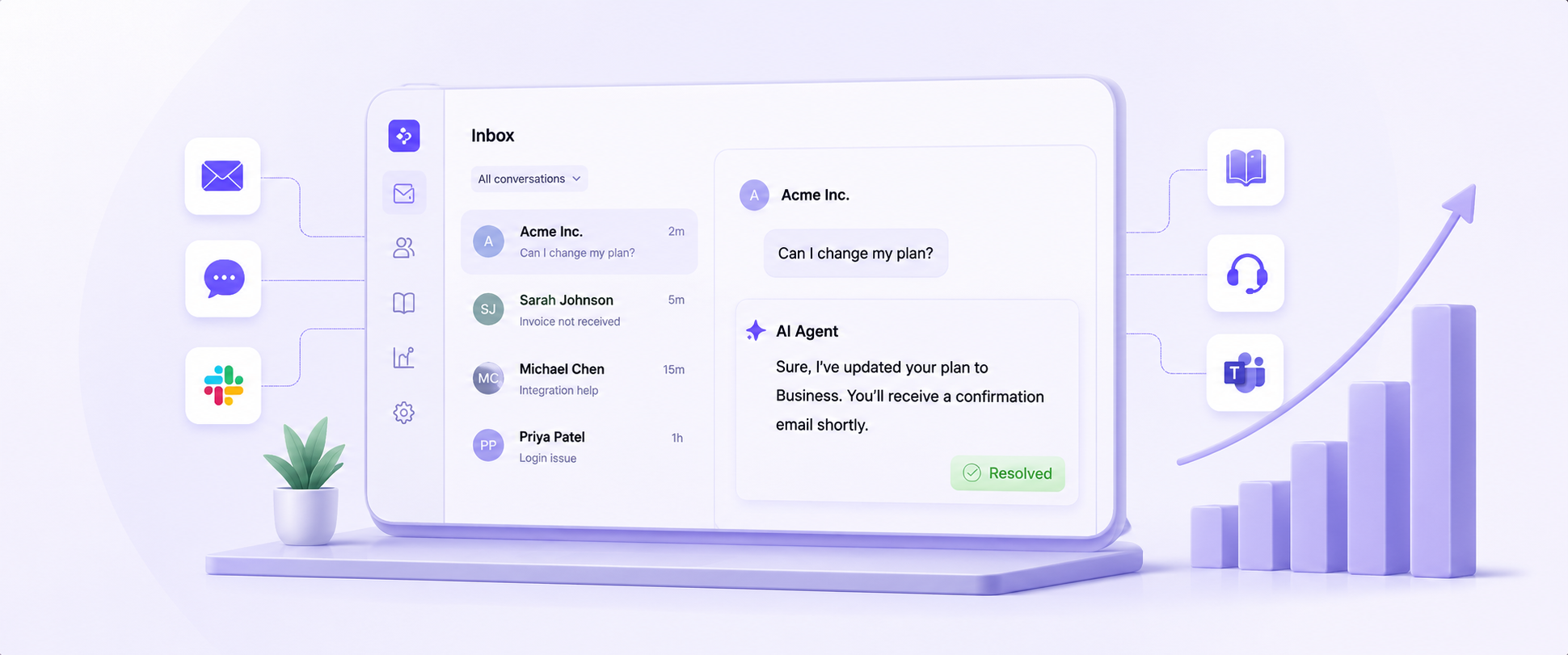
Enjo is AI-native customer support software that works standalone or layers AI onto a helpdesk you already run. For small teams, Inbox pairs a shared inbox with an AI Agent that resolves common requests before they reach an agent.
Best for: Small teams that want AI handling repetitive tickets without paying per seat for the privilege.
Key capabilities:
- Unlimited seats and unlimited AI Agent usage on every plan, including Free
- The AI Agent resolves common requests using Answers (Enjo's native Q&A knowledge base) or content pulled from connected docs
- Guardrails let a small team set compliance and tone boundaries on AI responses without hiring someone to manage it
- Inbox gives every agent a unified view of tickets, with no per-seat charge on any plan
- Help Center generates customer-facing knowledge base articles automatically from resolved tickets
- Slack and Microsoft Teams support out of the box, useful for teams whose customers live there
Pricing: Free is $0/month with unlimited seats and 200 AI replies included, no credit card required. Starter is $95/month with unlimited seats and 1,000 AI replies included. The standard plan is $295/month, with 3,000 AI replies included, plus advanced guardrails, audit trails, and Agent Assist. Enterprise is custom. Additional AI replies on Starter and Standard cost $0.05 each. For the most current plans, see pricing.
Where it falls short: Enjo's customer service vertical launched in 2026, so the case study depth here is thinner than its IT and HR deployments. There's no native phone channel today.

Gorgias
Gorgias is a Shopify-native customer support software built for e-commerce. It charges by ticket volume, not seats, so a small team can add agents freely without the bill moving.
Best for: Shopify and e-commerce stores that need order data inside every support conversation.
Key capabilities:
- Unlimited agent seats on Basic and above; pricing scales with ticket volume instead
- Deep Shopify integration surfaces order history and shipping status directly in the ticket
- AI Agent automates order tracking, returns, and FAQ responses
- 150+ native integrations, including Klaviyo, Recharge, and Loop Returns
Pricing: Starter is $10/month (50 tickets, capped at 3 seats). Basic is $50/month annual billing (300 tickets, unlimited seats), $60/month if billed monthly. Pro is $300/month (annual), 2,000 tickets. Advanced is $750/month (annual), 5,000 tickets. AI Agent resolutions are a flat $0.90 per resolved conversation, and tickets beyond your monthly allotment cost $36 per 100 overage tickets on the Pro plan. For the most current plans, visit gorgias.com/pricing.
Where it falls short: Ticket-based pricing means a strong sales month, more orders, more “where is my order” tickets, can spike your bill right when revenue is highest. Voice and SMS are separate paid add-ons.
LiveAgent
LiveAgent is a desktop-first customer support software that bundles ticketing, live chat, and a call center into a single tool. It's priced per agent but undercuts most of this list on the entry tier.
Best for: Small teams that want phone support without buying a separate contact center product. If live chat is your main channel rather than a bundled extra, see our comparison of the best live chat software.
Key capabilities:
- Ticketing, live chat, knowledge base, and a customer portal from the entry tier
- AI Answer Assistant and an AI chatbot are included from the Small plan, with no separate add-on fee
- Call center and IVR unlock on the Medium plan
- Mobile apps for iOS and Android at no extra cost
Pricing: Small is $15/agent/month; Medium is $29/agent/month; Large is $49/agent/month; Enterprise is $69/agent/month, billed annually (roughly 20% more on a monthly plan). No permanent free plan; a 30-day free trial is available. For the most current plans, visit liveagent.com/pricing.
Where it falls short: Social media channels (Facebook, Instagram, WhatsApp, X) are paid add-ons at $39/month each on the smaller plans, and WhatsApp requires a third-party setup with Twilio or 360dialog rather than a native integration. Removing the LiveAgent badge costs an extra $19/month below Enterprise.
HelpCrunch
HelpCrunch is customer support software that combines live chat, a help desk, email marketing, and a knowledge base into a single dashboard. It's aimed at small teams looking to consolidate several tools into a single subscription.
Best for: Small teams that want support and lightweight marketing automation in the same tool.
Key capabilities:
- Shared inbox unifying chat, email, and social messengers
- AI Agents answer routine questions from your knowledge base, including those from the Pro plan
- Built-in knowledge base editor with SEO basics
- Email marketing automation and popups bundled in, not sold separately
Pricing: Basic is $15/user/month, Pro is $25/user/month, and Unlimited is quoted on a custom basis. AI conversations are metered as an add-on to the base plan: 100 extra AI conversations cost $29/month billed monthly, or $23.20/month if billed annually. For the most current plans, visit helpcrunch.com/pricing.
Where it falls short: AI isn't included as free capacity baked into the sticker price the way it is at Enjo or LiveAgent; every AI conversation beyond your starting allowance is a metered add-on, and the per-100 rate doesn't get meaningfully cheaper until you're buying in the thousands.
Zoho Desk
Zoho Desk is the customer support software inside the broader Zoho suite. It's priced lower than most competitors here and works best for teams already on other Zoho products.
Best for: Budget-conscious small teams, especially those already on Zoho CRM or another Zoho product.
Key capabilities:
- Omnichannel ticketing across email, social, and live chat
- Zia, Zoho's AI assistant, handles sentiment analysis, auto-tagging, and an Answer Bot on higher tiers
- The multi-brand help center is included on most tiers
- Built-in telephony and reporting without separate add-on purchases
Pricing: Express is $7/agent/month; Standard is $14/agent/month; Professional is $23/agent/month; and Enterprise is $40/agent/month. A free edition exists for up to 3 users. For the most current plans, visit zoho.com/desk/pricing.
Where it falls short: Search functionality inside the knowledge base draws consistent complaints in reviews, and the interface feels dated next to newer entrants on this list.
Freshdesk
Freshdesk is Freshworks' entry-level customer support software, with ticketing, a knowledge base, and Freddy AI for triage and self-service. It's built for teams that want a full suite without enterprise pricing.
Best for: Small teams that want a complete, recognizable helpdesk without a steep learning curve.
Key capabilities:
- Omnichannel ticketing across email, chat, phone, and social in one view
- Freddy AI Agent handles ticket categorization and automated resolution, with the first 500 sessions included monthly
- Canned responses and SLA management are included from the entry tier
- Free tier available for testing before committing
Pricing: Growth is $19/agent/month; Pro is $55/agent/month; and Enterprise is $89/agent/month, all billed annually. Freddy AI Agent sessions beyond the included 500/month cost extra per 100 sessions. For the most current plans, visit freshdesk.com/pricing.
Where it falls short: The most useful AI capabilities sit on the Pro tier, and above, so the $19 entry price doesn't include what most small teams actually want automated.
Help Scout
Help Scout is customer support software built around a shared inbox that feels like a regular email client rather than a ticketing system. Conversations from email, live chat, and connected channels are routed to a single queue with collision detection, so two agents never reply to the same customer.
Best for: Small teams that want the simplicity of email with light collaboration tools layered on top, with room to grow into more advanced workflows.
Key capabilities:
- Shared inbox with unlimited saved replies and tags from the entry paid tier
- AI Inbox Assist and AI Drafts are unlimited and included starting on Standard and Plus, respectively, and are not metered
- AI Answers, a separate autonomous chatbot, resolves customer questions directly from your Docs knowledge base
- Multiple Docs knowledge base sites, with custom branding available
Pricing: Standard is $25/seat/month, Plus is $45/seat/month, and Pro is $75/seat/month, all billed annually. A Free plan covers up to 5 users, 1 inbox, and 1 Docs site. AI Answers is a separate metered add-on at $0.75 per resolution, with a 3-month free trial. For the most current plans, visit helpscout.com/pricing.
Where it falls short: The core AI Assist and AI Drafts features are genuinely included rather than metered, which is better than most on this list. But AI Answers, the part that actually resolves tickets without an agent, is still billed per resolution on top of any plan.
Crisp
Crisp is customer support software priced per workspace rather than per seat. It bundles live chat, a shared inbox, and a chatbot builder, with AI metered by credits at every tier, including the top one.
Best for: Startups and small teams that want a flat seat-based bill and are comfortable managing an AI credit budget.
Key capabilities:
- Flat per-workspace pricing covers a set number of seats; the whole team uses one price
- Omnichannel inbox spanning chat, email, WhatsApp, Messenger, and Instagram
- Hugo, Crisp's AI agent, handles FAQs and basic resolution from included credits
- Co-browsing lets an agent see and navigate a customer's screen live, including from Essentials
Pricing: Free includes 2 seats, no AI credits. Mini is $45/month (4 seats, $5 in AI credits). Essentials is $95/month (10 seats, $25 in AI credits). Plus is $295/month (20+ seats, $75 in AI credits). AI is metered by credit at every paid tier, including Plus; there is no unlimited-AI tier. For the most current plans, visit crisp.chat/en/pricing.
Where it falls short: Even on the top Plus plan, AI runs on a $75/month credit allowance, not unlimited usage. A small team leaning heavily on Hugo for resolution can burn through that allowance and will need to budget for overages, even at the highest tier.
Tidio
Tidio is customer support software built around live chat and a chatbot, popular with small e-commerce stores. It has a genuinely usable free tier and a notoriously steep jump to its top plan.
Best for: Very small e-commerce teams with fewer than 10 agents who want live chat with light AI.
Key capabilities:
- Free plan includes 50 conversations/month and live chat across web, Facebook, Instagram, and WhatsApp
- Growth plan unlocks advanced analytics, permissions, and automatic chat assignment
- Lyro, Tidio's AI agent, answers FAQs from trained content; your first 50 Lyro conversations are free for life
- Visual Flows builder for proactive chatbot sequences
Pricing: Free is $0 (50 conversations, 10 seats). Starter is $24.17/month, annual billing (100 conversations). Growth starts at $49.17/month, annual billing (from 250 conversations, scaling with volume). Plus starts at $749/month for custom limits. Lyro AI, beyond the free 50 conversations, is a separate add-on starting at $32.50/month. For the most current plans, visit tidio.com/pricing.
Where it falls short: The jump from Growth to Plus is roughly 15x with no plan in between, and it's the only place to go once your volume or seat needs outgrow Growth's ceiling.
Zendesk
Zendesk is the most recognized name in customer support software. It's a full omnichannel suite with AI agents, voice, and reporting, built for teams that expect to scale into a real contact center.
Best for: Small teams that expect to grow into a much larger support operation quickly and want a platform that won't need replacing.
Key capabilities:
- Omnichannel ticketing across email, chat, voice, and social in a unified agent workspace
- AI agents, an AI knowledge base, and an AI action builder are included starting on the Suite Team
- Skills-based routing and IVR on Suite Professional and above
- Large app marketplace for third-party integrations
Pricing: Support Team is $19/agent/month for email-only ticketing. Suite Team, where AI agents and omnichannel routing start, is $55/agent/month. Suite Professional is $115/agent/month. Suite Enterprise + Copilot is quoted only for sales. The Copilot add-on is a separate $50/agent/month on top of any Suite plan, as are the Workforce Engagement Bundle and Contact Center add-ons at $50/agent/month each. No permanent free tier; a free trial is available. For the most current plans, visit zendesk.com/pricing.
Where it falls short: Zendesk's per-seat-plus-add-on model is the steepest cost curve on this list. A 10-agent team on Suite Team with Copilot pays $1,050/month before any usage-based AI resolution fees. For a deeper look at routing and ticketing depth specifically, see our guide to customer service ticketing systems.
Customer Support Software Pricing for Small Business
This table uses each vendor's entry tier that includes at least basic AI or automation, the realistic starting point for a small team that wants more than plain ticketing. Per-seat tools use the annual billing list price multiplied by headcount; flat- or volume-based tools show the plan price unchanged across headcount.
Three tools here don't bill per seat at all, but each one shifted the cost driver elsewhere: Gorgias to ticket volume, Tidio to a usage ceiling, and Crisp to a credit-metered AI allowance that applies even on its most expensive plan. Enjo is the only one on this table with unlimited AI Agent usage bundled into every plan, rather than metered as a separate line item, including the Free plan.
How to Choose Customer Support Software for Your Small Business
Match your decision to where your team actually is, not where the vendor wants you to land. If hiring or AI usage growth is the constraint, start with Enjo's free tier. If you're running a Shopify store and ticket volume tracks revenue more than headcount, Gorgias's model fits that shape better than a per-seat tool would.
If you need phone support without buying a separate contact center product, LiveAgent's entry plan covers that at a lower per-seat cost than most of this list. If you expect to outgrow a simple inbox within a year and want a platform with contact-center depth waiting on the other side, Zendesk's higher up-front cost buys you a runway you won't have to migrate off of later.
If your team has more than 10 agents or is evaluating at a scale beyond a small business, see our broader breakdown of customer support platforms for B2B teams.
Frequently Asked Questions
Is there truly free customer support software for small business?
Yes, with caveats. Enjo's Free tier, Crisp's Free tier, and Tidio's Free tier are all functional, not crippled trials, but every free tier has a ceiling, on seats, conversation volume, or AI usage, that a growing team will eventually hit. For a dedicated breakdown of every real free customer service software option, see our full comparison.
What's the real cost of “per agent” pricing as you scale?
It compounds. A tool priced at $15/agent looks identical to one priced at $55/agent until you hire your sixth agent, at which point the gap is well over $200/month and climbing. Run the math at your expected team size in 12 months, not just today's headcount.
Do small teams need a separate AI tool, or is it built in?
It depends on the vendor, and the details matter more than the marketing page suggests. Enjo and Help Scout's core AI assist features are genuinely unlimited and included. Others, like Zendesk's Copilot, Gorgias's AI Agent, HelpCrunch's AI conversations, and Crisp's Hugo credits, meter AI separately, turning it into a second variable to budget for, even on an otherwise flat-priced plan.
What's the difference between customer support software and a help center?
Customer support software (a helpdesk or inbox) is the platform your team uses to manage and resolve incoming tickets. A help center is the customer-facing self-serve portal where customers find answers without contacting your team at all. Several tools on this list, including Enjo, bundle both; others sell them separately.
A tool that looks cheap on the homepage and stays affordable at 10 agents is not always the same tool. Start with whichever platform on this list won't force a re-platforming decision the moment your team actually grows. If you're a SaaS company specifically, our guide to SaaS customer support software covers the growth-stage and scale-stage tools this list intentionally leaves out.
What to Look for in Customer Support Software for Small Business
Five things separate a tool that fits a small team from one that just looks cheap on the homepage.
- What triggers the next price jump? Per-seat, per-ticket, and per-resolution pricing each have a different breaking point. Knowing which lever moves your bill matters more than the sticker price.
- Whether AI is included or metered separately. Several vendors here treat AI as a second invoice on top of the base plan, billed by conversation, credit, or resolution.
- Time to a working setup. A small team without dedicated ops headcount needs something live this week, not after an implementation project.
- Where your customers actually are. Email and chat cover most teams. Slack matters specifically if your customers are other B2B companies that already work there.
- Whether the free tier is real. A usable free plan and a 7-day trial dressed up as “free” are not the same thing.
Enjo runs over 600 enterprise deployments and has held SOC 2 Type II and ISO 27001 compliance through six years of 99.9% uptime, the kind of security record a procurement checklist asks for at companies far bigger than the ones reading this guide, which still matters once your support tool starts holding customer data.
The Best Customer Service Software for Small Business, Ranked
Enjo
Enjo is AI-native customer support software that works standalone or layers AI onto a helpdesk you already run. For small teams, Inbox pairs a shared inbox with an AI Agent that resolves common requests before they reach an agent.
Best for: Small teams that want AI handling repetitive tickets without paying per seat for the privilege.
Key capabilities:
- Unlimited seats and unlimited AI Agent usage on every plan, including Free
- The AI Agent resolves common requests using Answers (Enjo's native Q&A knowledge base) or content pulled from connected docs
- Guardrails let a small team set compliance and tone boundaries on AI responses without hiring someone to manage it
- Inbox gives every agent a unified view of tickets, with no per-seat charge on any plan
- Help Center generates customer-facing knowledge base articles automatically from resolved tickets
- Slack and Microsoft Teams support out of the box, useful for teams whose customers live there
Pricing: Free is $0/month with unlimited seats and 200 AI replies included, no credit card required. Starter is $95/month with unlimited seats and 1,000 AI replies included. The standard plan is $295/month, with 3,000 AI replies included, plus advanced guardrails, audit trails, and Agent Assist. Enterprise is custom. Additional AI replies on Starter and Standard cost $0.05 each. For the most current plans, see pricing.
Where it falls short: Enjo's customer service vertical launched in 2026, so the case study depth here is thinner than its IT and HR deployments. There's no native phone channel today.
Gorgias
Gorgias is a Shopify-native customer support software built for e-commerce. It charges by ticket volume, not seats, so a small team can add agents freely without the bill moving.
Best for: Shopify and e-commerce stores that need order data inside every support conversation.
Key capabilities:
- Unlimited agent seats on Basic and above; pricing scales with ticket volume instead
- Deep Shopify integration surfaces order history and shipping status directly in the ticket
- AI Agent automates order tracking, returns, and FAQ responses
- 150+ native integrations, including Klaviyo, Recharge, and Loop Returns
Pricing: Starter is $10/month (50 tickets, capped at 3 seats). Basic is $50/month annual billing (300 tickets, unlimited seats), $60/month if billed monthly. Pro is $300/month (annual), 2,000 tickets. Advanced is $750/month (annual), 5,000 tickets. AI Agent resolutions are a flat $0.90 per resolved conversation, and tickets beyond your monthly allotment cost $36 per 100 overage tickets on the Pro plan. For the most current plans, visit gorgias.com/pricing.
Where it falls short: Ticket-based pricing means a strong sales month, more orders, more “where is my order” tickets, can spike your bill right when revenue is highest. Voice and SMS are separate paid add-ons.
LiveAgent
LiveAgent is a desktop-first customer support software that bundles ticketing, live chat, and a call center into a single tool. It's priced per agent but undercuts most of this list on the entry tier.
Best for: Small teams that want phone support without buying a separate contact center product. If live chat is your main channel rather than a bundled extra, see our comparison of the best live chat software.
Key capabilities:
- Ticketing, live chat, knowledge base, and a customer portal from the entry tier
- AI Answer Assistant and an AI chatbot are included from the Small plan, with no separate add-on fee
- Call center and IVR unlock on the Medium plan
- Mobile apps for iOS and Android at no extra cost
Pricing: Small is $15/agent/month; Medium is $29/agent/month; Large is $49/agent/month; Enterprise is $69/agent/month, billed annually (roughly 20% more on a monthly plan). No permanent free plan; a 30-day free trial is available. For the most current plans, visit liveagent.com/pricing.
Where it falls short: Social media channels (Facebook, Instagram, WhatsApp, X) are paid add-ons at $39/month each on the smaller plans, and WhatsApp requires a third-party setup with Twilio or 360dialog rather than a native integration. Removing the LiveAgent badge costs an extra $19/month below Enterprise.
HelpCrunch
HelpCrunch is customer support software that combines live chat, a help desk, email marketing, and a knowledge base into a single dashboard. It's aimed at small teams looking to consolidate several tools into a single subscription.
Best for: Small teams that want support and lightweight marketing automation in the same tool.
Key capabilities:
- Shared inbox unifying chat, email, and social messengers
- AI Agents answer routine questions from your knowledge base, including those from the Pro plan
- Built-in knowledge base editor with SEO basics
- Email marketing automation and popups bundled in, not sold separately
Pricing: Basic is $15/user/month, Pro is $25/user/month, and Unlimited is quoted on a custom basis. AI conversations are metered as an add-on to the base plan: 100 extra AI conversations cost $29/month billed monthly, or $23.20/month if billed annually. For the most current plans, visit helpcrunch.com/pricing.
Where it falls short: AI isn't included as free capacity baked into the sticker price the way it is at Enjo or LiveAgent; every AI conversation beyond your starting allowance is a metered add-on, and the per-100 rate doesn't get meaningfully cheaper until you're buying in the thousands.
Zoho Desk
Zoho Desk is the customer support software inside the broader Zoho suite. It's priced lower than most competitors here and works best for teams already on other Zoho products.
Best for: Budget-conscious small teams, especially those already on Zoho CRM or another Zoho product.
Key capabilities:
- Omnichannel ticketing across email, social, and live chat
- Zia, Zoho's AI assistant, handles sentiment analysis, auto-tagging, and an Answer Bot on higher tiers
- The multi-brand help center is included on most tiers
- Built-in telephony and reporting without separate add-on purchases
Pricing: Express is $7/agent/month; Standard is $14/agent/month; Professional is $23/agent/month; and Enterprise is $40/agent/month. A free edition exists for up to 3 users. For the most current plans, visit zoho.com/desk/pricing.
Where it falls short: Search functionality inside the knowledge base draws consistent complaints in reviews, and the interface feels dated next to newer entrants on this list.
Freshdesk
Freshdesk is Freshworks' entry-level customer support software, with ticketing, a knowledge base, and Freddy AI for triage and self-service. It's built for teams that want a full suite without enterprise pricing.
Best for: Small teams that want a complete, recognizable helpdesk without a steep learning curve.
Key capabilities:
- Omnichannel ticketing across email, chat, phone, and social in one view
- Freddy AI Agent handles ticket categorization and automated resolution, with the first 500 sessions included monthly
- Canned responses and SLA management are included from the entry tier
- Free tier available for testing before committing
Pricing: Growth is $19/agent/month; Pro is $55/agent/month; and Enterprise is $89/agent/month, all billed annually. Freddy AI Agent sessions beyond the included 500/month cost extra per 100 sessions. For the most current plans, visit freshdesk.com/pricing.
Where it falls short: The most useful AI capabilities sit on the Pro tier, and above, so the $19 entry price doesn't include what most small teams actually want automated.
Help Scout
Help Scout is customer support software built around a shared inbox that feels like a regular email client rather than a ticketing system. Conversations from email, live chat, and connected channels are routed to a single queue with collision detection, so two agents never reply to the same customer.
Best for: Small teams that want the simplicity of email with light collaboration tools layered on top, with room to grow into more advanced workflows.
Key capabilities:
- Shared inbox with unlimited saved replies and tags from the entry paid tier
- AI Inbox Assist and AI Drafts are unlimited and included starting on Standard and Plus, respectively, and are not metered
- AI Answers, a separate autonomous chatbot, resolves customer questions directly from your Docs knowledge base
- Multiple Docs knowledge base sites, with custom branding available
Pricing: Standard is $25/seat/month, Plus is $45/seat/month, and Pro is $75/seat/month, all billed annually. A Free plan covers up to 5 users, 1 inbox, and 1 Docs site. AI Answers is a separate metered add-on at $0.75 per resolution, with a 3-month free trial. For the most current plans, visit helpscout.com/pricing.
Where it falls short: The core AI Assist and AI Drafts features are genuinely included rather than metered, which is better than most on this list. But AI Answers, the part that actually resolves tickets without an agent, is still billed per resolution on top of any plan.
Crisp
Crisp is customer support software priced per workspace rather than per seat. It bundles live chat, a shared inbox, and a chatbot builder, with AI metered by credits at every tier, including the top one.
Best for: Startups and small teams that want a flat seat-based bill and are comfortable managing an AI credit budget.
Key capabilities:
- Flat per-workspace pricing covers a set number of seats; the whole team uses one price
- Omnichannel inbox spanning chat, email, WhatsApp, Messenger, and Instagram
- Hugo, Crisp's AI agent, handles FAQs and basic resolution from included credits
- Co-browsing lets an agent see and navigate a customer's screen live, including from Essentials
Pricing: Free includes 2 seats, no AI credits. Mini is $45/month (4 seats, $5 in AI credits). Essentials is $95/month (10 seats, $25 in AI credits). Plus is $295/month (20+ seats, $75 in AI credits). AI is metered by credit at every paid tier, including Plus; there is no unlimited-AI tier. For the most current plans, visit crisp.chat/en/pricing.
Where it falls short: Even on the top Plus plan, AI runs on a $75/month credit allowance, not unlimited usage. A small team leaning heavily on Hugo for resolution can burn through that allowance and will need to budget for overages, even at the highest tier.
Tidio
Tidio is customer support software built around live chat and a chatbot, popular with small e-commerce stores. It has a genuinely usable free tier and a notoriously steep jump to its top plan.
Best for: Very small e-commerce teams with fewer than 10 agents who want live chat with light AI.
Key capabilities:
- Free plan includes 50 conversations/month and live chat across web, Facebook, Instagram, and WhatsApp
- Growth plan unlocks advanced analytics, permissions, and automatic chat assignment
- Lyro, Tidio's AI agent, answers FAQs from trained content; your first 50 Lyro conversations are free for life
- Visual Flows builder for proactive chatbot sequences
Pricing: Free is $0 (50 conversations, 10 seats). Starter is $24.17/month, annual billing (100 conversations). Growth starts at $49.17/month, annual billing (from 250 conversations, scaling with volume). Plus starts at $749/month for custom limits. Lyro AI, beyond the free 50 conversations, is a separate add-on starting at $32.50/month. For the most current plans, visit tidio.com/pricing.
Where it falls short: The jump from Growth to Plus is roughly 15x with no plan in between, and it's the only place to go once your volume or seat needs outgrow Growth's ceiling.
Zendesk
Zendesk is the most recognized name in customer support software. It's a full omnichannel suite with AI agents, voice, and reporting, built for teams that expect to scale into a real contact center.
Best for: Small teams that expect to grow into a much larger support operation quickly and want a platform that won't need replacing.
Key capabilities:
- Omnichannel ticketing across email, chat, voice, and social in a unified agent workspace
- AI agents, an AI knowledge base, and an AI action builder are included starting on the Suite Team
- Skills-based routing and IVR on Suite Professional and above
- Large app marketplace for third-party integrations
Pricing: Support Team is $19/agent/month for email-only ticketing. Suite Team, where AI agents and omnichannel routing start, is $55/agent/month. Suite Professional is $115/agent/month. Suite Enterprise + Copilot is quoted only for sales. The Copilot add-on is a separate $50/agent/month on top of any Suite plan, as are the Workforce Engagement Bundle and Contact Center add-ons at $50/agent/month each. No permanent free tier; a free trial is available. For the most current plans, visit zendesk.com/pricing.
Where it falls short: Zendesk's per-seat-plus-add-on model is the steepest cost curve on this list. A 10-agent team on Suite Team with Copilot pays $1,050/month before any usage-based AI resolution fees. For a deeper look at routing and ticketing depth specifically, see our guide to customer service ticketing systems.
Customer Support Software Pricing for Small Business
This table uses each vendor's entry tier that includes at least basic AI or automation, the realistic starting point for a small team that wants more than plain ticketing. Per-seat tools use the annual billing list price multiplied by headcount; flat- or volume-based tools show the plan price unchanged across headcount.
Three tools here don't bill per seat at all, but each one shifted the cost driver elsewhere: Gorgias to ticket volume, Tidio to a usage ceiling, and Crisp to a credit-metered AI allowance that applies even on its most expensive plan. Enjo is the only one on this table with unlimited AI Agent usage bundled into every plan, rather than metered as a separate line item, including the Free plan.
How to Choose Customer Support Software for Your Small Business
Match your decision to where your team actually is, not where the vendor wants you to land. If hiring or AI usage growth is the constraint, start with Enjo's free tier. If you're running a Shopify store and ticket volume tracks revenue more than headcount, Gorgias's model fits that shape better than a per-seat tool would.
If you need phone support without buying a separate contact center product, LiveAgent's entry plan covers that at a lower per-seat cost than most of this list. If you expect to outgrow a simple inbox within a year and want a platform with contact-center depth waiting on the other side, Zendesk's higher up-front cost buys you a runway you won't have to migrate off of later.
If your team has more than 10 agents or is evaluating at a scale beyond a small business, see our broader breakdown of customer support platforms for B2B teams.
Frequently Asked Questions
Is there truly free customer support software for small business?
Yes, with caveats. Enjo's Free tier, Crisp's Free tier, and Tidio's Free tier are all functional, not crippled trials, but every free tier has a ceiling, on seats, conversation volume, or AI usage, that a growing team will eventually hit. For a dedicated breakdown of every real free customer service software option, see our full comparison.
What's the real cost of “per agent” pricing as you scale?
It compounds. A tool priced at $15/agent looks identical to one priced at $55/agent until you hire your sixth agent, at which point the gap is well over $200/month and climbing. Run the math at your expected team size in 12 months, not just today's headcount.
Do small teams need a separate AI tool, or is it built in?
It depends on the vendor, and the details matter more than the marketing page suggests. Enjo and Help Scout's core AI assist features are genuinely unlimited and included. Others, like Zendesk's Copilot, Gorgias's AI Agent, HelpCrunch's AI conversations, and Crisp's Hugo credits, meter AI separately, turning it into a second variable to budget for, even on an otherwise flat-priced plan.
What's the difference between customer support software and a help center?
Customer support software (a helpdesk or inbox) is the platform your team uses to manage and resolve incoming tickets. A help center is the customer-facing self-serve portal where customers find answers without contacting your team at all. Several tools on this list, including Enjo, bundle both; others sell them separately.
A tool that looks cheap on the homepage and stays affordable at 10 agents is not always the same tool. Start with whichever platform on this list won't force a re-platforming decision the moment your team actually grows. If you're a SaaS company specifically, our guide to SaaS customer support software covers the growth-stage and scale-stage tools this list intentionally leaves out.

Transform complex support workflows


Stay Informed and Inspired



Start Free. Prove Value. Scale When Ready.
Use Enjo for real customer conversations and see how it fits your support workflow. Scale as your support grows.