Transform complex support workflows
Customer Service KPIs: Examples and How to Set Targets
Customer service KPIs are meant to tell CS leaders whether their team is improving or declining over time. That was straightforward when every ticket was handled by a human. It is far less obvious now that AI resolves a growing share of customer conversations, since most KPIs still combine AI-resolved and human-resolved results into a single number.
The harder problem sits one step earlier. A metrics list tells you what exists. It does not tell you which five or six numbers you commit to, what target you set against each, or which of those targets has any external basis at all. Most of them do not.
Customer service KPIs for 2026: examples, the six worth a dashboard slot, and how to set targets when AI resolves part of the queue.
What Is a Customer Service KPI?
A customer service KPI is a support metric tied to a goal you are accountable for. A metric is any number you can measure; a KPI is the short list you report against and act on. Ticket volume on its own is a metric. Ticket volume tracked against agent headcount, because you are deciding whether to hire, is a KPI.
Most lists of key performance indicators for customer service skip that distinction and hand you every number a helpdesk can export. The result is a 20-tile dashboard nobody acts on.
The distinction decides what belongs on this page. For definitions, formulas and benchmarks across the full set, see the customer service metrics list. What follows is the selection layer: which ones become KPIs, what target to set, and how that changes once AI resolves part of the queue.
The 6 Customer Service KPIs That Belong on a Dashboard
Six is the working ceiling. Every one of these customer care KPIs earns its slot by changing a decision, and five of the six read differently depending on who resolved the request.
- CSAT, split by resolver. The number leadership asks for first, and the one most damaged by blending.
- First contact resolution, split by resolver. The quality signal behind every speed number.
- Average resolution time, split by resolver. What the customer actually experiences as how long this took.
- AI autonomous resolution rate. The share of AI-touched conversations resolved with no human involvement. It has no pre-AI equivalent.
- Escalation rate. The inverse of the above, and the number your automation team works from rather than reports.
- Cost per resolution, split by resolver. The one that connects all of it to a budget conversation.
Everything below is the wider menu of customer service KPI examples. Most of it is worth having on hand. Very little of it belongs on the standing dashboard.
20 Customer Service KPI Examples, and When Each Earns a Slot
Some of the KPIs below should be reported twice, once for AI-resolved conversations and once for human-resolved ones, since a single blended average can make very different operational situations look identical. Others are relationship-level or team-level by nature, and forcing the same split adds noise rather than signal. Each definition explains which applies.
Self-service resolution rate, sometimes called deflection rate, is worth naming even though it is not one of the twenty: it measures volume that never became a ticket at all, resolved through self-service or an AI agent before anything was logged. On a team running AI resolution alongside a real help center, it is often larger than every ticket-based KPI combined.
First Response Time (FRT)
First response time is the time from ticket creation to the first reply. AI-resolved FRT reflects system latency and sits close to instant; human-resolved FRT reflects real staffing and triage. Blending the two makes a well-staffed, AI-heavy team look identical to an understaffed team that got lucky on volume mix.
Average Resolution Time (ART)
Average resolution time captures the full lifecycle rather than just the first touch. AI-resolved ART typically lands in seconds or minutes; human-resolved ART reflects real complexity and backlog. A rising blended average could mean cases are genuinely harder, or that AI resolved the easy ones and passed a tougher mix to your team.
Average Handle Time (AHT)
Average handle time is the active work time an agent spends per ticket, not counting waiting. It is a capacity metric, not a satisfaction metric, and it does not mean much on the AI side. Track it for your human team to size headcount, rather than to compare against AI.
Customer Satisfaction (CSAT)
CSAT is the percentage of customers who rate an interaction positively on a post-resolution survey. It is the most commonly tracked customer service KPI and the one most damaged by blending. A drop in blended CSAT could mean AI is giving confidently wrong answers, or that your human team is overloaded and rushing replies. Those are opposite root causes with opposite fixes.
First Contact Resolution (FCR)
FCR is the percentage of tickets resolved in a single interaction with no follow-up. An 85% blended FCR could hide a 95-to-55 AI-to-human split or a 90-to-80 split, and those describe very different support operations. Split FCR by resolver before drawing any conclusion from it.
Customer Effort Score (CES)
CES asks customers to rate how easy an interaction felt, on the theory that low effort predicts loyalty better than satisfaction alone. AI-resolved CES reflects how easy the self-serve interaction felt; human-resolved CES reflects agent-side friction like transfers and repeated questions. A blended CES tells you effort is a problem somewhere, not where.
Resolution SLA / SLA Compliance
SLA compliance is the percentage of tickets resolved within a committed time window, usually tiered by priority. AI resolution is close to instant by default, so AI-heavy teams often see blended SLA compliance climb even when the human side has not improved at all. Track it for human-resolved tickets specifically if the commitment is meant to reflect your team's responsiveness.
Quality Score (QA Audit)
Quality score comes from an internal audit: closed tickets scored against a rubric for tone, accuracy and policy adherence. AI-resolved conversations can be scored on 100% of volume because the audit runs automatically, whereas human QA usually stays sample-based. Comparing a fully audited AI score against a 5% human sample as if they are the same kind of number is a common reporting mistake.
Cost per Resolution
Cost per resolution indicates whether support is becoming more or less expensive to run. AI-resolved and human-resolved costs sit on different curves, and the gap is narrowing rather than widening. Gartner forecasts that by 2030, cost per resolution for generative AI will exceed $3, higher than many B2C offshore human agents. A blended figure trending down could mean genuine efficiency, or that volume mix shifted toward AI without either resolution type getting cheaper.
For the full cost model, see the ROI of AI service desks.
AI Autonomous Resolution Rate
The AI autonomous resolution rate is the percentage of AI-touched conversations resolved without ever escalating to a human. It is the headline number most CS leaders report to leadership when asked how automation is progressing. It has no pre-AI equivalent, because there was no AI-touched category of ticket to measure before AI resolution existed as a workflow.
Escalation Rate
Escalation rate is the inverse: the percentage of AI-touched conversations handed to a human. Where the resolution rate is the number leadership wants, the escalation rate is the number your automation team works from, since it points at what AI is not confident enough to handle. A rising escalation rate on stable ticket types usually signals a knowledge gap, not a model problem.
Retention, churn and the business-level KPIs below do not split cleanly by AI versus human. They are still worth tracking, just not with the same lens.
Net Promoter Score (NPS)
NPS asks customers how likely they are to recommend the company, then nets detractors from promoters. It is relationship-level, not tied to any single resolution, so it does not split meaningfully by resolver the way FCR or CSAT does. Track it as a lagging indicator of overall support quality, not a per-interaction score.
Customer Retention Rate
Customer retention rate is the percentage of customers still active at the end of a period compared to the start, excluding new customers acquired during it. It sits downstream of many touches, support included, so one bad AI interaction rarely shows up here directly. Worth watching alongside support KPIs to catch whether support quality is contributing to churn.
Customer Churn Rate
Churn rate is the inverse of retention. Same underlying signal, same caveats. Support teams rarely move this number on their own, but a spike is worth investigating alongside a drop in CSAT or FCR.
Customer Lifetime Value (CLV)
CLV estimates total revenue expected from a customer over the life of the relationship. It is a business-level KPI that support influences indirectly through retention and expansion, and it should not be something a support team is measured against directly.
Agent Satisfaction (eNPS)
Agent satisfaction asks your support team how likely they are to recommend working at your company. It is a purely human-team metric with no AI-side equivalent. Worth tracking especially as AI takes on more routine volume, since the agent role and workload shift in ways that show up here first.
Ticket Volume
Ticket volume is the total number of requests logged in a period, the most basic customer support KPI there is. It only counts what became a ticket, so it undercounts real demand once AI resolves requests before anything is logged. Pair it with self-service resolution rate to see the full picture.
Ticket Backlog
Ticket backlog is the number of open, unresolved tickets at a point in time. It is a staffing signal rather than a quality one: growing backlog usually means demand outpaced capacity. Watch it alongside AHT and FRT to catch capacity problems before they surface in customer-facing numbers.
Ticket Reopens
Ticket reopens track the percentage of resolved tickets a customer reopens because the original resolution did not hold. It is a stronger proxy for resolution quality than FCR alone, since a ticket can close on first contact and still be wrong. You will need a fairly large sample before splitting it by resolver.
Volume by Channel
Volume by channel shows how requests distribute across Slack, Microsoft Teams, email, website chat and your Help Center portal. It is a routing and capacity-planning input rather than a performance KPI. Useful for deciding where to invest in AI coverage next: a channel carrying disproportionate volume with low AI involvement is usually the next automation target.
How to Set a Target for Each KPI
This is the part most lists of customer service KPI examples skip. Naming twenty numbers is easy. Deciding what each one should read is where the work is, and the honest answer for most of them is that no external benchmark exists.
Six rules, in order.
- Baseline before you target. Run one full reporting cycle and record the number before committing to a figure. A target set without a baseline is a guess with a deadline attached.
- Set the target by resolver, never on the blend. A blended CSAT target of 85% is unsettable: it can be met by AI carrying an easy mix while the human queue degrades. Two targets, two owners.
- Move one number at a time. Targets on four KPIs at once produce four half-efforts and no attributable cause when one of them moves.
- Pair every speed target with a quality guardrail. An FCR or resolution-time target without a reopen-rate floor beside it rewards resolving requests badly and quickly.
- Use an external benchmark only where a credible one exists. Four of the twenty have one. The rest do not, and a number pulled off an unsourced blog is worse than no target, because a team will hit it.
- Write the definition down before the target. FCR, resolution and escalation mean different things in different tools. An undocumented definition drifts, and the target drifts with it.
Where a credible external target exists, and where it does not
Twelve of the twenty have no credible external target. Saying so is more useful than supplying a number a team will hit without learning anything.
How Many Customer Service KPIs to Track
Not every KPI above deserves a permanent home. Pick the ones tied to a decision you are actually making this quarter: hiring, automation investment, or an SLA renegotiation. Cap it at five or six. If a KPI has not changed a decision in two review cycles, retire it rather than let the dashboard grow past what anyone reads.
Tracking Customer Service KPIs Across Multiple Tools
The AI-versus-human split above assumes you can see both numbers in one place. On most support stacks, you cannot. If AI resolves requests in Slack, tickets escalate to Zendesk or Jira, and self-service sits in a separate help center tool, "resolution rate" means three different partial numbers depending on which system produced the report.
This is not hypothetical. It is the default for a team running Salesforce or Zendesk with an AI add-on that reports only on its own conversations, plus a knowledge base tool with its own analytics. Reconciling those three into one true figure is usually a manual export-and-join, repeated every reporting cycle.
That reconciliation problem is also why targets drift. A number that takes four exports to produce gets produced late, and a target nobody can see in real time stops steering anything.
How Enjo Platform Helps You Improve These KPIs
Enjo changes these numbers by automating the work behind them rather than only reporting on them. The AI Agent resolves routine requests in Slack, Microsoft Teams or your Help Center before a ticket needs a human, which moves first contact resolution and self-service resolution rate. Agent Assist gives human agents real-time case summaries and reply suggestions, which reduces average handle and resolution time for requests that reach a person.
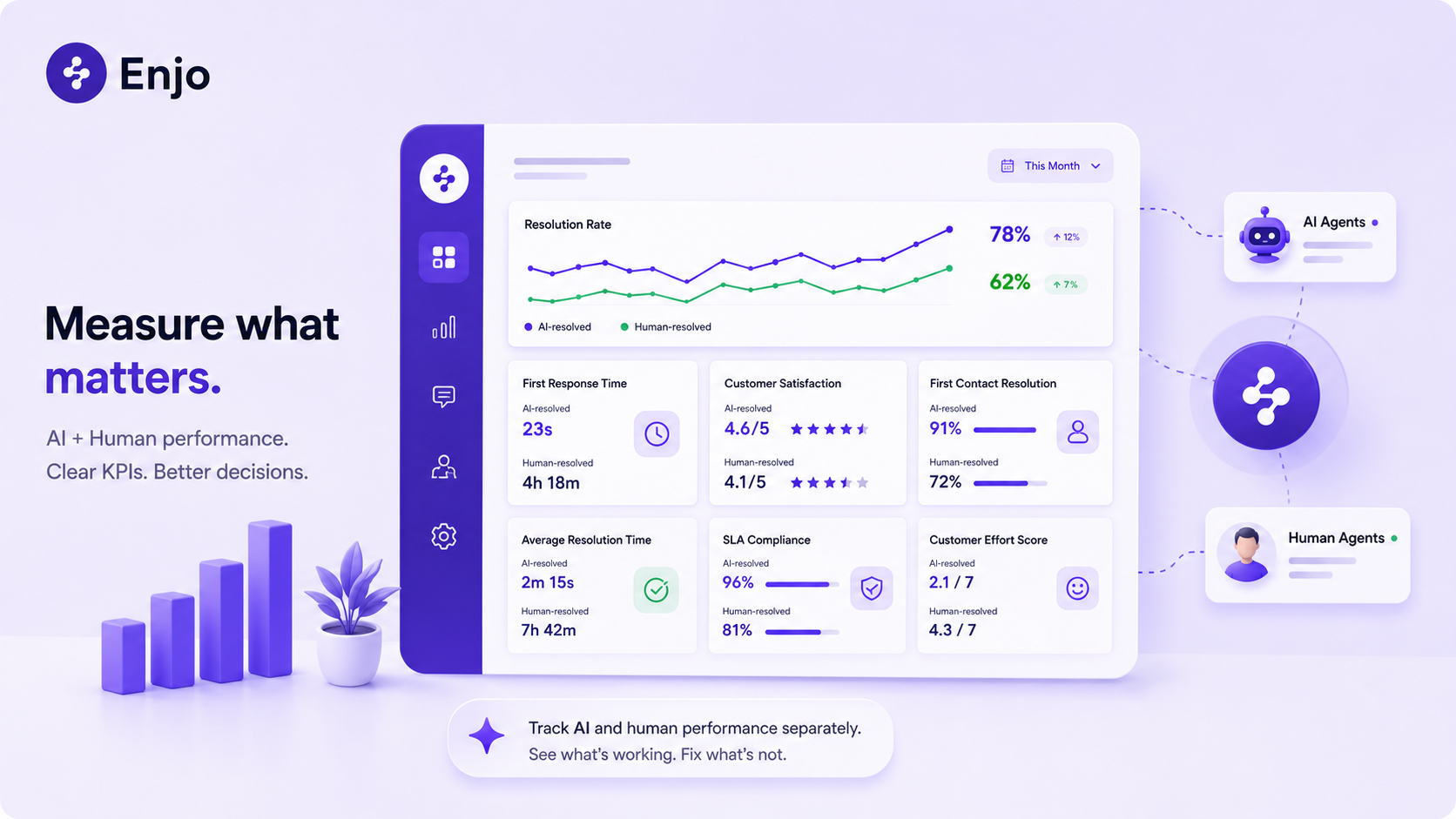
Sentiment analysis flags negative or escalated conversations early, protecting CSAT and CES before a poor interaction becomes a poor review. Enjo Insights reports AI and human performance separately, which is the split every KPI above depends on, and it is included on the Free plan.
Aptean is a useful illustration of scale. Across 80+ products and 3,500+ employees, Aptean resolves 300K+ customer service cases a year with Enjo, volume equivalent to 120 agents handled by AI, with 5M+ documents indexed as the knowledge base behind it. That is automation moving the underlying numbers, not a dashboard reporting on them afterwards.
Customer Service KPIs: A Quick Recap
Track KPIs as two numbers, not one, whenever AI and a human might both touch the same request: split FCR, CSAT, resolution time and cost per resolution by who resolved it. Keep NPS, retention, churn and the other business-level key performance indicators for customer service as single numbers, since they do not split meaningfully by resolver.
Set targets from your own baseline in the twelve cases where no credible external benchmark exists, and from a named source in the eight where one does. That rule holds across customer care KPIs and support KPIs alike. Cap the dashboard at five or six KPIs tied to a real decision, not everything a helpdesk can export.
Frequently Asked Questions
What is the difference between a customer service KPI and a metric?
A metric is anything you can measure. Key performance indicators for customer service are the subset tied to a specific goal you are accountable for, like reducing average resolution time by a set amount this quarter. Ticket volume is a metric on every team; it becomes a KPI only where changing it is an explicit goal. Not every metric needs to be a KPI, and most should not be.
How many customer service KPIs should a team track?
Five to six on a standing dashboard is a reasonable ceiling for most support teams. More than that dilutes focus without adding decision-making value. The test is whether a number has changed a decision in the last two review cycles; if it has not, it is a metric, not a KPI.
What is a good target for customer service KPIs?
It depends on the KPI, and for most of them no credible external benchmark exists. Four have solid published figures: CSAT at a 78% average with 85% as the top band, FCR at 69% average with 80% as the top band, SLA adherence around 96% on service desks, and NPS at a median of 41 for software companies. For the other twelve, set a delta against your own baseline rather than importing a number from an unsourced list.
Should first contact resolution be reported as a single number, or split by AI versus human?
Split it. A single blended FCR can look identical whether AI is doing most of the work or almost none, and those are different operational situations needing different fixes. The same applies to CSAT, resolution time and cost per resolution.
What is a KPI that did not exist before AI resolution?
Escalation rate, the percentage of AI-touched conversations handed to a human, has no pre-AI equivalent and is one of the more useful numbers for deciding where to expand automation next. AI autonomous resolution rate is its inverse and is the version leadership usually asks for.
How does AI resolution rate fit alongside traditional customer care KPIs?
It sits next to them, not in place of them. CSAT and resolution time still matter; AI resolution rate tells you how much of that performance is coming from AI rather than your human team, which changes how you would act on the number.