Customer Service Automation: A Practical Guide for CS Leaders in 2026
According to Gartner, at least 70% of customers will use a conversational AI interface to start their customer service journey by 2028. Automation is no longer an experimental initiative or a side project. It is rapidly becoming a core operating layer of customer service.
Yet outcomes vary dramatically. Well-structured deployments can achieve 40–60% autonomous resolution, while many others struggle to move beyond the low teens. The difference rarely comes down to effort or investment. More often, it comes down to architecture, system access, and how the automation is designed.
What Customer Service Automation Looks Like in Practice ?
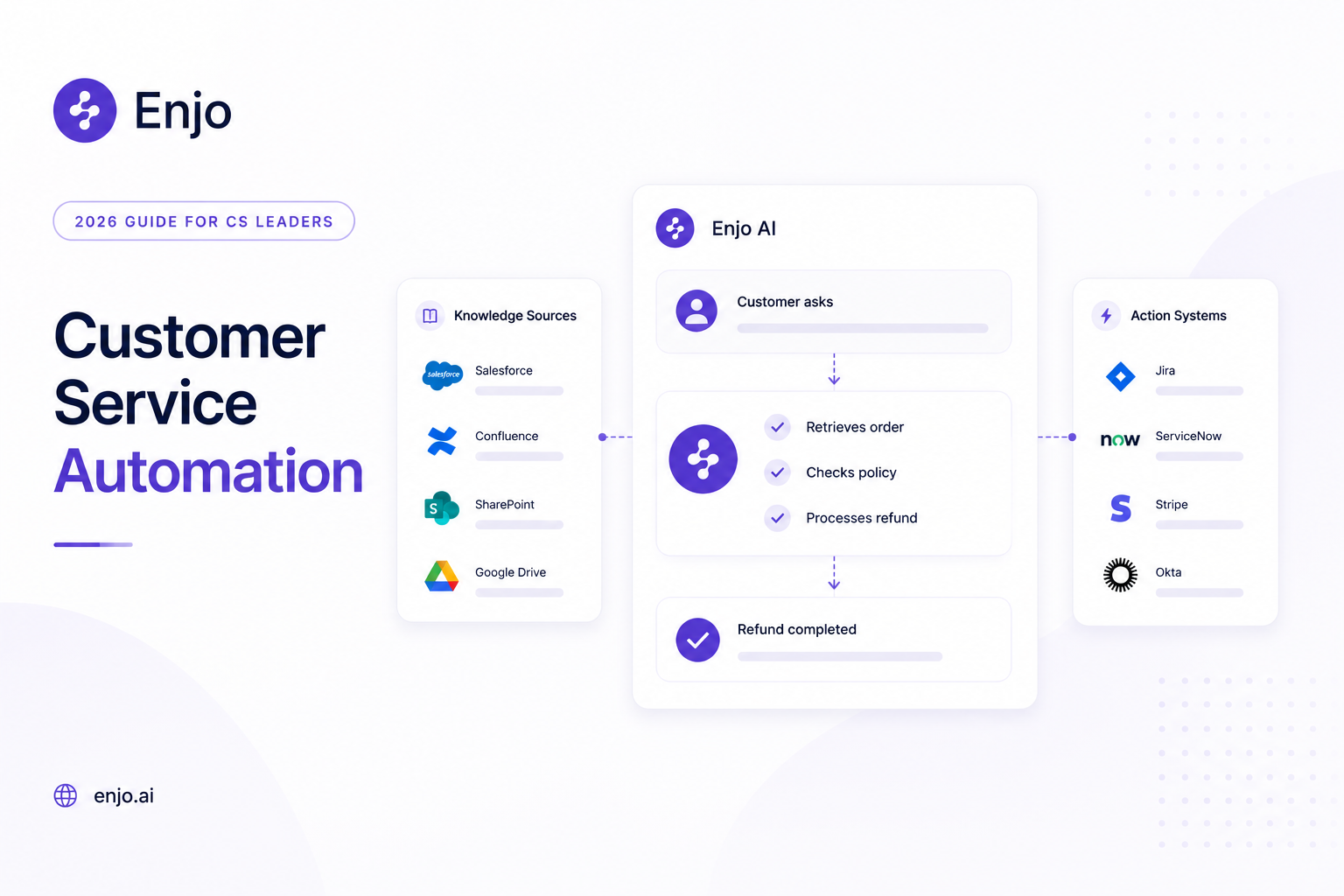
The category covers a wide range of technology. The implementations that deliver real ROI tend to combine several of these rather than relying on a single tool. Notice that each example below depends on the AI reaching beyond a single system: into payment platforms, CRM data, knowledge bases, and past ticket history.
AI agents resolving end-to-end. A customer asks about a refund. The AI identifies the order, checks the return policy, confirms eligibility, processes the refund in the connected payment system, and sends a confirmation. No human involved. This is the difference between a chatbot (which would surface a refund policy article) and an AI agent (which actually completes the refund).
Automated ticket routing. A billing dispute comes in via email. The system detects the intent, identifies the customer's tier and language, and routes the case to the agent best equipped to handle it. First-contact resolution goes up because the right person gets the case the first time, not the third.
Self-service that actually resolves. A customer searches your help center for "downgrade my plan." Instead of returning ten articles with the word "plan" in them, a help center with AI search returns a direct answer with steps specific to their account type and a link to complete the change. The ticket never gets created.
Agent assist in the live workflow. A human agent opens a complex case in Salesforce or Zendesk. AI surfaces a summary of the customer's history, suggests a reply grounded in how similar cases were resolved last month, detects negative sentiment, and offers one-click translation for a customer writing in Portuguese. The agent stays in control. The AI reduces the time spent searching.
Automated feedback loops. After a resolution, a CSAT survey fires automatically. The score feeds into analytics that identify which request types have the lowest satisfaction, which knowledge gaps are causing repeat contacts, and where the AI is falling short. The data closes the loop instead of sitting in a spreadsheet nobody checks.
Where Customer Service Automation Goes Wrong ?
Most failed implementations are not technology failures. They are architecture and planning failures. Here are the patterns that show up repeatedly.
The Knowledge Silo Problem
This is the most common reason automation stalls. The AI is connected to a single knowledge source (typically the helpdesk's own knowledge base), but the answers customers need live across five or six systems: Confluence, SharePoint, Google Drive, past tickets in another helpdesk, an internal wiki, product documentation on a marketing site. The AI can only answer what it can see. If even half of your team's working knowledge exists outside the system the AI reads, deflection will plateau no matter how good the model is.
Choosing a Platform for Features Instead of Knowledge Reach
It is easy to get distracted by a polished demo. The more important question is: where does the AI pull its answers from, and how many of your actual knowledge sources does it index? A platform with 50 features that reads one database will underperform a simpler platform that reads everything your agents currently search manually.
Skipping Escalation Design
The AI will not resolve everything. The question is what happens when it can't. If the escalation path dumps the customer into a generic queue with a blank ticket, the human agent starts from scratch and the customer has to repeat themselves. Escalation design (what context is transferred, where the ticket lands, andhow it's prioritized) matters as much as the AI's resolution rate.
Treating Automation as a One-Time Project
Knowledge bases go stale. New products launch. Policies change. The team that deploys automation and moves on will watch performance degrade within weeks. The knowledge layer is not a one-time setup; it needs continuous feeding. The implementations that sustain results treat automation as a continuous loop: monitor what the AI cannot resolve, fill the knowledge gaps, expand coverage, repeat.
Underestimating the In-House Build
A RAG prototype takes a weekend. Production takes six months or more: knowledge sync across systems, hallucination control, escalation logic, audit trails, SOC 2 Type II evidence, RBAC, multi-helpdesk integration, and ongoing model maintenance as foundation models change. By the time the security team signs off, the total cost (engineering time, infrastructure, compliance prep, ongoing maintenance) often rivals or exceeds what a commercial platform would have cost for years of service. If your organization has a strong ML team, a 12+ month runway, no near-term compliance constraints, and a workflow that genuinely will not fit a platform, building is the right call. If any one of those four conditions is missing, it is the wrong call.
How to Implement Customer Service Automation ?
.png)
1. Audit your volume and knowledge. Map where requests come from (email, chat, phone, Slack, web), identify the top 20 request types by volume, and document where the knowledge to resolve each one lives. If your knowledge is spread across 3+ tools, cross-system indexing should be a non-negotiable in your evaluation.
2. Start with high-volume, low-complexity requests. Identify the 5-10 request types that account for 40-60% of ticket volume and can be resolved with knowledge and a simple action (password reset, order status, refund policy). Automate these first. Prove ROI on the easy wins before scaling to complex workflows.
3. Connect all your knowledge sources. Not just the helpdesk knowledge base. Past tickets, Confluence, SharePoint, Google Drive, internal wikis, product documentation, uploaded files. This step is where most implementations either break through or plateau. The AI's resolution ceiling is set by the breadth of knowledge it can access, and most teams underestimate how many sources their agents actually rely on.
4. Deploy, test, and refine in production. Launch with a limited queue or sandbox. Monitor AI responses for accuracy, assess escalation quality (does the human agent get full context?), and measure the resolution rate against a baseline. Adjust confidence thresholds and escalation rules based on real data.
5. Expand coverage and close gaps continuously. Use analytics to identify request types the AI is not yet resolving. Fill the knowledge gaps with new articles, updated SOPs, and additional data connections. Expand to more queues, channels, and teams. The best implementations grow their automation rate every month.
Why Most Approaches Hit a Ceiling ?
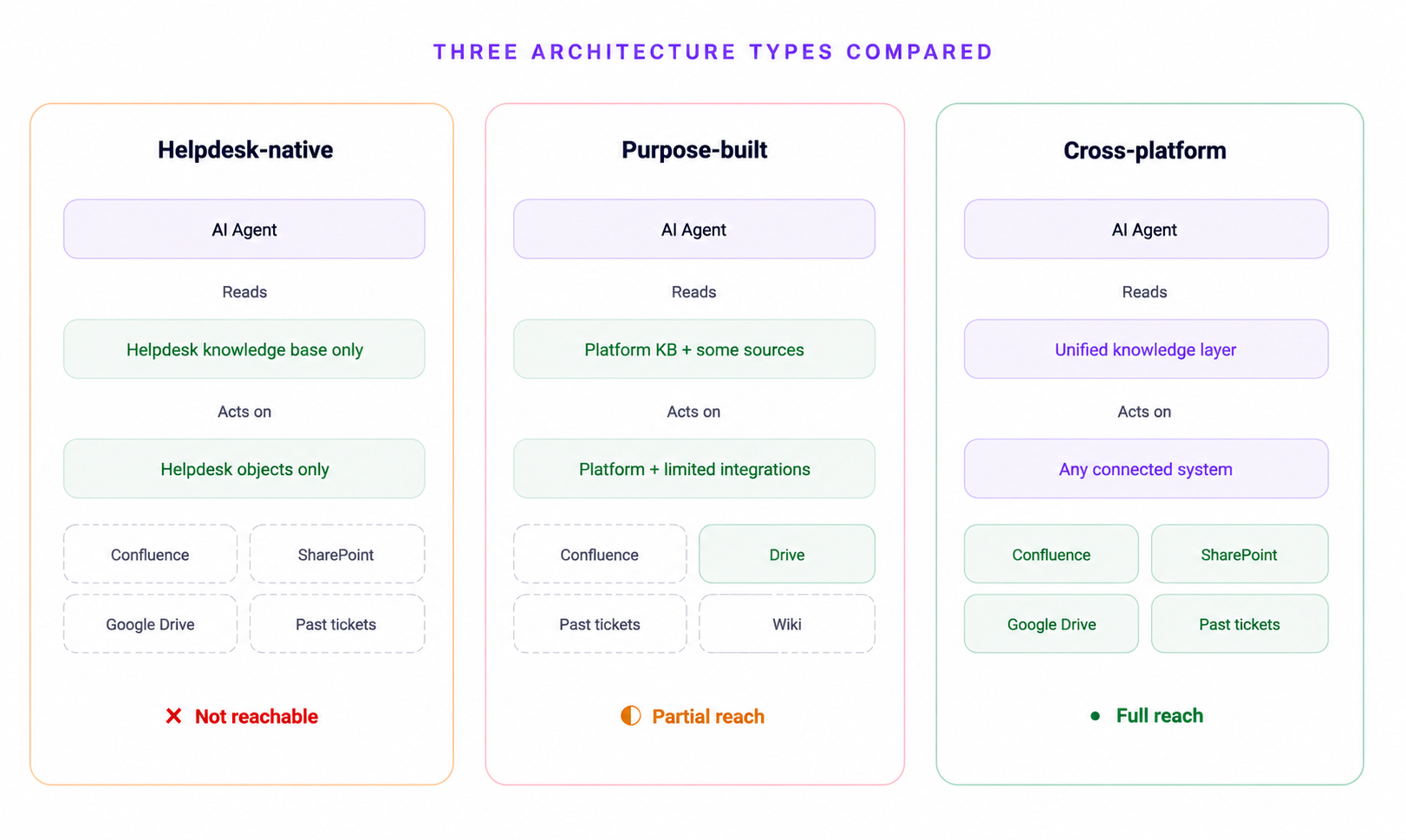
The steps above work if the underlying platform can actually reach your knowledge and act on it. Most cannot, and this is where the category splits.
Helpdesk-native AI (Agentforce, Zendesk AI, Freddy) is deeply integrated within its own platform. For teams whose entire support universe lives inside a single system, native AI is a reasonable path. But most CS teams have knowledge spread across multiple tools. Native AI reads one system's database and acts on one system's objects. If the knowledge lives elsewhere, the AI cannot reach it.
Purpose-built CS AI platforms (Intercom Fin, Forethought, Ada) bring stronger AI capabilities but tie the investment to a specific substrate. Fin requires Intercom. Ada introduces its own UI. Forethought is an overlay without a standalone helpdesk or help center. Each works well within its constraints, and for teams already standardized on those platforms, the fit may be right. The trade-off is portability: if your helpdesk strategy changes, the AI investment may not travel with you.
Cross-platform AI layers work inside your existing helpdesk (Salesforce, Zendesk, Jira, ServiceNow) while indexing knowledge from outside it. This is the architectural approach that gets past the single-system ceiling.
Enjo is built on this model. The Knowledge module indexes Confluence, SharePoint, Google Drive, Notion, Guru, past tickets across Salesforce, Zendesk, Jira, and ServiceNow, websites, and uploaded files into a single layer. That layer powers AI resolution, Agent Assist for human agents, and the customer-facing Help Center simultaneously. What the AI says is what agents see is what customers find.
AI Agents handle requests end-to-end. AI Flows orchestrates multi-step workflows with logic, fallbacks, and auditability. AI Actions connects to external systems (Okta, Jira, Salesforce, Stripe, custom APIs) so that the agent can retrieve data and perform operations during the conversation. When the AI is not confident, the Escalation engine creates a ticket in your existing helpdesk with the full conversation and customer context attached.
The Help Center closes its own content gaps. It generates articles from a URL, connected docs, or helpdesk ticket patterns. Unanswered portal questions escalate to the team; resolved conversations auto-draft new articles for review. The AI Command Center manages bulk content operations via natural language prompts. Coverage grows with every resolved conversation.
Customer Service Automation on Salesforce Service Cloud
If your team runs on Salesforce, Agentforce is the first option you will evaluate. It is Salesforce's native AI, tightly bound to Service Cloud objects, and for teams whose knowledge and actions live entirely inside Salesforce, it is the path of least resistance.
Where it gets complicated is knowledge reach. Agentforce reads Service Cloud data and Data Cloud. It does not index Confluence, SharePoint, Google Drive, or past tickets from a previous helpdesk. If your agents are toggling between Salesforce and three other tabs to find answers, Agentforce inherits those same blind spots.
Enjo for Salesforce takes a different approach. Agent Assist embeds directly in the Salesforce case view. AI Agents create and update Salesforce cases. AI Actions query and update Salesforce records in real time. But the knowledge layer also reads sources outside Salesforce, so the AI is not limited to what lives inside Service Cloud. Aptean, running on Salesforce with 80+ products, deployed Enjo in a single day and indexed 2M+ documents across their knowledge sources. That speed-to-value is worth comparing against a typical Agentforce rollout timeline.
How to Evaluate Customer Service Automation Software ?
Eight criteria that separate platforms worth buying from prototypes worth skipping.
1. Knowledge reach. Does the AI read only one system's knowledge base, or can it index Confluence, SharePoint, Google Drive, past tickets across systems, and websites? If your knowledge spans five tools and the AI only sees one, deflection will plateau.
2. Action depth. Can the AI take real actions in external systems (order lookups, account updates, access provisioning), or does it only suggest articles? Resolution requires action, not just information.
3. Helpdesk flexibility. Does the platform require migration to a new helpdesk, or does it work inside Salesforce, Zendesk, Jira, and ServiceNow? Migration is a six-month project that kills momentum.
4. Escalation quality. When AI cannot resolve, does the human agent get the full conversation and customer context, or do they start from scratch?
5. Self-service integration. Does the help center share the same knowledge layer as the AI agent, or is it a separate content silo? Separate silos mean the AI says one thing, the help center says another, and the agent sees a third version.
6. Security and compliance. SOC 2 Type II, ISO 27001, GDPR. Ask for current evidence, not marketing claims. Enjo is SOC 2 Type II compliant, ISO 27001 certified, and GDPR compliant, with 6 years of 99.9% uptime across 600+ enterprise deployments.
7. Pricing model. Per-seat pricing punishes growth. Per-resolution pricing punishes volume. Per-reply pricing scales with value delivered. Check whether AI features cost extra or are included on every plan. Enjo prices per AI Reply at $0.05 beyond plan allowance, with a free tier that includes 200 AI replies/month and unlimited human agent seats, no credit card required.
8.Time to production. Ask the vendor for a named reference customer's deployment timeline. If the answer is "it depends" without a specific example, the timeline is probably months.
Customer Service Automation Software: Architecture Comparison
Customer Service Automation FAQ
1. What is customer service automation?
Customer service automation is the use of AI agents, workflow tools, self-service portals, and agent assist technology to resolve customer requests with limited or no human involvement. It spans everything from chatbots and automated routing to multi-step AI resolution that retrieves data, takes action, and confirms outcomes. The goal is end-to-end resolution, not deflection to an article the customer may or may not read.
2. How much does customer service automation cost?
Pricing models vary across the category. Zendesk AI charges $1.50-$2.00 per automated resolution plus a per-agent Advanced AI add-on. Intercom Fin charges $0.99 per resolution. Agentforce charges $2 per conversation or roughly $0.10 per action via Flex Credits. Enjo prices per AI Reply at $0.05 beyond plan allowance, with a free tier that includes 200 AI replies per month and unlimited human agent seats, no credit card required.
3. Can customer service automation work with Salesforce Service Cloud?
Two paths. Agentforce is Salesforce's native AI, bound to Service Cloud data and Data Cloud. It is the simplest option if all your knowledge and actions live inside Salesforce. If your knowledge also spans Confluence, SharePoint, Google Drive, or past tickets in other systems, a cross-platform layer like Enjo runs inside Salesforce (Agent Assist in the case view, case creation via AI Agents) while indexing knowledge from outside it.
4. How long does it take to deploy customer service automation?
It depends on the platform. Aptean, an enterprise with 3,500+ employees and 80+ products, deployed Enjo in a single day. Purpose-built platforms typically take weeks. Helpdesk-native AI with consulting requirements can take 3-6 months. Ask any vendor for a named reference customer's deployment timeline.
5. What is the difference between a chatbot and customer service automation?
A chatbot answers questions from a script or knowledge base. Customer service automation is the broader system: AI agents that resolve end-to-end, automated ticket routing, cross-system actions, context-aware escalation, agent assist, self-service content management, and analytics. A chatbot is one component, not the whole picture.
What Customer Service Automation Looks Like in Practice ?
The category covers a wide range of technology. The implementations that deliver real ROI tend to combine several of these rather than relying on a single tool. Notice that each example below depends on the AI reaching beyond a single system: into payment platforms, CRM data, knowledge bases, and past ticket history.
AI agents resolving end-to-end. A customer asks about a refund. The AI identifies the order, checks the return policy, confirms eligibility, processes the refund in the connected payment system, and sends a confirmation. No human involved. This is the difference between a chatbot (which would surface a refund policy article) and an AI agent (which actually completes the refund).
Automated ticket routing. A billing dispute comes in via email. The system detects the intent, identifies the customer's tier and language, and routes the case to the agent best equipped to handle it. First-contact resolution goes up because the right person gets the case the first time, not the third.
Self-service that actually resolves. A customer searches your help center for "downgrade my plan." Instead of returning ten articles with the word "plan" in them, a help center with AI search returns a direct answer with steps specific to their account type and a link to complete the change. The ticket never gets created.
Agent assist in the live workflow. A human agent opens a complex case in Salesforce or Zendesk. AI surfaces a summary of the customer's history, suggests a reply grounded in how similar cases were resolved last month, detects negative sentiment, and offers one-click translation for a customer writing in Portuguese. The agent stays in control. The AI reduces the time spent searching.
Automated feedback loops. After a resolution, a CSAT survey fires automatically. The score feeds into analytics that identify which request types have the lowest satisfaction, which knowledge gaps are causing repeat contacts, and where the AI is falling short. The data closes the loop instead of sitting in a spreadsheet nobody checks.
Where Customer Service Automation Goes Wrong ?
Most failed implementations are not technology failures. They are architecture and planning failures. Here are the patterns that show up repeatedly.
The Knowledge Silo Problem
This is the most common reason automation stalls. The AI is connected to a single knowledge source (typically the helpdesk's own knowledge base), but the answers customers need live across five or six systems: Confluence, SharePoint, Google Drive, past tickets in another helpdesk, an internal wiki, product documentation on a marketing site. The AI can only answer what it can see. If even half of your team's working knowledge exists outside the system the AI reads, deflection will plateau no matter how good the model is.
Choosing a Platform for Features Instead of Knowledge Reach
It is easy to get distracted by a polished demo. The more important question is: where does the AI pull its answers from, and how many of your actual knowledge sources does it index? A platform with 50 features that reads one database will underperform a simpler platform that reads everything your agents currently search manually.
Skipping Escalation Design
The AI will not resolve everything. The question is what happens when it can't. If the escalation path dumps the customer into a generic queue with a blank ticket, the human agent starts from scratch and the customer has to repeat themselves. Escalation design (what context is transferred, where the ticket lands, andhow it's prioritized) matters as much as the AI's resolution rate.
Treating Automation as a One-Time Project
Knowledge bases go stale. New products launch. Policies change. The team that deploys automation and moves on will watch performance degrade within weeks. The knowledge layer is not a one-time setup; it needs continuous feeding. The implementations that sustain results treat automation as a continuous loop: monitor what the AI cannot resolve, fill the knowledge gaps, expand coverage, repeat.
Underestimating the In-House Build
A RAG prototype takes a weekend. Production takes six months or more: knowledge sync across systems, hallucination control, escalation logic, audit trails, SOC 2 Type II evidence, RBAC, multi-helpdesk integration, and ongoing model maintenance as foundation models change. By the time the security team signs off, the total cost (engineering time, infrastructure, compliance prep, ongoing maintenance) often rivals or exceeds what a commercial platform would have cost for years of service. If your organization has a strong ML team, a 12+ month runway, no near-term compliance constraints, and a workflow that genuinely will not fit a platform, building is the right call. If any one of those four conditions is missing, it is the wrong call.
How to Implement Customer Service Automation ?
1. Audit your volume and knowledge. Map where requests come from (email, chat, phone, Slack, web), identify the top 20 request types by volume, and document where the knowledge to resolve each one lives. If your knowledge is spread across 3+ tools, cross-system indexing should be a non-negotiable in your evaluation.
2. Start with high-volume, low-complexity requests. Identify the 5-10 request types that account for 40-60% of ticket volume and can be resolved with knowledge and a simple action (password reset, order status, refund policy). Automate these first. Prove ROI on the easy wins before scaling to complex workflows.
3. Connect all your knowledge sources. Not just the helpdesk knowledge base. Past tickets, Confluence, SharePoint, Google Drive, internal wikis, product documentation, uploaded files. This step is where most implementations either break through or plateau. The AI's resolution ceiling is set by the breadth of knowledge it can access, and most teams underestimate how many sources their agents actually rely on.
4. Deploy, test, and refine in production. Launch with a limited queue or sandbox. Monitor AI responses for accuracy, assess escalation quality (does the human agent get full context?), and measure the resolution rate against a baseline. Adjust confidence thresholds and escalation rules based on real data.
5. Expand coverage and close gaps continuously. Use analytics to identify request types the AI is not yet resolving. Fill the knowledge gaps with new articles, updated SOPs, and additional data connections. Expand to more queues, channels, and teams. The best implementations grow their automation rate every month.
Why Most Approaches Hit a Ceiling ?
The steps above work if the underlying platform can actually reach your knowledge and act on it. Most cannot, and this is where the category splits.
Helpdesk-native AI (Agentforce, Zendesk AI, Freddy) is deeply integrated within its own platform. For teams whose entire support universe lives inside a single system, native AI is a reasonable path. But most CS teams have knowledge spread across multiple tools. Native AI reads one system's database and acts on one system's objects. If the knowledge lives elsewhere, the AI cannot reach it.
Purpose-built CS AI platforms (Intercom Fin, Forethought, Ada) bring stronger AI capabilities but tie the investment to a specific substrate. Fin requires Intercom. Ada introduces its own UI. Forethought is an overlay without a standalone helpdesk or help center. Each works well within its constraints, and for teams already standardized on those platforms, the fit may be right. The trade-off is portability: if your helpdesk strategy changes, the AI investment may not travel with you.
Cross-platform AI layers work inside your existing helpdesk (Salesforce, Zendesk, Jira, ServiceNow) while indexing knowledge from outside it. This is the architectural approach that gets past the single-system ceiling.
Enjo is built on this model. The Knowledge module indexes Confluence, SharePoint, Google Drive, Notion, Guru, past tickets across Salesforce, Zendesk, Jira, and ServiceNow, websites, and uploaded files into a single layer. That layer powers AI resolution, Agent Assist for human agents, and the customer-facing Help Center simultaneously. What the AI says is what agents see is what customers find.
AI Agents handle requests end-to-end. AI Flows orchestrates multi-step workflows with logic, fallbacks, and auditability. AI Actions connects to external systems (Okta, Jira, Salesforce, Stripe, custom APIs) so that the agent can retrieve data and perform operations during the conversation. When the AI is not confident, the Escalation engine creates a ticket in your existing helpdesk with the full conversation and customer context attached.
The Help Center closes its own content gaps. It generates articles from a URL, connected docs, or helpdesk ticket patterns. Unanswered portal questions escalate to the team; resolved conversations auto-draft new articles for review. The AI Command Center manages bulk content operations via natural language prompts. Coverage grows with every resolved conversation.
Customer Service Automation on Salesforce Service Cloud
If your team runs on Salesforce, Agentforce is the first option you will evaluate. It is Salesforce's native AI, tightly bound to Service Cloud objects, and for teams whose knowledge and actions live entirely inside Salesforce, it is the path of least resistance.
Where it gets complicated is knowledge reach. Agentforce reads Service Cloud data and Data Cloud. It does not index Confluence, SharePoint, Google Drive, or past tickets from a previous helpdesk. If your agents are toggling between Salesforce and three other tabs to find answers, Agentforce inherits those same blind spots.
Enjo for Salesforce takes a different approach. Agent Assist embeds directly in the Salesforce case view. AI Agents create and update Salesforce cases. AI Actions query and update Salesforce records in real time. But the knowledge layer also reads sources outside Salesforce, so the AI is not limited to what lives inside Service Cloud. Aptean, running on Salesforce with 80+ products, deployed Enjo in a single day and indexed 2M+ documents across their knowledge sources. That speed-to-value is worth comparing against a typical Agentforce rollout timeline.
How to Evaluate Customer Service Automation Software ?
Eight criteria that separate platforms worth buying from prototypes worth skipping.
1. Knowledge reach. Does the AI read only one system's knowledge base, or can it index Confluence, SharePoint, Google Drive, past tickets across systems, and websites? If your knowledge spans five tools and the AI only sees one, deflection will plateau.
2. Action depth. Can the AI take real actions in external systems (order lookups, account updates, access provisioning), or does it only suggest articles? Resolution requires action, not just information.
3. Helpdesk flexibility. Does the platform require migration to a new helpdesk, or does it work inside Salesforce, Zendesk, Jira, and ServiceNow? Migration is a six-month project that kills momentum.
4. Escalation quality. When AI cannot resolve, does the human agent get the full conversation and customer context, or do they start from scratch?
5. Self-service integration. Does the help center share the same knowledge layer as the AI agent, or is it a separate content silo? Separate silos mean the AI says one thing, the help center says another, and the agent sees a third version.
6. Security and compliance. SOC 2 Type II, ISO 27001, GDPR. Ask for current evidence, not marketing claims. Enjo is SOC 2 Type II compliant, ISO 27001 certified, and GDPR compliant, with 6 years of 99.9% uptime across 600+ enterprise deployments.
7. Pricing model. Per-seat pricing punishes growth. Per-resolution pricing punishes volume. Per-reply pricing scales with value delivered. Check whether AI features cost extra or are included on every plan. Enjo prices per AI Reply at $0.05 beyond plan allowance, with a free tier that includes 200 AI replies/month and unlimited human agent seats, no credit card required.
8.Time to production. Ask the vendor for a named reference customer's deployment timeline. If the answer is "it depends" without a specific example, the timeline is probably months.
Customer Service Automation Software: Architecture Comparison
Customer Service Automation FAQ
1. What is customer service automation?
Customer service automation is the use of AI agents, workflow tools, self-service portals, and agent assist technology to resolve customer requests with limited or no human involvement. It spans everything from chatbots and automated routing to multi-step AI resolution that retrieves data, takes action, and confirms outcomes. The goal is end-to-end resolution, not deflection to an article the customer may or may not read.
2. How much does customer service automation cost?
Pricing models vary across the category. Zendesk AI charges $1.50-$2.00 per automated resolution plus a per-agent Advanced AI add-on. Intercom Fin charges $0.99 per resolution. Agentforce charges $2 per conversation or roughly $0.10 per action via Flex Credits. Enjo prices per AI Reply at $0.05 beyond plan allowance, with a free tier that includes 200 AI replies per month and unlimited human agent seats, no credit card required.
3. Can customer service automation work with Salesforce Service Cloud?
Two paths. Agentforce is Salesforce's native AI, bound to Service Cloud data and Data Cloud. It is the simplest option if all your knowledge and actions live inside Salesforce. If your knowledge also spans Confluence, SharePoint, Google Drive, or past tickets in other systems, a cross-platform layer like Enjo runs inside Salesforce (Agent Assist in the case view, case creation via AI Agents) while indexing knowledge from outside it.
4. How long does it take to deploy customer service automation?
It depends on the platform. Aptean, an enterprise with 3,500+ employees and 80+ products, deployed Enjo in a single day. Purpose-built platforms typically take weeks. Helpdesk-native AI with consulting requirements can take 3-6 months. Ask any vendor for a named reference customer's deployment timeline.
5. What is the difference between a chatbot and customer service automation?
A chatbot answers questions from a script or knowledge base. Customer service automation is the broader system: AI agents that resolve end-to-end, automated ticket routing, cross-system actions, context-aware escalation, agent assist, self-service content management, and analytics. A chatbot is one component, not the whole picture.

Transform complex support workflows


Stay Informed and Inspired




Start Free. Prove Value. Scale When Ready.
Use Enjo for real customer conversations and see how it fits your support workflow. Scale as your support grows.