.fs-cmsfilter_active span { color: black; }
table of contents

Transform complex support workflows

Deploy AI inside your existing support stack and prove business impact quickly.
Request a Demo

The 7 Best Free Knowledge Base Software in 2026 (and the AI Tax Legacy Vendors Charge)

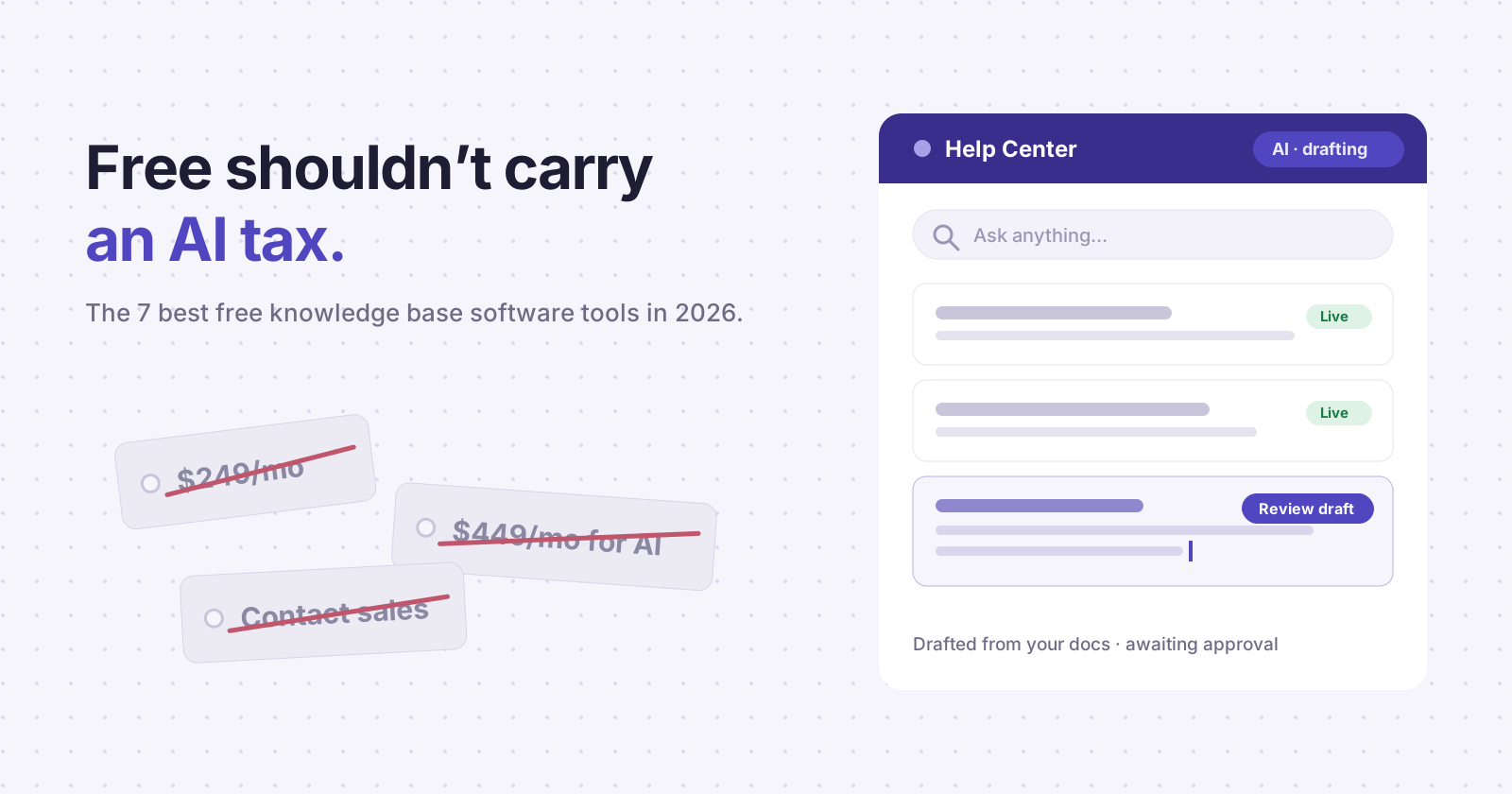
The free knowledge base category lost two of its biggest names in eighteen months. Document360 discontinued its free plan in November 2024 and moved all pricing behind sales calls, leaving a 14-day trial as the only way in. Helpjuice still sells a $249/month entry plan, but the AI features sit on a separate tier at $449/month. If you searched "free knowledge base software" expecting a long menu of real options, the menu has been shrinking.

AI Support Agents
table of contents

The free knowledge base category lost two of its biggest names in eighteen months. Document360 discontinued its free plan in November 2024 and moved all pricing behind sales calls, leaving a 14-day trial as the only way in. Helpjuice still sells a $249/month entry plan, but the AI features sit on a separate tier at $449/month. If you searched "free knowledge base software" expecting a long menu of real options, the menu has been shrinking.

Quick verdict: Enjo is the pick for SaaS teams that want customer-facing free help center software with AI included (200 AI Replies/month, unlimited seats, custom domain, no credit card). Notion wins for internal docs. BookStack wins if you have a self-hosting mandate. The rest of this page covers what each free tier actually includes, where the limits bite, and the two taxes most vendors have quietly attached to the word "free."

Enjo's free tier runs on the same platform 600+ enterprises use, with 6 years of 99.9% uptime behind it.

Free is disappearing. Here's the math.

Two costs hide inside most knowledge base tools, and neither shows up on the pricing page.

The first is the headcount tax. A help center is only useful while it's current, and keeping it current is a job. Articles go stale every time the product ships. Most support teams don't have a content ops function, so the docs drift, customers stop trusting them, and ticket volume climbs back up. Stale docs now carry a second penalty: the same articles ground the AI agent answering your customers, so an out-of-date help center produces out-of-date AI answers. One stale article, two layers of wrong.

The second is the AI tax. Helpjuice's base plan at $249/month includes no AI at all; the AI Writer, AI Search, and chatbot unlock at $449/month, an 80% jump. Helpjuice also counts read-only users as paid seats (current rates at helpjuice.com, pricing page). Document360 went further and removed the free entry point entirely. Its own documentation confirms the free plan was discontinued in November 2024, and new buyers now get a 14-day trial followed by a sales conversation for a quote; you can confirm this at document360.com. Freshdesk replaced its old forever-free plan with a "Free Program" covering 2 agents for 6 months.

The pattern is consistent. Vendors built static editors, bolted AI on later, and priced the bolt-on as a premium. The evaluation below treats that as a disqualifying default, because in 2026 a knowledge base without AI is a filing cabinet.

How we evaluated

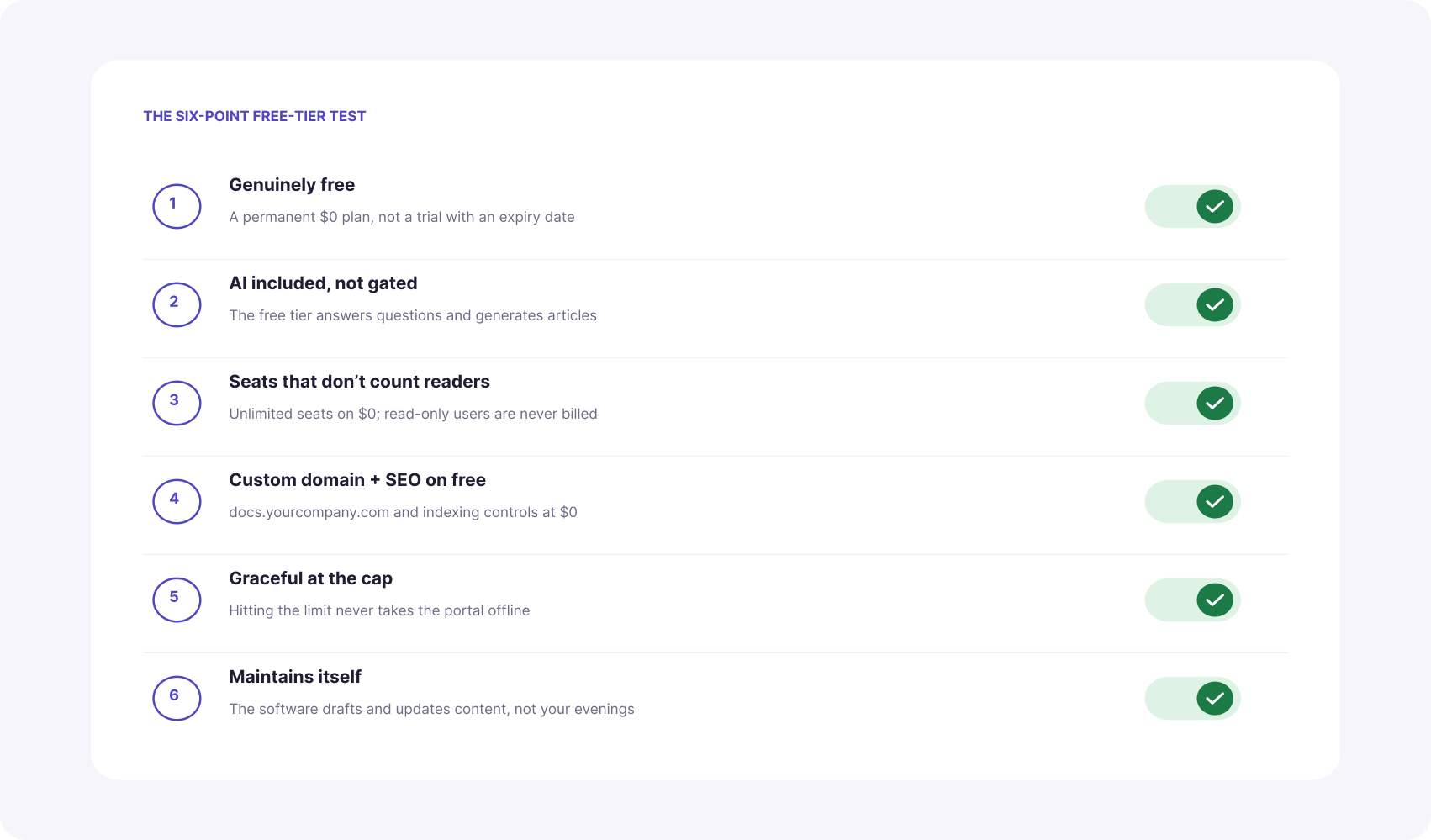
Six dimensions, applied to every tool on this list. Each one exists because a vendor on this page fails it.

1. Genuinely free. A permanent $0 plan, not a time-boxed trial wearing a free badge. The test is simple: does the plan expire, and does getting started require a sales conversation? Freshdesk's current free option expires at six months; Document360 offers a 14-day trial and then a quote call. Both are trials. A real free tier is one you could still be running in 2028 without ever entering a credit card.

2. AI included or gated. In 2026, AI search and AI answers are the reason customers use a help center instead of emailing you, so a free tier without them is a demo of the product's least valuable half. Check whether the free plan can generate articles and answer customer questions, or whether every AI feature routes to an upgrade screen. The gap is wide: Helpjuice prices its AI suite at a $200/month premium over an already paid plan, and Notion now reserves ongoing AI access for its $20/user/month Business tier.

3. Seat limits, and what counts as a seat. Two traps here. The obvious one is a low cap (GitBook allows one user free, Zoho Desk three agents). The quiet one is who counts: Helpjuice bills read-only users as paid seats, so a 120-person company pays for 120 even if five people ever write an article. If the goal is knowledge base software free of per-seat math, unlimited seats on the $0 plan is the line to hold.

4. Custom domain and SEO on free. A help center on a vendor subdomain sends your support traffic, backlinks, and rankings to someone else's domain. Check whether docs.yourcompany.com is included at $0 or priced as an upgrade; GitBook charges $79 per site per month for it. SEO controls (meta titles, sitemaps, indexing) belong in the same check, since a public help center is an organic acquisition channel on top of a deflection layer.

5. What happens at the cap. Every free tier has a ceiling. The question is whether hitting it takes your help center offline or degrades it gracefully. A portal that goes dark mid-quarter is a customer-facing outage you scheduled by accident. Ask the vendor directly: when we exceed the free limit, what exactly stops working?

6. Maintenance burden. The biggest cost of any knowledge base is the one no pricing page lists: the hours your team spends keeping articles current. Tools split cleanly into editors that wait for you to write and systems that draft, update, and flag content themselves. If you don't have a content ops function, weight this dimension above all the others, because it decides whether the help center is alive in a year.
Side-by-side: how the best free knowledge base options compare

Enjo Free-Tier Comparison Table
Tool Permanent free tier Seats on free AI on free Custom domain on free Generates articles When you hit the cap Best for
Enjo ✓ Yes Unlimited ✓ 200 AI Replies/mo ✓ Yes ✓ From URL, docs, or tickets Portal stays live; AI replies pause Customer-facing SaaS help centers
Freshdesk No, 6-month program 2 agents No On paid tiers No Upgrade or lose access Helpdesk-first small teams
Notion Yes (solo) 1 full member, block-capped teams Trial only No No Block cap stops team editing Internal docs and wikis
GitBook Yes (solo) 1 user No No, Premium at $79/site No Pay $79/site + $15/user to grow Developer and API docs
Zoho Desk Yes 3 agents No Limited No Upgrade for channels and KB depth Zoho-ecosystem micro-teams
Bitrix24 Yes Unlimited No No No Storage and feature gates All-in-one suite seekers
BookStack Yes (self-hosted) Unlimited No ✓ Your server No No cap; you run it Self-hosting mandates

The 7 best free knowledge base software tools

1. Enjo: best free AI knowledge base for customer-facing help centers

Enjo Help Center is an AI-native self-serve portal that generates its own articles and keeps them current. It launched as part of a platform already running employee service for 600+ enterprises, including Snowflake, Netflix, and Spotify teams.

Best for: B2B SaaS support and product teams that own the docs but don't have a content ops team to maintain them.

Key capabilities:

  • Article Generation drafts a complete help center from a website URL, connected docs (Notion, Confluence, Google Drive), or ticket patterns in Zendesk and Intercom. You start from a populated portal, not a blank editor.
  • Self-Improving Loop closes the maintenance gap. Unanswered portal questions escalate to your team; resolved conversations auto-draft new articles for review. The help center grows from real customer questions instead of a content backlog.
  • AI Search and the Embeddable AI Assistant give customers direct, source-cited answers instead of ten blue links. Both run on the same content layer your team edits.
  • AI Command Center handles bulk operations through natural language prompts: rewrite a collection for a new release, retag fifty articles, update a renamed feature everywhere.
  • Magic Onboarding does the setup for you. Sign up with your work email and Enjo fetches your company basics, then stands up a personalized AI agent and help center, ready to go.
  • 100+ languages, custom domain, SEO controls, and audience targeting are included on the free tier, not gated.

Speed to launch is the practical difference. Import existing documentation and the portal is live in minutes; generating 20 to 30 articles from the knowledge you provide takes about 15 to 20 minutes.
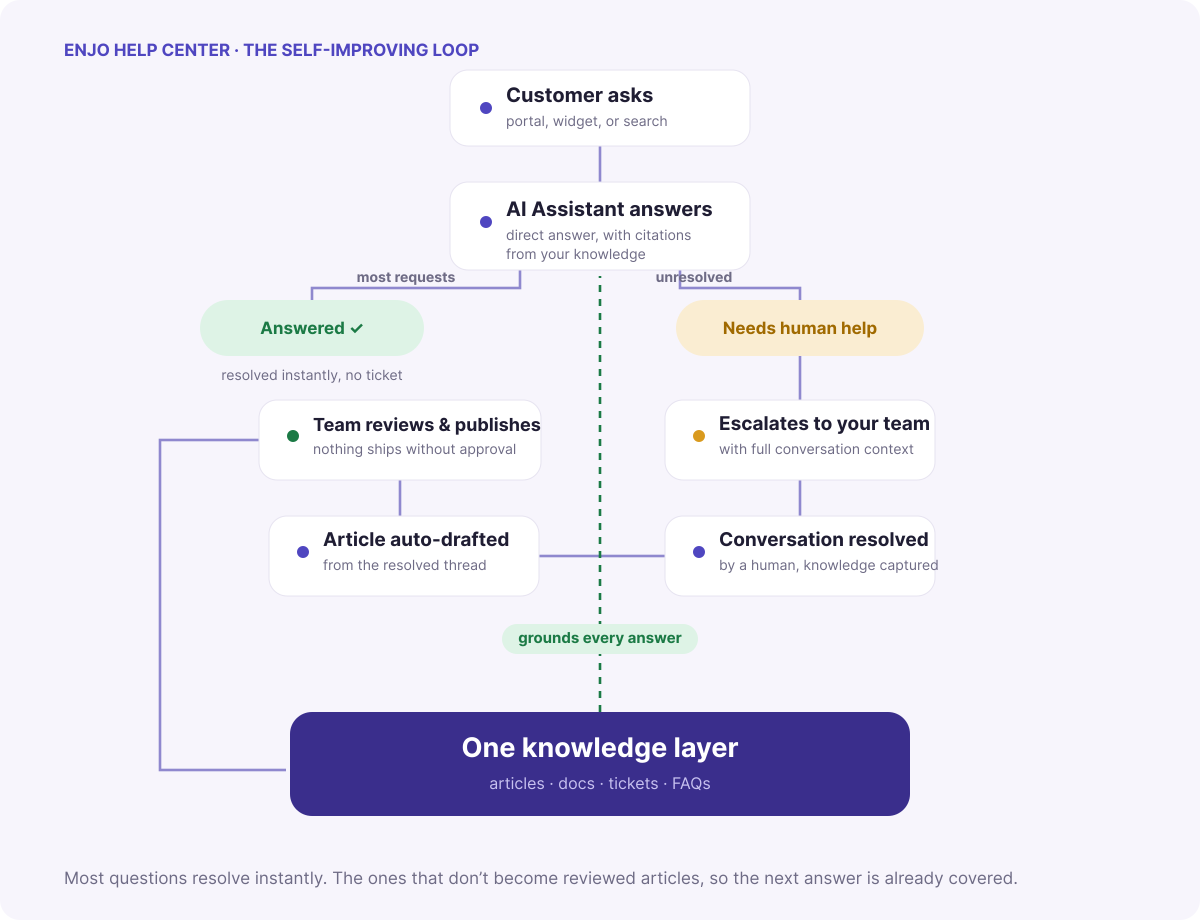
Pricing (from enjo.ai/pricing, fetched June 12, 2026): Free at $0/month with 200 AI Replies, unlimited seats, custom domain, and no credit card. The portal stays live after the AI cap is hit; articles, collections, branding, and SEO keep working, and only AI replies pause until the next cycle. Starter is $95/month for 1,000 AI Replies and adds AI Actions, Core Guardrails, and Enjo branding removal. Extra replies cost $0.05 each on paid plans.

Where it falls short: Enjo Help Center is newer than the incumbents on this list. Teams that need publication-grade authoring workflows, deep versioning, or a mature multi-language editor will find Document360-class tools more developed there. And while the platform carries SOC 2 Type II, ISO 27001, and GDPR compliance from six years of enterprise deployments, the customer-facing help center product doesn't yet have a long public case study trail of its own.

Launch your free Help Center → Free forever · 200 AI replies/mo · Unlimited seats · No credit card

2. Freshdesk: free knowledge base bundled with a helpdesk, for a while

Freshdesk is a full helpdesk from Freshworks with a knowledge base module inside it.

Best for: Small teams that want ticketing and docs from one vendor and plan to pay within six months.

Key capabilities: Email and social ticketing, a knowledge base with categories and SEO basics, ticket dispatch, and pre-built reports. The paid Growth tier starts at $19/agent/month, and a multilingual knowledge base requires Pro at $55/agent/month.

Pricing: The Free Program covers 2 agents for 6 months. Freddy AI capabilities are paid, priced in sessions on paid tiers. Verify current rates at freshworks.com on the Freshdesk pricing page (fetched June 12, 2026).

Where it falls short: The free tier is a long trial, not a plan. Freshdesk's old forever-free option for up to 10 agents is gone, and the knowledge base is a helpdesk feature rather than a standalone product, so you adopt the whole suite to get it.

3. Notion: best free option for internal docs

Notion is a workspace for notes, wikis, and databases that many teams stretch into a knowledge base.

Best for: Internal documentation, onboarding guides, and team wikis where the audience already lives in Notion.

Key capabilities: Flexible pages and databases, templates, 10 guest invitations, and cross-platform sync. The editor is the best on this list for unstructured writing.

Pricing: Free for individual use with unlimited pages; team workspaces hit a block cap that pushes collaboration to Plus. Notion AI is bundled into Business at $20/user/month and Enterprise; Free and Plus users get a limited trial rather than ongoing AI access. Notion's newer Custom Agents are free to try, then $10 per 1,000 monthly Notion credits. Verify current rates at notion.com on the pricing page (fetched June 12, 2026).

Where it falls short: Notion is not a customer-facing help center. There's no native help center experience with collections, deflection analytics, or an answer widget, and public pages on the free plan live on a Notion domain. Teams that publish docs to customers from Notion usually end up paying for a third-party site builder on top.

4. GitBook: best free option for developer docs

GitBook is a documentation platform built around Git workflows and a block-based editor.

Best for: Solo developers and open-source maintainers publishing technical docs and API references.

Key capabilities: GitHub and GitLab sync, an interactive API playground, preview deployments, LLM optimizations on the free plan, and a clean reading experience developers trust.

Pricing: The Free plan is $0 per site, built for individuals, and publishes to a gitbook.io subdomain. Premium runs $79 per site/month plus $15 per user/month and is where team collaboration, AI search, and custom domains start. The AI Assistant, AI insights, and GitBook Agent sit on Ultimate at $299 per site/month plus $15 per user. Verify current rates at gitbook.com on the pricing page (fetched June 12, 2026).

Where it falls short: One seat, and the paid cliff is steep. A second editor plus a custom domain means Premium at $94/month minimum, and the AI features beyond search require Ultimate at $299 per site. Costs scale on two axes (sites and users), which gets expensive for multi-product SaaS teams.

5. Zoho Desk: free helpdesk tier, knowledge base starts higher up

Zoho Desk is a helpdesk in the Zoho suite with a Free Edition for email support.

Best for: Micro-teams already inside the Zoho ecosystem handling low-volume email support.

Key capabilities: Email ticketing out of the box, a customer portal, and a clean upgrade path through the Zoho suite. Paid tiers start with Express at roughly $7/agent/month.

Pricing: The Free Edition covers 3 agents, free forever, with no credit card, and Zoho positions it as easy email ticketing. On Zoho's current pricing page the knowledge base module is listed from the Standard plan, not the Free Edition, and Zia AI features sit higher still. Verify what the Free Edition includes at zoho.com on the Zoho Desk pricing page (fetched June 12, 2026).

Where it falls short: Three agents, no AI, and the knowledge base itself is positioned as a Standard-tier feature on the current pricing page. If a free public help center is the goal rather than free ticketing, Zoho's $0 plan may not cover it.

6. Bitrix24: free all-in-one suite with a knowledge base module

Bitrix24 bundles CRM, project management, chat, and a knowledge base into one platform.

Best for: Teams that want one free login for everything and will tolerate the interface tradeoffs.

Key capabilities: Internal knowledge bases organized by workspace, granular access control, and a free plan that includes the wider suite (CRM, tasks, chat) with 5 GB of storage.

Pricing: The free plan includes unlimited users with 5 GB of storage, alongside paid tiers from $49/month flat for small teams. Verify current limits at bitrix24.com (fetched June 12, 2026).

Where it falls short: The knowledge base is a side module in a sprawling suite, and reviewers consistently describe the interface as overwhelming. There's no AI maintenance loop; content stays as current as your team keeps it.

7. BookStack: best open-source knowledge base

BookStack is a free, MIT-licensed, self-hosted wiki organized into books, chapters, and pages.

Best for: Teams with a self-hosting mandate, infrastructure on hand, and data-residency requirements that rule out SaaS.

Key capabilities: A simple WYSIWYG and Markdown editor, full-text search, role-based permissions, and zero license fees forever.

Pricing: Free to use without limits. Your costs are the server, backups, updates, and admin time.

Where it falls short: You are the maintenance plan. No AI, no article generation, no managed uptime, and the hosting plus admin hours often exceed the price of a hosted free tier once you count them honestly.

How to choose, by team shape

Run the decision on what you're publishing and who maintains it.

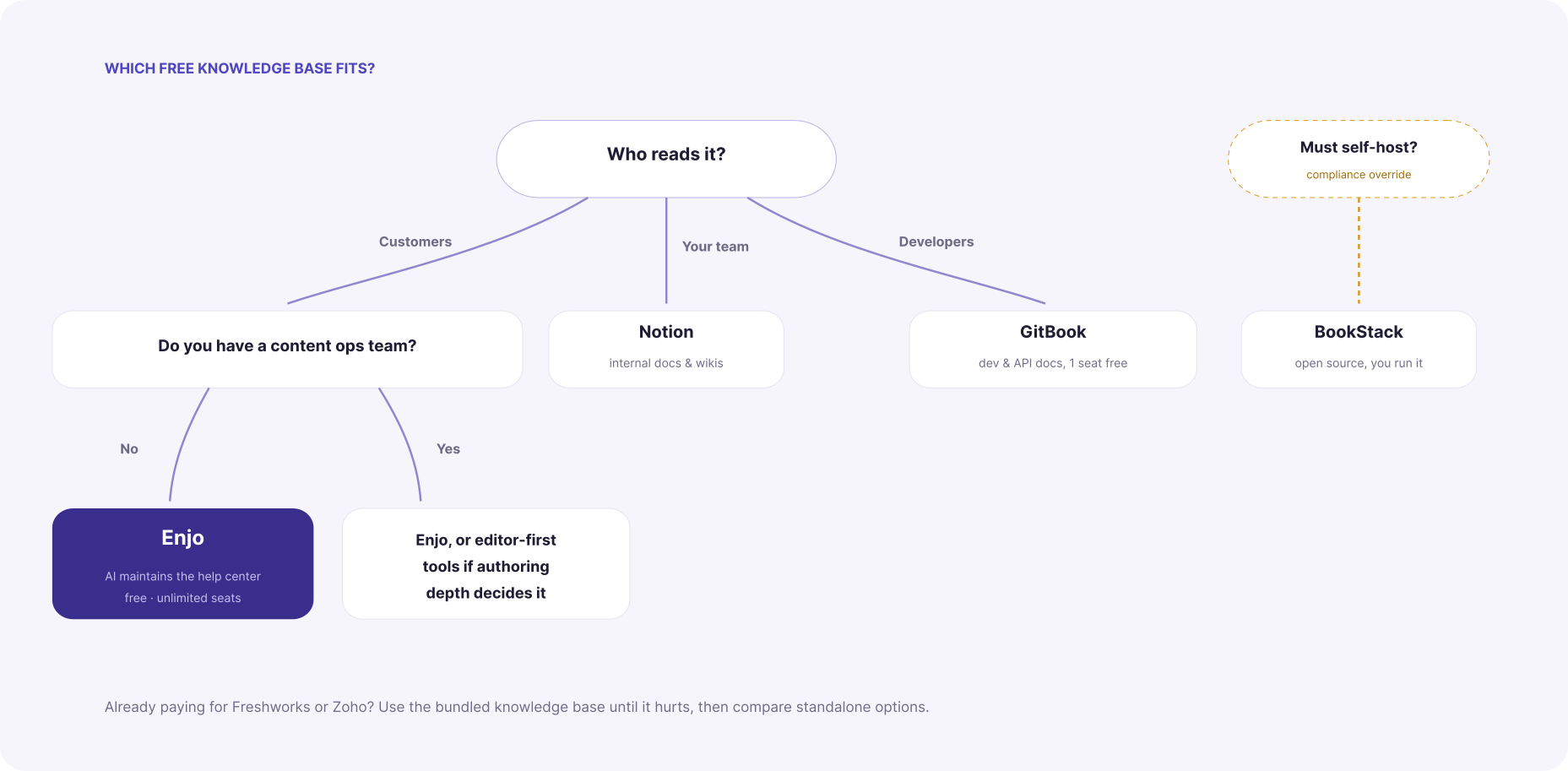
A customer-facing help center for a SaaS product, owned by a support or product manager without a content team: Enjo. The free tier covers the custom domain and SEO a public help center needs, and Article Generation plus the Self-Improving Loop do the maintenance work you don't have headcount for. Our guide to AI knowledge bases covers how the grounding layer works.

An internal wiki for processes and onboarding: Notion, and don't overthink it. If your team works inside Microsoft Teams, the Teams knowledge base approach is worth reading first.

Developer documentation with code samples in version control: GitBook, accepting the one-seat free limit.

Already paying for Freshworks or Zoho: use the bundled knowledge base until it hurts, then compare against a standalone knowledge base platform.

A self-hosting requirement from security or compliance: BookStack, with eyes open about the admin time.
FAQ

Is there genuinely free knowledge base software? Yes, but fewer options than the category's reputation suggests. Enjo, Notion, Bitrix24, and BookStack offer permanent free tiers. Document360 discontinued its free plan in November 2024, Freshdesk's free option is now a 6-month program for 2 agents, and Zoho Desk's Free Edition covers ticketing with the knowledge base positioned at a paid tier.

What's the best free knowledge base software with AI included? Most vendors gate AI behind paid tiers; Helpjuice's AI features start at $449/month, GitBook's AI Assistant requires Ultimate at $299/site, and Notion bundles AI into its $20/user Business tier. Enjo includes 200 AI Replies/month on the free tier, covering AI Search, the Embeddable AI Assistant, and Article Generation.

What happens when I hit Enjo's free AI reply cap? The help center stays live and fully functional. Articles, collections, custom domain, and SEO all keep working; only AI replies pause until the next billing cycle or an upgrade. The free tier never takes your portal offline.

Can I use Notion as free help center software for customers? You can publish public Notion pages, but you give up the help center fundamentals: a custom domain on free, an answer widget, deflection analytics, and AI responses. Notion is the right free tool for internal docs and the wrong one for customer self-service.

Should I pick a free hosted tier or open-source knowledge base software? Open-source tools like BookStack cost nothing in licenses and everything in time: hosting, patching, backups, and content upkeep are yours. Hosted free tiers trade that for usage caps. If your constraint is headcount rather than budget, the hosted AI option costs less in practice.

The verdict

For a customer-facing help center you don't have the headcount to maintain, launch on Enjo's free tier: $0, unlimited seats, custom domain, 200 AI Replies/month, no credit card, and a portal that stays live even when the AI cap is hit. For internal docs, take Notion. For developer docs, GitBook. For a self-hosting mandate, BookStack.

If you want proof before you commit, Enjo's Desk Assessment analyzes your past tickets and threads and auto-drafts articles and Q&A pairs from them. Nothing publishes until you approve it.

FREE, AND IT STAYS THAT WAY

A free knowledge base shouldn’t cost extrato make the AI work.

Enjo includes AI on the free tier: 200 AI replies a month, unlimited seats, your own domain. No $449 paywall, no plan that expires in six months. Point it at your docs and the articles draft themselves.

No credit card. No code. Unlimited human seats. Pay only when you scale.

The free knowledge base category lost two of its biggest names in eighteen months. Document360 discontinued its free plan in November 2024 and moved all pricing behind sales calls, leaving a 14-day trial as the only way in. Helpjuice still sells a $249/month entry plan, but the AI features sit on a separate tier at $449/month. If you searched "free knowledge base software" expecting a long menu of real options, the menu has been shrinking.

Quick verdict: Enjo is the pick for SaaS teams that want customer-facing free help center software with AI included (200 AI Replies/month, unlimited seats, custom domain, no credit card). Notion wins for internal docs. BookStack wins if you have a self-hosting mandate. The rest of this page covers what each free tier actually includes, where the limits bite, and the two taxes most vendors have quietly attached to the word "free."

Enjo's free tier runs on the same platform 600+ enterprises use, with 6 years of 99.9% uptime behind it.

Free is disappearing. Here's the math.

Two costs hide inside most knowledge base tools, and neither shows up on the pricing page.

The first is the headcount tax. A help center is only useful while it's current, and keeping it current is a job. Articles go stale every time the product ships. Most support teams don't have a content ops function, so the docs drift, customers stop trusting them, and ticket volume climbs back up. Stale docs now carry a second penalty: the same articles ground the AI agent answering your customers, so an out-of-date help center produces out-of-date AI answers. One stale article, two layers of wrong.

The second is the AI tax. Helpjuice's base plan at $249/month includes no AI at all; the AI Writer, AI Search, and chatbot unlock at $449/month, an 80% jump. Helpjuice also counts read-only users as paid seats (current rates at helpjuice.com, pricing page). Document360 went further and removed the free entry point entirely. Its own documentation confirms the free plan was discontinued in November 2024, and new buyers now get a 14-day trial followed by a sales conversation for a quote; you can confirm this at document360.com. Freshdesk replaced its old forever-free plan with a "Free Program" covering 2 agents for 6 months.

The pattern is consistent. Vendors built static editors, bolted AI on later, and priced the bolt-on as a premium. The evaluation below treats that as a disqualifying default, because in 2026 a knowledge base without AI is a filing cabinet.

How we evaluated

Six dimensions, applied to every tool on this list. Each one exists because a vendor on this page fails it.

1. Genuinely free. A permanent $0 plan, not a time-boxed trial wearing a free badge. The test is simple: does the plan expire, and does getting started require a sales conversation? Freshdesk's current free option expires at six months; Document360 offers a 14-day trial and then a quote call. Both are trials. A real free tier is one you could still be running in 2028 without ever entering a credit card.

2. AI included or gated. In 2026, AI search and AI answers are the reason customers use a help center instead of emailing you, so a free tier without them is a demo of the product's least valuable half. Check whether the free plan can generate articles and answer customer questions, or whether every AI feature routes to an upgrade screen. The gap is wide: Helpjuice prices its AI suite at a $200/month premium over an already paid plan, and Notion now reserves ongoing AI access for its $20/user/month Business tier.

3. Seat limits, and what counts as a seat. Two traps here. The obvious one is a low cap (GitBook allows one user free, Zoho Desk three agents). The quiet one is who counts: Helpjuice bills read-only users as paid seats, so a 120-person company pays for 120 even if five people ever write an article. If the goal is knowledge base software free of per-seat math, unlimited seats on the $0 plan is the line to hold.

4. Custom domain and SEO on free. A help center on a vendor subdomain sends your support traffic, backlinks, and rankings to someone else's domain. Check whether docs.yourcompany.com is included at $0 or priced as an upgrade; GitBook charges $79 per site per month for it. SEO controls (meta titles, sitemaps, indexing) belong in the same check, since a public help center is an organic acquisition channel on top of a deflection layer.

5. What happens at the cap. Every free tier has a ceiling. The question is whether hitting it takes your help center offline or degrades it gracefully. A portal that goes dark mid-quarter is a customer-facing outage you scheduled by accident. Ask the vendor directly: when we exceed the free limit, what exactly stops working?

6. Maintenance burden. The biggest cost of any knowledge base is the one no pricing page lists: the hours your team spends keeping articles current. Tools split cleanly into editors that wait for you to write and systems that draft, update, and flag content themselves. If you don't have a content ops function, weight this dimension above all the others, because it decides whether the help center is alive in a year.

Side-by-side: how the best free knowledge base options compare

Enjo Free-Tier Comparison Table
Tool Permanent free tier Seats on free AI on free Custom domain on free Generates articles When you hit the cap Best for
Enjo ✓ Yes Unlimited ✓ 200 AI Replies/mo ✓ Yes ✓ From URL, docs, or tickets Portal stays live; AI replies pause Customer-facing SaaS help centers
Freshdesk No, 6-month program 2 agents No On paid tiers No Upgrade or lose access Helpdesk-first small teams
Notion Yes (solo) 1 full member, block-capped teams Trial only No No Block cap stops team editing Internal docs and wikis
GitBook Yes (solo) 1 user No No, Premium at $79/site No Pay $79/site + $15/user to grow Developer and API docs
Zoho Desk Yes 3 agents No Limited No Upgrade for channels and KB depth Zoho-ecosystem micro-teams
Bitrix24 Yes Unlimited No No No Storage and feature gates All-in-one suite seekers
BookStack Yes (self-hosted) Unlimited No ✓ Your server No No cap; you run it Self-hosting mandates

The 7 best free knowledge base software tools

1. Enjo: best free AI knowledge base for customer-facing help centers

Enjo Help Center is an AI-native self-serve portal that generates its own articles and keeps them current. It launched as part of a platform already running employee service for 600+ enterprises, including Snowflake, Netflix, and Spotify teams.

Best for: B2B SaaS support and product teams that own the docs but don't have a content ops team to maintain them.

Key capabilities:

  • Article Generation drafts a complete help center from a website URL, connected docs (Notion, Confluence, Google Drive), or ticket patterns in Zendesk and Intercom. You start from a populated portal, not a blank editor.
  • Self-Improving Loop closes the maintenance gap. Unanswered portal questions escalate to your team; resolved conversations auto-draft new articles for review. The help center grows from real customer questions instead of a content backlog.
  • AI Search and the Embeddable AI Assistant give customers direct, source-cited answers instead of ten blue links. Both run on the same content layer your team edits.
  • AI Command Center handles bulk operations through natural language prompts: rewrite a collection for a new release, retag fifty articles, update a renamed feature everywhere.
  • Magic Onboarding does the setup for you. Sign up with your work email and Enjo fetches your company basics, then stands up a personalized AI agent and help center, ready to go.
  • 100+ languages, custom domain, SEO controls, and audience targeting are included on the free tier, not gated.

Speed to launch is the practical difference. Import existing documentation and the portal is live in minutes; generating 20 to 30 articles from the knowledge you provide takes about 15 to 20 minutes.

Pricing (from enjo.ai/pricing, fetched June 12, 2026): Free at $0/month with 200 AI Replies, unlimited seats, custom domain, and no credit card. The portal stays live after the AI cap is hit; articles, collections, branding, and SEO keep working, and only AI replies pause until the next cycle. Starter is $95/month for 1,000 AI Replies and adds AI Actions, Core Guardrails, and Enjo branding removal. Extra replies cost $0.05 each on paid plans.

Where it falls short: Enjo Help Center is newer than the incumbents on this list. Teams that need publication-grade authoring workflows, deep versioning, or a mature multi-language editor will find Document360-class tools more developed there. And while the platform carries SOC 2 Type II, ISO 27001, and GDPR compliance from six years of enterprise deployments, the customer-facing help center product doesn't yet have a long public case study trail of its own.

Launch your free Help Center → Free forever · 200 AI replies/mo · Unlimited seats · No credit card

2. Freshdesk: free knowledge base bundled with a helpdesk, for a while

Freshdesk is a full helpdesk from Freshworks with a knowledge base module inside it.

Best for: Small teams that want ticketing and docs from one vendor and plan to pay within six months.

Key capabilities: Email and social ticketing, a knowledge base with categories and SEO basics, ticket dispatch, and pre-built reports. The paid Growth tier starts at $19/agent/month, and a multilingual knowledge base requires Pro at $55/agent/month.

Pricing: The Free Program covers 2 agents for 6 months. Freddy AI capabilities are paid, priced in sessions on paid tiers. Verify current rates at freshworks.com on the Freshdesk pricing page (fetched June 12, 2026).

Where it falls short: The free tier is a long trial, not a plan. Freshdesk's old forever-free option for up to 10 agents is gone, and the knowledge base is a helpdesk feature rather than a standalone product, so you adopt the whole suite to get it.

3. Notion: best free option for internal docs

Notion is a workspace for notes, wikis, and databases that many teams stretch into a knowledge base.

Best for: Internal documentation, onboarding guides, and team wikis where the audience already lives in Notion.

Key capabilities: Flexible pages and databases, templates, 10 guest invitations, and cross-platform sync. The editor is the best on this list for unstructured writing.

Pricing: Free for individual use with unlimited pages; team workspaces hit a block cap that pushes collaboration to Plus. Notion AI is bundled into Business at $20/user/month and Enterprise; Free and Plus users get a limited trial rather than ongoing AI access. Notion's newer Custom Agents are free to try, then $10 per 1,000 monthly Notion credits. Verify current rates at notion.com on the pricing page (fetched June 12, 2026).

Where it falls short: Notion is not a customer-facing help center. There's no native help center experience with collections, deflection analytics, or an answer widget, and public pages on the free plan live on a Notion domain. Teams that publish docs to customers from Notion usually end up paying for a third-party site builder on top.

4. GitBook: best free option for developer docs

GitBook is a documentation platform built around Git workflows and a block-based editor.

Best for: Solo developers and open-source maintainers publishing technical docs and API references.

Key capabilities: GitHub and GitLab sync, an interactive API playground, preview deployments, LLM optimizations on the free plan, and a clean reading experience developers trust.

Pricing: The Free plan is $0 per site, built for individuals, and publishes to a gitbook.io subdomain. Premium runs $79 per site/month plus $15 per user/month and is where team collaboration, AI search, and custom domains start. The AI Assistant, AI insights, and GitBook Agent sit on Ultimate at $299 per site/month plus $15 per user. Verify current rates at gitbook.com on the pricing page (fetched June 12, 2026).

Where it falls short: One seat, and the paid cliff is steep. A second editor plus a custom domain means Premium at $94/month minimum, and the AI features beyond search require Ultimate at $299 per site. Costs scale on two axes (sites and users), which gets expensive for multi-product SaaS teams.

5. Zoho Desk: free helpdesk tier, knowledge base starts higher up

Zoho Desk is a helpdesk in the Zoho suite with a Free Edition for email support.

Best for: Micro-teams already inside the Zoho ecosystem handling low-volume email support.

Key capabilities: Email ticketing out of the box, a customer portal, and a clean upgrade path through the Zoho suite. Paid tiers start with Express at roughly $7/agent/month.

Pricing: The Free Edition covers 3 agents, free forever, with no credit card, and Zoho positions it as easy email ticketing. On Zoho's current pricing page the knowledge base module is listed from the Standard plan, not the Free Edition, and Zia AI features sit higher still. Verify what the Free Edition includes at zoho.com on the Zoho Desk pricing page (fetched June 12, 2026).

Where it falls short: Three agents, no AI, and the knowledge base itself is positioned as a Standard-tier feature on the current pricing page. If a free public help center is the goal rather than free ticketing, Zoho's $0 plan may not cover it.

6. Bitrix24: free all-in-one suite with a knowledge base module

Bitrix24 bundles CRM, project management, chat, and a knowledge base into one platform.

Best for: Teams that want one free login for everything and will tolerate the interface tradeoffs.

Key capabilities: Internal knowledge bases organized by workspace, granular access control, and a free plan that includes the wider suite (CRM, tasks, chat) with 5 GB of storage.

Pricing: The free plan includes unlimited users with 5 GB of storage, alongside paid tiers from $49/month flat for small teams. Verify current limits at bitrix24.com (fetched June 12, 2026).

Where it falls short: The knowledge base is a side module in a sprawling suite, and reviewers consistently describe the interface as overwhelming. There's no AI maintenance loop; content stays as current as your team keeps it.

7. BookStack: best open-source knowledge base

BookStack is a free, MIT-licensed, self-hosted wiki organized into books, chapters, and pages.

Best for: Teams with a self-hosting mandate, infrastructure on hand, and data-residency requirements that rule out SaaS.

Key capabilities: A simple WYSIWYG and Markdown editor, full-text search, role-based permissions, and zero license fees forever.

Pricing: Free to use without limits. Your costs are the server, backups, updates, and admin time.

Where it falls short: You are the maintenance plan. No AI, no article generation, no managed uptime, and the hosting plus admin hours often exceed the price of a hosted free tier once you count them honestly.

How to choose, by team shape

Run the decision on what you're publishing and who maintains it.

A customer-facing help center for a SaaS product, owned by a support or product manager without a content team: Enjo. The free tier covers the custom domain and SEO a public help center needs, and Article Generation plus the Self-Improving Loop do the maintenance work you don't have headcount for. Our guide to AI knowledge bases covers how the grounding layer works.

An internal wiki for processes and onboarding: Notion, and don't overthink it. If your team works inside Microsoft Teams, the Teams knowledge base approach is worth reading first.

Developer documentation with code samples in version control: GitBook, accepting the one-seat free limit.

Already paying for Freshworks or Zoho: use the bundled knowledge base until it hurts, then compare against a standalone knowledge base platform.

A self-hosting requirement from security or compliance: BookStack, with eyes open about the admin time.

FAQ

Is there genuinely free knowledge base software? Yes, but fewer options than the category's reputation suggests. Enjo, Notion, Bitrix24, and BookStack offer permanent free tiers. Document360 discontinued its free plan in November 2024, Freshdesk's free option is now a 6-month program for 2 agents, and Zoho Desk's Free Edition covers ticketing with the knowledge base positioned at a paid tier.

What's the best free knowledge base software with AI included? Most vendors gate AI behind paid tiers; Helpjuice's AI features start at $449/month, GitBook's AI Assistant requires Ultimate at $299/site, and Notion bundles AI into its $20/user Business tier. Enjo includes 200 AI Replies/month on the free tier, covering AI Search, the Embeddable AI Assistant, and Article Generation.

What happens when I hit Enjo's free AI reply cap? The help center stays live and fully functional. Articles, collections, custom domain, and SEO all keep working; only AI replies pause until the next billing cycle or an upgrade. The free tier never takes your portal offline.

Can I use Notion as free help center software for customers? You can publish public Notion pages, but you give up the help center fundamentals: a custom domain on free, an answer widget, deflection analytics, and AI responses. Notion is the right free tool for internal docs and the wrong one for customer self-service.

Should I pick a free hosted tier or open-source knowledge base software? Open-source tools like BookStack cost nothing in licenses and everything in time: hosting, patching, backups, and content upkeep are yours. Hosted free tiers trade that for usage caps. If your constraint is headcount rather than budget, the hosted AI option costs less in practice.

The verdict

For a customer-facing help center you don't have the headcount to maintain, launch on Enjo's free tier: $0, unlimited seats, custom domain, 200 AI Replies/month, no credit card, and a portal that stays live even when the AI cap is hit. For internal docs, take Notion. For developer docs, GitBook. For a self-hosting mandate, BookStack.

If you want proof before you commit, Enjo's Desk Assessment analyzes your past tickets and threads and auto-drafts articles and Q&A pairs from them. Nothing publishes until you approve it.
FREE, AND IT STAYS THAT WAY

A free knowledge base shouldn’t cost extrato make the AI work.

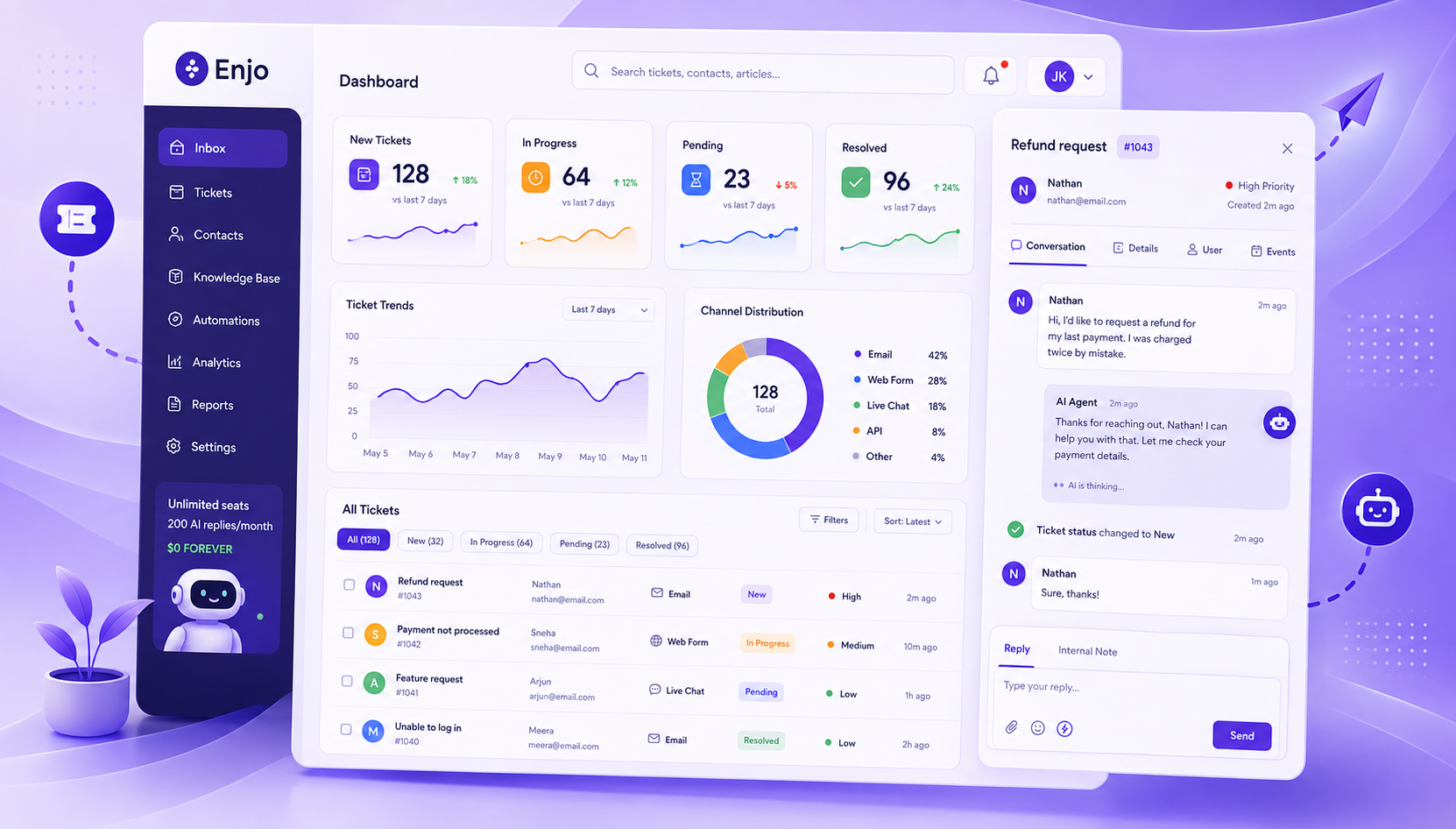
Enjo includes AI on the free tier: 200 AI replies a month, unlimited seats, your own domain. No $449 paywall, no plan that expires in six months. Point it at your docs and the articles draft themselves.

No credit card. No code. Unlimited human seats. Pay only when you scale.

Transform complex support workflows

Deploy AI inside your existing support stack and prove business impact quickly.
Request a Demo