Transform complex support workflows
7 Best Customer Self-Service Portals in 2026, Compared on AI Cost
A customer self-service portal gives customers one place where they find answers and finish simple tasks without contacting support, and in 2026 the tools split on where the AI sits in the price: included on a free plan, metered per resolution, outcome or session, or held back to a higher plan. Enjo Help Center ranks first because AI answers on the portal come on every plan, Free included, and every question it cannot answer comes back as a draft article once your team resolves it.
The seven tools, in ranked order:
- Enjo Help Center: AI answers included on the Free plan, and every unanswered question comes back as a draft article.
- Zendesk: a help center inside per-agent Suite plans, with AI agent resolutions metered after an allowance.
- Fin (formerly Intercom): a public help center with the helpdesk seat, and every AI outcome billed.
- Help Scout: a Docs site and the Beacon widget, with AI answers billed per resolution on paid plans.
- Zoho Desk: a portal and Answer Bot that start on the Standard edition.
- Freshdesk: a portal on every plan, with Freddy AI sessions metered after the first 500.
- Featurebase: a help center tied to feedback boards, with its AI agent billed per resolution.
Each tool is compared on where its AI answers, what that AI costs to switch on and what happens to a question it cannot answer, with every price checked on the vendor's own site on 12 October 2026.
Customer Self-Service Portals Compared
Every row was checked on the vendor's own site on 12 October 2026. Starting price is the lowest paid plan; the last column separates permanent free plans from trials.
| Tool | Best For | Where AI Sits in the Price | Starting Price | Free Plan |
|---|---|---|---|---|
| Enjo Help Center | AI answers on the portal from day one | Included, per AI reply | $95/month (Starter) | Yes, 200 AI replies a month |
| Zendesk | Suite ticketing plus a help center | Per resolution after an allowance | $55/agent/month (Suite Team) | No; 14-day trial |
| Fin (formerly Intercom) | Chat-led self-service | Per outcome, $0.99 | $29/seat/month (Essential) | No; 14-day trial |
| Help Scout | Shared inbox plus help docs | Per resolution, $0.75 | $25/user/month (Standard) | Yes, up to 5 users |
| Zoho Desk | A help desk inside the Zoho suite | In plan from Standard | Not confirmed in USD | Yes, without a knowledge base |
| Freshdesk | A portal on every plan | 500 sessions, then metered | $19/agent/month (Growth) | No; 14-day trial |
| Featurebase | Help center plus feedback boards | Per AI resolution, $0.49 | $29/seat/month (Growth) | Yes, 1 seat, no AI |
What Is a Customer Self-Service Portal?
A customer self-service portal is the site where a company's customers find answers and finish simple tasks without contacting support. The customer self-service software behind most portals on this list combines four layers:
- A help center or knowledge base: the articles and search customers read. Help desk suites bundle one, and teams starting with no budget can begin from our comparison of free knowledge base software.
- AI answers: an AI agent or assistant that answers from those articles on the portal and in a chat widget, included in the plan or billed per answer.
- Account and request actions: logged-in customers checking a request or changing their account without writing in.
- A path to a person: a contact form, a chat handoff or an escalation that carries the conversation to your team.
Developer documentation platforms such as GitBook publish product and API docs from version control and sit outside this list; our comparison of GitBook alternatives covers them. The knowledge layer underneath every portal is a separate decision, covered in our comparison of knowledge management systems, and how the channel works, from first question to escalation, is the subject of our guide to self service customer service.
Why Teams Use a Customer Self-Service Portal
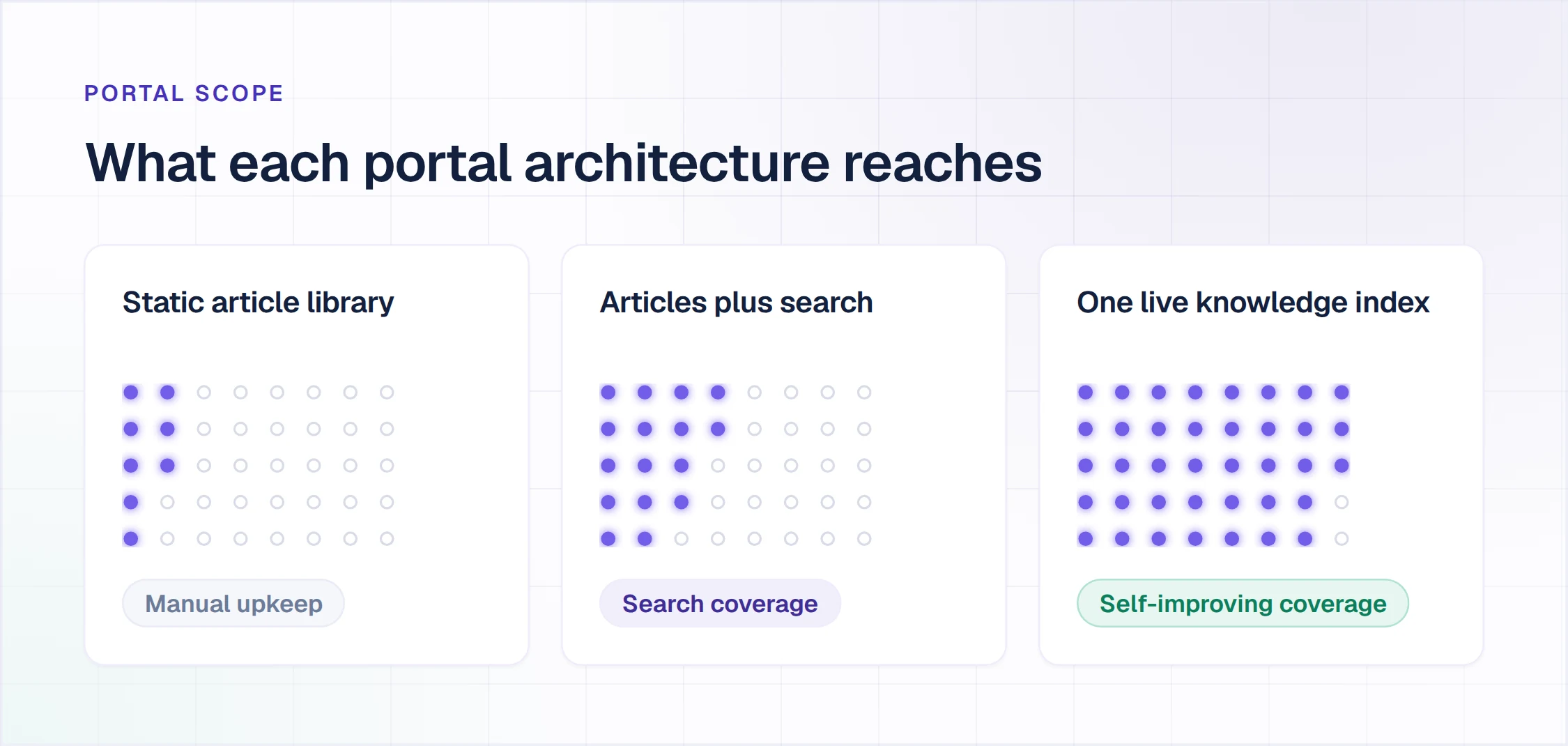
Gartner's survey on self-service resolution found that 73% of customers use self-service at some point in their journey, while only 14% of issues are fully resolved there. The most common reason for failure, in 43% of cases, was that customers could not find content relevant to their issue.
- Routine questions resolve without an agent: password resets, billing and how-to questions get an answer from the portal, so the queue holds the cases that need a person.
- Answers at any hour: the portal answers at 2 a.m. in every timezone you sell into, at the same quality as noon.
- One answer everywhere: customers get the same approved information whichever channel they use.
- A record of what is missing: every unanswered question shows your team which article to write next.
Gartner expects self-service and live chat to overtake traditional channels as the leading customer service technologies by 2027. Gartner also found that 60% of customer service agents do not promote self-service to customers, so adoption depends on the content and the handoff as much as on the portal. Stale articles now cost twice: once when a customer reads them, and again when the AI answering that customer is grounded on them.
How We Evaluated These Tools
Each tool was judged on its customer-facing portal, from the vendor's own pages, checked on 12 October 2026, on five questions.
- Where the AI answers: on the portal, in a chat widget, or only in tools for agents.
- Where the AI sits in the price: included, on a higher plan, an add-on or a per-answer meter.
- What happens to an unanswered question: a dead end, a contact form, or a handoff that carries the conversation.
- How articles get written and kept current: generated from existing content, drafted from resolved conversations, or written by hand.
- Who sees what: public articles, content for logged-in customers and audience rules.
The 7 Best Customer Self-Service Portals in 2026
Every entry follows one shape, ending with dated pricing and one verified limitation; Enjo's slot carries its scope.
1. Enjo Help Center
Best for: AI answers on the portal from day one.
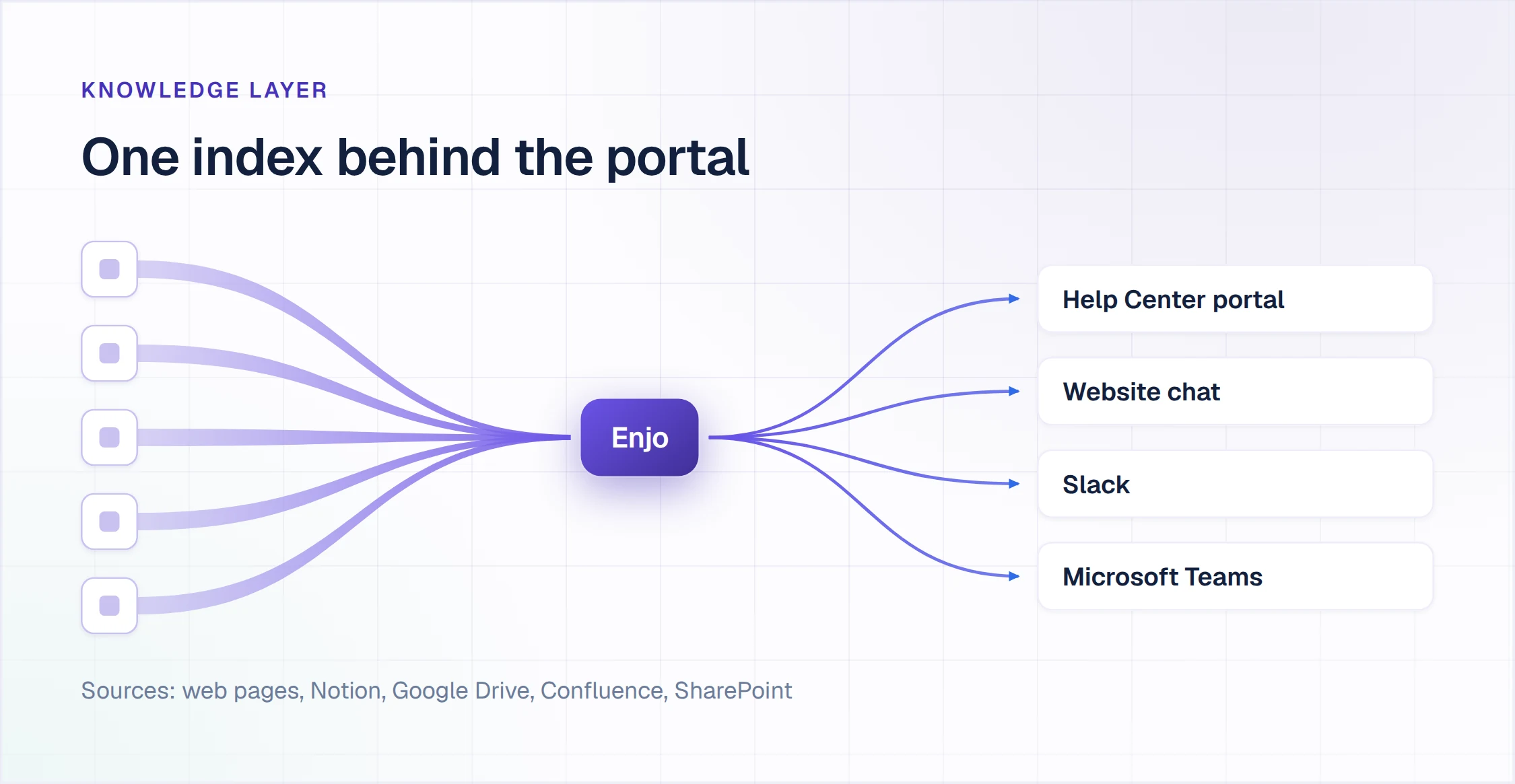
Enjo Help Center is the requester-facing portal in Enjo Platform: it generates articles from a website URL, connected docs or helpdesk ticket patterns, and answers from the same knowledge index that grounds Enjo in website chat and Slack Connect shared channels.
How it goes to market: included on every Enjo plan from Free, priced per AI reply, with unlimited human agent seats on published plans.
- Article Generation: drafts articles from a website URL, from connected Notion, Google Drive, Confluence or SharePoint, or from ticket patterns in Zendesk, Intercom or Freshdesk.
- AI Search: semantic search that returns a direct answer with the source cited.
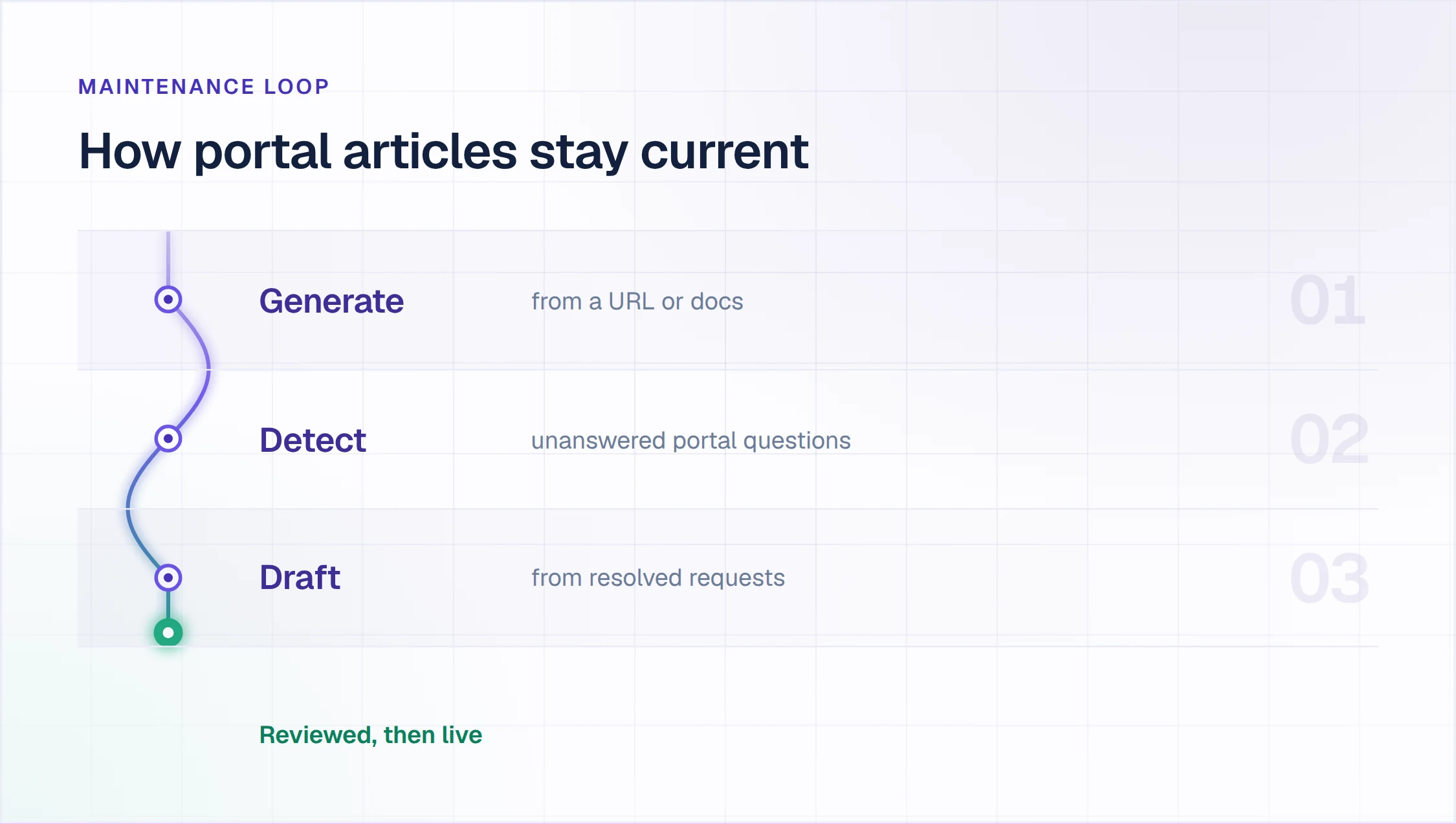
- Self-Improving Loop: an unanswered question escalates to your team in Inbox with the full conversation, account context and suggested next steps, and the resolved conversation becomes a draft article for review.
- Audience Targeting: article visibility by plan, role, segment or login state.
- Publish Workflow: review and approval before any article goes live.
- Appearance and Multilingual: branding, a custom domain and localized help centers with translation.
- Security: every answer grounded in your knowledge with citations, Guardrails on AI inputs and outputs and full audit logs. Enjo is SOC 2 Type II compliant, ISO 27001 certified and GDPR compliant, and Troopr Labs, the company behind Enjo, has 600+ enterprise deployments and 99.9% uptime over 7 years.
AI on the portal: included on every plan, within each plan's monthly AI replies: 200 on Free, 1,000 on Starter and 3,000 on Standard.
Pricing: Free is $0 a month with 200 AI replies, Inbox, Help Center and Insights, unlimited human agent seats and no credit card; at the limit, requests auto-escalate to your team in Inbox. Starter is $95 a month for 1,000 AI replies and Standard $295 for 3,000, with additional replies at $0.05 each (pricing on enjo.ai, checked 12 October 2026).
Scope: Enjo Help Center is built around the maintenance loop rather than the authoring editor. Articles are generated from a URL or connected docs, unanswered questions draft new articles for review, and the same index that answers requests keeps the portal current, which is the point rather than a limit.
2. Zendesk
Best for: suite ticketing plus a help center.
Zendesk is a customer service suite whose help center and knowledge base, now sold as Zendesk Knowledge, come with its Suite plans.
How it goes to market: sold per agent seat in Support and Suite plans, paid yearly, with AI agents billed on automated resolutions.
- Generative search: answers a question typed into help center search from one or more content sources, with the source articles available for reference.
- Knowledge connectors: bring content from Google Drive, Confluence and SharePoint into Zendesk without migrating it.
- AI agents: answer across messaging and other channels from approved Zendesk content.
AI on the portal: generative search is included in every Suite plan; AI agents include 5 automated resolutions per agent a month on Suite Team and 10 on Suite Professional, then $2.00 each pay-as-you-go or $1.50 committed.
Pricing: Suite Team is $55 and Suite Professional $115 per agent a month billed annually ($69 and $149 monthly); the $19 Support Team plan has no help center, and Copilot is a $50 per agent add-on paid yearly. Zendesk offers a 14-day trial and no free plan (pricing on zendesk.com, checked 12 October 2026).
Where it falls short: the help center is priced by agent seat, so its cost grows with the support team rather than with the questions customers bring, and AI agent resolutions add a second meter on top.
3. Fin (formerly Intercom)
Best for: chat-led self-service.
Fin, the company formerly called Intercom, sells the Fin AI Agent and a helpdesk whose plans include a public help center. Salesforce completed its acquisition of Fin on 10 September 2026.
How it goes to market: Fin AI Agent is billed per outcome, on Fin's own helpdesk at a per-seat price or as a layer on other helpdesks.
- Public help center: included with the helpdesk plan, alongside the Knowledge Hub.
- Fin AI Agent: answers over chat, email and voice from help center articles, internal support content, PDFs and webpages.
- Handoff rules: you set how and when Fin triages or hands a conversation to your team.
AI on the portal: $0.99 per outcome, such as a resolution; with another helpdesk, a 50-outcome monthly minimum applies.
Pricing: helpdesk seats are $29 (Essential), $85 (Advanced) and $132 (Expert) per seat a month, plus Fin outcomes from $0.99; the Pro add-on starts at $100 a month. The 14-day trial needs no credit card, and there is no free plan (pricing on fin.ai and intercom.com, checked 12 October 2026).
Where it falls short: Fin bills per outcome on top of helpdesk seats, so the monthly cost rises with the volume Fin resolves.
4. Help Scout
Best for: a shared inbox plus help docs.
Help Scout is a customer support platform with a shared inbox, a Docs knowledge base and Beacon, a help widget for your site or app.
How it goes to market: sold per user in Standard, Plus and Pro plans, with a Free plan for up to 5 users; AI Answers is a per-resolution add-on.
- Docs: knowledge base sites; the Free plan includes one Docs site of up to 10 articles.
- Beacon: a widget that shows help articles and contact options inside your site or app.
- AI Answers: answers customer questions from your Docs, billed per resolution.
- AI Assist, AI Drafts and AI Summarize: AI Assist on Standard and up; AI Drafts and AI Summarize on Plus and Pro.
AI on the portal: AI Answers at $0.75 per resolution on Standard, Plus and Pro, with three months of unlimited resolutions free from account creation.
Pricing: Standard is $25, Plus $45 and Pro $75 per user a month, shown beside a 16% annual discount; Free covers up to 5 users, 100 contacts a month and one Docs site (pricing on helpscout.com, checked 12 October 2026).
Where it falls short: AI Answers is metered per resolution on top of per-user pricing, so the bill grows with both the team and the questions answered.
5. Zoho Desk
Best for: a help desk inside the Zoho suite.
Zoho Desk is a help desk with a self-service portal and knowledge base, integrated with the rest of the Zoho suite.
How it goes to market: sold per user in Express, Standard, Professional and Enterprise editions billed annually, plus a Free Edition with three user licenses for email ticketing.
- Help center and knowledge base: from the Standard edition.
- Answer Bot: answers in the help center from Standard.
- Zia and multilingual help centers: from Professional.
AI on the portal: Answer Bot is included from Standard, with no per-answer fee listed.
Pricing: priced per user, billed annually. zoho.com/desk/pricing rendered in Indian rupees from our location on 12 October 2026, so USD prices are not confirmed and none is quoted here.
Where it falls short: the Free and Express editions carry no knowledge base, so the self-service portal starts on Standard.
6. Freshdesk
Best for: a portal on every plan.
Freshdesk is the help desk from Freshworks, with a customer portal and knowledge base on every plan.
How it goes to market: sold per agent in Growth, Pro and Enterprise plans billed annually, with Freddy AI Agent sessions and Freddy AI Copilot sold on top.
- Customer portal and knowledge base: on Growth, Pro and Enterprise.
- Freddy AI Agent: Freshworks' AI agent for customer conversations, with the first 500 sessions included on every plan.
- Freddy AI Copilot: a $29 per agent a month add-on on Pro and Enterprise.
AI on the portal: 500 Freddy AI Agent sessions included, then $49 per 100 sessions.
Pricing: Growth is $19, Pro $55 and Enterprise $89 per agent a month, billed annually. Signup starts a 14-day Enterprise trial, and there is no free plan (pricing on freshworks.com, checked 12 October 2026).
Where it falls short: AI answers are metered per session after the first 500, and there is no free plan.
7. Featurebase
Best for: a help center plus feedback boards.
Featurebase is a support and product platform that puts a help center, an in-app widget and an AI agent called Fibi beside feedback voting, roadmaps and surveys.
How it goes to market: sold per seat on Growth, Professional and Enterprise plans billed yearly, plus a Free plan with one seat and no AI; the Fibi AI Agent is billed per AI resolution.
- Help center and AI search: a help center page with an AI search bar.
- Fibi AI Agent: answers customer questions and hands off to a person.
- Feedback and roadmaps: feedback voting, roadmaps and surveys in the same product.
AI on the portal: Fibi AI Agent from Growth, at $0.49 per AI resolution.
Pricing: Free has one seat and no AI; Growth is $29, Professional $59 and Enterprise $99 per seat a month, billed yearly (pricing on featurebase.app, checked 12 October 2026).
Where it falls short: AI is not on the Free plan, and Fibi bills $0.49 per AI resolution on top of per-seat pricing.
What It Costs to Switch the AI On
The entry price rarely includes the AI that answers customers. This table shows, for a team of 10 agents, the cheapest plan where each tool's AI answers on the portal, what those seats cost and how the AI is metered from there.
| Tool | Cheapest Plan With AI Answers | Seats for 10 Agents | How the AI Is Metered |
|---|---|---|---|
| Enjo Help Center | Free | $0; seats unlimited | 200 AI replies a month included |
| Zendesk | Suite Team | $550, billed annually | 50 resolutions included, then $2.00 each |
| Fin (formerly Intercom) | Essential helpdesk | $290 | $0.99 per outcome |
| Help Scout | Standard | $250 | $0.75 per resolution |
| Zoho Desk | Standard | Not confirmed in USD | No per-answer fee listed |
| Freshdesk | Growth | $190, billed annually | 500 sessions, then $49 per 100 |
| Featurebase | Growth | $290, billed yearly | $0.49 per AI resolution |
Per-seat plans grow with the support team, and per-answer meters grow as the AI succeeds, so a team that doubles its portal traffic doubles that line. Enjo prices the AI reply and includes unlimited human agent seats, so an eleventh agent adds nothing. For the same math at a set monthly volume, our comparison of help center software prices nine tools at 5 agents and 1,000 AI answers.
How to Test a Customer Self-Service Portal on Your Own Docs
Run these four checks on every tool you shortlist, with your own content and the questions your customers actually send.
- Where does the AI answer? Ask a real customer question on the portal, then in the chat widget. If the AI answers only in tools for agents, the portal is still a search box.
- What happens to a question your content does not cover? Ask one. Look for a dead end, a contact form, or a handoff that carries the conversation, and check whether anything records the gap.
- What does it cost to switch the AI on for your team? Price the plan where the AI answers a customer, not the entry plan, at your seat count and next quarter's volume.
- Who sees which articles? Publish one article for logged-in customers only and one for everyone, and confirm each audience sees the right one.
Enjo Help Center answers all four on the content you already have. The AI answers in the Help Center portal, in website chat and in Slack Connect shared channels from one index. A question it cannot answer escalates to your team in Inbox with the full conversation, account context and suggested next steps, and the Self-Improving Loop turns the resolution into a draft article. The Free plan includes 200 AI replies a month with unlimited human agent seats, and Audience Targeting sets visibility by plan, role, segment or login state.
If budget is the constraint, our ranking of free customer service software covers the same pricing question across a wider set of tools.
Frequently Asked Questions About Customer Self-Service Portals
What is a customer self-service portal?
A customer self-service portal lets customers find answers and finish simple tasks without contacting support: a help center or knowledge base, AI answers on the portal and in chat, and a path to a person when self-service runs out. The tools differ most on where the AI sits in the price.
What are examples of customer self-service portals?
Help centers bundled with a help desk, such as Zendesk, Help Scout, Freshdesk and Zoho Desk; AI agents with a help center, such as Fin and Featurebase; and help centers built around the maintenance loop, such as Enjo Help Center, which drafts new articles from resolved conversations.
Is there a free customer self-service portal with AI included?
Yes. Enjo Help Center is included on Enjo's Free plan with 200 AI replies a month, unlimited human agent seats and no credit card; at the limit, requests auto-escalate to your team in Inbox. Among the other tools here, Help Scout lists AI Answers on its paid plans only, Featurebase's Free plan has no AI, and Zoho Desk's Free Edition has no knowledge base.
How much does a customer self-service portal cost?
From $0 on Enjo Help Center's Free plan, with paid plans from $95 a month for 1,000 AI replies, to per-seat plans from $19 to $132 per agent or seat a month on plans that include a portal or help center. The AI usually adds a second meter, from $0.49 to $2.00 per resolution or outcome, or $49 per 100 sessions, so price the plan where the AI answers a customer.
What's the difference between a help center and a self-service portal?
A help center is the article library and search customers read; a self-service portal wraps it with AI answers, account and request actions, and a path to a person. Our comparison of help center software defines the four related terms side by side.
How long does it take to set up a self-service portal?
With Enjo Help Center, Article Generation drafts the first set from a website URL or connected docs, so same-day go-live is feasible. The time goes into reviewing drafts in the Publish Workflow, and it grows with how much existing content you sync.
Launch a Self-Service Portal That Drafts Its Own Articles
Point Enjo Help Center at your website or your docs, review the drafts and publish. The Free plan includes 200 AI replies a month and unlimited human agent seats with no credit card; at the limit, requests auto-escalate to your team in Inbox.